USA Quiz
- 98.00
- 4.8
- Installs
- 100.00K
- Price
- Free

Screenshots
Analysis by Reviewed
Learning American geography can feel harder than it sounds. There are many states, unfamiliar capital names, and cities that are easy to mix up when you only study from a list. I found USA Quiz most useful because it turns that memorization into short trivia sessions that are easier to fit into an ordinary day. Instead of treating the subject like a textbook exercise, I could test what I remembered, notice where I was guessing, and return to the same topic later.
This is a free trivia game from Qbis Studio, aimed at players of every age. Its focus is the United States, especially states, capitals, cities, and notable places. The concept is simple, but the subject gives it more depth than a quick novelty quiz. A child can use it for basic geography practice, while an adult might enjoy it as a casual way to refresh knowledge before a trip, a school activity, or a conversation.
The game has attracted a 4.8 average from around 1.6 thousand ratings, with more than 100 thousand installs. Those numbers suggest that it has found a clear audience, but they do not change the main question: does it help you make progress without becoming tedious? In my experience, the answer is yes, provided you approach it as a repeated practice tool rather than expecting a complete geography course.
What a first session feels like
My first impression was that USA Quiz is easy to understand. There is no need to learn a complicated control scheme or spend time building a profile before playing. The important decision is simply to begin answering questions and pay attention to the information that causes hesitation. That low barrier matters for a quiz game, because a long setup would work against the quick-session format.
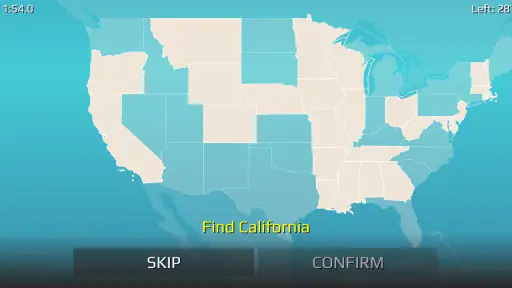
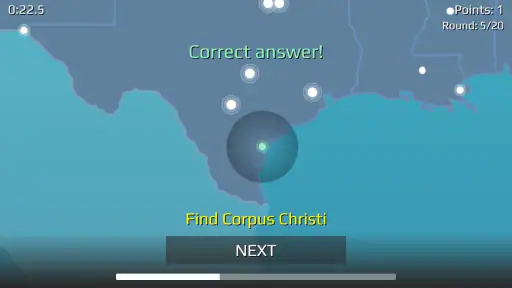
The questions are connected to American geography rather than general trivia. That gives each round a practical learning purpose. If I forgot a capital, the mistake pointed to a specific fact that needed attention. If I recognized a city but was unsure which state it belonged to, the uncertainty exposed a different kind of gap. The game is therefore more useful when I treat wrong answers as study prompts instead of rushing past them.
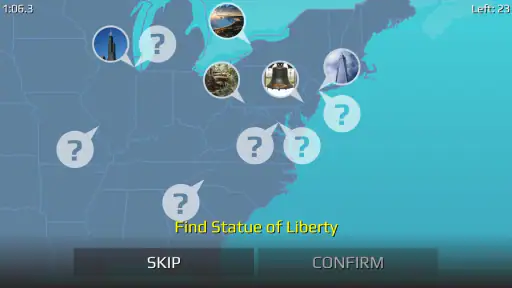
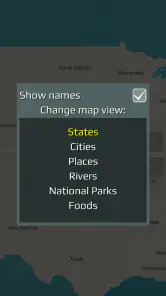
One detail I appreciated is the range of subjects suggested by the game’s focus. States and capitals are the obvious foundation, but cities and famous places make the experience less repetitive than drilling two matching lists forever. A player who already knows many capitals can still find value in connecting locations with broader American geography.
That said, this is still a focused quiz, not an exploration game. I would not install it expecting maps to wander through, a story campaign, or a substitute for detailed travel planning. Its strength is the question-and-answer loop. The better your expectations match that loop, the more satisfying the app becomes.
More From Our News Desk

Weather by Xiaomi Review: Clear at a Glance, Less Clear Up Close

X Under Pressure: Can It Recover When Posting Goes Wrong?

Clash of Clans Is Won Between the Battles

Android Auto Makes the Case for Quieter Car Software

MobiOffice: Transforming Mobile Productivity with Seamless Integration

EA SPORTS FC™ Mobile Soccer: Redefining Mobile Sports Gaming
Who will get the most from it
I think it suits learners who prefer active recall. Reading a list of capitals can create the feeling that everything is familiar, but answering without looking is more revealing. Parents may also find it suitable for a short shared activity with children, especially when the goal is to make geography less intimidating. Because the content rating is Everyone, it is positioned for a broad audience rather than a narrowly mature one.
It can also work for adults who want a quiet mental break. A few questions during a commute, a lunch pause, or while waiting for an appointment can be more engaging than scrolling through unrelated content. The key is not to measure success by how much time you spend playing. A short session that fixes one confusing capital may be more valuable than a long session completed on autopilot.
I would be more cautious about recommending it as the only resource for a serious exam. Trivia can reinforce recall, but it does not automatically teach location, borders, regional relationships, population, history, or pronunciation in depth. Someone preparing for a detailed geography test would benefit from pairing it with a map and structured notes.
Getting from installation to the first useful result
After installing it, I recommend starting with a simple goal: do not try to master every state in one sitting. Begin by answering naturally, even when you are uncertain. The first meaningful success is not a perfect run. It is identifying a small group of facts that you can now recognize faster than before.
A practical routine is to play one session, pause after mistakes, and say the answer aloud. For example, if a capital does not stick, connect it to the state in a complete phrase rather than memorizing the two words separately. Then return later and see whether the connection survives. This makes the game part of a learning workflow instead of a sequence of disposable guesses.
Another useful approach is to separate recognition from recall. If you choose the right answer because it looks familiar, you have made progress, but you may not yet be able to produce it independently. On a later attempt, cover the choices mentally before selecting one and try to retrieve the answer first. This small change makes the quiz more demanding and gives you a clearer idea of what you truly know.
For a family session, I would let each person explain why an answer seems correct before tapping it. That turns a solitary quiz into a conversation about geography. It also makes incorrect answers less discouraging, because the group can examine the reasoning rather than treating a mistake as failure.
How to use the questions as a learning tool
The most effective habit I found was keeping a mental distinction between careless errors and genuine knowledge gaps. If I knew the answer but tapped too quickly, the solution was to slow down. If I confused two capitals repeatedly, I needed a stronger association. Treating both mistakes the same way makes practice less efficient.
I also found it helpful to group difficult facts by region or by the kind of confusion they caused. A player might mix up two capital names, while another might recognize the capital but forget the state. Those are different problems and should be reviewed differently. The game provides the prompt; the player has to supply the strategy.
One non-obvious advantage of this format is that it exposes false confidence quickly. When reading, I could feel that I knew a fact because the words looked familiar. When answering, that confidence either held up or disappeared immediately. That instant test is valuable for students, travelers, and anyone who wants a realistic picture of their knowledge.
There is also a good reason not to play only until you achieve a high score. Repeating questions while they are fresh can make improvement look larger than it really is. I prefer leaving some time between sessions, then checking whether the same facts remain available. Spacing practice makes the result more meaningful, even if the next attempt feels less comfortable.
Common confusion during play
The biggest source of frustration is likely to be the difference between knowing a state and knowing its capital. Those facts are related, but they are not interchangeable. A player may recognize a state immediately and still hesitate when asked for its capital. I would not interpret that hesitation as proof that the game is unfair; it is exactly the kind of distinction a focused quiz can reveal.
Cities and famous places can create another layer of uncertainty. A familiar name may belong to a state you did not expect, or a place may be easier to recognize visually than verbally. When that happens, I recommend slowing down and treating the question as a location exercise rather than relying on the first association that comes to mind.
Some players may also assume that a correct answer means they have fully learned the topic. It does not. Multiple-choice success can come from elimination, partial memory, or luck. To make each question count, try to explain the answer after selecting it. If you cannot explain it, mark it mentally as a fact worth revisiting.
The game’s simplicity can itself be a limitation. Players who want extensive explanations after every response may find the experience less satisfying than a dedicated educational platform. Likewise, anyone looking for a visual map-based lesson may prefer an atlas or geography app with richer reference material. USA Quiz works best as an active recall companion, not as a complete encyclopedia.
Free access and the purchase decision
USA Quiz is free to download and play, which makes it easy to test whether the format suits you before spending anything. Optional in-app purchases range from $2.99 to $7.99 per item. I would approach those purchases cautiously and only consider them if the available experience already fits your learning style. Paying does not remove the need for regular practice or replace a map when visual understanding is your goal.
The free entry point is especially useful for families and occasional players. You can see whether children stay interested, whether the questions match their level, and whether the game encourages discussion rather than frustration. For an adult, it provides a low-risk way to decide whether short geography drills are more motivating than flashcards or a conventional quiz website.
Compared with a general trivia app, this game sacrifices subject variety for a clearer learning target. A broad trivia alternative may offer more surprise, but it can scatter your attention across history, entertainment, science, and sports. Compared with flashcards, USA Quiz feels more playful and less like formal study, although flashcards may give you greater control over exactly what to review. Compared with a map application, it is quicker for recall but weaker for understanding physical relationships between places.
That trade-off is important. If your goal is to remember capitals and recognize American locations, the focused format is an advantage. If your goal is to plan a cross-country route, understand regional geography, or study detailed facts, another tool should take the lead and this game should remain a supplement.
A realistic everyday routine
Imagine having ten minutes before leaving for work or school. Instead of opening a large lesson, you start a short quiz and answer until your attention begins to fade. You notice that several capitals are easy, while a few state-city connections keep causing hesitation. Rather than immediately replaying everything, you finish, name the difficult pairs aloud, and return to them later in the day.
That routine is where I see the clearest value. The game does not need to dominate your schedule to be useful. It can provide the retrieval practice, while your own notes, conversations, or a physical map provide context. On a weekend road-trip preparation session, for instance, I would use the quiz to test names and then switch to a map to understand where those places sit in relation to one another.
For children, a parent could turn a session into a small challenge: answer independently first, then explain one choice. The adult should avoid correcting too quickly. Asking what made the child choose an answer encourages reasoning and makes the next attempt more memorable. This is a better use of the app than simply celebrating speed.
What changes after regular use
With repeated sessions, the game can help turn vague familiarity into quicker recognition. The improvement is most noticeable when you deliberately revisit mistakes instead of chasing a flawless result. I would keep sessions short enough that attention remains active, because tired guessing produces little useful learning.
The current version is 1.17.5 and supports devices running Android 6.0 or later. That makes it accessible to people using older compatible phones, although the actual comfort of play will still depend on the device’s screen and performance. I would check compatibility before installing on an especially old handset, particularly if it is being used by a child or shared among family members.
Qbis Studio has kept the premise narrow, and I see that as both the identity and the boundary of the game. There is no need to learn a complicated system before reaching the first question. At the same time, players who quickly exhaust basic state-and-capital knowledge may want to combine it with deeper resources so their learning continues to grow.
My strongest tip is to use the game diagnostically. Do not ask only, “What score did I get?” Ask, “Which type of fact did I miss, and what will I do differently next time?” That question turns a casual trivia session into a repeatable method. It also helps you decide when the app has done its job and when another resource is needed.
My recommendation for a first-time player
I recommend starting without trying to optimize anything. Play a first round, notice which questions feel automatic, and pay special attention to the answers that surprised you. Then take a break rather than immediately grinding the same material. On your next visit, try recalling the difficult facts before looking at the choices.
If you enjoy that cycle, the game is worth keeping as a compact geography practice tool. If you dislike multiple-choice quizzes, need detailed explanations, or learn best through maps and visual exploration, you may be happier with a different kind of educational app. That is not a failure of USA Quiz; it simply reflects the limits of its focused design.
For me, the best reason to recommend it is its approachable path from installation to progress. You can begin with no preparation, discover a real weakness within minutes, and use the next session to check whether memory has improved. The most useful way to play is to treat every wrong answer as a small study plan. As a free trivia game for American geography, USA Quiz is straightforward, accessible, and genuinely helpful when used alongside curiosity, repetition, and a map.
USA Quiz Frequently Asked Questions
Is USA Quiz free to download, and are there optional purchases?
USA Quiz is free to download, so you can try its trivia without paying upfront. The game also offers optional in-app purchases, priced from around $2.99 to $7.99 per item. These purchases are separate from downloading the app, so check the purchase options before confirming any transaction, particularly if a child will be using the device.
What devices and age groups is USA Quiz intended for?
USA Quiz is a trivia game rated for Everyone, making it suitable for a broad audience, including families and younger players. It runs on Android devices with version 6.0 or later. Before downloading, check that your device meets this requirement; the age rating can help you decide whether the game is appropriate for your household.
What is USA Quiz, and how does the game work?
USA Quiz is a trivia game focused on the United States, offering questions about American history, geography, presidents, landmarks, states, culture, and other national facts. Players typically choose an answer from several options and receive immediate feedback. Depending on the version, the game may include different categories, difficulty levels, timed rounds, or progression systems that make each session feel more challenging. Its store summary highlights learning the states, their capitals, cities, and famous places.
Is USA Quiz suitable for beginners and experienced trivia players?
Yes, USA Quiz can be enjoyed by both newcomers and experienced quiz fans. The questions generally cover basic facts as well as more specific details, so beginners can learn while playing and knowledgeable users can test the limits of their memory. Before downloading, it is worth checking whether the available version includes adjustable difficulty, category selection, or hints to make the experience more comfortable.
Can I play USA Quiz without an internet connection?
Offline availability may depend on the specific USA Quiz version and the features being used. Basic question rounds may work without a connection if the content is stored on the device, while advertisements, online rankings, updates, or multiplayer functions may require internet access. Users who want to play while traveling should test the game in airplane mode after installation.
Pros
- Covers U.S. states
- history
- landmarks
- and general knowledge.
- Short rounds make it easy to play during quick breaks.
- Questions gradually test both basic facts and finer details.
- Useful for students preparing for geography or civics quizzes.
- Simple controls let you focus on answering rather than navigating.
Cons
- Some questions may feel repetitive after extended play.
- Difficulty can vary noticeably between different quiz categories.
- A wrong answer may reveal limited explanation or background information.
- Players seeking advanced trivia may find the question pool too basic.
- Performance depends on the app’s available question variety and updates.
- Category
- Trivia
- Version
- 1.17.5