Sudoku Master!
- 3.69K
- 4.8
- Installs
- 10.00M
- Price
- Free
Screenshots
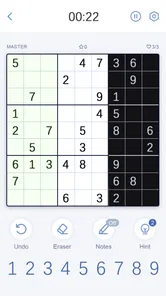
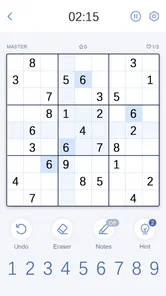
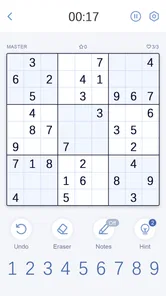
Analysis by Reviewed
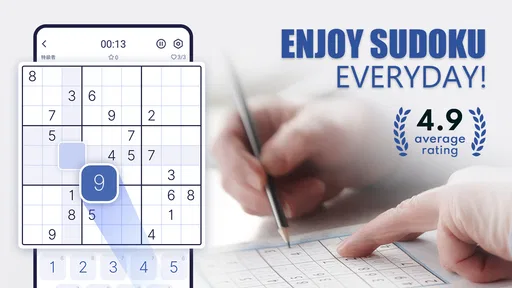
My first impression of Sudoku Master is that it keeps its attention on the grid rather than trying to turn a quiet logic game into a spectacle. That suits Sudoku: I want to concentrate on a pattern, not work around a busy interface. If you enjoy puzzles that give you room to think at your own pace, this game has an appealingly direct starting point.
A calm starting point for a familiar puzzle
Sudoku is built on a simple promise: fill a grid while following its number-placement rules. The challenge comes from noticing what the rules imply, and a mobile version works best when it lets that reasoning stay in the foreground. Here, the uncluttered presentation makes it easy to settle into a puzzle without needing to learn an elaborate game world first.
The mood is practical rather than theatrical. I find that a good fit for short sessions: open a puzzle while waiting for a kettle, take a few minutes during a break, or return to a half-finished grid when I have more time. It is also a useful choice when I want something mentally engaging that does not demand a fast reaction or a long uninterrupted stretch.
The game is a free puzzle title from Hungry Studio, and its appeal is easy to understand if you already enjoy working through Sudoku by hand. It has a 4.7 average from around 51,000 ratings and has been installed over five million times. Those figures suggest it has found a broad audience, though what matters more to me is whether its puzzle routine fits your habits.
A Dive into the Grid
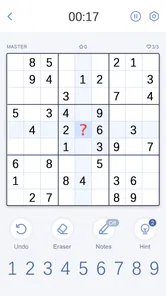
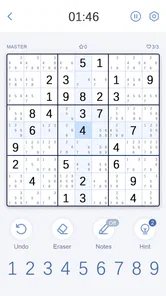
First things first, let's talk about the design and interface of Sudoku Master. The app greets you with a clean and intuitive layout. The developers have done a stellar job at keeping things simple yet engaging. You won't find any unnecessary bells and whistles here - just pure, undiluted Sudoku goodness. The grid is crisp, and the numbers are easy on the eyes, which is a blessing for those of us who might spend a bit too long squinting at the screen.
Features that Stand Out
So, what sets Sudoku Master apart from the myriad of Sudoku apps out there? Well, for starters, the app offers multiple difficulty levels, ranging from "Easy Peasy" to "Brain Melter". Whether you're a novice or a seasoned Sudoku solver, there’s something here for you.
The game offers six difficulty levels and a large supply of puzzles, so I can choose a gentler challenge when I want to practise basic scanning or step up when familiar patterns stop being interesting. That range is more useful than it may sound: difficulty is personal, and a label that feels demanding to one player may be comfortable for another. I would start below my assumed level, then move upward when I can solve consistently without guessing. That gives a better sense of progress than picking the hardest option simply because it is available.
More From Our News Desk

 Gmail
Gmail in a Busy Inbox: Who Benefits Most?
From first account to crowded workday, Gmail earns its place through dependable search and flexible sorting—but its best fit depends on how much inbox maintenance you can tolerate.

 Prime Video
Switching to Prime Video: What Changes in Your Viewing Routine
Prime Video can make a compelling second home for streaming, but switching means learning a different catalog, rental layer, and route from browsing to playback.

 Universal TV Remote Control
 Works Best as a Reliable Backup
A phone remote earns its place through quick setup and reliable habits. Here is how to get more from Universal TV Remote Control—and where its limits show.

 Weather - By Xiaomi
Weather by Xiaomi Review: Clear at a Glance, Less Clear Up Close
Xiaomi’s weather app makes everyday forecasts quick to scan, but its calm surface can leave useful details and recovery paths harder to find than they should be.

 X
X Under Pressure: Can It Recover When Posting Goes Wrong?
A resilience-focused review of X, examining setup, mistaken posts, interruptions, weak connections, and the gaps that matter when recovery needs to be dependable.

 Clash of Clans
 Is Won Between the Battles
Its raids are quick; its community is a long-term project of coordination, teaching, rivalry, and shared responsibility—with all the friction that entails.
Latest News



One feature I particularly enjoyed is the hint system. It's like having a little Sudoku guru sitting on your shoulder, ready to nudge you in the right direction when you're stuck. The hints are well-balanced, providing just enough assistance without giving away the entire solution. Plus, there's a nifty note-taking feature that allows you to jot down possible numbers without committing just yet—perfect for those tricky spots where you're unsure of your next move.
Make each move teach you something
A hint is most valuable when I use it as a prompt to inspect the grid, not as a shortcut to the finish. Before asking for help, I pause and check one row, column, or box at a time. If I still cannot see a safe move, a nudge can help me notice a possibility I overlooked. Then I try to explain to myself why that number belongs there. This turns a rescue into practice and helps me rely less on hints as patterns become familiar.
Notes are most useful when I keep them tidy. I add candidates only to cells where they help me compare possibilities, rather than filling every empty square automatically. Too many notes can become another layer to scan and maintain, especially after a number is placed. A sensible rhythm is to pencil in candidates for a small area, make a deduction, and revisit only the affected row, column, and box. That keeps the screen readable and makes mistakes easier to spot.
For a realistic everyday session, I might begin a puzzle during a quiet commute or a lunch break, make a few deliberate placements, then stop when I need to move on. Sudoku is naturally easy to pause mentally, but a mobile session can still be interrupted. I treat an unfinished board as something to return to rather than a task that must be completed immediately. If I come back unsure of my plan, I rescan the current row and box before changing any notes; that small reset is safer than guessing based on a half-remembered idea.
Picking the right kind of challenge
The six levels make the game approachable, but they do not guarantee that every puzzle will feel perfectly calibrated to every solver. A difficulty label is a guide, not a promise about how long a board will take or which techniques it will require. If a puzzle feels too easy, move up; if it turns into a frustrating stall, step down and focus on accuracy. I would rather finish a thoughtfully chosen easier board than force myself through a level that makes every session feel like homework.
The large puzzle library also suits people who want repetition without having to search elsewhere for another board. That is useful for building a routine: a few puzzles at a comfortable level can help make scanning rows and boxes feel more automatic. It is less compelling if you want a puzzle game with a changing story, varied objectives, or surprises beyond number placement. The basic appeal here is depth through repeated deduction, not a sequence of different game modes.
Sound, pace, and the quiet mood
Sudoku’s strongest atmosphere is often the one that leaves space for concentration. I approach this game as a quiet activity, not an audio-led experience: the satisfying part is the moment a constraint resolves, not a dramatic presentation around it. That makes it easy to fit into a calm break or a wind-down routine, and it also means players looking for expressive music, a setting to explore, or a strong narrative should choose a different kind of game.
The pacing comes from the player. I can spend a while comparing candidates in one tight area, or make a quick pass through the grid and leave the harder deduction for later. That flexibility is a real strength, but it can also make a session feel repetitive if I am not in the mood to concentrate. When I want action, novelty, or a clear sequence of short objectives, a conventional arcade or story puzzle will probably hold my attention better.
How it fits beside other Sudoku options
Compared with paper Sudoku, this app is easier to carry and lets me use digital notes and hints when a board gets difficult. Paper remains a better fit if I enjoy writing candidates by hand, want to avoid screen time, or prefer to see my own marks and corrections physically. Compared with more elaborate mobile puzzle games, Sudoku Master is more focused: the draw is the grid itself, not a collection of unrelated mechanics. That focus is welcome when I want classic Sudoku, but it is a limitation if I expect a changing campaign or lots of different puzzle types.
There is also a practical choice between hints and independent solving. If my aim is to improve, I try to reserve hints for genuine dead ends and work through the logic before tapping for help. If I simply want a relaxed puzzle, using a hint sooner can keep the session pleasant. Neither approach is wrong; the useful question is whether I am playing to practise or to unwind, because the same tool serves those goals differently.
What to know before settling in
The game is free to download, with optional in-app purchases priced from $0.99 to $39.99 per item. I would approach those purchases as optional rather than a reason to install: the central activity is solving Sudoku, and the game already provides a substantial puzzle selection. If you are cautious about spending, check purchase prompts before confirming anything and keep your own budget in mind. The age rating is Everyone, so the basic number puzzle is suitable for a broad audience, including beginners who want a gentle way to practise logical thinking.
On Android, the listed minimum is version 5.0, and the current release is 3.3.5. The game first appeared on October 18, 2021, and its continued audience is reflected in roughly 1,300 written reviews alongside its ratings. I would still check that your device meets the operating-system requirement before installing. Those details make it a straightforward option for many Android users, while the puzzle itself is equally easy to understand for anyone familiar with Sudoku.
Who is it best for? I would recommend it to someone who likes classic number puzzles, wants a choice of challenge, or needs a small activity that can be picked up and put down without tracking a plot. It is also a reasonable starting point for a newcomer: begin on an easier level, use notes sparingly, and treat hints as explanations to learn from rather than buttons to press whenever progress slows.
Who should skip it? Players who dislike repeated grid-based deduction will not find much variety in the central activity, however many puzzles are available. It is also not the right choice for anyone seeking a social competition, a rich soundscape, or a game where the setting and characters drive the experience. If screen-based number entry feels tiring, paper may be more comfortable. And if you want a puzzle to surprise you with different rules from one round to the next, a broader logic-game collection would suit you better.
Performance and Experience
Now, let's chat about the performance. The app runs smoothly on both Android and iOS, with no noticeable lag or glitches. It's evident that the developers prioritized a seamless user experience, and it shows. I've spent countless hours immersed in solving puzzles, and not once did I encounter any technical hiccups.
Another neat aspect is the daily challenges. These are a fantastic way to keep the game fresh and exciting. Each day, you're presented with a new puzzle that comes with its own set of challenges. Completing these can earn you rewards, which adds a fun and competitive edge to the game.
Ending Thoughts
In conclusion, Sudoku Master is a must-have for any puzzle enthusiast. Its user-friendly interface, combined with a variety of features and smooth performance, makes it a joy to play. Whether you're looking to kill some time or seriously hone your Sudoku skills, this app has got you covered.
If you're ready to challenge your brain and possibly discover your new favorite pastime, give Sudoku Master a try. Who knows, you might just find yourself hooked!
Sudoku Master! Frequently Asked Questions
Can I play Sudoku Master at my own pace, or does it put me on a timer?
Sudoku Master is a puzzle game for working through Sudoku grids, and its six difficulty levels let you choose a challenge that fits your mood and experience. You can focus on solving each grid without needing to treat the game as a race. If you prefer a more demanding session, choose a harder level; for a relaxed start, a lower difficulty is a natural fit.
Is Sudoku Master a good choice for someone who is new to Sudoku?
The game offers six difficulty levels, so newcomers can begin with a more approachable challenge and move up as they become comfortable with Sudoku’s logic. The basic goal is to fill a grid while avoiding repeated numbers in each row, column, and section. That makes it easy to understand what you are working toward, while the different levels provide room to build confidence.
Can I play Sudoku Master without an internet connection?
Yes. Sudoku Master can be played offline, so you can solve puzzles when you are travelling or somewhere with limited connectivity. Its store summary highlights a large collection of Sudoku puzzles, making the offline option useful for keeping a game ready without relying on an active connection. Some online-oriented features, such as daily challenges, may need internet access.
How many Sudoku puzzles and difficulty levels are included?
Sudoku Master includes more than 40,000 Sudoku puzzles and offers six difficulty levels, so players can choose a challenge that suits their experience. Its range makes it useful for someone learning the rules as well as for a regular player looking for tougher puzzles. You can work through puzzles at your own pace and switch difficulty as your confidence changes.
What is Sudoku Master, and who developed it?
Sudoku Master is a puzzle game developed by Hungry Studio. Its focus is classic Sudoku: filling a grid by using logic to place numbers without repeating them in a row, column, or section. The game is free to download and is rated for Everyone, making it an option for a broad range of players who want a straightforward number puzzle.
Pros
- Easy-to-use interface for all ages.
- Variety of difficulty levels.
- Daily challenges enhance engagement.
- Offline play mode available.
- Hints and tips for learning.
Cons
- Contains in-app ads.
- Limited free hints.
- No multiplayer mode.
- Occasional app crashes.
- Requires purchase to remove ads.