Spades - Card Game
- 10.43K
- 4.7
- Installs
- 5.00M
- Price
- Free
Screenshots
Analysis by Reviewed
I judge a card game on two things: whether I can follow the play at a glance and whether I still want to think about my choices after a few hands. Spades - Card Game has the familiar trick-taking rhythm that makes Spades easy to return to, while a phone lets me fit a hand into a short break instead of arranging a table and a full group. Blackout Lab made this free card game for Android, and its 4.7 average from around 212,000 ratings suggests it has found a sizable audience. I’d look at it as a convenient way to play a traditional game, not as a substitute for every kind of card night.
Reading the table and finding your way
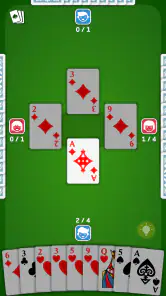
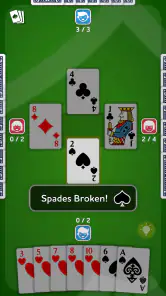
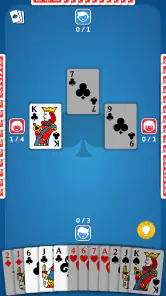
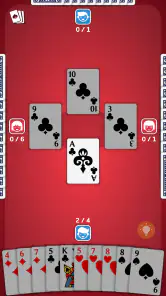
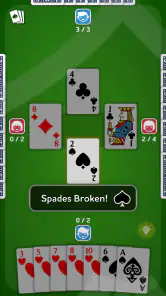
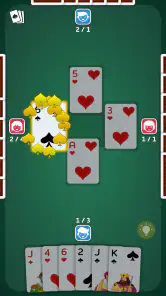
Spades asks you to track what has been played, anticipate how a trick may go, and make a sensible bid from the cards in your hand. The app’s clean table layout helps keep attention on those decisions. Cards are easy to read, and the controls feel straightforward enough that a new player can focus on learning the flow rather than hunting through menus. The game is rated for Everyone, and it suits casual play as well as practice for people who already know the rules.
The tutorial is useful if you need a refresher, but I’d still take a moment to learn the basic ideas of bidding and following suit before judging your first few results. A loss can come from a risky estimate, not from confusing controls. A practical habit is to review which high cards have already appeared before deciding how aggressively to play the next trick. That small pause makes the game feel more like a test of planning than a race to tap a card.
The Gameplay Experience
The first thing you'll notice about Spades - Card Game is how intuitive the interface is. The developers have done a fantastic job of making the game accessible for both seasoned players and newcomers. The rules are well-explained, and there’s even a tutorial mode for those who are new to the game. I found the AI opponents to be quite challenging, which is great if you’re looking to hone your skills before playing against real people.
Graphics and Design
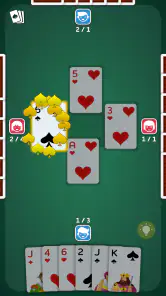
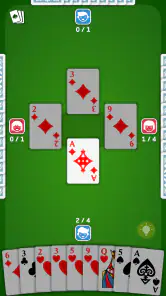
The design of the app is sleek and modern, with a variety of backgrounds and card designs to choose from. It’s clear that the developers put a lot of effort into the visual aspects of the game. The animations are smooth, and the user interface is clean, making for an enjoyable gaming experience. The cards are easy to read, and the layout is user-friendly, so you won’t find yourself fumbling around trying to figure out what to do next.
Playing in different settings
This format is especially handy when I have a few quiet minutes on a commute, while waiting for an appointment, or during a break at home. A quick solo session against AI is the low-friction choice when I don’t want to coordinate with anyone; online play makes more sense when I’m in the mood for opponents beyond the computer. For an everyday example, I might play a hand during a lunch break, then stop when I need to get back to work. The compact, turn-based pace is easier to interrupt than a real-time action game, though I’d avoid starting a match when I know I’ll have to leave immediately.
Compared with many mobile card games that lean on quick matching or luck-driven rounds, Spades rewards keeping track of suits and making a considered bid. That makes it a better fit for someone who enjoys partnership-style trick taking than for a player seeking a casual solitaire puzzle or a fast, low-attention distraction. If you want the conversation and table banter of an in-person game, a phone match won’t recreate that; if you want to practice decisions without assembling a group, the AI offers a useful alternative.
More From Our News Desk

Weather by Xiaomi Review: Clear at a Glance, Less Clear Up Close

X Under Pressure: Can It Recover When Posting Goes Wrong?

Clash of Clans Is Won Between the Battles

Android Auto Makes the Case for Quieter Car Software

MobiOffice: Transforming Mobile Productivity with Seamless Integration

EA SPORTS FC™ Mobile Soccer: Redefining Mobile Sports Gaming
Motor and sensory comfort
Because the central task is choosing and playing cards, the experience does not demand the rapid, repeated input associated with action games. I can take time to inspect the hand and make a move, which is helpful when I want a calmer pace. Changing the card design or background can also make the table feel more comfortable to look at, though customization is personal preference rather than a guarantee that every visual need is covered.
There are still practical limits. Small phone screens can make a card table less comfortable for anyone who needs larger text or more space, and animations or changing visual elements may not suit every player. I’d try it on the device and display setting I actually plan to use, rather than assuming that a clean layout will work equally well for everyone. If visual clarity is a priority, choosing a card design that stands out against its background is a sensible first adjustment.
Multiplayer Mode
One of the highlights of Spades - Card Game is its multiplayer mode. You can play with friends or join random matches online. The matchmaking system is quick, and I didn’t experience any lag during my games. Playing with friends adds a whole new level of fun, and it’s a great way to stay connected with people, especially if you can’t meet up in person.
Online play is the better choice when you want human decisions and the unpredictability that comes with them; solo play is more convenient for learning at your own pace. A helpful way to use both is to practice a rule or bidding approach against AI, then see how it holds up against other people. The trade-off is that a random match can’t offer the familiarity of playing with your usual group, while a friend match depends on everyone being available at the same time.
Customization Options
The app offers a good amount of customization options, allowing you to personalize your playing experience. You can choose different themes and card designs, which keeps the game feeling fresh and exciting. I particularly enjoyed being able to customize my avatar and profile, adding a bit of personal flair to my gaming experience.
If you’re deciding whether it’s worth trying, the practical answer is straightforward: it’s free, has more than five million installs, and runs on Android 6.0 or later. The current version is 1.40.3. Those details make it an easy option to test if you already enjoy Spades, but they don’t mean it will suit everyone. Players who dislike online opponents, want a different card-game format, or prefer playing face-to-face may be happier with another choice.
Who will enjoy it most
I’d recommend it to someone who knows Spades or wants a mobile introduction to trick-taking, especially if they value the choice between computer opponents and online matches. The tutorial and readable table lower the initial barrier, while the strategic decisions leave room to improve. Blackout Lab’s game is less compelling if you’re looking for a deep collection of unrelated card games or a social experience built around conversation rather than turns.
Overall, Spades - Card Game is a fantastic app that brings the classic card game to your mobile device in a fun and engaging way. Whether you’re playing solo against AI or competing with friends online, there’s plenty of entertainment to be had. If you’re a fan of card games or just looking for something new to try, I’d definitely recommend giving this app a download. It’s a great way to pass the time and challenge your strategic thinking skills.
A measured recommendation
Its strongest quality is the simple access it gives me to a game whose enjoyment comes from reading the hand, not flashy effects. I would start with the tutorial, choose a card design that is easy for me to distinguish, and use solo play to get comfortable before joining an online table. That makes the first session less frustrating and gives me a better sense of whether the pace and visual presentation work for me.
For a free game rated for Everyone, it is an approachable option, but inclusive play still depends on the person, the screen, and the setting. I’d choose it for a quiet break or casual practice, and choose a larger display or a real table when screen size, accessibility needs, or social connection matter more. That balance is why I’d recommend trying it without expecting it to replace every way of playing cards.
Spades - Card Game Frequently Asked Questions
Can I play Spades - Card Game offline?
Spades - Card Game centers on a familiar card-game format, so it may appeal if you want a quick round during spare time. Whether you can play without an internet connection depends on the mode you choose and how the game handles access on your device. If offline play is important to you, check the game’s available options after installing before relying on it while disconnected.
What should I know about the game’s content and age suitability?
Spades - Card Game is rated Everyone and focuses on playing cards, bidding, and taking tricks. That makes its central activity easy to understand as a traditional card game rather than a game built around mature themes. It can suit a broad range of players, though younger players may still benefit from learning the rules with someone who already knows how Spades works.
Who developed Spades - Card Game, and what kind of game is it?
Spades - Card Game is a card game developed by Blackout Lab. It focuses on the familiar Spades format, where players bid on how many tricks they expect to take and then try to meet those bids during play. If you enjoy strategic card games built around careful planning and partnerships, its core concept should feel appealing.
What is Spades - Card Game about?
Spades - Card Game is a classic trick-taking card game where players aim to accurately predict the number of tricks they can win in each round. Played with a standard 52-card deck, the game involves strategic partnerships, bidding, and gameplay, making it a popular choice for card game enthusiasts seeking both skill and strategy.
Is Spades - Card Game available for both Android and iOS?
Yes, Spades - Card Game is available for download on both Android and iOS platforms. Users can enjoy the game on their smartphones or tablets, ensuring a seamless and enjoyable gaming experience regardless of their preferred device. Check the Play Store or App Store for the latest version. The Android version requires Android 6.0 or later.
Pros
- Engaging multiplayer mode
- Smooth and intuitive interface
- Variety of card decks
- Offline play available
- Regular updates and events
Cons
- Ads can be intrusive
- Some features require in-app purchases
- Occasional connectivity issues
- Limited customization options
- Tutorial could be more comprehensive
- Category
- Card
- Version
- 1.40.3