Merry Christmas Color
- 13.00
- 4.9
- Installs
- 10.00K
- Price
- Free

Screenshots
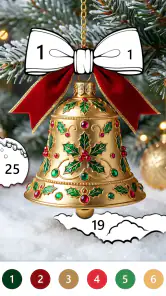
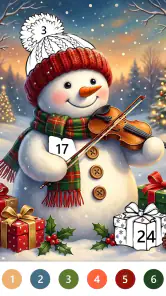

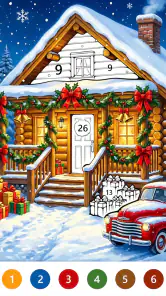
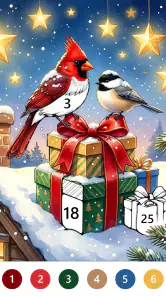
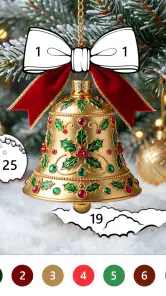
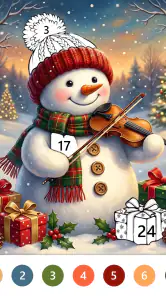

Analysis by Reviewed
I like coloring games best when I can open one, settle into a picture, and make progress without learning a complicated system. Merry Christmas Color is a seasonal board game built around filling illustrations by number, so its appeal is easy to understand: it offers a quiet activity with a Christmas theme rather than a race, puzzle challenge, or competitive match. I’d consider it for short breaks, especially when I want something low-pressure on my phone.
A quick way to tell whether it suits your routine
Before installing, I’d ask myself whether I want a guided coloring session or a tool for making original art. This game is aimed at the first kind of play: the numbers take care of the color choices, leaving me to focus on filling spaces and watching an image come together. If I enjoy that steady, low-stakes rhythm, its seasonal focus can be a welcome change from games built around scores or deadlines.
A seasonal coloring game in its current form
LoveColoring Game has made a focused little game for people who enjoy paint-by-number coloring. The Christmas framing gives the experience a particular mood and makes it feel more suited to the holiday season than an all-purpose coloring library. If you already know you like numbered coloring, that focus is a strength; if you want a broad collection of themes throughout the year, it may feel limiting.
The game is free to install, with optional in-app purchases priced from $0.99 to $9.99 per item. That makes it easy to try before spending, but I would treat the purchase range as a reason to check what is offered in the app before committing to a longer session. The game is suitable for Everyone, and its current version is 1.0.2. It has a 4.9 average from 591 ratings and more than 10K installs, a positive reception that is encouraging without telling me whether its particular art style will suit you.
Its short store description, “Merry Christmas Color,” is a fair indication of the seasonal emphasis, but the useful question is how that theme fits your routine. I can imagine opening it while waiting for a kettle to boil or taking a quiet pause after work. Numbered coloring gives a small, clear next step: find the matching area and fill it. That structure is less demanding than inventing a palette or planning an entire drawing from scratch.
Why the paint-by-number format works for short breaks
The main practical advantage of this format is that it reduces decision-making. In a free-form drawing app, choosing colors, tools, and what to draw can become the activity itself. Here, the number system supplies direction, so I can begin without having to arrive with an idea or artistic confidence. That can make a difference when I have only a few minutes and want to relax rather than start a project that needs concentration.
A useful way to approach a picture is to work in small passes instead of trying to finish it in one sitting. I would fill the easiest or most visible numbered regions first, then return later for the remaining details. That keeps a short session satisfying and makes it easier to resume without needing to remember a complicated plan. It is a simple habit, but it suits numbered coloring particularly well.
More From Our News Desk

Weather by Xiaomi Review: Clear at a Glance, Less Clear Up Close

X Under Pressure: Can It Recover When Posting Goes Wrong?

Clash of Clans Is Won Between the Battles

Android Auto Makes the Case for Quieter Car Software

MobiOffice: Transforming Mobile Productivity with Seamless Integration

EA SPORTS FC™ Mobile Soccer: Redefining Mobile Sports Gaming
There is also a trade-off in the same simplicity. If you enjoy choosing every color or making a picture your own, a numbered design can feel restrictive: the activity is about completing the intended image, not freely composing one. I would choose a drawing app instead when I wanted to sketch, experiment with brushes, or create something from a blank canvas. Merry Christmas Color is better suited to following a guided visual task.
What the version and release information really tell us
The game was released on September 22, 2026, and its current version is 1.0.2. Those details place it at an early point in its product life, rather than suggesting a long-established title with a substantial history of updates. They tell me where the game stands now, but they do not establish what future releases will add. I would not assume that new themes, features, or changes are already planned.
For someone installing it now, the practical takeaway is to judge the current experience on its own merits. The version number is a useful reference if you are comparing what you see with a friend’s installation or checking whether you have the current build. It is not, by itself, evidence of a particular improvement or a record of which features changed. With a relatively new release, the game may still evolve, but that is an expectation rather than a promise.
Existing users can use the same perspective: a new version number is a reason to notice whether the app behaves differently, not a guarantee that their favorite part has changed. If you already enjoy its seasonal coloring, you can keep using the version available to you and evaluate updates when they arrive. I would pay attention to whether a change improves the actual coloring routine, rather than treating a higher number as a benefit on its own.
Where it fits among other coloring and board games
As a board-category game, this is not the kind of title I would pick for tactical decisions, turn-taking, or a contest with another player. Its pleasure is individual and visual. Compared with a conventional board game, it asks for little strategic planning and offers a gentler way to occupy a few minutes. Compared with broad coloring apps, the Christmas identity makes it more specific and potentially more charming during the relevant season, but also less adaptable if you want unrelated subjects.
It also occupies a middle ground between a coloring book and a casual puzzle. The picture gives the session a visible destination, while the numbered areas provide a light matching task. That can be more engaging than simply tapping through a passive screen, yet it remains much less demanding than a puzzle that expects you to reason several moves ahead. If you want active competition or a strong challenge, this is probably not the right fit; if you want a calm task with a clear visual payoff, it makes more sense.
One non-obvious tip is to think of the number system as a way to control how much attention you spend, not just as an instruction. When I want a quick reset, I would choose a few easy areas and stop there. When I have a longer, calmer window, I could take on the finer parts of the picture. This avoids turning a relaxing activity into a chore to finish everything immediately.
Everyday use, comfort, and the limits to consider
Picture a busy evening: you have a few minutes before dinner, but not enough time to begin a show or a longer game. A paint-by-number session gives you a contained activity with a clear stopping point. You can make a little progress, put the phone down, and return later. That use case is more convincing to me than expecting the game to provide deep variety or hold attention for hours.
The seasonal theme is both its identity and its main constraint. If Christmas imagery is exactly what you want, that focus helps the game feel coherent. If you tend to tire of holiday visuals quickly, the same focus may make the selection feel repetitive sooner than a general-purpose coloring collection would. I would skip it if I were looking for year-round variety, a creative toolkit, or social play; a broader coloring app or a multiplayer board game would better serve those needs.
Another practical trade-off is the difference between free access and optional spending. You can start without paying, while individual in-app purchases range from $0.99 to $9.99. Before buying anything, I would check whether the particular content or option is useful to the way I play, rather than assuming a purchase is necessary to enjoy the basic idea. That small pause helps keep a simple relaxation game from becoming an impulse purchase.
The minimum operating system is Android 8.0. That is useful to know before installing on an older device, since compatibility can determine whether the game is an option at all. Its Everyone age rating also makes it suitable for a broad audience, though the best match is still someone who likes gentle visual activities. For a child, a parent may want to review any purchase prompts together; for an adult looking to unwind, the number-based structure is the more important consideration.
Small choices that can make a session feel better
I would treat each picture as a sequence of manageable stopping points rather than a single task to complete. A practical approach is to make a little progress, pause when attention starts to wander, and return when the activity sounds appealing again. That is especially useful when coloring is meant to be a break, not another item on a to-do list. The visible progress gives a natural sense of completion for a short visit, even if the whole image remains unfinished.
If I were sharing the device with a younger player, I would also make the purchase decision before handing it over: try the free experience first, then decide together whether any optional purchase is worthwhile. That keeps the focus on the coloring itself and avoids treating every in-app prompt as part of the game’s core activity. The same habit is useful for adults who want a no-surprise way to test whether the format holds their interest.
What I would watch as the game develops
Because the release is recent and the current version is 1.0.2, I would keep an eye on the game’s practical development rather than guessing at a roadmap. The most meaningful signs would be whether the seasonal concept remains enjoyable over repeat sessions, whether the coloring flow feels comfortable on the device you use, and whether future versions make the experience more useful without losing its calm pace. Those are things a player can assess directly as they use it.
I would also watch how well the game serves both brief and longer sessions. A good paint-by-number game should be easy to pick up for a moment but not feel frustrating when you want to stay with a picture. If you install it, try a short session first and notice whether the numbered approach relaxes you or makes the task feel too guided. That answer matters more than a high rating when deciding whether this style is personally enjoyable.
My recommendation
I’d recommend Merry Christmas Color to anyone who wants a gentle, seasonal coloring activity and likes being guided by numbered spaces. Its strongest use is as a small, repeatable pause in the day: no elaborate setup, no competitive pressure, and no need to invent an image. The 4.9 average is a welcome sign of interest from other players, but I would still base the decision on whether Christmas-themed, paint-by-number coloring sounds appealing to you.
I would look elsewhere if I wanted a large range of subjects, freehand tools, deeper board-game strategy, or multiplayer interaction. For those needs, this game’s narrow focus is a real limitation, not something to overlook. But if a short, low-pressure coloring session sounds like a pleasant way to unwind, the free download makes it reasonable to try, with optional purchases best considered only after you know what you want from the experience.
Who is most likely to enjoy it?
I see it as a good fit for someone who already finds comfort in coloring books and prefers a little structure over a blank page. It can also work for a person who wants a quiet phone activity to share alongside family time, as long as everyone is happy with a Christmas-centered subject and the simple number-matching routine. The key is that the appeal comes from the act of filling in the picture, not from unlocking a demanding game system or competing against anyone.
If your usual alternative is scrolling through short videos, this offers a more deliberate way to spend a few spare minutes: you choose an area, complete it, and can stop without losing the thread. If your preferred alternative is a strategic board game, a social word game, or an open-ended art app, this will likely feel too gentle and narrow. I would make that distinction before downloading rather than expecting one small game to cover every kind of downtime.
A sensible first-session test
To decide whether the coloring flow suits you, I would try one brief session and pay attention to two things: whether searching for the numbered areas feels soothing, and whether following the assigned colors feels satisfying rather than limiting. If both parts work, the game has a clear role as a seasonal wind-down activity. If either becomes irritating, a free-form coloring app may be a better match because it lets you choose your own pace and palette.
That first check also helps answer a practical question: does the game fit the amount of attention you want to give your phone? I would avoid starting it when I need a demanding challenge or an activity that keeps a group involved. I would reach for it when I have a small pocket of quiet and want something visual, self-paced, and easy to leave unfinished until later.
Merry Christmas Color Frequently Asked Questions
What is Merry Christmas Color?
Merry Christmas Color is a holiday-themed coloring app where you can fill illustrations inspired by Christmas, such as festive decorations, winter scenes, and seasonal characters. The exact collection of pictures and available tools can vary by version, so check the app’s listing and screenshots before downloading. It is intended for casual creative activity rather than a full-featured drawing or professional art program.
Is Merry Christmas Color free to download and use?
The price and payment options depend on the version and the store where you download Merry Christmas Color. The app may be free to install but include advertisements, optional purchases, or features that require payment. Review the store listing for current pricing and check the app’s permissions and in-app purchase information before installing, especially if a child will be using it.
How does the coloring work, and do I need drawing experience?
Coloring apps are generally designed to be approachable: you select an illustration, choose a color, and tap or otherwise fill parts of the picture using the available controls. You typically do not need prior drawing experience. Available features—such as palettes, undo, zoom, or saving—can differ by release, so consult the current app description if a particular tool matters to you.
Can I use Merry Christmas Color offline?
Some coloring apps let you work with illustrations already available on your device without an internet connection, while other content or features may need to load online. Offline availability can depend on the app version and whether a picture has already been downloaded. If you plan to use it while traveling, try opening the app and the desired illustrations before disconnecting from Wi-Fi or mobile data.
Is Merry Christmas Color suitable for children, and what should parents check?
A simple coloring activity may be suitable for children, but suitability depends on the app’s content, advertisements, purchase options, and privacy practices. Before handing over a device, review the age guidance and store disclosures, check whether ads or external links appear, and use parental controls to restrict purchases where appropriate. Ratings and features may differ between the Android and iOS versions.
Pros
- Simple coloring controls are easy for children and beginners to use.
- A festive theme makes it a good seasonal activity.
- Coloring can be done at your own pace without time pressure.
- A variety of Christmas-themed pictures offers some choice.
- Completed artwork can be saved for later viewing or sharing.
Cons
- The Christmas-only theme may feel repetitive after the holidays.
- Some pictures or features may require an internet connection.
- Ads may interrupt coloring
- depending on the version.
- Small details can be tricky to color accurately on a phone.
- The app may offer limited options for customizing colors or brushes.
- Category
- Board
- Version
- 1.0.2













