Color by Number ®: No.Draw
- 23.74K
- 4.6
- Installs
- 50.00M
- Price
- Free
Screenshots


Analysis by Reviewed
What appeals to me about Color by Number ®: No.Draw is the way it turns a picture into a small, orderly task: find a numbered area, choose its matching color, and fill it in. That simple loop is the point. I don’t have to plan a design or decide which shades work together; I can settle into the image one patch at a time. For a board-style game, it’s a quieter kind of play, and I find it works best when I want something focused but undemanding.
Why the numbered coloring loop works
In a freeform drawing app, the blank page can be the hardest part. Here, the numbered sections give me a clear next move, so I can start without needing an idea or any drawing confidence. The trade-off is that this is more about following a pattern than making an image entirely my own. I enjoy the gentle structure, but anyone looking for open-ended painting or a puzzle with a changing strategy may find the routine too guided.
I’d use it in short pauses: while waiting for someone, during a quiet break, or at the end of the day when I’m not ready to start another demanding activity. A practical tip is to choose an image that looks manageable before settling in; a more detailed picture can take patience, while a simpler one gives a quicker sense of completion. The numbered approach makes it easy to return to the task, though it may feel repetitive if you want every session to play differently.
How it fits everyday downtime
Picture a bus ride or a few minutes between chores. I can open a coloring page, make progress on a handful of sections, then stop without having to remember a complicated sequence of moves. That makes it a better fit for fragmented free time than a game that asks me to hold several rules in mind. If I’m in the mood to experiment with composition, though, a sketching app would give me more control; if I want a competitive challenge, a traditional board game is the clearer choice.
Who is likely to enjoy it
Creative APPS makes this free board game, which is rated for Everyone and has a 4.6 average from around 371,000 ratings. It has passed 50 million installs, a sign that the accessible format has broad appeal, though popularity alone doesn’t guarantee it will suit every player. I’d recommend trying it if you like calm, guided activities and want coloring without needing art supplies. I’d skip it if you dislike repetitive tapping, want to draw freely, or mainly play games for competition and changing tactics.
Getting Started with Color by Number
Jumping into Color by Number ®: No.Draw is as easy as pie. Once you download it, you’re greeted with a clean interface that’s both inviting and intuitive. You don’t need to be a tech wizard to navigate through it. The app offers a variety of categories to choose from, ranging from simple designs for beginners to more intricate patterns for the seasoned artist. Trust me, there’s something for everyone!
A Closer Look at the Features
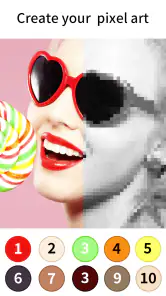
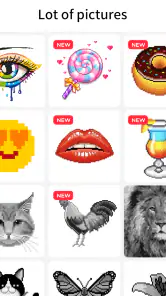
One of the standout features is the vast library of images. You’ll find everything from cute animals, breathtaking landscapes, to geometric patterns. And, if you’re feeling adventurous, the app also allows you to import your own photos to turn them into color-by-number masterpieces. How cool is that?
More From Our News Desk

Weather by Xiaomi Review: Clear at a Glance, Less Clear Up Close

X Under Pressure: Can It Recover When Posting Goes Wrong?

Clash of Clans Is Won Between the Battles

Android Auto Makes the Case for Quieter Car Software

MobiOffice: Transforming Mobile Productivity with Seamless Integration

EA SPORTS FC™ Mobile Soccer: Redefining Mobile Sports Gaming
But wait, it gets better! The app isn’t just about coloring within the lines. It’s an educational tool too. As you color, you’ll notice that it helps improve your number recognition skills and hand-eye coordination. Plus, it’s a fantastic way to keep the kids entertained and learning at the same time.
Why I’m Hooked
What truly sets this app apart is its ability to let you disconnect from the hustle and bustle of everyday life. Imagine sitting down after a long day, selecting a picture, and just letting the colors flow. The soothing effect it has is almost magical. And with the offline mode, you can take your coloring book anywhere — no Wi-Fi needed!
Another noteworthy aspect is the app's regular updates, which ensure that you never run out of images to color. It feels like there’s always something new to explore, making each session feel fresh and exciting.
The Final Stroke
To sum it up, Color by Number ®: No.Draw is more than just an app; it’s an experience. Whether you’re looking to unwind, tap into your creativity, or simply kill some time, this app has got you covered. It’s not just about filling in colors; it’s about the joy and relaxation that comes with it.
So, if you haven’t tried it yet, what are you waiting for? Dive into a world of colors and let your imagination run wild. Who knew coloring by numbers could be this much fun?
A few practical trade-offs
The game is free to download, with optional in-app purchases ranging from $3.49 to $79.99 per item. I’d treat those as a choice rather than a requirement: start with the available coloring experience and decide later whether spending makes sense for your habits. The current version is 3.3.0 and requires Android 5.0 or later, useful details if you’re checking compatibility before installing. It was released on November 8, 2017, and its long run doesn’t change the basic appeal: the numbered coloring task remains simple to understand.
One useful way to keep sessions relaxing is to stop when the activity starts feeling like a chore. I wouldn’t try to finish a detailed image in one sitting; choosing a small stopping point makes it easier to enjoy progress rather than chase completion. The pixel-puzzle framing suggests a visual task, not a substitute for a full drawing tool, so I’d keep expectations in that lane. If you want to practice making your own compositions, use a sketching app; if you want a low-pressure activity with a defined next step, this is more appropriate.
What to expect before you settle in
People often wonder whether this kind of coloring is suitable for a child or whether it asks for artistic experience. The Everyone rating and number-led format make it approachable for a wide audience, and I don’t think you need drawing skills to begin. Still, for younger players, I’d choose an image together and keep the session short if tapping through sections loses their interest. It can occupy a quiet moment, but I wouldn’t present it as a guaranteed lesson or a replacement for hands-on creative play.
Another fair question is whether it works for every mood. For me, its strength is predictability: I can focus on matching areas and colors without inventing a plan. That same predictability is its limitation. When I want surprise, competition, or a fresh tactical decision every few seconds, I reach for a different kind of game. When I want a calm, guided way to fill a spare moment, the straightforward format is exactly the reason I open it.
My closing recommendation
Overall, I’d recommend this to someone who enjoys visual tasks, likes steady progress, and appreciates a little structure rather than a blank canvas. Creative APPS keeps the central idea easy to grasp, and the broad audience reflected in its 50 million-plus installs makes sense for a game that doesn’t demand a learning curve. Just remember that the satisfaction comes from completing the pattern, not from designing one yourself. If that sounds appealing, it’s a pleasant option to keep on hand for quiet breaks.
A useful way to pace a picture
I find the numbered format easiest to enjoy when I treat a page as a series of small checkpoints rather than one job to finish. Before starting, I look at the overall image and decide whether I have time for a quick section or a longer stretch. If I’m interrupted, I can leave the picture partway through and come back to the same visual goal instead of restarting a round or rebuilding a strategy. That makes it handy during a lunch break, while waiting for an appointment, or when I’m winding down but still want a little activity.
There is also a small attention trade-off worth knowing: the numbered areas invite close looking, but they don’t require the same kind of sustained planning as a logic puzzle. I can keep my focus on matching each region without having to remember a chain of clues. On the other hand, if I’m tired enough that even scanning tiny spaces feels irritating, I’m better off choosing a simpler picture or putting the phone away. The calm effect depends on the image and my mood; it isn’t automatic.
Making the format work on a small screen
When a picture has many small sections, I’d avoid rushing through it with broad, impatient taps. Slowing down and checking the number before filling an area helps prevent the session from turning into a hunt for missed spots. I also find it useful to work through one color at a time when that feels natural, rather than jumping around the page without a plan. This gives the task a gentle rhythm and can make it easier to see which areas remain, although it is still a personal preference rather than a rule the game requires.
That approach is especially useful in brief sessions: choose a color, make a little progress, then stop at a natural pause. It keeps a half-finished picture from feeling like an obligation. For a longer evening session, I might switch to a more detailed image, but I wouldn’t assume that extra detail means a more rewarding result. The pleasure comes from the steady matching process, so the right level of complexity is the one that holds my attention without making me squint or tap impatiently.
How it compares with other ways to play
Compared with a conventional board game, this is a solo visual activity rather than a social contest built around turns, tactics, or an opponent. Compared with a free drawing app, it removes the pressure to invent a picture and choose every color, but that convenience also limits creative control. And next to a standard jigsaw-style puzzle, its satisfaction is less about fitting pieces together and more about revealing an image through orderly color choices. Those differences matter more than a broad label such as “relaxing game”: I’d choose this when I want an obvious next action, not when I want conversation, competition, or open-ended creation.
People deciding whether it is suitable for a family might also consider what kind of shared activity they want. A child and adult can sit together and talk about the picture or take turns choosing what to color, but the format does not make the experience collaborative by itself. If the goal is a game that naturally prompts discussion, shared decisions, or friendly rivalry, another board game will do that better. If the goal is a quiet activity that a child can explore at their own pace, the approachable number-matching idea is a more natural fit.
Choosing it for the right reason
The app’s free entry makes it easy to try the basic idea before deciding whether it belongs in a regular routine. I’d pay attention to my own reaction after a few sessions: do I enjoy the small, visible progress, or do I start wishing I could change the picture and colors myself? That is a better guide than assuming that a large image collection will keep everyone interested. Optional purchases can affect how someone chooses to spend within the game, so I’d be deliberate about any purchase and keep the listed per-item range in mind rather than tapping through without checking.
For someone who wants to build drawing skills, experiment with palettes, or create a finished image from a blank canvas, a drawing app is a better tool. For someone seeking a deep board-game challenge, a competitive title offers more meaningful decisions. I’d also skip this if repeated, precise tapping is uncomfortable or if I mainly want games with changing objectives. Its strength is narrow but clear: the numbered coloring task turns a spare moment into an easy-to-follow visual project.
Where it earns a place in my routine
I can imagine keeping it for the awkward gaps that are too short for a film or a complicated game: waiting for a ride, sitting quietly after chores, or taking a screen break that still involves doing something. The best use is not to fill every idle minute, but to have a low-pressure option ready when I want one. Because the activity does not ask me to plan a route through a level or compete against a clock, I can set my own pace and put it down once the moment is over.
My recommendation is therefore quite specific. If matching numbered spaces and watching a picture take shape sounds satisfying, this is an easy format to try, and its broad audience makes sense for an activity with little to learn. If the appeal of coloring for you is personal expression, or if you need a game to surprise you with new decisions, it may feel too constrained. I’d keep it as a calm, guided alternative to more demanding play, not as a replacement for drawing or traditional board games.
Color by Number ®: No.Draw Frequently Asked Questions
How much storage space should I have available before installing Color by Number ®: No.Draw?
It is sensible to leave some free space on your device before installing Color by Number ®: No.Draw, especially if you plan to download additional pictures as you play. The game centers on filling pixel-style images by matching numbers with colors, so having room for the installation and content can help avoid interruptions. You can check your device’s available storage before downloading.
What should I know about the game’s rating and popularity before downloading?
Color by Number ®: No.Draw is rated for Everyone, making it a broadly accessible choice for players of different ages. It has an average rating of 4.6 from around 371,000 ratings, along with about 24,000 written reviews. Those figures offer a quick sense of its reception, though whether its coloring puzzles suit you will depend on the kind of casual game you enjoy.
Is Color by Number ®: No.Draw free to download?
Yes. Color by Number ®: No.Draw is free to download and play, so you can try its number-based coloring without paying upfront. It also offers optional in-app purchases, with prices ranging from $3.49 to $79.99 per item. You can enjoy the basic coloring experience without making a purchase, while paid options may suit players who want additional content or features.
What is Color by Number ®: No.Draw, and how does it work?
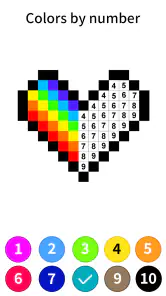
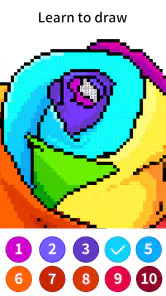
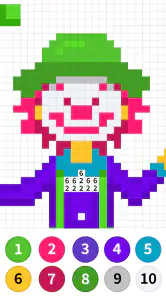
Color by Number ®: No.Draw is a relaxing coloring app that allows users to fill in pixelated images with colors by following a number-based guide. Each number corresponds to a specific color, making it easy for users to create beautiful artworks without needing artistic skills. Simply select an image and fill in the pixels with the corresponding colors to complete the artwork.
Is Color by Number ®: No.Draw suitable for all ages?
Yes, Color by Number ®: No.Draw is designed to be user-friendly and is suitable for all ages. The app offers a wide range of images that cater to different interests and skill levels, making it perfect for children and adults alike. It's an excellent tool for developing concentration and creativity while providing a relaxing experience.
Pros
- Easy to use interface for all ages.
- Wide variety of images to choose from.
- Relaxing and stress-relieving activity.
- Offline mode available for coloring.
- Regular updates with new artworks.
Cons
- Ads can be intrusive during use.
- Some features require in-app purchases.
- Limited customization options.
- Occasional bugs in the app.
- Requires a stable internet for updates.
- Category
- Board
- Version
- 3.3.0













