Color Adventure: Draw the Path
- 999.00
- 4.6
- Installs
- 100.00M
- Price
- Free

Screenshots

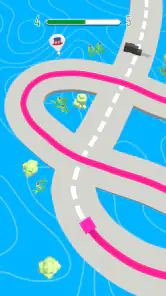
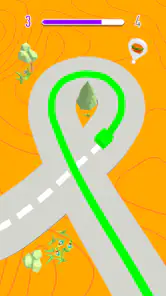
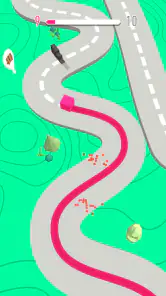
Analysis by Reviewed
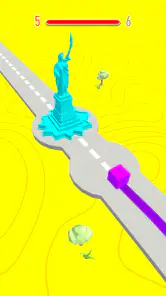
I usually reach for a simple arcade game when I have a few spare minutes and want something more hands-on than watching a screen. Color Adventure: Draw the Path caught my eye because its central idea turns drawing into the main way to move through a level. It has a bright, relaxed look, but the task still asks me to think about where a route should go rather than simply tapping through without attention.
Why the first few levels feel inviting
The basic appeal is easy to understand: you guide a colored cube by drawing a line along its route. That makes the game approachable for a quick break, and I can see why it suits players who want a small puzzle-like decision inside an arcade format. The developer is CASUAL AZUR GAMES, and the game is free to start, with in-app purchases listed at $2.99 per item. Its Everyone age rating also makes it an easy option to consider for shared family play, though I’d still check purchase settings before handing a device to a child.
In an everyday setting, I’d use it while waiting for a bus or during a short pause between tasks: play a level, see whether my line gets the cube through, then put the phone away. The draw-and-guide idea gives that brief session a clear focus. It is not the sort of game I’d choose when I want a long story or a deep progression system; its appeal is the immediate act of tracing a route and reacting to what the level puts in front of me.
Get Ready to Draw Your Way to Victory!
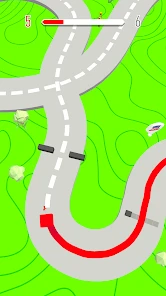
The concept behind Color Adventure: Draw the Path is delightfully simple yet incredibly engaging. The game puts you in control of a colorful character whose path is dictated by your own hand-drawn lines. As you progress, you’ll navigate through increasingly complex environments, each filled with obstacles and surprises. The controls are intuitive, making it easy for anyone to pick up and start playing. Just swipe your finger to draw paths and guide your character to the finish line.
A Splash of Colors and Challenges
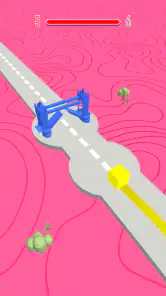
One of the standout features of this game is its eye-catching graphics. The vibrant colors not only make the game visually appealing but also add an element of excitement as you draw paths across different landscapes. Each level presents a new challenge, encouraging players to think strategically about how they draw their paths. You’ll find yourself immersed in a world where every swipe of your finger could mean success or failure.
As you advance, the game introduces new elements to keep things interesting. From moving platforms to unexpected obstacles, there’s always something new to adapt to. The game cleverly balances difficulty with enjoyment, ensuring that you’re consistently challenged while still having a blast.
Reading the scene before drawing
A useful habit is to pause for a moment and scan the visible route before swiping. Since the line itself is your plan, a hurried gesture can make a simple section harder than it needs to be. I’d treat each attempt as a small experiment: notice where the obstacle changes the route, adjust the next line, and avoid assuming that the fastest-looking path is automatically the safest one. That makes the drawing mechanic feel more intentional without turning a casual game into homework.
More From Our News Desk

Weather by Xiaomi Review: Clear at a Glance, Less Clear Up Close

X Under Pressure: Can It Recover When Posting Goes Wrong?

Clash of Clans Is Won Between the Battles

Android Auto Makes the Case for Quieter Car Software

MobiOffice: Transforming Mobile Productivity with Seamless Integration

EA SPORTS FC™ Mobile Soccer: Redefining Mobile Sports Gaming
This also helps set expectations around difficulty. Color Adventure is a better fit for players who enjoy correcting a quick mistake than for anyone who finds retries irritating. Its arcade structure asks for short bursts of attention, and the growing obstacles provide the pressure; it does not need a complicated control scheme to create a challenge. If you prefer an arcade game built around fast reflexes, constant action, or a strong narrative, another style may suit you better.
Sound, pace, and the mood between attempts
The visual approach gives the game a cheerful, easygoing identity, while the route-drawing keeps that mood from feeling entirely passive. I find that contrast useful: the colors make it inviting, but the need to choose a line gives each level a little tension. The best way to enjoy it is to let the pace stay light. There is no need to race through every stage; taking a beat to look at the route can be more satisfying than swiping immediately and hoping for the best.
For comparison, many casual arcade alternatives lean on repeated taps, lane changes, or reflex tests. Here, the notable trade-off is that the player’s gesture shapes the route, so the pleasure comes from planning and correction rather than constant input. That makes it a stronger choice for a calm waiting-room session than for a commute where you cannot keep your attention on the screen. It also means the drawing can feel less rewarding if you want precision controls or a very demanding skill ceiling.
A Game for All Ages
Whether you’re a child or an adult, this game is designed to entertain a wide audience. Its straightforward mechanics make it accessible to younger players, while the increasing difficulty levels offer enough complexity to keep seasoned gamers engaged. It’s a great way to unwind after a long day or to keep your mind sharp while having fun.
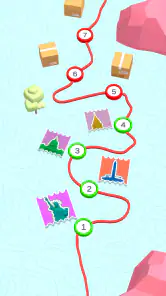
The game also features a variety of levels, each with its own unique theme and design. This keeps the gameplay fresh and exciting, as you never know what colorful challenge awaits you next. Plus, the ability to replay levels and improve your scores adds a layer of competitiveness for those who enjoy beating their personal bests.
What to expect before installing
This free arcade game is currently at version 1.18.0. It was released on August 28, 2019, and requires Android 6.0 or later. It has a 4.6 average from around 158,000 ratings, with over 100 million installs. Those figures suggest it has found a broad audience, but the more useful question is whether its particular rhythm suits you: the central draw-and-route mechanic is the reason to try it, not a promise of a deep campaign.
If you’re deciding whether to keep it on your phone, I’d judge it by how often you enjoy a quick route puzzle. It works best when you have enough attention to inspect a level and enough patience to adjust after a poor line. Someone looking for a quick visual distraction may enjoy the colors but lose interest if they do not like planning; someone who wants a layered strategy game may find the choices too light. The in-app purchase price is $2.99 per item, so it is worth being mindful of purchases if other people use your device.
Choosing the right moment to play
I’d recommend saving a level for a moment when you can give the screen a little attention, rather than trying to play while walking or juggling several tasks. The route is the central decision, so being able to see the obstacles before you draw makes the experience more satisfying. A short break at home, a quiet wait in a lobby, or a pause between chores gives the game room to be relaxing without making it feel like background noise.
For a parent sharing a phone or tablet, the simple premise and Everyone rating make it approachable, but the purchase setting is still worth reviewing first. The game is free to begin, while items can cost $2.99 each. I would also show a younger player how to pause and inspect the route rather than treating every failed attempt as a reason to swipe faster. That small habit helps the drawing feel like a choice, not just a reflex.
What the drawing mechanic rewards
A practical way to approach a tricky-looking stage is to separate observation from action: first identify where the route narrows or changes, then draw with that point in mind. This is more useful than trying to invent a perfect line at a glance. If an attempt goes wrong, I’d change one part of the route on the next try instead of making a completely different gesture. That makes it easier to tell whether the revised line actually solves the problem.
The trade-off is that this kind of control depends on a player enjoying small corrections. If you prefer a game where timing a jump or reacting instantly is the main skill, a conventional reflex arcade game may feel sharper and more rewarding. If you like seeing a route, committing to it, and learning from a misstep, the hand-drawn path gives this one a more thoughtful texture than simple tapping.
How it fits beside other arcade games
Compared with runners and lane-switching games, this is less about maintaining a stream of rapid inputs and more about making a route decision before the cube moves through the scene. Compared with a traditional puzzle game, it feels lighter and more immediate, because the levels are built around guiding the character rather than managing a large set of rules. That middle ground is its clearest appeal: a small problem to solve, wrapped in an arcade presentation.
That also marks the point where I would choose something else. Players who want a campaign with a developing story, extensive strategic systems, or a competitive multiplayer focus should look elsewhere. The appeal here is compact and specific, not broad. It is best treated as a pocket-sized diversion for someone who likes visual puzzles but does not want a lengthy commitment.
A calm look with a little pressure underneath
The bright presentation gives each attempt a friendly tone, but the obstacles keep the experience from becoming entirely decorative. I like that balance because it makes the game easy to approach without removing the need to pay attention. The setting is most effective when I treat it as a sequence of small scenes: read what is ahead, draw a route, and see how the decision plays out.
My main reservation is that the same focused loop may become repetitive for players who want every session to introduce a major new mechanic or a strong sense of progression. The changing obstacles offer variation, but the central activity remains drawing a path. That consistency is a benefit when I want something familiar and low-pressure; it is a limitation when I am looking for a game that continually changes how I play.
In conclusion, this is a cheerful arcade game built around a clear, hands-on idea. Its colorful scenes invite a relaxed session, while drawing a route gives each level enough thought to hold my attention. I’d suggest trying it if you enjoy brief visual challenges and don’t mind adjusting a line after a mistake. If you want nonstop action, a deep story, or demanding precision, another kind of game will probably suit you better. For the right mood, it makes a pleasant little pause in the day.
Color Adventure: Draw the Path Frequently Asked Questions
How long does it take to learn the controls in Color Adventure: Draw the Path?
The basic idea is straightforward: tap to draw color lines and guide a colored cube along its route. That makes the game approachable if you prefer simple controls over a long tutorial or complicated setup. The challenge comes from paying attention to the path as you steer the cube, so a quick first session should help you decide whether this style of arcade gameplay suits you.
Can I play Color Adventure: Draw the Path in short sessions?
Its tap-to-draw premise is easy to pick up, making Color Adventure: Draw the Path a natural fit for brief play sessions when you have a spare moment. You can focus on guiding the colored cube along its route without needing to learn a complicated control scheme first. If you enjoy compact arcade challenges that reward attention as you play, this may suit your routine.
How much storage space does Color Adventure: Draw the Path need?
Before downloading, it is worth checking that your device has enough free storage for the game and its files. The amount required can vary with the device and installation, so there is no single figure that applies to everyone. Color Adventure: Draw the Path is a mobile arcade game, and keeping some spare space can also help your device manage updates and other apps.
What is the main objective of Color Adventure: Draw the Path?
Color Adventure: Draw the Path is a mobile game that challenges players to navigate through a series of intricate paths by drawing lines. The objective is to guide a color ball or character to the end of the path without hitting obstacles, requiring both strategic planning and quick reflexes to succeed. Its simple tap-to-draw premise makes the central challenge easy to understand, while each route calls for attention as you guide the colored cube along its way.
Is Color Adventure: Draw the Path suitable for all age groups?
Yes, Color Adventure: Draw the Path is designed to be family-friendly and suitable for all ages. Its intuitive controls and simple gameplay mechanics make it accessible for younger players, while the increasing difficulty levels provide a challenge for older players, ensuring an engaging experience for everyone. The game has an Everyone content rating, so it is presented as an option for a broad audience.
Pros
- Engaging gameplay with intuitive controls.
- Diverse levels keep the game exciting.
- Colorful graphics enhance user experience.
- Challenging puzzles improve cognitive skills.
- Offline mode available for uninterrupted play.
Cons
- In-app purchases can be expensive.
- Ads may interrupt gameplay frequently.
- Some levels are overly difficult.
- Limited rewards without purchase.
- Occasional bugs can affect progress.
- Category
- Arcade
- Version
- 1.18.0