Chess - Offline Board Game
- 5.65K
- 4.8
- Installs
- 50.00M
- Price
- Free

Screenshots
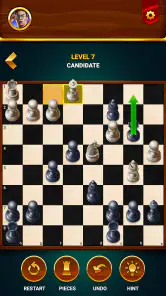
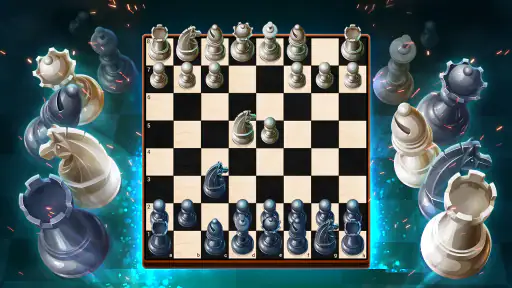
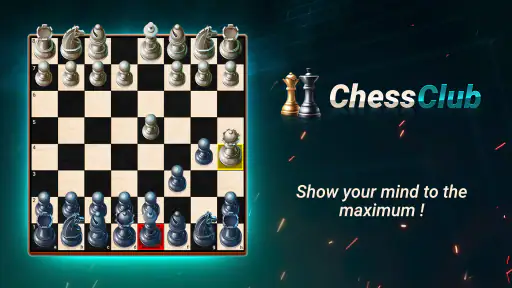
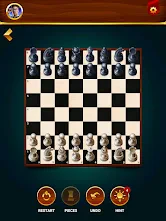
Analysis by Reviewed
I find this chess game most useful when a board is needed in a hurry: while waiting for an appointment, during a trip, or when two people at home want to play without setting up a physical set. The offline option is a practical advantage, but it also makes this a different kind of chess app from online-first alternatives: there’s no need to coordinate a connection just to start a match. For shared-device use, though, it helps to agree whose turn it is before handing over the phone, since the device itself does not replace the conversation between players.
Making a shared device work
If one phone or tablet is passed around at home, I’d treat each session as belonging to the person currently playing rather than assuming the app will keep everyone’s progress separate. That simple boundary avoids confusion over settings or unfinished games. For a casual family match, a useful routine is to finish or abandon the current board before another person takes the device; it keeps the next session clear and prevents a child from accidentally continuing someone else’s game.
The game suits short, self-contained practice especially well. A beginner can try a move, use a hint, and think through the result, while a more experienced player can choose a tougher opponent for a focused break. If you want to study a position together, take turns explaining why a move looks promising before making it. That turns a shared screen into a conversation rather than a passive distraction, without requiring a separate lesson or a live opponent online.
Choosing it over other chess options
Compared with a physical board, this is easier to carry and can offer a computer opponent when nobody else is available; the trade-off is that a screen does not have the same social feel as moving pieces across a table. Compared with chess apps centered on online play, its offline strength is more valuable when signal is unreliable or you simply want a quick solo game. If your main goal is playing people remotely, following a competitive chess community, or arranging regular matches with friends, an online-focused alternative may fit better.
I’d also avoid treating an undo button or move suggestion as a substitute for learning. They are useful for checking a thought or recovering from a mis-tap, but relying on them for every decision can interrupt the habit of calculating a few moves ahead. A good middle ground is to make your own choice first, then use the advisor when you are genuinely stuck. That keeps help available without letting it play the game for you.
Ever found yourself in a situation where you’re craving a strategic mental workout but find yourself without internet access? Enter Chess - Offline Board Game, a handy option for a quick game away from a connection. Whether you're a chess grandmaster or just a curious beginner, it gives you a way to play chess on your device.
Unleashing Your Inner Grandmaster
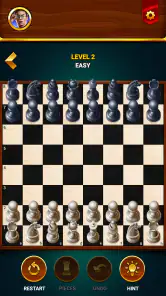
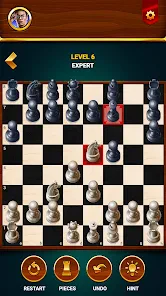
First things first, let’s talk about the interface. As soon as you fire up the game, you’re greeted with a clean, intuitive design. The developers clearly kept simplicity at the forefront, ensuring that players of all levels can navigate with ease. No unnecessary frills here; just a straightforward chess experience.
More From Our News Desk

Weather by Xiaomi Review: Clear at a Glance, Less Clear Up Close

X Under Pressure: Can It Recover When Posting Goes Wrong?

Clash of Clans Is Won Between the Battles

Android Auto Makes the Case for Quieter Car Software

MobiOffice: Transforming Mobile Productivity with Seamless Integration

EA SPORTS FC™ Mobile Soccer: Redefining Mobile Sports Gaming
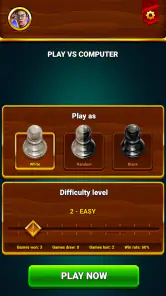
The app offers a range of difficulty levels. Whether you’re just starting out or you’ve already got a few checkmates under your belt, there’s a level to match your skills. I particularly enjoyed the adaptive AI, which adjusts to your playing style and keeps you on your toes. It’s like having a virtual chess coach guiding you along the way.
A World of Features Without a Data Plan
One of the standout features of this app is its offline capability. Too often, we find ourselves at the mercy of spotty internet connections, but not with this game. You can enjoy chess matches without a Wi-Fi connection, making it useful for long flights or remote getaways.
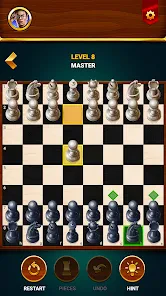
Additionally, the app includes a handy move advisor, which is useful for beginners. It provides hints and tips without being too intrusive, allowing you to learn at your own pace. Plus, the undo option is a lifesaver for those "oops" moments when you accidentally move your queen into the line of fire. Trust me, I’ve been there!
How to make practice more useful
For a short session, I find it helpful to choose one thing to work on rather than trying to improve every part of my chess at once. You might focus on protecting pieces, noticing checks, or asking what your opponent could threaten next. Make a move without a hint, pause to explain your reasoning, and only then consult the advisor if you are stuck. The sequence makes the hint easier to learn from because you can compare it with your own idea instead of simply following it.
Another practical approach is to replay a position mentally after a mistake. The undo option can help you inspect the move that went wrong, but I would use it sparingly: undoing every uncomfortable choice can make a match feel like trial and error rather than a game with consequences. If you are teaching a younger player, you can agree that undo is for accidental taps, while deliberate moves stay on the board. That small rule keeps the game friendly without turning every match into a debate about whether a move should count.
Everyday play, without a connection
A realistic use is a commute or waiting room where you have a few minutes but cannot count on a stable signal. I would start a short solo match and treat it as a complete break, rather than expecting to maintain an online game across interruptions. At home, the same flexibility helps when one person wants to play and nobody else is free: the computer opponent is there without arranging a time or asking someone to sign in. The trade-off is that a computer game is not a substitute for the unpredictability or conversation of a human opponent.
It also works well as a low-pressure way to introduce chess. Instead of giving a beginner a long explanation of every idea, you can let them make choices, review a hint together, and talk through what changed on the board. This is especially useful when the adult helping them is not a strong player; the board gives both people something concrete to discuss. If the learner wants structured lessons or a curriculum that tracks progress over time, a dedicated training product would be a better fit.
Endgame: Is It Worth Downloading?
As a board game from GamoVation, this free chess title has a 4.8 average from around 732,000 ratings and has passed 50 million installs. It’s rated Everyone, while in-app purchases are available, so I’d still check purchase boundaries before letting a child use a shared device. The current version is 2.5.21, and it requires Android 6.0 or later. Those details make it an easy option to consider for a household looking for a familiar game, though shared use still benefits from clear expectations about who is playing and when.
So, is it worth the space on your device? I think it is for people who want a portable chessboard, casual practice, and the option to play when the internet is unavailable. The offline capability is its clearest everyday advantage, and the different difficulty choices give beginners and more confident players a way to find a starting point. If you are mainly looking for remote matches, a competitive community, or formal study tools, I would look at an online-focused or training-oriented alternative instead.
In summary, if you enjoy chess or want an accessible way to think through a few moves, Chess - Offline Board Game is worth trying. It is a convenient digital board rather than a complete chess-learning or online competition service. I’d download it for offline games and shared casual practice, while keeping expectations realistic about the social feel of a physical board and the depth offered by specialized chess platforms.
What to expect at home
The age label is a useful starting point, not a complete household rule. I’d still set expectations around screen time and purchases, especially when a child borrows an adult’s device; the game is free to install, with optional in-app items priced from $1.99 to $27.99 each. That does not make it unsuitable for younger players, but it does make a quick conversation about asking before buying worthwhile. If a parent wants tightly separated profiles or built-in family scheduling, a chess app is not a replacement for device-level controls.
For coordination, this works best when the household agrees whether a session is solo practice or a two-person game before opening it. If a player is interrupted, pausing the handoff until the board is finished—or making a deliberate choice about whether to restart—prevents the next person from inheriting a confusing position. In my experience, those tiny habits matter more on a shared screen than any extra feature.
Who will enjoy it, and who may want another option
I’d recommend it to casual players who want chess available without a connection, beginners who appreciate hints, and households that can share one screen courteously. It is less compelling for someone seeking tournament structure, online opponents, or a detailed training curriculum; those needs call for a more specialized chess service. The app’s appeal is its approachable board-game format, not a promise to cover every part of chess life.
GamoVation’s game was released on September 27, 2021, and the large audience it has attracted suggests it is an established choice, although popularity alone cannot tell you whether its playing style suits you. I would start with a few short games at a comfortable difficulty, use the advisor selectively, and see whether the AI gives you the kind of challenge you want. If it feels too easy or too demanding, changing difficulty is more useful than judging the whole experience from one match.
A practical household verdict
For a household, I’d choose this when the goal is a quick chess game that can be played offline and shared informally, not when everyone needs separate accounts or organized online play. Before passing the device to a child, agree on purchases and decide whether an unfinished board should be resumed or cleared. Those simple boundaries make the experience smoother without expecting the game to manage family routines for you.
My overall recommendation is straightforward: it is a sensible choice for casual players, beginners, and families who want an accessible digital board ready when a physical set is inconvenient. I would skip it if your priority is serious online competition or a structured training plan. For the ordinary moments in between—waiting, travelling, or sharing a short game at home—it offers a useful, low-friction way to keep chess within reach.
Chess - Offline Board Game Frequently Asked Questions
Who developed Chess - Offline Board Game, and what kind of game is it?
Chess - Offline Board Game is a board game developed by GamoVation, built around the familiar rules and strategy of chess. If you want a digital way to play a classic board game, its chess-focused approach makes the purpose clear from the start. The game is free to download, and its store description calls it “The ultimate Chess app available. Install now for pure enjoyment!”
How popular is Chess - Offline Board Game?
Chess - Offline Board Game has reached over 50 million installs, giving it a broad audience of players. It has an average rating of 4.8 from around 732,000 ratings, alongside about 5,700 written reviews. Those figures suggest that many people have tried the game, though your own experience will depend on what you want from a chess app and how you prefer to play.
When was Chess - Offline Board Game released, and what is its current version?
Chess - Offline Board Game was released on September 27, 2021, and its current version is 2.5.21. If you are considering a download, checking that your device meets the operating system requirement is a useful first step. The game is a straightforward choice for players looking for chess on a mobile device, whether they are returning to the game or learning its basics.
Is Chess - Offline Board Game free to download, and does it include in-app purchases?
Chess - Offline Board Game is free to download, so you can try it without paying upfront. The game also offers optional in-app purchases, with items priced from $1.99 to $27.99. Those purchases are worth checking before confirming anything, especially if you prefer to keep your gaming free; the game itself is presented as a chess experience you can enjoy without an internet connection.
What devices can run Chess - Offline Board Game?
The game is available for Android devices running Android 6.0 or later. Before downloading, check your device’s operating system version to make sure it meets that requirement. Chess - Offline Board Game is a board game from GamoVation, and its straightforward chess focus makes it a natural option for players looking for a digital version of the classic game.
Pros
- No internet required for gameplay
- Variety of difficulty levels
- Helps improve strategic skills
- Simple and intuitive interface
- Low storage space needed
Cons
- Limited multiplayer options
- No online player ranking
- Basic graphics
- Ads may disrupt game flow
- Lacks advanced features
- Category
- Board
- Version
- 2.5.21













