Age of Empires Mobile
- 6.49K
- 4.2
- Installs
- 5.00M
- Price
- Free

Screenshots



Analysis by Reviewed
I approach Age of Empires Mobile as a strategy game for players who want to check in, make a few decisions, and gradually shape an empire on a phone. It carries a familiar name, but I wouldn’t treat it as a straight portable copy of the PC games. The mobile format changes how I think about pacing: instead of settling in for one long match, I plan around short visits and keep an eye on what needs attention next. That makes it easier to fit into a busy day, though it won’t satisfy everyone looking for the same kind of hands-on session as a traditional desktop strategy game.
A practical rhythm for building and fighting
My most useful habit is to give each visit a small purpose: check the town, decide which task matters most, then move on rather than tapping through everything without a plan. In a strategy game with several things competing for attention, that simple routine helps me avoid treating every notification or available action as equally urgent. I focus first on the choice that supports my next goal, whether that is preparing my settlement or getting ready for a fight. It’s a modest change, but it makes short sessions feel more deliberate.
I also try to think ahead before committing resources. If I spend them as soon as I can, I may have less flexibility when I want to change priorities. Keeping a clear near-term aim makes the decisions easier to judge: am I strengthening my position, preparing an army, or simply tidying up unfinished tasks? This isn’t a magic shortcut, and it won’t remove the game’s longer-term demands. It does make the routine feel more manageable, especially when I only have a few minutes at a time.
For a realistic day-to-day example, I might open the game during a quiet break, identify one outstanding settlement task, and make that decision before switching to anything that needs a longer stretch of attention. Later, when I can focus, I can revisit combat or multiplayer rather than trying to make a tactical call while distracted. That split between a quick check and a deliberate session is more useful than repeatedly opening the game without knowing what I want to accomplish.
Settings and habits that help on a phone
On mobile, comfort matters as much as strategy. I recommend checking the game’s available settings early and choosing controls and presentation that feel clear on your own screen. I would rather make the interface easy to read than chase a more dramatic view if it makes important details harder to spot. I also avoid making rushed decisions while distracted: a quick glance at the screen is enough for a basic check-in, but it is not always the right moment to make a meaningful tactical choice.
A repeatable routine can save more effort than frantic tapping. I use one pass to review what needs attention, another to make the decisions I have already chosen, and then I stop when the next useful action would require more time. That helps me enjoy the game without turning every spare moment into an obligation. If you prefer a strategy game that can be put down easily and resumed in small bursts, this style may suit you; if you want every session to be a self-contained battle, the ongoing empire-building rhythm may feel less satisfying.
There is a practical trade-off in keeping that routine light: I can make the game fit around the day, but a short session may not be the best time to weigh several competing priorities. I find it helps to separate a quick scan from a real decision. If I am unsure what matters most, I leave the larger choice for later rather than spending resources simply because the option is available. The habit is useful precisely because it does not depend on a secret shortcut or constant attention.
More From Our News Desk

Weather by Xiaomi Review: Clear at a Glance, Less Clear Up Close

X Under Pressure: Can It Recover When Posting Goes Wrong?

Clash of Clans Is Won Between the Battles

Android Auto Makes the Case for Quieter Car Software

MobiOffice: Transforming Mobile Productivity with Seamless Integration

EA SPORTS FC™ Mobile Soccer: Redefining Mobile Sports Gaming
What the mobile version changes
The key trade-off is that a phone encourages convenience, while classic Age of Empires play is often remembered for focused, continuous matches and close control of a battlefield. I wouldn’t install this expecting the exact same experience shrunk to a smaller screen. Instead, I see it as a mobile strategy game that borrows the franchise’s broad appeal while asking me to adjust to a different cadence. Players who enjoy making incremental decisions are likely to settle in more easily than those who mainly want a long, uninterrupted test of tactical execution.
That difference also shapes who should skip it. If you dislike games that ask you to return regularly, or you want a complete match that begins and ends in one sitting, a conventional match-based strategy title may be a better fit. If you’re curious about the series but have never played the PC games, you don’t need nostalgia to understand the appeal; just come in expecting a mobile-first routine rather than a direct remake. For me, the best use case is a few thoughtful checks between other tasks, not an attempt to replace a dedicated evening of PC strategy.
Compared with a turn-based strategy game, this asks for a different kind of patience: turns usually give you a clear pause to consider each move, while an evolving mobile empire makes planning around return visits part of the experience. Compared with a desktop real-time strategy match, it is less suited to someone seeking uninterrupted, fine-grained control as the main attraction. I would choose between them based on the session I want, not simply on the shared strategy label. This game makes more sense when I want to keep shaping a longer-running position in small visits.
Building Your Empire, One Tap at a Time
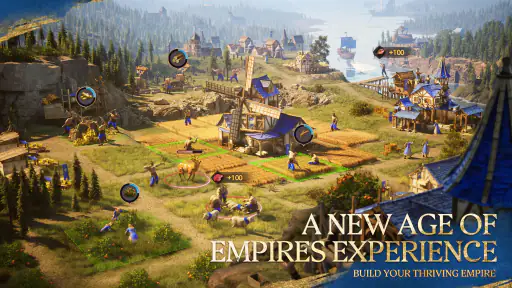
First off, let’s talk about the gameplay. When I fired up Age of Empires Mobile for the first time, I was immediately struck by how the game effortlessly captures the essence of the classic PC version while adding its own mobile-friendly twist. The controls are intuitive, with touch gestures that make managing your empire a breeze. You’ll find yourself tapping away to gather resources, construct buildings, and train your army, all with the ease of a seasoned ruler.
Graphics and Sound: A Feast for the Senses
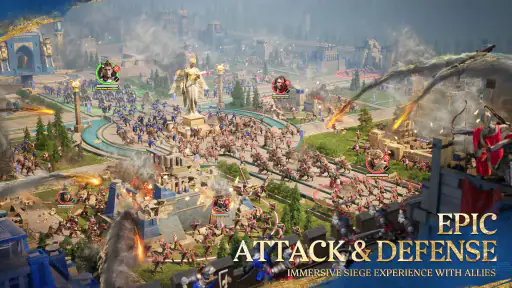
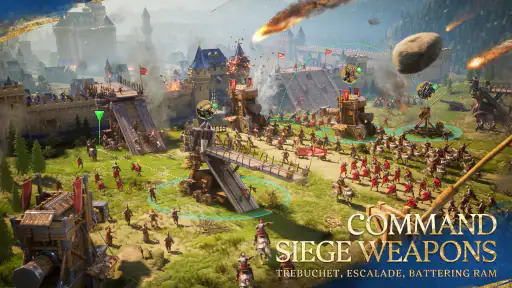
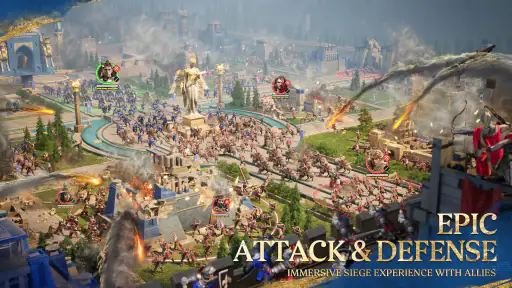
Now, let’s get to the visuals. I have to say, the graphics on this mobile version are nothing short of stunning. The developers have done an impressive job of optimizing the visuals without compromising on detail. Whether you’re zooming in on your villagers hard at work or surveying the battlefield, everything is crisp and vibrant. And the sound? Well, it’s like music to a strategist’s ears. The soundtrack and effects perfectly complement the action, immersing you deeper into the experience.
Multiplayer Mayhem
One of the standout features of Age of Empires Mobile has to be its multiplayer mode. I’ve spent countless hours challenging friends and foes alike in epic battles for supremacy. The matchmaking system is smooth, and the competition is fierce, ensuring you’ll never get bored. Plus, with regular updates and events, there’s always something new to keep you coming back for more.
In-Game Purchases: A Double-Edged Sword
Now, while the game is free to play, it does come with in-game purchases. As someone who’s a bit cautious about freemium models, I found the microtransactions here to be relatively fair. They’re not overly intrusive, but they’re there if you want to speed up your progress. It’s all about balance, and thankfully, Age of Empires Mobile manages to keep it in check without compromising the fun.
Who it suits, and what to expect
I would recommend it most to people who enjoy building toward a goal over several short sessions, especially fans curious to see how the Age of Empires name translates to mobile. Level Infinite is the developer, and the game is free, so trying it does not require an upfront purchase. Its Teen content rating is worth keeping in mind when deciding whether it is appropriate for younger players. The audience response is encouraging, with an average rating of 4.2 from around 262,000 ratings and over 5 million installs, but popularity alone cannot tell you whether its pace will suit you.
If you are weighing it against other strategy games, ask what kind of decision-making you enjoy. A compact, turn-based game may be a better choice if you want every move to happen at your own pace; a traditional real-time PC strategy game is more suitable if precise, continuous control is the main attraction. Here, I find the appeal in returning to an evolving empire and choosing what to do next. That makes it a convenient option for a commute or a quiet break, though I would save important choices for a moment when I can give the screen proper attention.
For someone new to the series, the useful question is not whether this reproduces a particular PC match, but whether its mobile rhythm is appealing on its own. I would start with modest expectations, use early visits to learn which decisions feel important, and avoid assuming that every available action needs to be handled immediately. For a longtime fan, the familiar setting may make the transition inviting, but nostalgia cannot remove the differences in pacing. The game is a better fit when you are open to those differences rather than waiting for a desktop-style session to appear.
Spending, progress, and the long view
The purchase model deserves a practical check before you settle in. The game includes optional in-app purchases, with items ranging from $0.99 to $99.99, so I would decide on a spending limit before browsing them rather than making a quick purchase to solve a temporary bottleneck. Paying for convenience is not the same as enjoying the underlying strategy; if waiting or gradual progress frustrates you, spending may not fix the mismatch. The current version is 1.5.100.100, and it runs on Android 5.0 or later, useful details to check before installing on an older device.
I also wouldn’t assume that a busy-looking session requires constant action. When I have only a short break, I can make one considered choice and leave the rest for later; when I have more time, I can pay closer attention to battles and multiplayer. That distinction is useful for deciding whether to keep the game in a daily routine: it works best when returning feels like a choice, not a chore. Its 6,500 reviews offer another broad signal of player experience, but my own test is simpler: do I enjoy the decisions enough to come back without feeling pushed?
One sensible way to approach optional spending is to treat it as a separate decision from whether the game itself is enjoyable. I would first see whether the ordinary pace and planning suit me, then consider whether any purchase actually addresses a lasting annoyance rather than a momentary impatience. That matters in a game built around gradual goals: a purchase may change convenience, but it cannot make the core routine more satisfying if I do not enjoy returning to it. Players who prefer a fully self-contained experience with no ongoing progression pressure may be happier choosing another kind of strategy game.
There are a few practical questions I would settle before committing. Will it suit a short break? Yes, if I use that time for a simple check and save complex choices for later. Does it replace the PC games? I would say no; it has a different cadence and is better judged as its own mobile strategy experience. Is it appropriate for every age? The Teen rating is a useful guide for families making that call. And is it worth trying if I am unsure about the series? Since it is free to start, I can test whether the routine appeals without paying upfront, while keeping optional purchases in mind.
In conclusion, if you’re a fan of strategy games or have fond memories of the original Age of Empires, this mobile adaptation is definitely worth a download. It brings the same strategic depth and excitement we’ve come to love, all packed into a convenient mobile package. Whether you’re a seasoned veteran or a newcomer to the series, there’s something here for everyone. So, what are you waiting for? Start building your empire today!
Age of Empires Mobile Frequently Asked Questions
Can I play Age of Empires Mobile on both Android and iOS?
Age of Empires Mobile is available for Android and iOS, so you can choose the mobile platform that suits your device. The experience is built for phones and tablets, bringing the medieval strategy setting to handheld play. If you are switching devices or choosing which version to install, check that your device meets its platform’s requirements before downloading.
How much storage space should I leave for Age of Empires Mobile?
It is sensible to make sure your device has adequate free storage before installing Age of Empires Mobile. Strategy games can receive updates, so leaving some room beyond the initial download can help avoid problems when installing new content. The space needed can depend on your device and the game’s current version, so check the download size shown by your app store before proceeding.
What kind of game is Age of Empires Mobile?
Age of Empires Mobile is a strategy game set in the medieval world and part of the iconic Age of Empires franchise. Its central appeal is building an empire and making decisions about how to develop and defend it, alongside battles. If you enjoy planning and strategy on a mobile device, this is the kind of experience the game is designed to offer.
Who develops Age of Empires Mobile, and what should I expect from the franchise connection?
Age of Empires Mobile is developed by Level Infinite and draws on the name and broad appeal of the Age of Empires franchise. It is made as a mobile game rather than simply being the PC series on a phone, so it is best approached as a strategy experience designed for mobile play. The franchise connection gives it a familiar setting, while the game has its own mobile format.
What is Age of Empires Mobile?
Age of Empires Mobile is a strategic, real-time gaming experience brought to Android and iOS devices. It adapts the classic Age of Empires PC game series for mobile play, offering players the opportunity to build empires, strategize, and engage in battles on the go. The mobile version retains the essence of the original while providing a more accessible platform for gamers worldwide.
Pros
- Stunning graphics for immersive gameplay.
- Rich historical context enhances learning.
- Diverse civilizations to explore.
- Strategic depth in gameplay mechanics.
- Frequent updates with new content.
Cons
- Requires stable internet connection.
- In-app purchases can be costly.
- High battery consumption.
- Complex for new players.
- Limited offline mode features.
- Category
- Strategy
- Version
- 1.5.100.100