2 Player Games - Offline
- 94.00
- 4.7
- Installs
- 1.00M
- Price
- Free

Screenshots




Analysis by Reviewed
When I have a few spare minutes with someone nearby, I’d rather start a quick game than scroll through separate phones. 2 Player Games - Offline is built around that shared moment: a collection of board-style games intended for friends and family, with two players taking turns or competing on the same device. Its appeal is practical rather than elaborate. You can bring it out while waiting for food, during a quiet evening at home, or when a longer game would be too much commitment.
One phone, two people, and a little friendly rivalry
I find that a shared-screen game works best when the phone is treated as the center of the activity, not as one person’s device to control. Before choosing a match, I’d agree on where it sits and who gets the first turn; that small courtesy can make a casual rivalry feel fair from the start. The next thing I’d settle is how the household wants the device used.
A shared screen can make an ordinary pause feel social
The most useful thing about this kind of game is that it gives two people a reason to look at the same screen. That sounds simple, but it changes the mood compared with passing around a phone to show a video or taking turns playing a solo game. Both players are involved, and the activity can fill a short pause without needing a board, pieces, or a lengthy explanation.
I’d consider it for a household where people share a tablet or phone, or for a pair of friends who want an easy distraction while sitting together. It can also be a handy fallback when plans are on hold: one person can suggest a match, the other can join, and the game becomes a small activity rather than another stretch of idle waiting. The offline focus is especially relevant in places where a connection is inconvenient, though the experience is still most naturally social when both players are physically together.
A realistic use for me would be a meal that is taking longer than expected, with one person already finished and the other still waiting. Instead of asking the first person to entertain themselves on a separate screen, we could put the phone between us and agree on a quick match. The important detail is that this works best as a shared activity, not as a way to occupy one person while everyone else carries on. If a third person is present, I’d invite them to watch or take turns choosing what to play, while being clear that the actual match is still for two.
The title tells you what to expect: the emphasis is on two-player sessions, not a large online community or a deep single-player campaign. That makes it a better fit for people who can readily find a nearby opponent. If you usually play alone, want long-term progression, or prefer a narrative that unfolds over many sessions, this is unlikely to replace your usual game.
Set the device up before the first round
For shared-device play, the smoothest approach is to agree on who is holding the phone and how you’ll pass it before starting. This small bit of coordination helps avoid the awkward moment where one player has to lean across the other or the screen changes hands mid-turn. On a table, placing the device between both players can make the match feel more balanced and reduce the temptation for either person to keep the screen angled toward themselves.
More From Our News Desk

Weather by Xiaomi Review: Clear at a Glance, Less Clear Up Close

X Under Pressure: Can It Recover When Posting Goes Wrong?

Clash of Clans Is Won Between the Battles

Android Auto Makes the Case for Quieter Car Software

MobiOffice: Transforming Mobile Productivity with Seamless Integration

EA SPORTS FC™ Mobile Soccer: Redefining Mobile Sports Gaming
I’d also decide in advance whether you’re playing for one round or simply until someone wants to stop. Short, informal matches work well in a household because they don’t require everyone to clear an evening. If a younger player is involved, a quick look at the game together before handing over the device is sensible: it lets an adult check the presentation and establish expectations without assuming that a general age label answers every family’s preferences.
Because the game is described as offline, it can suit a shared moment when Wi-Fi is unavailable. Still, I wouldn’t treat that as a guarantee about every part of using the app, such as installation or store-related activity; the practical plan is to install it ahead of time and try a match before relying on it during a trip. That is a useful habit for any game you hope to use away from home.
For a shared tablet, I’d also choose a stable surface and a comfortable viewing angle before starting, particularly if the players differ in height or reach. It is a small adjustment, but it can make the controls easier for both people to see and helps keep one player from becoming the default device-holder. On a crowded table, clearing a little space first is more useful than trying to balance the phone between plates or bags. These are mundane details, yet they matter more in a local two-player game than in a solo title, because both people need to follow the same screen.
Turn-taking is part of the experience
Two-player games on one screen have a particular strength: they make turn-taking visible. Each person can see what is happening, discuss a move, and respond immediately. But shared-screen play also asks for a little patience. If one player taps quickly or keeps the phone close, the other can feel more like an audience than an opponent. Taking turns holding the device, or setting it flat between you, is an easy way to keep the match fair.
For mixed-age pairs, I’d let the less experienced player choose the first game and take a moment to work out the controls together. That turns the first round into a trial rather than a test. It can be a better introduction than explaining everything verbally, since both players can learn from the same screen. If one person is much more competitive, agreeing that the first match is only practice can also make the experience more welcoming.
A collection of quick games is useful when a group wants variety, but it can create a small decision problem: people may spend more time choosing than playing. My tip is to settle on one option before passing the phone around, then switch only if both players are ready. For a casual household session, that keeps the game moving and makes it easier for someone who has just joined to understand what is happening.
One practical way to keep the choice from taking over is to treat the first selection as a trial, not a permanent commitment. Agree to give the chosen game one short attempt, then decide together whether to continue or switch. That avoids a long debate based on guesses about what each option is like. It also gives a younger or less confident player permission to say that a game is not clicking without making the choice feel like a mistake.
Age and household boundaries still deserve attention
The game is rated for Everyone, which makes it broadly approachable in age terms, and its focus on face-to-face play can be a nice change from games built around public chat or strangers. I see that as a useful starting point for a family considering a shared activity, not as a substitute for an adult’s own judgment. Children differ in what they enjoy, and families have different rules about screen time and in-app spending.
It is listed as free, with optional in-app purchases priced between $1.99 and $4.99 per item. In a household where children use a shared device, I’d review purchase settings and agree on who may make purchases before leaving the game available. That advice is not a claim about special family controls inside the app; it is simply a sensible boundary for any free-to-start game used by more than one person.
Shared phones also raise a small but worthwhile question: whose device is it, and who is responsible for changing its settings or making purchases? If a child borrows a parent’s phone, make that borrowing explicit and keep the device owner involved. If siblings share a tablet, setting a simple rule—ask before installing or buying anything—can prevent a casual game from becoming a household disagreement. The app’s two-player premise encourages cooperation in the room, but it does not replace those family agreements.
I would make the boundary concrete rather than relying on a vague reminder to “be careful.” For instance, the adult who owns the device can handle installation and any purchase decisions, while children can choose whether they want to play and help decide when to stop. That separation keeps a quick game from blurring the line between permission to use a phone and permission to change its settings or spend money. It is especially helpful when siblings take turns, since the device belongs to the household even if one child is the more enthusiastic player.
How it fits beside board games and other mobile play
Compared with a physical board game, this is easier to carry and quicker to bring out, but it cannot offer the tactile pieces or the wider table presence that some families enjoy. A traditional deck of cards is more flexible and doesn’t depend on a charged phone, while this game is more convenient when nobody wants to find or put away components. I’d choose based on the moment: a proper game night favors a physical set, while a short wait or an impromptu break favors a phone-based match.
Against solo mobile games, the main difference is social attention. A solo puzzle can be more satisfying when you want quiet concentration, but it won’t give two people an activity to share. Against online multiplayer titles, this is a more direct option for people already in the same room; online games are a better fit when friends are far apart or when you want to compete with a wider pool of players. The trade-off is clear: this experience is centered on nearby company rather than remote matchmaking.
That makes it less suitable for a household where everyone prefers separate screens or where only one person is interested in playing. It may also frustrate players who want detailed strategy, extended progression, or a polished competitive scene. I’d treat it as a casual social companion, not as a replacement for a favorite deep board game or a dedicated multiplayer title.
There is also a useful middle ground between a phone game and a full board-game session. If two people want something more deliberate, with physical pieces and room for several players, a tabletop choice is likely to feel more satisfying. If the goal is simply to use a few spare minutes without searching for a box or clearing a large table, this is the easier option. I would not judge one as universally better: the deciding factor is whether the household wants a quick shared screen or the fuller ritual of setting up a game together.
Who will get the most from it
Soup Ent’s board game is an easy recommendation for friends, siblings, couples, and parents who want a low-effort way to play together on one device. It has reached over a million installs and holds a 4.7 average from around five thousand ratings, a strong sign that its straightforward premise has found an audience. Those figures can help set expectations about popularity, but they don’t tell you whether its style will suit your particular household; the key question is whether you have someone nearby who enjoys quick, informal competition.
The game is free to install, and its current version is 1.5.6. It was released on March 15, 2025, and supports devices running version 7.1 or later. I’d check that your device meets that requirement before planning to use it on an older phone or tablet. The review count is 94, which is another reason I’d judge it by trying a session with the person you expect to play with rather than assuming that popularity alone guarantees a fit.
It is probably not the right pick for someone seeking a solo-first experience, remote play with distant friends, or a single complex game to master over time. Nor would I choose it as the centerpiece of a family gathering where a larger group needs to participate at once: its two-player focus naturally leaves other people watching or waiting. In that setting, a group party game or a physical board game designed for several players would be a better match.
I’d be most likely to recommend it to people who already share a device comfortably and enjoy light competition without needing a winner to matter much. It can also suit a parent and child who want a brief activity that leaves room to talk between turns. I’d hesitate if one player dislikes sharing a screen, if the household expects every game to include everyone at once, or if a mobile game is meant to provide a substantial solo pastime. Those are not problems the two-player format can solve; they are signs that a different kind of activity will fit better.
A practical household recommendation
I like the idea of a small game that can turn a shared phone into a reason to interact, especially when there is no appetite for setting up a full board game. The strongest use case is uncomplicated: two people, a nearby device, and a few minutes to fill. Its limitations follow from that same simplicity. It depends on having a willing second player, and shared-device etiquette matters if both people are to feel included.
For a household, I’d install it in advance, agree on device and purchase boundaries, and start with a short match together. That gives everyone a chance to see whether the format feels comfortable before making it part of a regular routine. If quick, local competition sounds appealing, 2 Player Games - Offline is worth trying; if your family wants a deep campaign, remote multiplayer, or a larger group activity, another kind of game will serve you better. My recommendation is for casual, face-to-face play—small, convenient, and best when the people sharing the screen are just as important as the game.
2 Player Games - Offline Frequently Asked Questions
What is 2 Player Games - Offline?
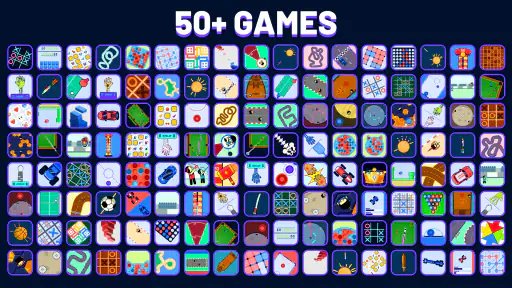
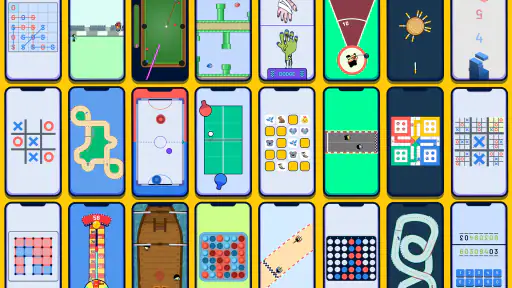
2 Player Games - Offline is a collection of simple mini-games designed for two people to play on the same device. Depending on the games included in your version, you may find quick competitive challenges such as sports, puzzles, or reaction-based contests. Its main appeal is that players can take turns or compete side by side without needing separate phones, making it suitable for casual play at home or while traveling.
Can I play 2 Player Games - Offline without an internet connection?
The app is intended to let players enjoy its games offline, so an internet connection generally should not be necessary for local play once the app is installed. However, internet access may still be required for the initial download, updates, or features such as advertisements and optional online services. Check the app’s store listing and permissions for details, and consider trying a game in airplane mode to confirm offline availability on your device.
Can two people play on one phone or tablet?
Yes, the central idea is local multiplayer: two players share one phone or tablet and interact with the same screen. This makes setup quick because you do not need to create accounts, pair devices, or invite someone online. Keep in mind that controls and screen space vary by mini-game, so a larger tablet may be more comfortable, while a phone works well for short rounds and casual head-to-head matches.
Is 2 Player Games - Offline free, and does it contain ads or in-app purchases?
The app may be free to download, but its exact pricing, advertising, and purchase options can depend on the developer, platform, region, and current version. Free games commonly display ads, and some may offer purchases to remove advertisements or unlock additional content. Before installing, review the Google Play or App Store listing for current details, including in-app purchases, age guidance, and any subscription terms.
Is 2 Player Games - Offline suitable for children, and what should I check before downloading?
Simple local mini-games can be suitable for family play, but suitability depends on the specific app version and the content it includes. Before downloading, check the store’s age rating, privacy information, developer details, and requested permissions. If a child will use the app, review whether it shows ads, links to external pages, or offers purchases, and use your device’s parental controls where appropriate.
Pros
- A wide range of quick games makes it easy to find a match for different moods.
- Local two-player controls let friends compete on the same device.
- Short rounds suit casual play and brief breaks.
- Offline access is useful when Wi-Fi or mobile data isn’t available.
- Simple rules make many games easy for newcomers to pick up.
Cons
- Sharing one screen can feel cramped on smaller phones.
- Some games may become repetitive after extended play.
- Touch controls can make precise moves difficult in certain games.
- The experience depends on having another person nearby for two-player matches.
- Ads may interrupt play or appear between rounds.
- Category
- Board
- Version
- 1.5.6











