Yoosee
- 1.39K
- 3.9
- Installs
- 50.00M
- Price
- Free

Screenshots
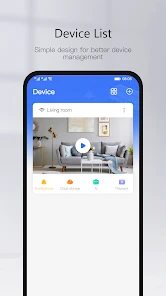
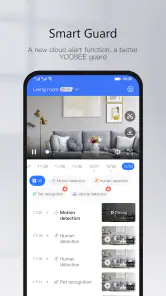
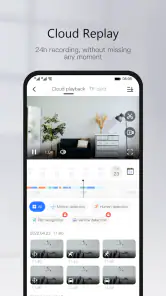
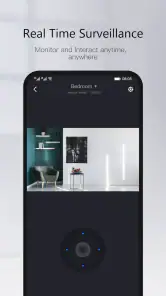
Analysis by Reviewed
Have you ever found yourself wishing you could keep an eye on your home while you're away? Enter Yoosee, the app that is like having a pair of eyes in every corner of your house. I recently had the opportunity to dive into this app, and let me tell you, it’s like something out of a spy movie!
Setting Up the Spy Gear
First things first, let's talk about how to get this bad boy up and running. Downloading Yoosee is a breeze and available for both Android and iOS. Once you’ve got it on your device, setting it up is as easy as pie. The app guides you through the process of connecting your cameras with a series of simple steps. I was pleasantly surprised by how user-friendly it is. No tech jargon, just straightforward instructions that even my grandma could follow!
Features That Make You Go "Wow!"
The real magic of Yoosee lies in its features. This app lets you monitor live footage from your cameras right on your phone. Imagine sitting in a café, sipping on your latte, and checking in on your pets at home. It's not just live footage either; you can record videos, take snapshots, and even communicate through its two-way audio feature. Yep, that’s right, you can tell your dog to get off the couch even when you’re miles away!
Another feature that got me all excited is the motion detection alerts. Whenever there’s movement in the camera’s field of view, Yoosee sends you an instant notification. It’s like having a security guard who never sleeps. Plus, you can customize the sensitivity and frequency of these alerts, so you don’t end up with notifications every time a leaf blows past your window.
Smooth Sailing or Rough Waters?
While Yoosee is packed with impressive features, it’s not without its quirks. Occasionally, the app can be a bit sluggish, especially if your internet connection isn’t the best. There were a couple of times when I experienced delays in live streaming, which can be a bit frustrating. However, these instances were rare, and once things were up and running, the performance was solid.
Another aspect worth mentioning is the app’s interface. It’s clean and intuitive, but maybe not the prettiest on the block. Some might find the design a bit dated, but honestly, when the functionality is this reliable, looks are hardly a deal-breaker.
Final Thoughts: Is Yoosee Worth It?
In the end, Yoosee is a fantastic tool for anyone looking to enhance their home security or just keep tabs on what’s happening at home. It’s packed with features that make life easier and give you peace of mind, knowing that you can always stay connected to your personal space. While it has its minor hiccups, the overall experience is smooth and reliable.
More From Our News Desk

Weather by Xiaomi Review: Clear at a Glance, Less Clear Up Close

X Under Pressure: Can It Recover When Posting Goes Wrong?

Clash of Clans Is Won Between the Battles

Android Auto Makes the Case for Quieter Car Software

MobiOffice: Transforming Mobile Productivity with Seamless Integration

EA SPORTS FC™ Mobile Soccer: Redefining Mobile Sports Gaming
So, if you're in the market for a security app that is reliable and packed with features, give Yoosee a shot. It’s like having a personal security assistant right in your pocket!
Yoosee Frequently Asked Questions
Does Yoosee require an account or internet access to use?
Yoosee is designed to let you view and manage connected cameras and smart devices from a smartphone, so network access is important for remote monitoring. Before installing, consider whether you are comfortable setting up the app and connecting your equipment to your home network. The experience is most useful when the camera and phone can communicate reliably.
Can Yoosee send alerts when a camera detects movement?
Yoosee includes motion detection alerts as part of its monitoring features. These can help you keep track of activity around a connected camera without watching a live feed continuously. Notifications are most useful when the camera is positioned appropriately and configured for your needs, so it is worth checking the device settings and alert preferences after setup.
Is Yoosee free to download, and what devices can I use it on?
Yoosee is a free app in the Video Players & Editors category, developed by Gwell. It is rated for Everyone and requires Android 7.0 or later. Its main purpose is to help users see their world closer through connected cameras and smart devices, so it is most useful when you already have compatible equipment to set up.
What is Yoosee and what can it be used for?
Yoosee is a smart home application designed for remote monitoring and control of security cameras and other smart devices. It enables users to view live video feeds, receive motion detection alerts, and communicate through two-way audio, all from their smartphones. The app is compatible with a variety of smart devices, making it versatile for enhancing home security and automation.
Is Yoosee compatible with all types of security cameras?
Yoosee is compatible with a wide range of IP cameras and smart home devices. However, it is essential to check the specific device compatibility before purchasing or installing new equipment. Most popular IP cameras and smart devices that support the ONVIF protocol should work seamlessly with the Yoosee app, allowing for easy integration into existing security systems.
Pros
- User-friendly interface for easy navigation.
- High-quality video streaming.
- Supports multiple device connections.
- Real-time alerts and notifications.
- Affordable subscription plans.
Cons
- Limited cloud storage options.
- Occasional app crashes reported.
- Requires stable internet connection.
- No integration with smart home systems.
- Some features locked behind paywall.
- Category
- Video Players & Editors
- Version
- 6.37.1











