

XVX All Video Downloader
- 12.00
- 3.8
- Installs
- 100.00K
- Price
- Free

Screenshots

Analysis by Reviewed
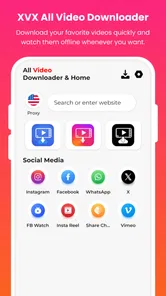
When I want to keep a video available after leaving Wi-Fi, I care less about a long feature list than about whether a downloader can make the save-and-watch routine straightforward. XVX All Video Downloader is built around that practical job: it is a video utility for finding downloadable MP4 videos and watching saved files offline. I’d consider it when convenience matters more than a full editing suite or a general-purpose media library.
One quick check before you rely on a download
I’d start by choosing a short clip from a source I visit often, rather than testing the app with the one video I absolutely need for a trip. That makes the first attempt a useful compatibility check, not a high-stakes gamble. If detection recognizes the clip and the saved file plays properly offline, I have a concrete reason to keep using the app for that source.
It also helps to think about the intended use before saving. A temporary reference for a recipe or a lesson may be worth keeping for a few days, while a video I can easily revisit through its original service may not need a local copy. This simple distinction keeps the download routine useful instead of turning it into another place where media accumulates.
Why video detection is the central feature
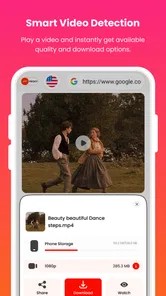
The app’s main appeal is smart detection: rather than treating every download as a manual file-management task, it aims to recognize video that can be saved. In everyday use, that could shorten the steps between spotting a clip and keeping a copy for later. The value is not simply having a download button; it is reducing the need to switch between browsing, copying a link, and hunting through folders.
That promise has a practical boundary. Detection can only help when the video and its source are supported, and no downloader should be assumed to save every clip on every site. I would treat XVX as a focused tool for compatible MP4 videos, not as a universal way to capture anything that plays in a browser. If a particular source does not offer a detectable video, the feature cannot turn it into a downloadable file.
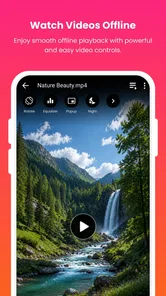
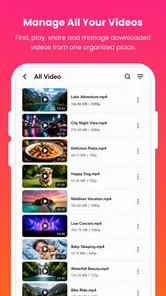
Once a video is saved, offline playback makes the download useful beyond the moment of discovery. A clip can be watched where a connection is weak, or revisited without streaming it again. For me, that pairing—recognize a suitable video, save it, then play it offline—is the clearest reason to choose this app over a basic player.
A focused downloader rather than an editor
XVX sits in the video players and editors category, but its role is closer to a downloader with playback than to a tool for trimming footage, adding captions, or building a finished video. That distinction matters if you are choosing between apps. I would not install it expecting a creative editing workflow; I would install it to collect compatible clips and watch them later.
More From Our News Desk

 Gmail
GmailGmail in a Busy Inbox: Who Benefits Most?
From first account to crowded workday, Gmail earns its place through dependable search and flexible sorting—but its best fit depends on how much inbox maintenance you can tolerate.

 Prime Video
Switching to Prime Video: What Changes in Your Viewing Routine
Prime Video can make a compelling second home for streaming, but switching means learning a different catalog, rental layer, and route from browsing to playback.

 Universal TV Remote Control
Universal TV Remote Control Works Best as a Reliable Backup
A phone remote earns its place through quick setup and reliable habits. Here is how to get more from Universal TV Remote Control—and where its limits show.

 Weather - By Xiaomi
Weather by Xiaomi Review: Clear at a Glance, Less Clear Up Close
Xiaomi’s weather app makes everyday forecasts quick to scan, but its calm surface can leave useful details and recovery paths harder to find than they should be.

 X
XX Under Pressure: Can It Recover When Posting Goes Wrong?
A resilience-focused review of X, examining setup, mistaken posts, interruptions, weak connections, and the gaps that matter when recovery needs to be dependable.

 Clash of Clans
Clash of Clans Is Won Between the Battles
Its raids are quick; its community is a long-term project of coordination, teaching, rivalry, and shared responsibility—with all the friction that entails.
Latest News



The developer is TAYAL TRADERS. The app is free, has an Everyone age rating, and is currently at version 15.0. Its average rating is 3.8 from around 500 ratings, and it has passed 100,000 installs. Those figures suggest that it has found an audience, though they do not tell me how well it handles any specific site or device. I’d judge it by whether its detection fits the sources I actually use.
What the download-and-watch routine looks like
A sensible workflow is to begin with the video you want to keep, let the app detect whether it can be downloaded, and save it only if the detected option matches your intention. Then check the saved copy before relying on it later. This simple habit catches problems such as selecting the wrong clip or assuming a download completed when it did not.
I would also make a small test download before collecting several videos. Open the result in the app’s offline playback experience and confirm that both picture and sound are present. This is useful because a file that appears to have saved is not much help if it is incomplete or not the content you meant to keep. A short test makes it easier to decide whether the app works with your preferred sources.
For organization, I’d download with a purpose rather than treating the app as an unlimited archive. Keep only the clips you expect to watch, and remove files when they stop being useful. That is a practical way to avoid clutter and preserve space, especially on a phone that already holds photos, messages, and other media. It also makes offline playback more valuable: a compact collection of relevant videos is easier to browse than a pile of forgotten downloads.
One useful trade-off is to save a video before a trip or a day with unreliable reception, then verify it while you still have a connection. Offline playback is most dependable when you have already checked the file, rather than discovering on a train or in a waiting room that the clip did not save as expected. I’d use the app as preparation, not as a last-second rescue tool.
When offline viewing earns its place
Imagine finding a tutorial you want to follow while cooking, then needing to move around the kitchen where the signal is unreliable. If the video is compatible and saved beforehand, you can replay the relevant steps without depending on a steady stream. The same routine can help with a reference clip for a commute or a video you want to show someone in a place where mobile reception is patchy.
There is a useful distinction between keeping something for convenience and treating a downloader as a replacement for the original service. If the source offers its own offline option, that may be the cleaner choice, particularly for content tied to an account or platform. A downloaded MP4 is more appealing when you need a straightforward local copy of a compatible video, but the app should not be treated as a way around restrictions or creator preferences.
Before saving, I’d consider whether I have a legitimate reason to keep the video and whether the source permits it. That pause is especially worthwhile for material that belongs to someone else. A tool can make saving convenient, but convenience does not settle the question of permission. For personal references or content offered for download, the workflow makes more sense than using it to collect anything that happens to play.
The friction points I would plan around
The biggest limitation is source compatibility. Smart detection sounds effortless, but it is not a guarantee that every webpage or streaming service will expose a downloadable MP4. If your main need is saving content from one particular platform, test that source first. Someone who needs broad support across many services may be better served by that platform’s own offline feature or a downloader designed specifically for the source.
There is also a difference between downloading and managing a media collection. XVX’s stated purpose is narrow, which is helpful when you want a direct route to offline video but less suitable if you expect robust playlists, library sorting, playback controls for every format, or editing tools. I would choose a dedicated media player for a mixed collection of files, and an editor when the goal is to alter footage rather than save it.
Another point to keep in mind is storage. Video files can take up meaningful room, so downloading everything “just in case” can quickly make the offline benefit less convenient. My approach would be to save only what has a clear use, review the collection periodically, and remove clips after I no longer need them. That small bit of housekeeping is more important here than it would be for an app that only streams content.
Finally, the app’s average rating is a modest signal rather than a guarantee of a smooth experience for every person. Ratings reflect different devices, expectations, and video sources. I would not read the figure as proof that detection will work everywhere, nor as a reason to dismiss the app outright. A quick compatibility check with one ordinary video is a more useful decision test.
Who is likely to get the most from it
XVX All Video Downloader is a reasonable fit for someone who regularly finds compatible MP4 videos and wants a simple way to keep them for offline viewing. It is especially relevant if your routine is occasional and practical: save a few clips before travel, keep a reference video handy, or avoid buffering when a connection is inconsistent. The free price makes that limited use easier to try without committing to a paid app.
I’d skip it if I mainly watch content inside services that already provide dependable offline access, or if I need a comprehensive video editor. I would also look elsewhere if the sources I care about fail the initial detection test. In those cases, a built-in download option, a standard media player, or a dedicated editing app better matches the job than a downloader whose central advantage depends on recognizing compatible videos.
For anyone who does try it, my advice is straightforward: test one short, permitted video from a source you use often, confirm the saved file plays offline, and then decide whether the workflow is worth keeping. That check tells you more than a broad promise can. XVX All Video Downloader is at its best when smart detection turns a compatible video into a verified offline copy with minimal fuss.
My overall view is positive but measured. The app has a clear purpose, and the combination of video detection and offline playback can solve a real everyday problem without requiring a full editing setup. Its usefulness depends on the videos you want to save, though, so I would treat source compatibility and storage habits as part of the experience rather than afterthoughts. If those fit your routine, it is a practical utility; if not, a platform’s own offline mode or a broader media app is the better choice.
Choosing the right tool for the viewing habit
The choice between this downloader and a platform’s built-in offline feature comes down to what I want to keep and where I expect to watch it. A built-in option is often the more natural fit for account-linked content, since it keeps the viewing experience within its original service. XVX makes more sense when a compatible video can be saved as a local MP4 and I want to replay that file without returning to the source each time.
Compared with a standard media player, the distinction is the step before playback. A player is the stronger choice when I already have video files and need a dependable place to browse and watch them. This app’s reason to be installed is the detection-and-save route; if I never use that route, a dedicated player is likely the simpler choice. Neither tool replaces an editor, because saving a clip and changing its content are different jobs.
One practical question is whether a saved video will be available without a connection. That is exactly the point of checking the downloaded copy inside offline playback before leaving home. I would not assume that seeing a download appear means it is ready for every situation; opening it once while still connected is a quick way to confirm the file is usable. This small step is especially helpful when the clip matters for a lesson, a reference, or a planned journey.
Another consideration is how much local media I really need. If I only want one or two clips for a specific day, a focused downloader can be convenient. If I am building a large, mixed-format collection, I would favor a media library designed to organize files rather than expecting a narrow downloader to do both jobs. Keeping those expectations separate is the clearest way to avoid disappointment.
At release, XVX arrived on April 27, 2026, and it requires Android 10 or later. That makes checking the device’s Android version a sensible first step for anyone considering installation. The app is aimed at a broad audience, but compatibility still begins with the phone itself and then depends on whether the desired source exposes a video the app can detect.
Overall, I see the strongest case for XVX in a modest, repeatable routine: find a permitted video, test whether detection recognizes it, save it, verify playback, and remove it when it is no longer useful. It is not the right answer for every streaming habit or every media collection, but that sequence can be genuinely handy for someone who often needs a few compatible clips away from reliable internet. XVX All Video Downloader is worth considering when that specific need matters more than editing tools or a full-featured media library.
XVX All Video Downloader Frequently Asked Questions
What is XVX All Video Downloader used for?
XVX All Video Downloader is designed to help users save supported online videos to their devices for offline viewing. Its tools and available sources may depend on the app version, device, and the websites involved. Before downloading, check the app’s current description and permissions so you know what it supports; not every video or platform will necessarily be available to download.
Can XVX All Video Downloader download videos from any website or social media platform?
No downloader can be assumed to work with every website. A platform may block downloads, require an account, restrict access, or change its technology, and those changes can affect compatibility. Check the app’s supported sources and test the specific content you want to save. Some videos may also be protected or otherwise unavailable for downloading, even if they play normally online.
Is it legal to download videos with XVX All Video Downloader?
That depends on the video, the platform’s terms, and the laws where you live. Saving your own content or material that the creator has authorized for download is generally different from copying copyrighted work without permission. A video being publicly viewable does not automatically mean it can be downloaded or redistributed. Review the applicable rules and obtain permission when needed.
Is XVX All Video Downloader free, and does it contain ads or in-app purchases?
Pricing, advertising, and paid features can vary by release and by the store listing available in your region. Review the current Google Play or App Store page before installing, including its notes about ads and in-app purchases. If the app offers optional upgrades or subscriptions, check their price and renewal terms carefully so you understand any ongoing charges before confirming a purchase.
What permissions and safety checks should I consider before installing XVX All Video Downloader?
Review the app’s requested permissions and grant only those that make sense for its functions. Saving files may require access to device storage or a media folder, while unrelated requests deserve closer scrutiny. Install it from a trusted store or source, check recent user feedback and the developer’s information, and keep your device security software and operating system up to date.
Pros
- Supports downloading videos from multiple websites in one app.
- Built-in browser makes it easy to find videos before downloading.
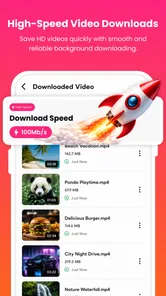
- Download manager helps track active and completed downloads.
- Can pause and resume downloads when your connection is interrupted.
- Offers video downloads in different available resolutions.
Cons
- Some websites may block downloads or stop working without notice.
- Not every video is available in all resolutions or formats.
- Ads may interrupt browsing or the download workflow.
- Large video files can use substantial storage and mobile data.
- Downloaded content may be subject to copyright or site restrictions.











