

XA Downloader - Video Saver
- 850.00
- 4.4
- Installs
- 10.00M
- Price
- Free

Screenshots
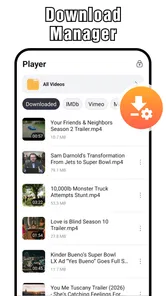



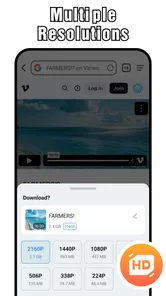
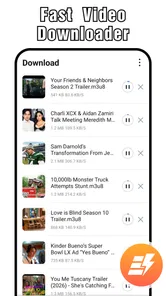
Analysis by Reviewed
XA Downloader - Video Saver makes its strongest case in the first few days: I can see a video I want to keep, save it for a moment when I have no reliable connection, and play it later. That simple loop is useful, but it is also the kind of convenience that can feel exciting at first and then disappear into routine. For me, the question is whether saving clips solves a recurring problem often enough to justify keeping another app on my phone.
Where the first-week appeal comes from
As a video downloader and player from RedFoxUnitedInc, XA Downloader - Video Saver is aimed at people who want a straightforward route from finding a clip to watching it offline. It sits in the video players and editors category, though its appeal is more practical than creative: it is about keeping videos available, not editing them into something new. The app is free to install, has a Teen age rating, and offers in-app purchases ranging from $0.99 to $8.99 per item.
The familiar use case is easy to picture: I spot a useful cooking demonstration while waiting for a train, save it, and watch it again at home without having to search through a busy feed. Multiple resolution options are part of the appeal because they give users a choice rather than forcing every clip into the same quality setting. A sensible habit is to match the resolution to the job: choose a higher one when small on-screen details matter, and a lower one when the clip is mainly for casual viewing and storage space matters more.
A Simple Solution to a Common Problem
At its core, XA Downloader - Video Saver is all about simplicity and efficiency. You know those times when you see a must-watch video, and you're in a place with sketchy Wi-Fi? We've all been there. This app swoops in to save the day by allowing you to download videos directly to your device. It's like having a trusty sidekick ready to capture those moments when the internet lets you down.
User-Friendly Interface
First things first, the user interface is as smooth as butter. Seriously, navigating through the app feels intuitive, even if you're not the most tech-savvy person out there. The design is clean, and the functionalities are laid out in a way that just makes sense. Whether you're a newbie or a seasoned downloader, you'll find yourself right at home.
Speed and Quality
No one likes waiting around for a download to finish, especially when you're on a time crunch. Fortunately, this app delivers on speed without compromising quality. The downloads are swift, and the quality of the video remains top-notch. You won't have to worry about pixelated messes or buffering issues when watching offline.
Compatibility and Versatility
One of the standout features of this app is its compatibility with a wide range of platforms. Whether you're trying to save videos from social media giants like Instagram or Facebook, or smaller, niche sites, XA Downloader - Video Saver has got you covered. It's like the Swiss Army knife of video downloading apps!
More From Our News Desk

 Gmail
GmailGmail in a Busy Inbox: Who Benefits Most?
From first account to crowded workday, Gmail earns its place through dependable search and flexible sorting—but its best fit depends on how much inbox maintenance you can tolerate.

 Prime Video
Switching to Prime Video: What Changes in Your Viewing Routine
Prime Video can make a compelling second home for streaming, but switching means learning a different catalog, rental layer, and route from browsing to playback.

 Universal TV Remote Control
Universal TV Remote Control Works Best as a Reliable Backup
A phone remote earns its place through quick setup and reliable habits. Here is how to get more from Universal TV Remote Control—and where its limits show.

 Weather - By Xiaomi
Weather by Xiaomi Review: Clear at a Glance, Less Clear Up Close
Xiaomi’s weather app makes everyday forecasts quick to scan, but its calm surface can leave useful details and recovery paths harder to find than they should be.

 X
XX Under Pressure: Can It Recover When Posting Goes Wrong?
A resilience-focused review of X, examining setup, mistaken posts, interruptions, weak connections, and the gaps that matter when recovery needs to be dependable.

 Clash of Clans
Clash of Clans Is Won Between the Battles
Its raids are quick; its community is a long-term project of coordination, teaching, rivalry, and shared responsibility—with all the friction that entails.
Latest News



That flexibility is handy, but it is not a reason to assume every clip will be available to save. In practice, I would treat a downloader as a convenient option for videos a service permits you to keep, rather than a guaranteed way around platform restrictions. If a clip will not download, repeatedly retrying is unlikely to make it a better tool; saving the original post or using the platform’s own offline option, when available, may be the more dependable choice. I also keep downloads to material I have permission to save, since access in an app does not automatically grant permission to reuse someone else’s video.
Secure and Trustworthy
In today's world, security is a big deal, especially with apps that access your files and data. I'm happy to report that this app takes your privacy seriously. It doesn't pry into your personal information, and the downloads are secure. You can breathe easy knowing your data's safe while you snag your favorite clips.
Making it a useful monthly habit
The lasting value depends less on how many videos I can collect and more on whether I return to them. A short saved list for recipes, exercise demonstrations, or reference clips can be genuinely useful; an enormous pile of forgotten downloads becomes clutter. I would make a quick review part of the routine: remove clips I have watched, keep only those I expect to revisit, and choose resolution with storage in mind. That small bit of housekeeping is the difference between a practical offline library and a folder I never open.
Compared with simply bookmarking a post, downloading is better when I need the video itself to be available away from a connection or when I want to avoid searching the feed again. A bookmark is lighter and often keeps the original context, while a platform’s own offline feature can be a better fit when it is available and I want to stay within that service. XA Downloader makes most sense when those alternatives do not match the way I plan to watch; it is not automatically the best choice for every clip.
Where convenience can turn into friction
There are a few practical questions worth answering before relying on it. Can I choose a resolution? Yes, multiple resolution options are part of the app’s appeal, so I would use that choice deliberately rather than always selecting the largest file. Can it replace a regular video player? It includes video playback, which is convenient for watching saved clips, but someone who wants a full media library with extensive organization or editing tools may prefer a dedicated player or editor. Should I expect every social video to download? No downloader should be treated as universal; availability can depend on the source and its restrictions.
For a low-friction workflow, I would save a clip when I find it, pick a suitable resolution, then check that it plays before I leave a reliable connection. That last step matters if the video is needed for a lesson, a recipe, or a trip: it catches a failed or incomplete save while there is still time to use another option. I would also avoid building a habit around downloading everything that looks interesting. Selective saving keeps the app useful and helps prevent offline storage from becoming a second, less manageable feed.
What may wear thin over time
The main trade-off is that convenience still asks for attention. Downloads need space, resolution choices require a little judgment, and source restrictions can interrupt the otherwise simple process. People who mostly stream at home, rarely revisit saved clips, or already rely on a service’s own offline viewing may find that this extra step adds little. The same is true for anyone looking for a video editor rather than a way to save and play clips: the category includes both kinds of tools, but this app’s central purpose is downloading.
Who will get the most from keeping it
I see the strongest fit for people who regularly return to particular clips and cannot count on a stable connection at the moment they need them. A student might save a permitted tutorial before heading somewhere with weak reception, then check it once offline before relying on it for revision. Someone following a repair demonstration could keep the relevant section available beside the object they are fixing, instead of repeatedly handling the phone to reload a page. In both cases, the value is not simply having a download; it is being able to plan around a clip that would otherwise depend on a feed and a connection.
There is also a useful distinction between occasional saving and building a personal video archive. XA Downloader is easier to justify for a small, changing collection of clips than for a large library that needs detailed labels, playlists, or long-term cataloguing. If I am saving something for one trip, I can choose a practical resolution, test playback, and remove it afterwards. If I expect to manage years of media, a dedicated library tool is likely to offer a better organizing workflow. The more ambitious the archive becomes, the more the housekeeping can outweigh the quick save.
A practical routine for travel and reference
For a commute or trip, I would prepare in two passes. First, save only the clips I am actually likely to watch, rather than treating every interesting post as a future essential. Then, while I still have a dependable connection, open each saved video and confirm that it is playable. This catches problems before the moment when offline access matters. I would give detail-heavy material more resolution and keep casual viewing lighter, then clear the temporary collection when the trip is over.
That routine also answers a common practical concern: whether the app can be trusted as the only plan for something important. I would not make it the sole copy of a critical lesson or instruction without checking the saved file first. A download is useful insurance, but the source may limit access and a save can fail. For information I cannot afford to lose, keeping a separate note or choosing an official offline option when available is a sensible backup. The app works best as a convenient part of a plan, not as a guarantee that every online video will always be available.
Choosing it over familiar alternatives
Against streaming, downloading trades immediacy for preparation: I spend a moment saving a clip now so I can watch it later without relying on a connection. Against bookmarks, it offers the video itself for offline viewing, while a bookmark is usually better for preserving a post’s context and returning to the original source. Against a platform’s built-in offline viewing, a separate downloader may suit a different viewing routine, but the platform’s own option is preferable when it meets the need and keeps the content within its intended service.
Those differences matter more than a broad claim that one approach is always superior. If I am browsing casually and have reliable internet, a bookmark is simpler and leaves less to manage. If I am preparing for a journey, a local copy can be more reassuring, provided the content is allowed to be saved and the file plays. If I need editing, extensive library controls, or a carefully maintained media collection, I would choose a tool built around those jobs instead. This app is appealing when its narrow task is the task I actually need done.
The small costs of keeping it useful
Its upkeep is not complicated, but it is easy to ignore until saved videos start taking up room or become difficult to find. I would treat downloads as temporary by default: keep a clip while it has a clear purpose, then remove it when that purpose has passed. That approach reduces the temptation to save at the highest resolution every time and prevents a useful offline shelf from turning into an uncurated backlog. The best long-term habit is selective saving, not collecting for its own sake.
Another source of fatigue is interruption. A source restriction can stop the workflow, and having several resolution choices means I need to make a decision before saving. Neither issue is a deal-breaker for occasional use, but both are worth noticing if I expect one tap to work across every site and every video. When a source blocks a save, I would switch to a bookmark or its official offline feature rather than spend time trying to force the same result. That keeps the tool from becoming a frustrating detour.
How it fits after the novelty fades
XA Downloader - Video Saver has an average rating of 4.5 from around 116,000 ratings, with over 10 million installs, and its current version is 1.7.2. It was released on April 11, 2025, and supports Android 8.0 and later. Those figures suggest that many people have tried it, but I would still judge it by whether its specific workflow fits my routine. If I need to keep permitted videos handy for commutes, travel, or repeat reference, it has a clear role; if I mainly browse casually and rely on bookmarks, I would skip another download tool.
It is a better match for Android users who want a free way to save and play clips, are comfortable managing a modest collection, and have recurring moments when offline access matters. The in-app purchases mean that free installation is not the same as promising every paid option will cost nothing, so I would check the purchase details before deciding to spend. People who want an editor, a full media-management system, or guaranteed access to every video should look elsewhere. That is not a knock on its basic purpose; it is a reminder to choose the app for the job it actually performs.
In conclusion, if you're in the market for a reliable, easy-to-use video downloading app, XA Downloader - Video Saver should be at the top of your list. It's fast, versatile, and respects your privacy, making it the perfect companion for any video enthusiast. Whether you're saving that adorable cat video or an insightful TED Talk, this app ensures you can watch it whenever and wherever you want. Happy downloading!
XA Downloader - Video Saver Frequently Asked Questions
Can XA Downloader - Video Saver play videos as well as save them?
Yes. XA Downloader - Video Saver combines video downloading with a video player, so you can use it to save videos and watch them on your device. Its multiple resolution options can help you choose a download suited to your needs. If you mainly want a player or a downloader, consider whether having both functions in one app fits the way you manage videos.
Which video resolutions can I choose when saving a video?
The app offers multiple resolution options, which can be useful when you want to balance picture quality against available storage. The best choice depends on the video and how you plan to watch it, such as on a larger screen or while conserving space. Check the options presented for each video before starting a download, since available resolutions may vary.
Does XA Downloader - Video Saver need an internet connection?
You will need an internet connection to access online videos and download them to your device. Once a video has been saved, you can use the app’s player to watch it offline, which is helpful when you are away from a network. Keep in mind that offline viewing applies to videos already downloaded; browsing for or retrieving new videos requires connectivity.
Is XA Downloader - Video Saver available for older Android devices?
XA Downloader - Video Saver requires Android 8.0 or later. Check your device’s Android version before downloading so you can avoid compatibility issues. If your device meets that requirement, you can consider whether its available storage is sufficient for the app and the videos you intend to save. The app is free to download, with optional in-app purchases.
Is XA Downloader - Video Saver free to download, and are there paid features?
XA Downloader - Video Saver is free to download, so users can try its video-saving and playback tools without an upfront purchase. The app also offers in-app purchases, which may be relevant if you want access to optional paid features. Before buying anything, review the purchase details shown in the app and consider whether its free functions meet your needs.
Pros
- Supports multiple video formats.
- Fast download speeds.
- User-friendly interface.
- Batch downloading available.
- No registration required.
Cons
- Contains ads.
- No built-in media player.
- Limited video editing features.
- Some downloads may fail.
- No support for streaming sites.











