

WispLens
- 6.00
- 3.6
- Installs
- 10.00K
- Price
- Free

Screenshots
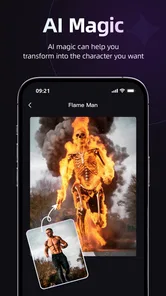
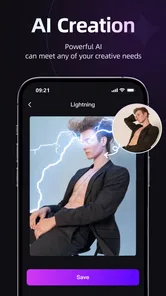
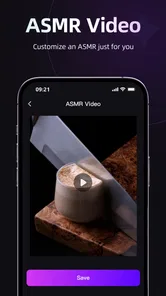
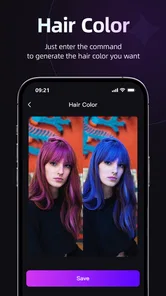
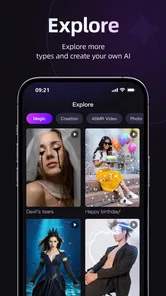
Analysis by Reviewed
I approached WispLens as a decision rather than a simple download: is an AI video generator useful enough to become part of a normal editing routine, or is it better treated as an occasional creative experiment? After spending time with the app, my answer is fairly clear. It is most appealing to people who want to explore AI-assisted video creation without committing to a full desktop editor, while users who need dependable manual control may feel constrained.
That distinction matters because “video editor” can mean very different things. Some apps are built around trimming clips, arranging a timeline, correcting sound, and exporting predictable results. WispLens belongs to a more experimental corner of video players and editors, where the starting point is an idea and the app’s intelligence helps turn that idea into moving content. I found that approach refreshing, but it also changes what you should expect from the experience.
What to consider before choosing WispLens
The first question is not whether AI video sounds interesting. It is whether you want speed and creative prompting more than detailed editing control. If your goal is to make a short visual concept, try a stylized scene, or produce something quickly for personal sharing, WispLens has a sensible appeal. If you already know exactly where every cut, transition, caption, and audio cue must land, a conventional editor will probably feel more comfortable.
The app is free to install, which makes testing it relatively easy. It is rated for Everyone, runs on devices using Android 7.0 or later, and comes from JETS GROUP. Those details make it approachable for a broad audience, although an older compatible operating system does not automatically mean every device will feel equally fast when handling AI-generated video. On a modest phone, I would keep expectations practical and avoid judging the concept solely by the first loading or rendering delay.
WispLens has an average rating of 3.6 from 35 ratings and six written reviews, with over 10K installs. I read that as a sign of an early, still-forming audience rather than a mature consensus. There is enough interest to show that the idea attracts people, but not enough public feedback to treat the app as a universally proven replacement for established editors.
The current version is 8.5, and the app was released on September 2, 2025. For me, that combination suggests a product worth evaluating on its current workflow instead of assuming it already has every refinement found in older editing tools. The useful test is simple: can you move from an idea to a shareable result without fighting the interface?
Start with the result you actually need
Before opening the generator, I recommend deciding what “finished” means for your project. A private visual message, a quick mood clip, and a polished promotional video all demand different levels of control. WispLens makes the most sense when the visual idea is more important than precise production technique.
More From Our News Desk

 Gmail
GmailGmail in a Busy Inbox: Who Benefits Most?
From first account to crowded workday, Gmail earns its place through dependable search and flexible sorting—but its best fit depends on how much inbox maintenance you can tolerate.

 Prime Video
Switching to Prime Video: What Changes in Your Viewing Routine
Prime Video can make a compelling second home for streaming, but switching means learning a different catalog, rental layer, and route from browsing to playback.

 Universal TV Remote Control
Universal TV Remote Control Works Best as a Reliable Backup
A phone remote earns its place through quick setup and reliable habits. Here is how to get more from Universal TV Remote Control—and where its limits show.

 Weather - By Xiaomi
Weather by Xiaomi Review: Clear at a Glance, Less Clear Up Close
Xiaomi’s weather app makes everyday forecasts quick to scan, but its calm surface can leave useful details and recovery paths harder to find than they should be.

 X
XX Under Pressure: Can It Recover When Posting Goes Wrong?
A resilience-focused review of X, examining setup, mistaken posts, interruptions, weak connections, and the gaps that matter when recovery needs to be dependable.

 Clash of Clans
Clash of Clans Is Won Between the Battles
Its raids are quick; its community is a long-term project of coordination, teaching, rivalry, and shared responsibility—with all the friction that entails.
Latest News



For example, imagine that I want to send a friend a short birthday greeting with a dreamy animated atmosphere. I do not need a multi-track timeline or frame-by-frame adjustments; I need a quick way to turn a written concept into something visually memorable. That is the kind of everyday task where an AI-first app can save effort. I can focus on the message and overall mood rather than building every visual element manually.
On the other hand, if I am assembling footage from a family event and need faces, dialogue, and timing preserved exactly, I would choose a traditional mobile editor first. AI generation can be imaginative, but imagination is not the same as faithful editing. The more important the original footage is, the more valuable direct control becomes.
Why the AI-first workflow stands out
WispLens’s strongest idea is that it lowers the barrier between a thought and a video concept. Many people have a scene in mind but lack the patience to search for clips, build a sequence, and tune every visual detail. An AI video generator gives those users a different entry point: describe the result you want, review what appears, and decide whether the direction is worth developing.
I especially like this for brainstorming. Instead of treating the first output as a final product, I would use it as a visual sketch. A rough result can reveal whether an idea feels calm, funny, dramatic, or simply unclear. That makes the app useful even when the generated clip is not ready to publish, because it can help me refine the concept before spending time in a more demanding editor.
A practical tip is to separate the creative brief into three parts: subject, setting, and mood. A request that combines those elements is easier to evaluate than a vague instruction filled with unrelated adjectives. I would also keep the first attempt focused on one visual idea. Asking for too many actions or changes at once can make it harder to understand what worked and what failed.
Another useful workflow is to create a short visual draft first, then use a conventional editor for the finishing work. That division of labor is important. WispLens can handle the imaginative starting point, while another app can be better for exact trimming, captions, music levels, or combining the generated material with camera footage. In my view, this hybrid approach is more realistic than expecting one app to excel at every stage.
Where it can save time
The main time saving is not necessarily the final export. It is the reduction in setup. Traditional editing often begins with collecting assets, choosing an aspect ratio, arranging clips, and deciding how to make a blank timeline feel intentional. An AI-led process can help you get past that empty-canvas problem.
This is valuable for casual creators who post infrequently. If I only make a video every few weeks, I may not remember the shortcuts or want to rebuild a complicated workflow each time. A simpler creative entry point gives me a better chance of actually finishing something instead of abandoning the project halfway through.
It can also help teachers, students, and hobbyists who need a visual demonstration rather than a broadcast-ready production. A generated clip can illustrate an atmosphere, a fictional scene, or a presentation idea. The important caveat is to review the result carefully before sharing it as factual or representative. Creative generation should support communication, not replace judgment.
The friction I would not ignore
AI generation introduces a different kind of uncertainty from ordinary editing. With a timeline editor, I can usually identify the control that needs changing. With generated content, the result may simply miss the intended subject, tone, or movement, and the next attempt may not correct the problem in a predictable way. That can make experimentation exciting, but it can also become tiring.
There is also a learning curve hidden behind the apparent simplicity. Writing a useful instruction takes practice. Shorter is not always better, and adding more detail does not guarantee a better result. I found it more productive to change one part of an idea at a time rather than rewriting everything after every attempt. That makes the process feel less like guessing.
Another trade-off is consistency. If I need the same character, object, or visual identity to remain stable across several clips, I would be cautious. AI-generated scenes can be compelling as individual moments while being less dependable as parts of a carefully controlled sequence. For a one-off visual, that may be acceptable. For a series, it can become a major weakness.
Users should also pay attention to the app’s purchase model. WispLens is free, but in-app purchases range from $4.99 to $39.99 per item. I would begin with a small personal test and decide whether the results justify spending money before treating it as a regular production tool. The higher end of that range makes the cost decision more serious for anyone who only creates occasionally.
When another category is a better fit
WispLens should not be judged against every video app using the same standard. A conventional timeline editor is the better choice when precision is the priority. Those tools are designed for deliberate cutting, arranging, layering, and polishing. They may take longer to learn, but they offer a clearer relationship between an action and its result.
A template-based social video app may be preferable when I want a familiar format, quick captions, and a predictable look. That category often suits users who care more about producing a polished short post than inventing unusual visuals. WispLens is more interesting when the concept itself is the reason for making the video.
A camera-focused app is also a better fit for people who mainly record real events. If the value lies in preserving an actual performance, conversation, trip, or family moment, I would not use AI generation as the central tool. I would capture the event directly and edit it with software that protects the original material.
For professional work, I would be even more selective. Client projects usually require repeatability, revisions, brand consistency, and clear control over assets. WispLens may help with early ideation, but I would not automatically make it the only application in a professional workflow. Its greatest strength is creative acceleration, not a promise of complete production management.
What switching to it really involves
The cost of switching is not just financial. It is also a change in habits. Someone moving from a timeline editor may initially look for familiar tools and wonder why the process begins with an idea instead of a sequence of clips. Someone coming from no editing background may find the opposite: the app feels easier at first, but improving results requires learning how to describe a visual clearly.
I would make the transition gradually. Keep the usual editor for important projects, and use WispLens for small experiments, concept drafts, or playful messages. This lets you discover whether its style matches your needs without putting an important video at risk. It also gives you a chance to learn which kinds of prompts produce results you actually enjoy.
Storage and sharing should be part of that decision as well. AI-created clips can encourage repeated attempts, and repeated attempts can quickly create a messy collection of drafts. I would delete failed versions promptly and save only the outputs that have a clear purpose. This simple habit makes the app feel more like a creative notebook and less like an endless pile of unfinished experiments.
For a normal day, I can imagine opening WispLens during a commute or a short break, developing a visual idea, and saving the most promising result for later. I would not expect to complete a complex film in that moment. The better use is to capture momentum while an idea is fresh, then decide later whether the clip is good enough to share or worth refining elsewhere.
Who I would recommend it to
I would recommend WispLens to curious beginners, casual creators, and people who enjoy testing new ways to express an idea. It is especially suitable if you do not want to master a complicated timeline before making your first interesting clip. The free entry point makes that experiment easier, while the Everyone rating keeps it accessible for general audiences.
I would also recommend it to experienced editors as a supplementary idea tool, not necessarily as a replacement. A professional or serious hobbyist may appreciate having a faster way to explore a mood or scene before rebuilding the concept with more precise software. In that role, the app can be valuable even if the final edit happens somewhere else.
I would skip it if my priority is exact control, reliable continuity, or editing real footage with minimal alteration. I would also hesitate if I dislike trial and error, because AI generation rarely feels as direct as moving a clip on a timeline. And if I am uncomfortable with the possibility of paying for additional items before I know how often I will use the app, I would keep the testing phase deliberately small.
My recommendation after weighing the trade-offs
WispLens is worth trying, but I would approach it as an AI creativity companion rather than a universal video editor. Its appeal comes from turning an idea into a visual starting point with less manual setup. That is a meaningful advantage for casual projects, brainstorming, and playful communication.
My advice is to begin with one modest project, use a focused description, and judge the app by whether it helps you reach a useful result faster than your normal method. Do not compare a rough generated concept with a finished professional edit; compare the time and effort required to get the first worthwhile visual on screen.
In the end, WispLens is best for people who value creative momentum over exact control. I like its place in the market because it offers a different starting point from ordinary editors, but I would keep a traditional tool nearby for precision work. If that balance matches the way you create, the app is an enjoyable and accessible experiment. If your videos depend on dependable timing, continuity, and hands-on editing, another category will serve you better.
WispLens Frequently Asked Questions
Will WispLens run on my phone or tablet?
WispLens requires Android 7.0 or later, so check your device’s operating system before downloading. If your device meets that requirement, you can install the app and see how it performs on your hardware. WispLens is a video-focused app, and its suitability may depend on the device you plan to use and the features you want to try.
Who makes WispLens, and is it widely used?
WispLens is developed by JETS GROUP and is listed in the Video Players & Editors category. It has over 10,000 installs and an average rating of 3.6 from 35 ratings, with six written reviews. Those figures offer a quick snapshot of its reach and user feedback, but reading the available reviews can help you decide whether the app suits your expectations.
What is WispLens and what can I use it for?
WispLens is an AI video generator, presented as an app for creating video content. Its exact usefulness depends on the tools included in the current version, so it is worth reviewing the in-app descriptions before relying on a specific feature. In testing, the app is best approached as a convenient mobile utility rather than a complete replacement for professional software.
Is WispLens free to download and use?
WispLens is free to download, but it also offers in-app purchases ranging from $4.99 to $39.99 per item. Before confirming a purchase, check the price and terms shown in the app so you understand what you are paying for. Users should also verify whether the free version provides enough functionality for their intended use.
What permissions does WispLens require?
Because WispLens is a visual or camera-related application, it may request access to the camera, photos, media files, storage, notifications, or internet connection. These permissions should be reviewed individually rather than accepted automatically. Camera and photo access may be necessary for core features, while notifications or other permissions could be optional. You can usually change access later through your device’s privacy settings.
Pros
- Simple interface makes lens controls easy to understand.
- Useful for quick visual experiments without advanced editing skills.
- Live preview helps you adjust effects before capturing images.
- Lightweight concept suits casual
- on-the-go creative use.
- Offers a different way to explore everyday scenes visually.
Cons
- Results may vary depending on lighting and camera quality.
- Some effects can look less natural than expected.
- Advanced customization options may feel limited.
- Performance may drop on older phones or tablets.
- Privacy details should be checked before granting camera access.











