WFAA - News from North Texas
- 2.77K
- 4.2
- Installs
- 500.00K
- Price
- Free

Screenshots



Analysis by Reviewed
Ever found yourself searching for a reliable source to keep up with all the buzz around North Texas? Well, let me spill the beans about this fantastic app that’s been my go-to lately. It’s called WFAA - News from North Texas, and it’s like having a personal news anchor in your pocket. Let’s dive into the details!
What local coverage changes in practice
For me, the strongest reason to use WFAA is its North Texas focus. A national news feed can be useful for major stories, but local developments often get lost among headlines from everywhere else. This app gives me a more direct way to check the issues that may affect a day in the region, from weather and traffic to community news and sports. It is a free news app from TEGNA, and its value depends less on how many headlines I can scroll through than on whether the local angle is relevant to my life.
I would use it as a quick orientation point, not as the only source for every decision. A headline can tell me that something is happening nearby, while a fuller report or an official notice may be the better place to confirm details that matter. That distinction is especially important during severe weather or other urgent situations: local reporting helps me notice developments, but it should not replace official emergency guidance.
A useful check-in, not another endless feed
My preferred routine would be to open the app once before leaving home, scan the local headlines, then choose only the story or section that affects my plans. If I am commuting across the area, the traffic coverage gives me a reason to check this local source before turning to a broader news app. If the day looks weather-sensitive, I can review the forecast as context and decide whether I should look for a more current update before heading out.
There is a practical trade-off in that routine. Checking one regional source can save me from sorting through unrelated headlines, but it also means I am seeing a narrower view of the news. I would not rely on WFAA alone if I were trying to understand a national issue or compare how different outlets frame a complex story. For that, I would add a broader publication rather than expect a North Texas-focused app to do both jobs equally well.
A closer look at WFAA’s local-first approach
So, here’s the scoop. WFAA - News from North Texas is your one-stop-shop for everything happening in and around the North Texas region. Whether you’re interested in breaking news, weather updates, or local sports, this app has got you covered. I mean, who doesn’t want their news served fresh and hot straight from the oven, right?
Features That Keep You Hooked
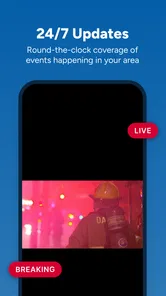
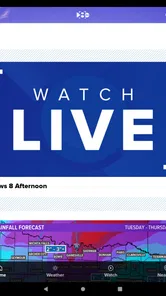
First things first, let’s talk features. The app is designed with a user-friendly interface that even my tech-resistant grandma could navigate. You’ve got your top stories right on the homepage, making it super easy to catch up on the latest happenings at a glance. One feature that really stands out is the app’s live streaming capability. You can literally watch the news as it happens, which is pretty neat if you ask me.
More From Our News Desk

Weather by Xiaomi Review: Clear at a Glance, Less Clear Up Close

X Under Pressure: Can It Recover When Posting Goes Wrong?

Clash of Clans Is Won Between the Battles

Android Auto Makes the Case for Quieter Car Software

MobiOffice: Transforming Mobile Productivity with Seamless Integration

EA SPORTS FC™ Mobile Soccer: Redefining Mobile Sports Gaming
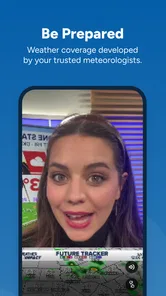
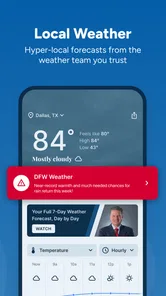
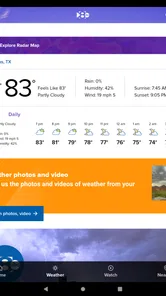
Oh, and did I mention the weather updates? If you’re anything like me and can’t decide what to wear without checking the weather first, you’ll appreciate the detailed forecasts that are updated regularly. The app also sends out push notifications for major events, so you’re always in the loop. No more FOMO!
Making headlines useful to your plans
A practical routine is to use the home screen for a quick scan, then open only the story that matters to the day ahead. If I’m heading across the area, I can check local traffic alongside the headlines instead of switching immediately to a general news app. For a weather-sensitive plan, I’d look at the forecast before setting out and check again if conditions become important; a forecast is useful context, not a guarantee about what I’ll encounter on a particular street.
Notifications are best treated as a filter, not a running commentary. I’d keep them on if I want to hear about major local developments, but silence them if frequent alerts distract me or if I only want news at set times. That small choice changes whether the app feels like a helpful heads-up or another source of interruptions. When a story is unfolding, live coverage can add immediacy; when I need careful background or several viewpoints, I’d pair it with a fuller report elsewhere.
A realistic day with the app
Imagine I have errands on opposite sides of the region and a family event later in the day. I could check the home screen with breakfast, open a local story if a headline affects one of my stops, and consult traffic before leaving. If the forecast suggests I should reconsider an outdoor plan, I can use that as a prompt to check conditions again closer to the event. The benefit is not that the app makes those decisions for me; it brings several locally relevant topics into the same quick check-in.
For a visitor, that same workflow can help with orientation: local headlines can provide context about what people nearby are discussing, while weather and traffic are practical checks before moving around. I would still use a dedicated navigation tool for turn-by-turn directions and official sources for time-sensitive safety instructions. The useful distinction is that WFAA can help me notice what may matter locally, while other tools handle more specialized tasks.
Stay Connected with Local Events and Sports
Now, if you’re a sports enthusiast, this app is going to be your new best friend. From high school games to professional leagues, you get all the sports news you could ever want. And it’s not just about the scores. The app provides in-depth analyses and interviews with local sports figures, giving you the inside scoop.
Plus, the community section is a fantastic way to stay connected with local events. Whether it’s a food festival or a charity run, you’ll find all the details here. It’s like having a social calendar without the hassle of maintaining one!
What to expect from local sports and events
The local angle is the useful part for readers who want more than national sports results. If I follow a school or team in the area, nearby reporting can make coverage feel more connected to the community than a national scoreboard. I would still treat the app as a source of stories and context rather than assume it replaces a dedicated league service for every live score, schedule, or statistical detail.
Likewise, community event coverage can help me spot an idea for the weekend, but I would check the event organizer’s own information before making a trip. This is a small but useful habit: use local journalism to discover what might interest you, then confirm practical details with the people running it. That lets the app serve as a discovery tool without asking it to be a complete calendar or reservation service.
Where it fits—and where it doesn’t
The clearest advantage over a national aggregator is the North Texas point of view: local developments are the reason to open this app, rather than one more broad feed competing for attention. The trade-off is that a regional source is naturally less suited to someone whose main interest is national or international reporting. If I were following a story outside the area, I’d reach for a broader outlet; if I wanted a quick local check before work, WFAA would be the more focused option.
It is also worth setting expectations about breadth. A local app can make nearby news easier to notice, but it cannot make every subject equally relevant to every reader. Someone who does not live in, work in, or regularly visit North Texas may find the coverage too specific for daily use. Visitors and people with family in the area, on the other hand, may appreciate having a straightforward way to keep tabs on local conditions without making a regional news site their only source.
Choosing between WFAA and other news habits
Compared with a general-purpose news aggregator, WFAA is the more sensible choice when the question is “What is happening around North Texas?” rather than “What are the biggest stories everywhere?” An aggregator may be better for building a broad mix of sources or following national and international topics in one stream. A local television station’s app is more useful when I want regional reporting and the option of live coverage in the same place. Neither approach is automatically better; they solve different reading habits.
It is also not the same as using a weather-only app, a navigation app, or a dedicated sports service. Those tools may be better when I need highly specific forecasts, route guidance, or detailed game information. WFAA’s advantage is convenience across local news subjects, while the trade-off is that a single regional app should not be expected to match every specialist tool in depth. I would keep it for the local perspective and use a specialist app when the task calls for one.
WFAA has a 4.5 average from around 9,400 ratings, with about 2,700 written reviews and over 500,000 installs. It is rated Everyone, and version 47.0.3 supports devices running iOS 7.1 or later. Those details make it an accessible, established option for people whose interests match its local focus, though the figures alone cannot tell me whether its coverage suits a particular reader.
Small choices that improve the experience
The first choice I would make is deciding whether alerts fit my routine. If I am already checking local news at breakfast, notifications may be more useful for developments I would otherwise miss. If I find myself opening every alert out of habit, turning them off or limiting when I check the app can make the experience calmer. The point is to let alerts support attention rather than dictate it.
I would also separate quick scanning from deliberate reading. A short glance at the top stories can answer whether anything local needs my attention; opening every headline turns that check into a longer session. When a story matters, I would read beyond the headline and look for context before sharing it or changing plans. That habit is valuable with any news source, but especially with breaking coverage, where details can develop.
For readers deciding whether the app suits their device, it is listed for iOS 7.1 or later and is free. It is an Everyone-rated news app, so its intended audience is broad, but the more important question is still geographic: the coverage is centered on North Texas. I would choose it because that region matters to me, not simply because it is available without a purchase.
Who gets the most from it
WFAA makes the most sense for residents who want a convenient local news check, commuters who regularly travel around North Texas, and people with family or other ties to the region. It can also suit sports fans interested in local teams and readers who like to discover community events. The common thread is a real reason to care about what is happening there; without that connection, the feed may feel narrow rather than helpful.
I would skip it as my main news app if I wanted a balanced national briefing, specialist reporting, or a feed centered on another city. I would also avoid treating it as a substitute for official guidance in an emergency, a dedicated navigation service, or a specialist forecast tool. Those are not flaws so much as limits of what a local news app is meant to do. Knowing that boundary helps me use its local reporting for the right purpose.
Why You Should Download It
Honestly, if you live in or have any interest in North Texas, downloading the WFAA - News from North Texas app is a no-brainer. It’s comprehensive, easy to use, and keeps you informed about everything that matters in your community. I’ve been using it for a while, and it’s safe to say it has become an indispensable part of my daily routine.
So, there you have it, folks. Whether you’re a news junkie, a sports fan, or just someone who likes to stay informed, this app has something for everyone. Give it a try and see for yourself how it transforms your news consumption experience. Happy reading!
My recommendation is strongest for North Texas residents who want local headlines, weather and traffic in one place, or for anyone who follows the area closely. If you prefer a carefully curated national briefing, need specialist reporting, or want coverage centered somewhere else, a different news source will serve you better. For everyone else with a real connection to the region, this free app is a practical way to make local updates part of the day without turning every check-in into a long news session.
WFAA - News from North Texas Frequently Asked Questions
Is WFAA - News from North Texas suitable for someone who wants local coverage?
Yes. WFAA - News from North Texas is focused on North Texas, making it a relevant choice if you want news and updates connected to the region rather than a general national news feed. Its coverage includes news, weather, sports, and traffic from WFAA and WFAA.com, so the app brings several everyday local information needs together in one place.
What is the WFAA - News from North Texas app?
The WFAA app is a comprehensive news platform that provides users with the latest news, weather updates, and live broadcasts from the North Texas region. It is designed to keep you informed with local stories, breaking news alerts, and in-depth reports. Whether you are interested in politics, sports, or community events, the app serves as a reliable source for all your news needs in the region.
Is the WFAA app free to download and use?
Yes, the WFAA - News from North Texas app is free to download from both the Google Play Store for Android devices and the Apple App Store for iOS devices. Users can access a wide range of news content without any subscription fees. However, keep in mind that there might be occasional in-app advertisements, which help support the platform and keep it free for users.
Can I customize the news alerts on the WFAA app?
Absolutely! The WFAA app offers customizable news alerts, allowing users to personalize their notification settings according to their interests. You can choose to receive alerts for specific topics such as breaking news, weather updates, or sports. This feature ensures that you only get notifications that are relevant to you, enhancing your overall user experience.
Does the WFAA app provide live streaming of news broadcasts?
Yes, the WFAA app includes a live streaming feature that allows users to watch news broadcasts in real-time. This feature is particularly useful for catching live coverage of breaking news events and weather emergencies as they unfold. Additionally, users can also access previously aired news segments, ensuring you never miss out on important updates.
Pros
- Comprehensive local news coverage
- User-friendly interface
- Real-time weather updates
- Live streaming of news events
- Customizable notification alerts
Cons
- Occasional app crashes
- Frequent ad interruptions
- Limited national news focus
- Requires stable internet connection
- No offline reading mode













