VPN - Super Unlimited Proxy
- 28.09K
- 4.7
- Installs
- 100.00M
- Price
- Free

Screenshots


Analysis by Reviewed
I usually reach for a VPN when I need a simple way to protect a connection away from home, not when I want to tune a dozen technical settings. VPN - Super Unlimited Proxy is aimed at that quick-start use: it is a free tools app from VPN Super Inc, and its one-tap approach is easy to understand even if you have never used a VPN before. I’d treat it as a convenient layer for everyday browsing, rather than a substitute for thinking carefully about what you share online.
A practical routine for everyday connections
My preferred habit is to open the app before joining a public hotspot, connect, and then check that the VPN is active before signing in to anything. That small order matters: connecting first avoids doing the most sensitive part of a session before the protected connection is ready. If I move from a café to mobile data, I also pause to check the connection rather than assuming the same session is still useful.
That routine suits someone checking email, reading news, or browsing while waiting for a train. It is less compelling if you need detailed network controls or a VPN configured around a particular work or home setup. The simple interface is a strength for quick use, but simplicity also means experienced users should not mistake a fast connection button for a complete privacy plan.
A commute routine that is easy to repeat
For a typical day out, I would make the same small sequence part of settling in: confirm whether I am on a public network, open the app if I am, connect, and only then start checking messages or travel details. If I later move to a different network, I would take a moment to verify the connection again. This is more useful than treating a VPN as a permanent green light, because the protection only helps when the VPN connection is actually active.
I would also avoid using the same session as a reason to leave every account signed in on a shared device. The app can change the network path, but it does not replace logging out, using strong account security, or checking that a page is genuine. For me, that distinction is the practical difference between using a VPN thoughtfully and expecting it to solve unrelated security problems.
Why VPN - Super Unlimited Proxy Stands Out
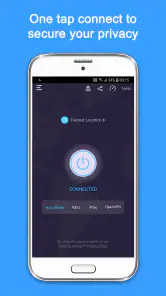
First off, let's talk about ease of use. VPN - Super Unlimited Proxy is as straightforward as it gets. You download it, fire it up, and with a single tap, you're connected. No complicated settings or confusing jargon here. It's perfect for those of us who just want to get online without jumping through hoops.
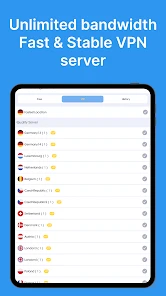
What really grabbed my attention was the app's speed. We've all been there, waiting for pages to load while using a VPN, but with this app, things zipped along quite nicely. Streaming videos or browsing social media felt just as quick as if I weren't using a VPN at all. That's a huge plus when you're trying to binge-watch your favorite series without buffering every five minutes.
More From Our News Desk

Weather by Xiaomi Review: Clear at a Glance, Less Clear Up Close

X Under Pressure: Can It Recover When Posting Goes Wrong?

Clash of Clans Is Won Between the Battles

Android Auto Makes the Case for Quieter Car Software

MobiOffice: Transforming Mobile Productivity with Seamless Integration

EA SPORTS FC™ Mobile Soccer: Redefining Mobile Sports Gaming
Getting more from the simple setup
That quick connection is especially handy when I do not want to make a series of decisions before checking one thing online. I can keep the goal narrow—protect a short browsing session on an unfamiliar network—rather than changing settings just because they are available. A repeatable default is easier to remember, and it makes problems easier to notice: if a page suddenly fails, I can test the connection before changing several things at once.
For someone who switches frequently between public Wi-Fi and mobile data, the useful habit is not to assume the VPN will behave identically through every transition. I check the app after a network change and reconnect if needed. That simple check is more actionable than repeatedly cycling through location choices, which can introduce a new variable without showing whether the original issue was the hotspot, the app, or the service I was trying to reach.
Security and Privacy Features
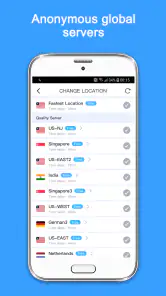
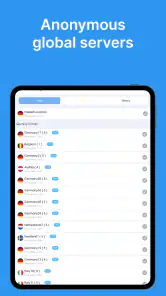
Now, onto the meat of the matter: security. The app boasts a no-log policy, meaning it doesn’t keep track of what you’re doing online. This is a big deal if you're concerned about privacy. Plus, it offers a bunch of server locations, so you can virtually hop around the globe to access content that might be restricted in your region.
Another thing worth mentioning is the app's ability to mask your IP address. This is crucial if you're connecting to public Wi-Fi networks, as it adds an extra layer of protection against potential hackers and snoopers. It's like having a digital cloak of invisibility, and who wouldn't want that?
What I would check before making it a habit
I would pay attention to the connection state and the purchase choices rather than assuming every part of the app works the same way for every session. The free download makes it easy to try, while optional in-app purchases mean it is worth reading each screen before confirming a purchase. If I only need occasional protection on shared Wi-Fi, I would first see whether the free experience meets that need instead of paying simply because an upgrade is visible.
I would also keep the app’s privacy claims in perspective. A VPN can reduce what a local Wi-Fi operator can see about the connection, but it shifts trust toward the VPN provider and does not make the destination website harmless. I would still avoid opening suspicious links, sharing sensitive details on unfamiliar pages, or assuming that a changed IP address makes an account anonymous.
Settings and small habits that help
I would keep the workflow repeatable instead of choosing a new location every time without a reason. Start with a nearby option for ordinary browsing, then change locations only when a particular site or service calls for it. If a page behaves oddly, disconnecting and reconnecting once is a sensible first check; repeatedly switching servers can make it harder to tell whether the issue is the VPN, the site, or the network itself.
One useful trade-off to remember is that a VPN changes how your traffic reaches websites, but it does not make every online action private or safe. I still avoid entering payment details on unfamiliar pages and keep account protections in place. For shared Wi-Fi, the app can add a layer between your device and the local network, but it cannot rescue you from phishing or a compromised account.
A sensible way to troubleshoot interruptions
When something stops loading, I would troubleshoot in a fixed order instead of jumping straight to a new provider. First, check whether the VPN is connected; then try the page again. If it still fails, disconnect briefly to see whether the issue is tied to the VPN, and reconnect before returning to ordinary browsing on public Wi-Fi. I would not enter private information during an unprotected test on a shared network.
This is a small workflow, but it helps distinguish a VPN problem from a site or network problem. It also avoids changing several settings at once and then forgetting which change mattered. If a particular service keeps refusing the connection, I would treat that as a compatibility limit rather than spending a long time rotating locations in the hope that one will work.
Where it fits among VPN options
Compared with a VPN that exposes many manual controls, this app is easier to start using and less demanding to manage. That makes it appealing for casual browsing, especially for someone who wants a quick connection rather than a networking project. A paid service with clearly documented advanced controls may be a better fit for work access, specialized routing, or users who want to inspect and adjust more of the connection behavior.
It is also worth separating everyday streaming from guaranteed access to a particular catalog. The app can offer location choices, but a changed virtual location does not promise that every platform will accept the connection. If a service blocks VPN traffic, changing locations may not solve it; I would not subscribe or rely on this app solely to reach one specific video library.
Choosing between a quick app and a specialist service
The usual alternative is either a VPN with a more involved control panel or a service selected for a particular requirement, such as company access or a consistent streaming setup. I would choose this app when speed of setup matters more than fine adjustment. I would lean toward a specialist option when I need to understand particular connection settings, follow an organization’s security rules, or troubleshoot a demanding setup with support tailored to it.
There is a trade-off in both directions. A simpler app saves time and is less intimidating, but it may not satisfy someone who wants to inspect and manage every detail. A more configurable service can offer a better fit for that person, but its extra choices are not automatically useful for someone who just wants to read messages on café Wi-Fi. The right choice depends on the job, not on how many controls an app displays.
Who should try it, and what to expect
The app has a 4.7 average from around 1.8 million ratings, and it has passed 100 million installs, so it is clearly familiar to a large audience. It is free to download, rated for Everyone, and currently at version 2.18.0, with Android 8.0 or later required. Optional in-app purchases range from $6.99 to $79.99 per item, so I would check the purchase screen carefully before choosing anything; the free starting point does not mean every option is free.
For a realistic use case, imagine opening a laptop or phone in a hotel lobby to check travel messages. I would connect through the app first, use the session for routine reading, and switch it off later if a site or service stops working as expected. That is a practical middle ground: less exposure on an unfamiliar hotspot without assuming that a VPN removes every risk. Someone who needs strict company-approved protection should use the tool their organization specifies instead.
Who benefits most—and who may be happier elsewhere
I think it makes the most sense for someone who wants a low-effort option for browsing on public Wi-Fi, occasional travel use, or routine reading away from home. It is also approachable for a first-time VPN user who would rather build one useful habit than learn a lot of networking terminology. If the main goal is a quick connection before checking email or looking up directions, its straightforward approach is a real advantage.
I would look elsewhere if I needed dependable access to a particular streaming library, advanced controls for a work environment, or a setup that an employer has formally approved. I would also skip relying on any VPN as my sole answer to privacy concerns. The app is a tool for a specific part of a safer browsing routine, not a substitute for careful account and device practices.
Does It Live Up to the Hype?
In terms of performance, VPN - Super Unlimited Proxy is right up there with some of the best. It manages to provide a seamless experience without compromising on speed or security. It's like having the best of both worlds, and for a free app, that's saying something.
However, if you're someone who needs a VPN for more advanced tasks, like torrenting or accessing highly restricted content, you might find the features a bit limited. But for everyday browsing and streaming, it's more than adequate.
In conclusion, if you're looking for a reliable, fast, and user-friendly VPN app, you might want to give this one a shot. It's not perfect, but it gets the job done without any fuss. So next time you're sipping on a latte and surfing the net, you can do so with peace of mind knowing your data is secure.
My take after settling into a routine
For me, the app makes the most sense as a low-friction tool I can use when a network is unfamiliar, rather than something I leave on automatically without thinking. The strongest habit is simple: connect before browsing, keep expectations realistic, and disconnect or troubleshoot when a service behaves differently. That keeps the convenience while avoiding the false confidence that can come from seeing a VPN icon.
If you want an approachable start and do not need extensive configuration, I can see why this app is popular. If privacy requirements are central to your job, you need detailed technical assurances, or one particular streaming service must work every time, I would compare specialist alternatives first. For casual hotspot use and ordinary browsing, though, its low effort is the main reason I would recommend giving it a try.
The practical verdict
My recommendation is to judge it by a small, clear task: can it make your ordinary public-network routine easier without getting in the way of the sites you use? Try the basic workflow, pay attention to whether your usual browsing behaves normally, and be deliberate about any purchase prompt. That gives you a useful answer without assuming that popularity or a simple interface guarantees a perfect fit.
Used with realistic expectations, it can be a handy part of a travel or café routine. Used as a promise of total anonymity, guaranteed streaming access, or workplace-grade protection, it is the wrong tool for the job. I would recommend it to casual users who value convenience, while pointing power users and people with strict requirements toward a service designed around those needs.
VPN - Super Unlimited Proxy Frequently Asked Questions
Can VPN - Super Unlimited Proxy help protect me when using public Wi-Fi?
VPN - Super Unlimited Proxy is presented as a way to secure your internet connection, which can be useful when browsing through a public Wi-Fi hotspot. A VPN routes traffic through a remote server and is intended to make the connection more private. It is still sensible to use strong passwords, keep your device updated, and avoid sharing sensitive information with untrusted websites.
Does VPN - Super Unlimited Proxy work for streaming or accessing region-restricted content?
The app is designed to provide unrestricted internet access, and a VPN can sometimes help users reach content that is limited by location by routing a connection through a remote server. Whether a particular service works can depend on the service’s own rules and its ability to recognize VPN traffic. Check the relevant service terms, and remember that connection quality may vary.
Is VPN - Super Unlimited Proxy suitable for beginners?
VPN - Super Unlimited Proxy is a utility app for people looking to use a VPN on a phone or tablet. Its purpose is straightforward: connect through a VPN to make internet use more private. If you are new to VPNs, review the app’s settings and any permissions it requests before connecting, and consider whether its features and purchase options match the way you plan to use it.
Is VPN - Super Unlimited Proxy appropriate for children?
The app has an Everyone content rating, but that rating does not mean every online activity accessed through a VPN is suitable for every child. Parents may want to discuss safe browsing, review device settings, and supervise internet use as appropriate. A VPN can change how a connection is routed, but it is not a substitute for parental controls or guidance.
What operating system does VPN - Super Unlimited Proxy require?
On Android, VPN - Super Unlimited Proxy requires Android 8.0 or later. Check your device’s operating system before downloading so you can confirm compatibility. The app is also available for iOS devices, making it an option for users across both mobile platforms. Installing it from a trusted app store is a sensible way to get the intended app.
Pros
- Fast connection speeds for streaming.
- Easy to use with one-tap connect.
- No registration required for use.
- Supports multiple devices and platforms.
- Unlimited data usage on free plan.
Cons
- Contains ads in free version.
- Limited server locations in free plan.
- No live customer support available.
- May slow down internet speed sometimes.
- Connection can drop unexpectedly.
- Category
- Tools
- Version
- 2.18.0








