Voice Recorder Sound Recorder
- 2.14K
- 4.7
- Installs
- 1.00M
- Price
- Free
Screenshots
Analysis by Reviewed
Have you ever found yourself in a situation where jotting down notes just doesn't cut it? Enter the Voice Recorder Sound Recorder, an app that transforms your smartphone into a handy recording device. I've spent some time tinkering with this app, and I’m excited to share my thoughts with you!
Why Choose a Voice Recorder App?
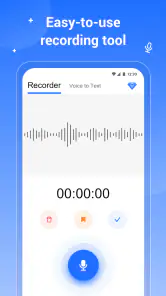
In the hustle and bustle of our daily lives, capturing thoughts or important information can sometimes be overwhelming. Voice Recorder Sound Recorder comes to the rescue by allowing you to record anything, anywhere, be it a lecture, meeting, or even a personal memo. The app’s user-friendly interface makes it super easy to navigate, and trust me, you don't need to be a tech wizard to get the hang of it.
Features That Stand Out
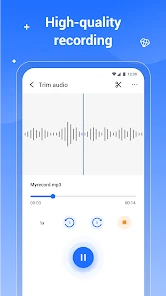
Let’s dive into what makes this app a standout choice. First off, it offers high-quality audio recordings, which is a big deal if you're someone who relies on clear sound playback. The app supports various audio formats, so compatibility isn't an issue, regardless of where you wish to play your recordings.
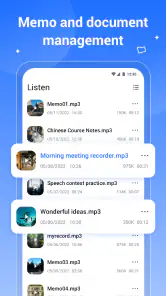
One feature I found particularly useful is the ability to organize recordings into folders. It’s like having a digital filing cabinet right in your pocket! Not to mention, the search functionality is pretty slick, allowing you to find specific recordings without scrolling endlessly.
Usability and Design
Design-wise, the app keeps things simple, which is exactly what you want in a utility app. It doesn't bombard you with unnecessary graphics or animations—everything is straightforward and intuitive. Recording is just a tap away, and you can even pause and resume recordings, which is perfect for those ‘oops’ moments when you accidentally hit record too early or need to skip a bit of silence.
And speaking of silence, the app includes a noise reduction feature that helps in minimizing background noise. This is particularly handy when you're recording in less-than-ideal environments like a busy café or a windy park.
The Final Verdict
All things considered, the Voice Recorder Sound Recorder is a robust app that stands tall among its competitors. Its simplicity, coupled with practical features, makes it a must-have tool for students, professionals, and anyone in between. Whether you're capturing a fleeting thought or an extensive lecture, this app has got your back. So, if you’re in the market for a reliable voice recording solution, I’d say give this app a whirl!
More From Our News Desk

Clash of Clans Is Won Between the Battles

Android Auto Makes the Case for Quieter Car Software

MobiOffice: Transforming Mobile Productivity with Seamless Integration

EA SPORTS FC™ Mobile Soccer: Redefining Mobile Sports Gaming

How Microsoft OneDrive Became a Mobile Productivity Giant

How Google Translate Breaks Language Barriers Effortlessly
So, there you have it, my take on this nifty little app. With its straightforward functionality and impressive quality, it's definitely worth checking out. Who knew recording audio could be so effortless and, dare I say, fun?
Voice Recorder Sound Recorder Frequently Asked Questions
What features does the Voice Recorder Sound Recorder offer?
The Voice Recorder Sound Recorder is equipped with a variety of features designed to cater to all your audio recording needs. It offers high-quality sound recording, easy-to-use interface, background recording, and the ability to share recordings via email or social media. Moreover, it supports multiple audio formats for saving files, making it versatile for different uses.
Is the Voice Recorder Sound Recorder app free to use?
Yes, the Voice Recorder Sound Recorder app is free to download and use. However, it may include in-app purchases for advanced features or to remove ads. Users can enjoy the basic functionalities without any cost, but premium versions may offer additional tools for those who require more advanced recording options.
Can I use the Voice Recorder Sound Recorder for professional purposes?
Absolutely, the Voice Recorder Sound Recorder is suitable for professional purposes. It provides high-quality audio output, making it ideal for recording meetings, interviews, lectures, and more. The app's ability to handle long recordings without losing quality makes it a reliable tool for professionals who need dependable audio recording solutions.
How user-friendly is the Voice Recorder Sound Recorder app?
The Voice Recorder Sound Recorder app is designed with user-friendliness in mind. Its intuitive interface allows users to start recording with just a tap. Features such as easy playback, edit, and sharing options are tailored for both beginners and experienced users, ensuring a smooth and hassle-free experience.
What should I do if I encounter problems with the app?
If you encounter any problems with the Voice Recorder Sound Recorder app, you can first check the app’s FAQ section or help guide for troubleshooting tips. If the issue persists, reaching out to the app’s customer support via email or through the app itself is recommended. The support team is usually prompt in handling issues and providing solutions.
Pros
- Easy to use interface.
- High-quality audio recording.
- Supports multiple audio formats.
- Allows background recording.
- Offers cloud backup options.
Cons
- Contains ads in free version.
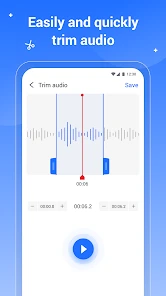
- Limited editing features.
- Requires in-app purchases for premium.
- No noise cancellation feature.
- Large files may slow device.
- Category
- Music & Audio
- Version
- 1.2.8











