

Voice Recorder & Audio Notes
- 1.00
- 4.6
- Installs
- 10.00K
- Price
- Free
Screenshots
Analysis by Reviewed
I like voice-recording apps that understand their job. They do not need to imitate a full music studio; they need to let me capture a thought quickly, find it later, and make a rough recording usable without turning the process into a project. Voice Recorder & Audio Notes takes that practical route. It is a free Music & Audio app from Simplesoft Studio, built around recording speech, trimming audio, adding tags, and keeping recordings organized.
After using it as a lightweight audio notebook, my overall view is clear: this is a focused recorder for everyday spoken notes, not a replacement for a complete editing suite. That distinction matters. If I want to remember an idea while walking, save a short interview answer, record a rehearsal reminder, or keep several voice memos sorted by subject, its compact feature set makes sense. If I need multitrack production, advanced cleanup, or a broad collection of studio tools, I would look elsewhere.
What makes the recording workflow useful
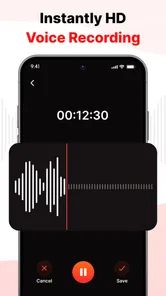
The most valuable part of Voice Recorder & Audio Notes is the short path from opening the app to creating a recording. A voice recorder earns its place on my phone when it removes hesitation. I do not want to configure a complicated session before saying a sentence. The app’s purpose is immediately understandable, and that makes it suitable for spontaneous notes as well as planned recordings.
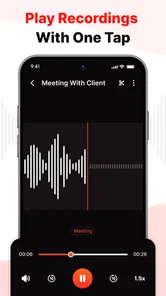
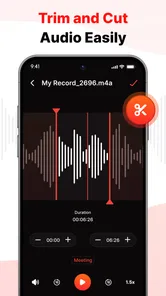
The trim function adds an important layer of control. A recording often contains a few seconds of silence at the beginning, a false start, or an unnecessary ending. Being able to cut those sections means I can keep the useful part without recording everything again. That is especially handy when I am sending a spoken reminder to someone or keeping a clean reference for myself.
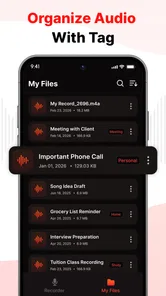
I also found the organization tools more important than they may first appear. A recorder can be excellent at capturing audio and still become frustrating once the number of files grows. Tags give me a way to separate ideas by project, class, meeting, rehearsal, or personal reminder. Instead of relying only on memory or a vague filename, I can create a simple system that reflects how I actually use the recordings.
My preferred workflow is to record first and organize immediately afterward. I give the clip a useful identity, trim obvious dead space, and attach a tag while I still remember why I made it. That small habit prevents the common problem of collecting a pile of unnamed audio and promising myself I will sort it later. In practice, the app works best when I treat tags as part of recording rather than as an occasional cleanup task.
There is also a useful distinction between capture and preservation. A quick spoken note does not need the same treatment as an important interview or a long lecture. For casual material, I can keep the process fast. For something I may need later, trimming and tagging provide a modest but effective second step. The app therefore fits both quick capture and basic personal archiving, provided I keep my expectations within its scope.
More From Our News Desk

 Gmail
GmailGmail in a Busy Inbox: Who Benefits Most?
From first account to crowded workday, Gmail earns its place through dependable search and flexible sorting—but its best fit depends on how much inbox maintenance you can tolerate.

 Prime Video
Switching to Prime Video: What Changes in Your Viewing Routine
Prime Video can make a compelling second home for streaming, but switching means learning a different catalog, rental layer, and route from browsing to playback.

 Universal TV Remote Control
Universal TV Remote Control Works Best as a Reliable Backup
A phone remote earns its place through quick setup and reliable habits. Here is how to get more from Universal TV Remote Control—and where its limits show.

 Weather - By Xiaomi
Weather by Xiaomi Review: Clear at a Glance, Less Clear Up Close
Xiaomi’s weather app makes everyday forecasts quick to scan, but its calm surface can leave useful details and recovery paths harder to find than they should be.

 X
XX Under Pressure: Can It Recover When Posting Goes Wrong?
A resilience-focused review of X, examining setup, mistaken posts, interruptions, weak connections, and the gaps that matter when recovery needs to be dependable.

 Clash of Clans
Clash of Clans Is Won Between the Battles
Its raids are quick; its community is a long-term project of coordination, teaching, rivalry, and shared responsibility—with all the friction that entails.
Latest News



A realistic day-to-day example
Imagine that I am commuting and suddenly remember three changes for a work presentation. Typing them into a phone can be awkward, especially when the thought arrives as a connected explanation rather than a short list. I can record the idea naturally, stop when I am finished, and later remove the empty opening or closing. A tag such as “presentation” makes the note easier to locate when I sit down to revise the slides.
The same approach works for students who want to capture a question after class, musicians who need to preserve a melody idea, and families who want a spoken reminder that is faster than writing. It is also useful for people who think aloud. A voice note can preserve the order and tone of an idea in a way that a hurried text entry may not.
That example also shows the app’s main strength: it reduces friction without pretending to solve every audio problem. The recording is the central object, trimming is a practical correction, and tags provide a basic filing system. Each feature supports the next one instead of pulling the user toward a complicated editing workflow.
Why trimming and tags matter together
Trimming alone is helpful, but its real value appears when combined with organization. A short, clean clip with a meaningful tag is easier to revisit than a longer recording that contains several false starts and no clear context. I would not overlook this combination if I were comparing the app with a bare-bones recorder that only creates files and leaves the rest to the phone’s storage browser.
My advice is to use a small number of consistent tags rather than inventing a new label for every recording. Broad groups such as projects, study, music, errands, and personal ideas are easier to maintain. The app gives me the organizational tool, but the quality of the system still depends on how consistently I apply it.
Another useful habit is to trim only what is clearly unnecessary. I would remove silence, accidental taps, or a repeated opening, but I would keep natural pauses that help me understand the thought later. Over-editing a personal note can make it harder to follow. Voice Recorder & Audio Notes is most effective when I use its editing ability to clarify a clip rather than polish it beyond recognition.
Where the app fits among familiar alternatives
The usual alternative is the basic recorder already found on a phone. That option may be enough for a single memo, and some people will prefer it because there is nothing new to learn. Voice Recorder & Audio Notes becomes more appealing when I want a clearer routine around recordings, particularly trimming and tagging. The difference is not that every recording sounds dramatically better; it is that the material can be handled more deliberately after capture.
At the other end are full audio editors and music-production apps. Those tools are better choices for layered projects, detailed sound shaping, complex arrangements, and serious post-production. They also bring more controls, which can be useful but can slow down a person who simply wants to save a spoken thought. I see this app as the middle ground between a one-button memo tool and a studio-oriented editor.
That middle position is both its appeal and its limitation. It gives me more control than a disposable recording utility, but it does not try to become an all-purpose audio workstation. Someone choosing it should value speed and order more than technical depth. If the main goal is to manipulate music, repair difficult recordings, or build a finished audio production, a specialized editor would be the better investment of time.
The app is available at no cost, which makes it easy to test without committing to a purchase. It is rated for Everyone, so its intended use is broad rather than restricted to a specialist audience. The current version is 6.0, and the app supports Android 7.0 or later, a useful point to check before installing it on an older device.
Its reach is still relatively modest compared with the biggest audio utilities: the app has over ten thousand installs, an average rating of 4.6 from around thirty-five ratings, and one written review shown with its listing. I read that as encouraging interest rather than definitive proof that it will suit every recording setup. A small catalog footprint does not make the app poor, but it does mean I would judge it by my own workflow rather than by popularity alone.
The weakness I noticed in a focused design
The same simplicity that makes the app approachable can feel limiting once my needs become more demanding. Trimming and tagging are useful, but they do not replace a deeper editing environment. When I want to shape a recording extensively, compare multiple takes, or work on a layered audio project, I would quickly reach for another tool.
I would also avoid treating tags as a substitute for a complete project library. Tags can tell me what a recording concerns, but they do not automatically provide the context that I might need months later. I still need to speak clearly at the beginning of an important memo or use a recognizable title. A tag such as “ideas” may be too broad if I create many clips under it.
There is a practical trade-off here. The app keeps the workflow approachable by concentrating on core recording management, but that means the user must supply some discipline. I need to choose sensible labels, review important clips, and avoid assuming that a quick recording will explain itself forever. For casual use, that is a minor responsibility. For research, journalism, or critical documentation, I would want a more comprehensive process around the app.
Audio quality expectations deserve the same caution. A recording app can only be as useful as the conditions in which I record. A quiet room and a clear speaking distance will usually matter more to a short voice note than an impressive list of controls. I would not choose this app on the assumption that trimming can repair every noisy or distant recording. Editing the edges of a clip is different from restoring difficult sound.
For that reason, I would make a quick test recording before relying on it for an important task. I would listen back with the same headphones or speaker I normally use, check that my voice is understandable, and confirm that my tagging routine feels natural. This is a better test than simply opening the app once and deciding based on appearance.
Who should use it, and who should skip it
I think Voice Recorder & Audio Notes is a strong fit for people who want a personal audio notebook. It suits students, writers, musicians collecting rough ideas, busy professionals saving spoken reminders, and anyone who prefers talking to typing. It is also a sensible choice for users who find a phone’s default recorder too bare because they want to trim and organize clips afterward.
The app is particularly attractive when the recordings are short, personal, and varied. A tag-based system can separate several parts of daily life without requiring a complicated database. I can imagine using it for errands, language practice, creative prompts, meeting reflections, and quick explanations to myself. The value comes from repeated small uses rather than one ambitious recording project.
I would skip it if I need a serious production environment. Podcasters working with several audio sources, musicians arranging complete tracks, and users who need extensive restoration should choose a purpose-built editor. I would also hesitate to make it the only tool for high-stakes documentation until I had tested it thoroughly in the exact conditions required. A simple recorder can be dependable for ordinary notes while still being the wrong choice for a demanding professional workflow.
Privacy-conscious users should also make a deliberate decision about what they record and how they manage it on their device. Spoken notes can contain sensitive information more easily than typed reminders because people tend to explain themselves in greater detail. I would avoid recording confidential conversations casually, and I would review important clips regularly instead of letting a large archive accumulate without thought.
One question many people have is whether the app is suitable for an older Android phone. Because its minimum requirement is Android 7.0, it is not limited to only the newest devices. Compatibility is still worth checking against the particular phone, but the stated requirement makes it relevant to a wider range of Android users than apps built only for recent systems.
Another practical question is whether it can replace a dedicated audio editor. In my view, no. It can handle the everyday tasks that make a voice note more useful, especially cutting unwanted sections and adding tags, but I would not expect it to cover advanced production needs. That is not a flaw in its intended design; it is the boundary that keeps the app straightforward.
Users may also wonder whether tagging is worth the extra effort for a small collection. I think it is, as long as the tags remain simple. Even a handful of recordings can become difficult to interpret when they were made weeks apart. A consistent label gives future me a clue about the recording’s purpose, while a short spoken introduction can preserve the details that a tag cannot.
Finally, I would recommend deciding in advance what deserves trimming. If every clip receives extensive editing, the app may feel slower than a basic recorder. If I trim only obvious mistakes and silence, the process stays quick. That balance is the key to getting value from the app without turning a simple voice memo into a miniature editing session.
My verdict on Voice Recorder & Audio Notes
Voice Recorder & Audio Notes succeeds because it stays close to a real need: capture speech, make the result tidier, and keep it findable. I appreciate that the recording does not have to remain a rough, forgotten file. Trimming gives me a quick cleanup step, while tags encourage a more reliable archive. Together, those features make the app more useful than a recorder that stops working the moment I press save.
My criticism is equally straightforward. The app’s focused design will not satisfy anyone searching for a complete audio workstation, and organization still depends on the user applying sensible labels and recording enough context. It is not a magic solution for poor recording conditions or a replacement for careful handling of important material.
For everyday voice notes, I would recommend it to a friend who wants something more capable than a bare recorder but less intimidating than a professional editor. The free price removes the main barrier to trying it, and the Everyone rating makes its audience broad. If your priority is quick recording with just enough cleanup and organization to keep audio useful, this app is a sensible, focused choice.
Voice Recorder & Audio Notes Frequently Asked Questions
Is Voice Recorder & Audio Notes free to download?
Voice Recorder & Audio Notes is free, so you can try its recording and audio-management tools without paying to download it. It is a Music & Audio app developed by Simplesoft Studio, with a general-audience age rating. If you are choosing a recorder for everyday notes, those basics make it easy to consider alongside other simple voice-recording apps.
What is Voice Recorder & Audio Notes used for?
Voice Recorder & Audio Notes is designed for capturing spoken audio and organizing it for later use. Its store summary highlights recording voice, trimming audio, organizing with tags, and managing recordings. It can suit meetings, lectures, interviews, personal reminders, ideas, and voice memos. Its note-focused approach makes it more practical than a basic recorder when you want to keep recordings organized or quickly find important content again.
Does Voice Recorder & Audio Notes work without an internet connection?
The core recording function generally works offline, which is convenient when you are in a classroom, traveling, or somewhere with limited connectivity. You can record audio directly on your device and access saved files later. However, features such as cloud synchronization, sharing through online services, automatic transcription, or other connected tools may require an internet connection, depending on the app version and device.
What audio quality and recording options does the app provide?
Voice Recorder & Audio Notes is primarily intended for clear voice capture rather than professional music production. The available quality, format, and recording settings can vary according to the operating system and installed version. Before recording an important interview or presentation, it is worth checking the settings, testing the microphone, and confirming that you have enough storage space for longer recordings.
Can I edit, organize, and share my recordings?
The app offers a convenient way to manage recorded audio and voice notes, making it easier to review files instead of searching through an unorganized list. Its summary specifically mentions trimming audio and organizing recordings with tags. Depending on the version, you may also be able to rename recordings, add notes, or share files with other apps. Sharing options can differ between Android and iOS, so verify available export options before relying on it for professional work.
Pros
- Simple interface makes recording and saving notes quick.
- Supports clear voice recordings for meetings
- ideas
- and reminders.
- Audio files can be organized for easier access later.
- Useful for hands-free note-taking when typing is inconvenient.
- Lightweight design should work well on most modern devices.
Cons
- Recording quality may depend heavily on the phone’s microphone.
- Long recordings can consume considerable storage space.
- Advanced editing tools may be limited compared with studio apps.
- Background recording behavior can vary by device and system settings.
- Some features or export options may require in-app purchases.











