VINELink
- 1.34K
- 3.6
- Installs
- 1.00M
- Price
- Free

Screenshots
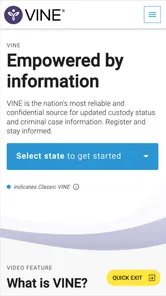
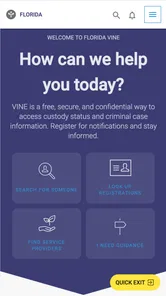
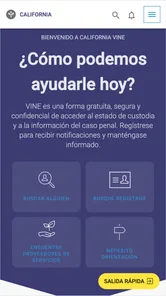
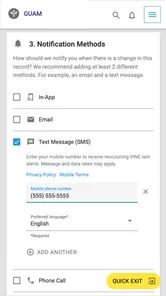
Analysis by Reviewed
When someone I care about is in the justice system, even a basic question about custody status can be hard to answer. I find VINELink most useful as a focused place to begin that check, rather than as an all-purpose legal resource. It is available on Android and iOS, and its narrow purpose is part of its value: I can look for a record and, when appropriate, arrange to follow status updates.
When a focused search helps
I’d consider this app when I need a place to begin checking custody information, especially if I’m helping a relative or friend keep track of someone in the justice system. It has a narrower purpose than a general search engine: instead of sending me through unrelated results, it is built around finding an inmate record and following status information. That focus is useful when I already have a name or ID number to work with.
A practical tip is to gather identifying details before searching. A common name can make any record lookup harder, so an ID number, if you have one, can help distinguish the right person. If you only know the facility, that can also guide the search. I would still double-check that a result refers to the person I mean before acting on it; an app search is a starting point for staying informed, not a substitute for careful confirmation.
Getting to Know VINELink
For me, the main point of VINELink is having a mobile way to look for custody information and follow relevant updates. It is designed for people who need to check on someone, not for reading every detail of a case or getting legal advice. That distinction is worth keeping in mind before relying on any result: a custody status can answer one immediate question, but it does not explain the full circumstances behind it.
Speed expectations and everyday use
For a straightforward lookup, the appeal is that I can search directly rather than work through a broad web search and sort through unrelated pages. I would expect the process to feel most efficient when I have a clear name or identification number ready. The useful measure of speed here is not just how quickly a screen opens, but how quickly I can get to the relevant record and understand what it says.
Picture checking on a family member during a busy day, then needing to get back to work or handle other responsibilities. Search can provide a focused way to check, while notifications can reduce the need to revisit the app repeatedly. I’d treat an alert as a prompt to look again and understand the change, rather than as a reason to assume I know every detail of what has happened.
Features That Stand Out
One of the key features of VINELink is its real-time notifications. You can sign up for alerts via phone, email, or text whenever there’s a change in an inmate’s status. This is particularly useful if you need to keep track of court dates or release information. Plus, the app is user-friendly. It’s designed to be intuitive so that even those who aren't tech-savvy can navigate it with ease.
More From Our News Desk

Weather by Xiaomi Review: Clear at a Glance, Less Clear Up Close

X Under Pressure: Can It Recover When Posting Goes Wrong?

Clash of Clans Is Won Between the Battles

Android Auto Makes the Case for Quieter Car Software

MobiOffice: Transforming Mobile Productivity with Seamless Integration

EA SPORTS FC™ Mobile Soccer: Redefining Mobile Sports Gaming
Another noteworthy aspect is the app’s search functionality. You can search by the inmate’s name, ID number, or even the facility where they are held. This flexibility makes it easier to find the information you need without jumping through hoops.
There is a real trade-off between alerts and checking manually. Notifications can spare me repeated searches, but they also mean I need to choose a contact method I can reliably access and pay attention to the messages I receive. If I’m only making a one-time inquiry, a direct search may be simpler than setting up ongoing updates. If I’m monitoring a changing situation, alerts are more practical, though I would keep the relevant person’s details handy in case I need to search again.
Reliability, limits, and alternatives
Because the app centers on custody information, I would use it as a dedicated reference rather than expect it to answer every question about a case. It is not a replacement for speaking with a legal professional, contacting a facility when appropriate, or checking official case information when the issue is a court filing or legal deadline. The best choice depends on the task: VINELink is suited to monitoring status, while a direct call or another official channel may be better when I need clarification or guidance about what to do next.
Its performance also depends on having enough information to find the right record. If a search returns several possible matches, I would slow down and compare the details instead of selecting the first result. That extra care matters more than shaving a few seconds off the lookup. For heavy use, such as checking repeatedly during a stressful period, I’d lean on alerts where appropriate and reserve manual searches for confirming details, rather than treating repeated refreshing as proof that information has changed.
Using it without adding stress
A useful routine is to decide in advance what question I am trying to answer. If I need to know whether a record appears or whether a status has changed, a search or alert can help me check that specific point. If I need to understand what a change means for a hearing, release plan, or family decision, I would take that information to the relevant professional or official contact instead of trying to infer the next step from a brief status update.
This also helps prevent an unhelpful cycle of checking. In a tense situation, it is tempting to reopen an app repeatedly and hope for certainty, but a status lookup cannot provide more detail than the record itself contains. I would set a sensible checking routine, keep the identifying information in a safe place, and use notifications if continued monitoring is genuinely needed. That approach makes the app a practical reference rather than the center of an already stressful day.
My Experience
When I first downloaded VINELink, I was a bit skeptical. I mean, how often does an app like this actually deliver on its promises? But after using it, I was pleasantly surprised. The setup was a breeze, and I was able to find the information I needed in no time. The real-time alerts were particularly impressive, ensuring I was always in the loop with the latest updates.
One thing I truly appreciate is the app’s commitment to privacy. It doesn’t store any of your personal information, which is a huge plus in today’s age of data breaches and privacy concerns.
Device fit and who should skip it
VINELink is a free Books & Reference app from Vinelink, with an Everyone age rating. It has been available since April 22, 2013, and its current version is 2.37; the minimum operating system requirement is 7.0. It has a 4.2 average from around 5.9 thousand ratings, with around 1.3 thousand written reviews and over 1 million installs. Those figures suggest an established audience, but they do not guarantee that every search will be relevant to every user’s needs.
On the device side, I would check compatibility before planning to depend on the app, especially if I use an older phone. A minimum operating system requirement is a practical threshold, not a promise that every device will feel equally responsive. I also would not judge reliability only by how quickly the app opens: the useful outcome is finding the correct record and being able to interpret the update carefully. If the app is unavailable on a device I rely on, a direct official channel is a more sensible backup than assuming a mobile search is the only route.
I would not choose it if I wanted broad legal research, help interpreting a case, or a general directory of public services. It is most useful when the goal is checking inmate custody status and receiving related notifications. If I were on an older device, I’d check the operating system requirement before trying to install it. And if the person I’m looking for is difficult to identify, I’d prepare the clearest available details first rather than expecting the app to resolve ambiguity on its own.
Who it suits, and what it cannot replace
I think the best fit is someone who has a concrete reason to follow a particular custody record: a relative coordinating family communication, a friend who wants to stay informed, or a professional who needs a convenient reference point alongside other work. It is less compelling for someone who only wants general background about criminal justice, wants to search court documents, or expects an app to explain legal rights. Those needs call for different resources, and trying to make one custody-focused tool do all of them can lead to confusion.
Compared with a general web search, this app gives the task a more direct focus and avoids making the user sort through unrelated pages. Compared with calling a facility, it can be more convenient for a routine check, while a call may be the better option when a record is unclear or a time-sensitive answer needs human clarification. I would treat these options as complementary rather than competing: use the app to look for status information, then turn to an official person or source when the decision depends on context.
One practical detail I would keep in mind is that a notification is not the same thing as a complete explanation. If a message arrives while I am away from home, I would note the change, reopen the relevant record when I can, and verify that I am looking at the right person before passing the information along. That small pause is especially valuable when family members are coordinating plans based on what they believe has changed.
Final Thoughts
In summary, if you ever find yourself needing to track inmate information, VINELink is an indispensable tool. Its easy-to-use interface, coupled with real-time notifications, makes it a reliable companion for anyone navigating the justice system. Whether you’re a concerned family member or a legal professional, this app is a must-have in your toolkit.
So, give it a try and see for yourself how it can simplify the complexities of staying informed about inmate statuses. Trust me, it’s worth the download!
VINELink Frequently Asked Questions
What should I know before downloading VINELink?
VINELink is a free Books & Reference app from Vinelink and the mobile version of VINE, the National Victim Notification Network. It is intended to help people access information about offender custody status and notifications. The app is rated for Everyone, so it is suitable for a broad audience, though the subject matter may be sensitive for some users.
What is VINELink and how does it work?
VINELink is a comprehensive online platform that provides users with access to timely and reliable information about the status of offenders. It is widely used by victims of crime to stay informed about the custody status of offenders. Users can register for notifications to receive updates via phone, email, or text message. The service is free and ensures privacy and confidentiality of the users.
How do I register for notifications on VINELink?
To register for notifications on VINELink, users need to visit the VINELink website or use the VINELink mobile app. Once there, you can search for the offender using their name or ID. After locating the offender, you can choose to receive notifications about their custody status via phone, email, or text. It’s essential to provide accurate contact information to ensure you receive timely updates.
Is VINELink available as a mobile app?
Yes, VINELink is available as a mobile app for both Android and iOS devices. The app allows users to search for offenders, register for notifications, and receive updates directly on their mobile devices. This makes it convenient for users to stay informed about the status of offenders anytime, anywhere. The app is user-friendly and mirrors the functionalities of the web version of VINELink.
Will VINELink work on my phone?
VINELink supports Android devices running version 7.0 or later, making it worth checking your phone’s operating system before downloading. The app is available for Android and iOS, so users on either platform can access its mobile features. Keeping your device’s software compatible can help you install and use the app as intended.
Pros
- Comprehensive access to inmate data
- User-friendly interface
- Real-time alerts and notifications
- Secure and reliable information
- Available on both Android and iOS
Cons
- Limited to certain states in the US
- Occasional app crashes reported
- Requires stable internet connection
- May have outdated information
- No offline access to data











