

Vimi: My Math Tutor
- 94.00
- 4.2
- Installs
- 100.00K
- Price
- Free

Screenshots




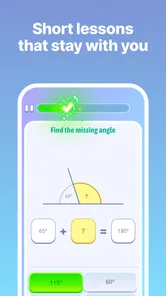
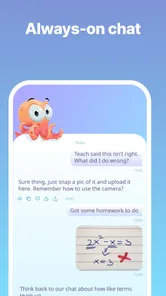


Analysis by Reviewed
I approached Vimi: My Math Tutor as something more useful than a camera that spits out an answer. It is an education app from Vimi AI Math Tutor, designed to act like a personal AI tutor, and that distinction matters. When I use it well, I am not just checking whether a result is correct; I am slowing down enough to understand where my method went wrong and what I should try next.
The app is free to start, has an Everyone age rating, and is available for Android devices running Android 8.0 or later. Its current version is 1.0.72. The basic appeal is easy to understand: open a math problem, work through it with help, and use the explanation to build confidence rather than relying entirely on a calculator. In practice, the value depends heavily on how deliberately I interact with it.
After spending time with it, my view is positive but measured. Vimi works best as a patient study companion, not as a replacement for learning the underlying method. It is particularly helpful when I am stuck on one step, reviewing homework, or trying to turn a wrong answer into a useful lesson. It is less convincing for someone who only wants instant results or expects a complete substitute for a teacher.
How I use Vimi for a normal study session
I use a normal study session to make the tutor a checkpoint rather than the starting point: I try the exercise, bring in the exact snag, and then see whether I can reproduce the reasoning on my own. That routine makes it easier to spot whether the difficulty is a forgotten rule or simply a rushed calculation. Next, I look at the small setup choices that can make repeated study sessions smoother.
Starting with the problem instead of the answer
My most reliable workflow begins before I ask for help. I first attempt the exercise on paper or in a notes app, even if I am unsure. That gives me something concrete to compare with the tutor’s explanation. If I open Vimi without making any attempt, it is too easy to read the solution passively and feel that I understand it without being able to reproduce the process later.
I then enter the problem and read the response from the beginning rather than jumping to the final line. This is especially important with algebra, where a small sign mistake or an incorrectly distributed bracket can affect every later step. The useful part is not simply seeing the final value. It is identifying the point where my approach stopped matching the correct sequence.
For a student, this creates a practical loop: attempt, compare, explain the mistake in your own words, and solve a similar exercise without assistance. I find that last step makes the biggest difference. Vimi can clarify the example in front of me, but the real test is whether I can transfer the idea to a new problem.
More From Our News Desk

 Gmail
GmailGmail in a Busy Inbox: Who Benefits Most?
From first account to crowded workday, Gmail earns its place through dependable search and flexible sorting—but its best fit depends on how much inbox maintenance you can tolerate.

 Prime Video
Switching to Prime Video: What Changes in Your Viewing Routine
Prime Video can make a compelling second home for streaming, but switching means learning a different catalog, rental layer, and route from browsing to playback.

 Universal TV Remote Control
Universal TV Remote Control Works Best as a Reliable Backup
A phone remote earns its place through quick setup and reliable habits. Here is how to get more from Universal TV Remote Control—and where its limits show.

 Weather - By Xiaomi
Weather by Xiaomi Review: Clear at a Glance, Less Clear Up Close
Xiaomi’s weather app makes everyday forecasts quick to scan, but its calm surface can leave useful details and recovery paths harder to find than they should be.

 X
XX Under Pressure: Can It Recover When Posting Goes Wrong?
A resilience-focused review of X, examining setup, mistaken posts, interruptions, weak connections, and the gaps that matter when recovery needs to be dependable.

 Clash of Clans
Clash of Clans Is Won Between the Battles
Its raids are quick; its community is a long-term project of coordination, teaching, rivalry, and shared responsibility—with all the friction that entails.
Latest News



A realistic everyday example
Imagine a student working after school on a worksheet about linear equations. They isolate the variable correctly on one exercise but become confused when the equation contains fractions. Instead of asking for every answer in a row, they can use Vimi on the difficult example, pay attention to how the fractions are handled, and then return to the worksheet with the app closed.
That approach keeps the app in a supporting role. If the student submits the entire worksheet without thinking, the same confusion will probably return during a test. If they use the explanation to name the rule they missed, Vimi becomes a revision tool rather than an answer dispenser.
What the first session feels like
The interface is approachable enough for a quick question, which is important when frustration is already high. I do not need a complicated lesson plan to begin. The conversational tutor format also feels more forgiving than searching through a long textbook chapter for the exact point of confusion.
Still, I recommend entering one focused problem at a time. A long block of exercises makes it harder to see which step deserves attention, and it encourages copying. A single question lets me inspect the reasoning, challenge a step that looks unclear, and then test myself before moving on.
Checking the app’s explanation actively
AI explanations should be read with attention, even when they sound confident. My habit is to ask myself three things: what rule was used, why was that rule appropriate here, and can I perform the next step without looking? If any answer is unclear, I treat that as a reason to ask for a simpler explanation or revisit the expression, not as proof that I have learned it.
This is also where Vimi compares well with a normal calculator. A calculator is excellent for verifying arithmetic, but it usually does not help me understand why I should rearrange an equation or choose a particular operation. Vimi is more useful during the reasoning stage, while a calculator remains valuable for the final numerical check.
Settings and habits worth checking
There is no benefit in changing options simply because they exist, but I do recommend reviewing the available app settings when you first install it. The practical questions are straightforward: is the text comfortable to read, are notifications useful or distracting, and does the app behave the way you expect when you return to a study session? Small adjustments can make repeated use less tiring.
I also suggest deciding in advance when you will use the tutor. If every difficult exercise immediately triggers an app session, independent problem-solving skills can weaken. A better rule is to spend a few minutes attempting the problem first, then use Vimi for a targeted explanation. That habit gives the app a clear job and prevents it from becoming an automatic shortcut.
Because the app is free to download but includes in-app purchases ranging from $19.99 to $154.90 per item, I would pay attention to any purchase screen before confirming anything. A family sharing a device should be especially careful about who can approve purchases. The free entry point makes it easy to try, but it does not mean every possible learning option is necessarily included without charge.
Faster patterns that preserve learning
Experienced use is less about rushing through problems and more about repeating a dependable pattern. I keep a short record of mistakes in my notes: the original problem, the step that failed, and the rule I should have applied. When the same type of question appears again, I consult that note before opening Vimi. This turns the app into a second layer of support instead of my first reaction.
Another useful pattern is to ask for help at the exact point of confusion. Rather than treating the whole exercise as mysterious, I identify the line I cannot justify. That makes the session more focused and gives me a better chance of noticing whether the issue is arithmetic, notation, or a misunderstood concept.
I also like alternating assisted and unassisted work. For example, I might use Vimi to understand one representative problem, solve two related exercises alone, and then return only to check the part that still feels uncertain. This is faster in the long run than requesting a full explanation for every item, because it builds recall while keeping the tutor available when genuinely needed.
Where it fits among other math tools
Compared with a textbook, Vimi is more immediate and conversational. I can address a particular sticking point without reading several pages first. A textbook, however, usually offers a carefully ordered curriculum, worked examples, diagrams, and practice sets that an AI tutor may not organize into a complete course. For long-term study, I would use both when possible.
Compared with a human teacher, the app is available when I am studying alone and does not make me feel embarrassed about asking a basic question repeatedly. A teacher is still better at recognizing broader patterns in my work, adapting a lesson to my habits, and deciding when I need a different explanation altogether. Vimi is a convenient supplement, not a replacement for personal instruction.
Compared with a search engine, the tutor format reduces the effort of sorting through unrelated pages. That convenience is useful late at night or during a short revision period. Search remains better when I need a formal definition, a visual demonstration, or several independent sources to compare. The right choice depends on whether my problem is a specific step or a wider topic.
Advanced use: turning explanations into practice
The strongest workflow I found is to convert every explanation into a small challenge. After reading the solution, I cover it and recreate the sequence from memory. Then I change one detail in the original problem, such as a coefficient or sign, and solve the altered version independently. This exposes whether I understood the method or merely recognized the answer.
Another worthwhile trade-off is detail versus speed. A short explanation may be enough when I only need to verify an arithmetic step. A more careful walkthrough is preferable when I am learning a new topic. I would not use the same level of assistance for every question; doing so makes simple revision unnecessarily slow and can make difficult material feel easier than it really is.
For parents, the most helpful role is not watching every interaction but asking the child to explain what changed after using the app. “What did you learn?” is more revealing than “Did it give you the answer?” The app can support a productive conversation, but the learner still needs to express the reasoning in their own language.
Limits I would keep in mind
AI tutoring has an unavoidable limitation: a polished explanation can still be misunderstood, and an apparently clear response may not match the exact method a class is currently teaching. If a teacher requires a particular notation or approach, I would compare Vimi’s reasoning with classroom notes rather than automatically replacing the assigned method.
Input quality is another practical concern. A poorly written expression, ambiguous notation, or missing symbol can lead to an explanation built on the wrong interpretation. I make a point of checking that the problem has been entered accurately before judging the response. This is a small step, but it prevents a great deal of confusion.
I would also skip Vimi if my main goal were advanced, structured exam preparation with a fixed syllabus, timed mock tests, and detailed progress reporting. The app’s personal-tutor concept suits questions and explanations; a dedicated course or teacher may be better for a complete study program. Likewise, students who already have strong independent methods may gain more from specialist tools focused on graphing, symbolic manipulation, or formal proof.
Who will get the most from it
I think Vimi is a good match for learners who regularly understand a lesson in class but get stuck when working alone. It is also useful for adults returning to math, parents helping with homework, and students who want a less intimidating way to ask for clarification. The low-friction format makes it easier to begin a short session instead of postponing the problem.
It is not the right fit for someone who wants to outsource every exercise, nor for a learner who will never attempt a problem independently. It may also frustrate users looking for a fully planned curriculum rather than on-demand assistance. Knowing that distinction before installing it will lead to a much better experience.
Adoption and practical value
The app has reached over 100 thousand installs and holds a 4.2 average from more than 400 ratings, with over 90 written reviews. Those figures suggest that the idea is resonating with a meaningful group of learners, while also reminding me that a rating cannot tell me whether the app fits my specific level or study style.
Its Everyone rating makes it broadly approachable, and the free starting price lowers the barrier to trying a few real problems. I would still treat the purchase options as a decision to make only after testing whether the explanations suit me. A tutor app is highly personal: what feels clear to one student may feel too brief or too conversational to another.
My verdict after using it as a study companion
Vimi: My Math Tutor earns my recommendation when it is used deliberately. I like the way it can sit between a calculator and a human teacher: more explanatory than a calculator, more immediately available than a teacher, but not as complete as either a structured course or personal instruction. Its best contribution is helping me turn a moment of confusion into a sequence I can repeat.
My advice is simple: attempt first, ask about the exact obstacle, read the reasoning, and solve a related problem without help. Check the app’s settings early, be cautious around in-app purchases, and do not let a correct response replace genuine practice. With those habits, this Education app from Vimi AI Math Tutor feels like a useful addition to a study routine rather than a shortcut that weakens it.
For learners who want patient, on-demand guidance, Vimi is worth trying. For anyone seeking a complete mathematics course, formal assessment system, or guaranteed substitute for expert teaching, I would choose a more specialized option. My final impression is that its value grows with the quality of the questions I bring to it—and with my willingness to close the app and solve the next problem alone.
Vimi: My Math Tutor Frequently Asked Questions
How much storage space does Vimi: My Math Tutor need?
The space an education app uses can depend on its version and the content you access, so it is sensible to check your device’s available storage before installing. Vimi’s current version is 1.0.72, and it requires Android 8.0 or later on Android devices. Keeping some free space available can also help with updates and any lessons or learning materials the app stores locally.
Who develops Vimi: My Math Tutor, and what do users think of it?
Vimi: My Math Tutor is developed by Vimi AI Math Tutor. It has an average rating of 4.2 from around 400 ratings, with roughly 90 written reviews, giving prospective users a snapshot of how others have responded. Ratings are only one part of the picture, so it is worth reading recent comments and considering whether the app’s approach to learning suits the student who will use it.
What is Vimi: My Math Tutor, and who is it designed for?
Vimi: My Math Tutor is an educational app designed to help students practice and understand mathematics through guided explanations, interactive exercises, and personalized learning support. It may be useful for learners who need help with homework, revision, or foundational skills, although the exact topics and difficulty levels can vary. Parents and students should check the app’s current curriculum coverage before downloading.
Can Vimi: My Math Tutor solve homework problems and explain the answers?
The app is intended to provide assistance with mathematical questions rather than simply display an answer. Depending on the problem and supported features, it may guide learners through calculations, show solution steps, or offer explanations intended to improve understanding. Users should still verify important results and treat the app as a learning aid, not a complete replacement for a teacher, textbook, or classroom instruction.
Does Vimi: My Math Tutor require an internet connection?
An internet connection may be necessary for features such as creating an account, loading lessons, processing questions, synchronizing progress, or receiving updated content. Some previously downloaded material might work offline, but offline availability can depend on the version and subscription plan. Before relying on the app for travel or schoolwork without Wi-Fi, check its current store description and test which tools remain accessible offline.
Pros
- Clear step-by-step explanations make difficult problems easier to understand.
- Useful for practicing arithmetic
- algebra
- geometry
- and other core math topics.
- Interactive lessons can make study sessions more engaging than static worksheets.
- Helpful for students who need extra practice outside regular classroom hours.
- Progress tracking can help users identify topics that need more attention.
Cons
- Some advanced features may require a subscription or in-app purchase.
- Explanations may not match every school’s teaching method or curriculum.
- The app may feel repetitive for students who already understand the basics.
- Requires a compatible device and internet access for some lessons or features.
- Automated tutoring may not handle unusual solution methods or vague questions well.











