

VidVast
- 7.00
- 4.6
- Installs
- 10.00K
- Price
- Free

Screenshots


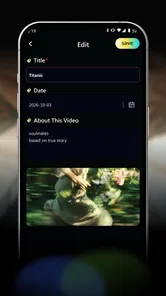

Analysis by Reviewed
I approached VidVast as a small, focused video tool rather than another all-purpose editor. Its central idea is simple: attach a name, a note, and a point in time to each video. That makes it more interesting for personal organization than for effects, transitions, or social-media production. After using it, my impression is that its value depends less on flashy editing and more on whether you regularly lose useful clips inside an overcrowded camera roll.
The app comes from Rojo Games and sits in the video players and editors category. It is free, rated for Everyone, and works on devices running Android 8.0 or newer. Its current version is 1.0.8. The store presents it with a quiet, private-sounding concept, but I would separate that wording from a technical privacy promise: the practical trust question is always what the app asks to access, what it displays before an action, and how much control it gives me while handling personal videos.
What VidVast is trying to solve
Most video apps assume I want to watch, trim, decorate, or publish. VidVast takes a different route. A clip can be important because of the moment it captures, the explanation I want to remember, or the reason I saved it in the first place. A short note can turn an anonymous file into something I can recognize later without opening every video.
That is especially useful for ordinary situations. I might record a leaking pipe to show a repair technician, save a short demonstration from a class, or keep several versions of a family event. Weeks later, filenames and thumbnails may not tell me which clip contains the detail I need. A clear name and a note such as “close-up of the valve” or “use the second take” provide context that a standard gallery usually lacks.
The time element is also meaningful. When a video contains several moments, remembering a specific point can be faster than scrubbing from the beginning. I found this concept more useful for reference clips than for entertainment. It fits videos I expect to revisit for a reason, not clips I simply watch once and forget.
There is an important trade-off here. This is not the app I would choose when my priority is advanced editing, polished captions, music, filters, or fast publishing. A conventional editor is stronger for changing the video itself. A gallery is often faster for casual browsing. VidVast makes sense in the space between those choices: it adds personal meaning and retrieval context without asking me to produce a finished video.
A practical everyday workflow
Imagine I film a washing machine making an unusual sound. In a normal camera roll, I may later see a date, a thumbnail, and perhaps a generic filename. With VidVast, I can give the clip a direct name, add a note describing the noise, and mark the moment when the sound becomes obvious. If I send the video to someone else, that information helps me explain what they should watch for.
More From Our News Desk

 Gmail
GmailGmail in a Busy Inbox: Who Benefits Most?
From first account to crowded workday, Gmail earns its place through dependable search and flexible sorting—but its best fit depends on how much inbox maintenance you can tolerate.

 Prime Video
Switching to Prime Video: What Changes in Your Viewing Routine
Prime Video can make a compelling second home for streaming, but switching means learning a different catalog, rental layer, and route from browsing to playback.

 Universal TV Remote Control
Universal TV Remote Control Works Best as a Reliable Backup
A phone remote earns its place through quick setup and reliable habits. Here is how to get more from Universal TV Remote Control—and where its limits show.

 Weather - By Xiaomi
Weather by Xiaomi Review: Clear at a Glance, Less Clear Up Close
Xiaomi’s weather app makes everyday forecasts quick to scan, but its calm surface can leave useful details and recovery paths harder to find than they should be.

 X
XX Under Pressure: Can It Recover When Posting Goes Wrong?
A resilience-focused review of X, examining setup, mistaken posts, interruptions, weak connections, and the gaps that matter when recovery needs to be dependable.

 Clash of Clans
Clash of Clans Is Won Between the Battles
Its raids are quick; its community is a long-term project of coordination, teaching, rivalry, and shared responsibility—with all the friction that entails.
Latest News



The same workflow applies to travel planning. I could keep several short clips of hotel rooms, label them by room or location, and note the detail I want to compare. For home projects, I could record wiring, measurements, or a before-and-after view and use notes to distinguish each stage. Students may find it useful for demonstrations where the important explanation occurs halfway through a recording.
My advice is to write notes for your future self, not for the person who recorded the video today. “Kitchen clip” is only slightly better than a camera filename. “Loose connector behind the lower panel” is much more useful when memory has faded. The app’s concept rewards precise wording, so the quality of the organization depends on the effort put into those small labels.
Where the idea is stronger than a normal gallery
A gallery is excellent at showing recent media, but it usually treats the video as a file first and a piece of information second. VidVast’s approach encourages me to record why a clip matters. That difference becomes more valuable as the collection grows or when videos are used as evidence, reminders, instructions, or personal references.
There is another subtle benefit: naming and notes can reduce unnecessary rewatching. If I am looking for the clip that shows a particular issue, I can use the description I created instead of opening several similar videos. The time marker adds a second layer of precision, helping me jump toward the relevant moment rather than relying on memory.
Still, I would not replace a full gallery with it. A gallery remains the better first stop for browsing all media, checking recent captures, or sharing something immediately. VidVast is more specialized. I see it as a deliberate filing tool for selected videos, not as a universal replacement for the device’s media library.
Trust begins with visible choices
Because videos can reveal faces, homes, documents, locations, and private conversations, I pay close attention to the boundary between useful organization and unnecessary access. I would judge VidVast by the permission prompts shown on my device, the moment access is requested, and whether I can choose what to make available rather than handing over more of my library than intended.
Android’s permission controls are therefore part of the experience, not an afterthought. Before selecting personal footage, I would read the prompt carefully and check the system settings afterward. If the device offers a limited or selected-media choice, that is preferable for a tool I only want to use with a few clips. If I am uncomfortable with a request, I would deny it and see whether the app still provides a useful path for the task I need.
I would also avoid treating the app’s quiet tone as proof that every video stays local or that no information leaves the device. Those are technical claims that should be established by the app’s visible privacy materials and behavior, not by a reassuring description. My cautious approach is simple: grant only the access needed for the current workflow, review it later, and remove it if I stop using the app.
Handling sensitive videos thoughtfully
The most important privacy decisions may happen before VidVast is opened. A video of a child, an identity document, a medical appointment, a workplace screen, or the inside of a home deserves more care than a disposable clip. I would not import sensitive material merely to test the labeling system. I would first decide whether the organizational benefit justifies placing that video inside another application.
Notes deserve the same caution as the footage itself. A note can accidentally expose more than the video thumbnail. Writing an address, a diagnosis, a password hint, or another person’s private detail creates a searchable description that may be more revealing than the original filename. My practical rule is to describe the purpose of the clip without copying confidential information into the note.
Time markers can also reveal context. A marked point in a recording might identify when a person speaks, when a document appears, or when a security event occurs. That is useful for legitimate reference, but I would think twice before sharing a labeled video with its annotations if the recipient only needs the raw footage. Organization improves discoverability, and discoverability is not always desirable.
How much control a careful user should expect
For me, user agency means being able to decide which videos are selected, what names and notes say, and whether an item remains in the app. It also means understanding what happens when I edit or remove an entry. Before building a large archive, I would test the process with a harmless sample: add one short clip, give it a deliberately clear note, mark a moment, then inspect how easy it is to revise or remove that information.
That small test is more valuable than immediately importing everything. It answers practical questions about the workflow while limiting exposure if the organization style does not suit me. It also shows whether I can correct mistakes without recreating the whole entry. For an app centered on personal metadata, editing and cleanup matter almost as much as creation.
I would keep an independent backup of important original videos. A labeling tool should not become the only place where an irreplaceable recording exists. If I change phones, uninstall the app, or reorganize storage, the original files should remain available through a separate trusted method. This is not a criticism unique to VidVast; it is sensible practice whenever an app becomes part of a personal archive.
Account and sharing choices deserve the same careful treatment. I would look for any sign-in request, sharing action, export step, or cloud-related option before using the app with confidential material. If a feature asks me to create an account for a task that seems local and simple, I would pause and decide whether that added dependency is worthwhile. A free app can still have a cost in attention, permissions, or data exposure, so “free” should not end the evaluation.
What the early reception suggests—and what it does not
VidVast has an average rating of 4.6 from around 260 ratings, with over 10 thousand installs. That is encouraging for a focused utility, especially because the concept is narrower than a mainstream editor. The numbers suggest that the basic idea has found an audience, but they do not replace my own check of permissions, controls, and day-to-day fit.
The app is also relatively early in its life, with a release date of May 28, 2026. I would therefore keep expectations realistic around polish and long-term workflows. Early versions can be perfectly usable while still leaving room for improvements in organization, migration, accessibility, sharing, or privacy explanations. I would start with a small collection instead of making it the sole home of a large personal video library.
That early-stage caution is balanced by the modest scope of the concept. VidVast does not need to solve every editing problem to be useful. If naming, notes, and time references are handled cleanly, the app can earn a place in a specific workflow without competing directly with large creative suites.
Who should use it and who should skip it
I would recommend trying VidVast if you keep instructional clips, project records, travel references, family memories with specific details, or videos you need to revisit for evidence. It is particularly suitable for people who think in terms of “why did I save this?” rather than merely “when did I record this?” The note field can make a small collection much easier to understand.
I would be more hesitant to recommend it to someone who only wants a fast camera-roll viewer or a professional editing environment. If your daily work involves color correction, layered audio, transitions, subtitles, or social publishing, you will likely be better served by a dedicated editor. If you mainly want automatic photo organization, a system gallery or photo-management service may be more convenient.
It may also be a poor fit for anyone who dislikes manual organization. The app’s strength depends on entering meaningful context. If I am unwilling to name clips or write useful notes, its advantage over ordinary storage becomes much smaller. The experience is not magic; it is a structured habit.
My cautious verdict
VidVast is an appealingly restrained idea for people whose videos need explanation more than decoration. I like the focus on names, notes, and precise moments because those details address a real weakness in ordinary video storage: remembering the purpose of a clip after the day it was recorded.
I would use it selectively, beginning with non-sensitive videos and checking every permission and sharing choice as I go. I would keep originals backed up, avoid putting confidential details into notes, and test deletion and editing before importing a larger collection. Those habits preserve control while letting the app prove its usefulness.
My final recommendation is therefore positive but measured. The free price and Everyone rating make it easy to try, and its 1.0.8 release gives the project a clear, focused starting point. But I would choose it for personal video reference, not advanced production, and I would not interpret its calm presentation as a substitute for checking actual privacy controls. For the right user, the strongest feature is the context you add yourself; for everyone else, a regular gallery or full editor may remain the simpler choice.
VidVast Frequently Asked Questions
What should I know about VidVast before downloading it?
VidVast is a free video app from Rojo Games, presented with the short description “VidVast.” Its store summary describes a personal way to give each video a name, a note, and a moment in time. The app is rated for Everyone and is listed in the Video Players & Editors category, making its focus more personal video organization than a promise of a particular streaming catalog.
Which devices can run VidVast?
VidVast is listed for Android devices running version 8.0 or later. Check your device’s operating system before downloading, since a phone running an older version may not be compatible. The app is currently version 1.0.8, so it is also sensible to check the app’s store page for compatibility and update details before installing.
What is VidVast and what can I use it for?
VidVast is a video-focused application designed for discovering, watching, and managing online video content in one place. Depending on the version available for your device, it may include browsing tools, personalized recommendations, search, playlists, favorites, and playback controls. Before downloading, check the app’s current store description because available features, supported content sources, and regional availability can change over time.
Is VidVast free to download and use?
VidVast is free to download. Its store summary emphasizes giving each video a name, a note, and a moment in time, suggesting a personal, organizational approach to videos. Review the app’s store page and any in-app notices before using it so you understand the current terms and any optional features that may be offered.
Does VidVast require an account or personal information?
The amount of information required by VidVast can depend on how you use the application. Basic browsing or playback may work without registration, while features such as synchronization, saved playlists, recommendations, or cross-device access may require an account. Before signing up, review the requested permissions and privacy policy so you understand how email addresses, device data, viewing activity, and other information may be handled.
Pros
- Simple interface makes browsing and discovering videos quick.
- Supports personalized viewing through recommendations and saved content.
- Video playback is generally smooth on stable internet connections.
- Useful search tools help locate specific creators or video topics.
- Regular content updates keep the platform feeling fresh.
Cons
- Some videos may be unavailable because of regional restrictions.
- Recommendations can become repetitive after extended use.
- Video quality and loading speed depend heavily on your connection.
- The app may use considerable mobile data when streaming at high quality.
- Some features or content may require in-app purchases or a subscription.











