Video Maker & Photo Music
- 12.32K
- 4.9
- Installs
- 10.00M
- Price
- Free

Screenshots
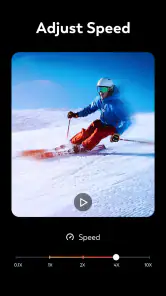
Analysis by Reviewed
I like this app best when the goal is a finished little memory, not a miniature film-production project. Video Maker | Photo Music takes the kind of material most of us already have on a phone—photos, a song, a few words—and makes it approachable to shape into a video. That convenience is its real strength, though it comes with a trade-off: people who want exact control over every cut may outgrow its simpler workflow.
A practical fit for small, personal projects
I’d reach for this app when I have a handful of phone photos and want to turn them into a short birthday greeting, a family recap, or a simple clip for friends without sitting down at a computer. A useful approach is to choose the pictures first, then settle on a song and add text only where it helps tell the story. That order keeps a slideshow from becoming a pile of effects competing for attention.
For example, after a day out, I might pick a few images that show the beginning, middle, and best moment, then use transitions to make those changes feel intentional. A short title can explain the occasion, while leaving most frames uncluttered lets the photos carry the emotion. This kind of editing is where a phone-first maker makes sense: the goal is a shareable memory, not a finely polished commercial edit.
A simple starting point for photo stories
The app is particularly useful when I already know the story I want to tell but don’t want to spend time learning a complex editor. A few pictures from a weekend visit, for instance, can become a recap for relatives who couldn’t come along. I’d sort the images into a rough order before opening the project: arrival, a couple of moments in the middle, then a strong closing image. Even a basic sequence feels more thoughtful when it has a beginning and end.
That preparation also helps if the photos have different orientations or visual styles. I look for a consistent run of images rather than trying to include every shot, since a slideshow can feel jumpy when one frame is a close-up and the next is a distant scene with no clear connection. Choosing fewer, more relevant pictures is often a better improvement than adding another transition.
For an everyday example, imagine making a short clip after a child’s school performance. I’d select a few photos from before and after the event, add a brief caption with the occasion, and use a song that suits the mood. The result can be shared with family without turning the evening into a long editing session. If the photos include other people, I’d also take a moment to decide whether the clip is meant for a private group or a public post before sharing it.
Easy-to-Use Interface
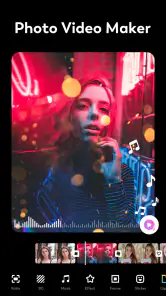
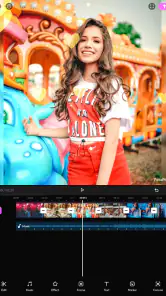
First off, the interface is super intuitive. You don’t have to be a tech guru to find your way around. As soon as you open the app, you’re greeted with a clean and straightforward layout. Everything is pretty much where you’d expect it to be, making the process of creating videos almost second nature. You can easily import your photos and music, and boom, you’re halfway through your project.
More From Our News Desk

Weather by Xiaomi Review: Clear at a Glance, Less Clear Up Close

X Under Pressure: Can It Recover When Posting Goes Wrong?

Clash of Clans Is Won Between the Battles

Android Auto Makes the Case for Quieter Car Software

MobiOffice: Transforming Mobile Productivity with Seamless Integration

EA SPORTS FC™ Mobile Soccer: Redefining Mobile Sports Gaming
The Magic of Music
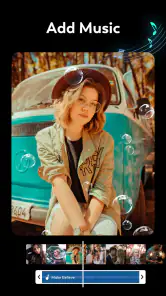
One of the standout features here is the music integration. The Video Maker | Photo Music app offers a wide range of tunes to choose from, or you can import your own tracks to set the perfect mood for your video. This is a game-changer, especially if you want to add that personal touch or stick to a theme. The app syncs your music with the video seamlessly, so you won’t have those awkward silent pauses.
One small workflow tip is to decide whether the music should set the pace or simply sit underneath the images. If I want a calm family montage, I keep the transitions restrained and let the soundtrack do the emotional work. For a more playful clip, a few stronger changes in image or text can give it energy. It’s worth previewing the whole sequence before exporting: a track that suits the first few pictures may feel mismatched by the ending.
Making the soundtrack work for the story
I would treat music as part of the edit rather than a finishing touch. Before committing to a track, I’d consider the mood of the pictures and whether the song draws attention away from them. A lively soundtrack can make a casual recap feel celebratory, but it can also make quiet family images seem oddly hectic. The best choice is not necessarily the most dramatic one; it is the one that helps the pictures feel connected.
There is a practical trade-off when using a personal track: it may feel more meaningful than a generic choice, but it also ties the video to that particular song. If I’m making something for a specific person or occasion, that can be exactly right. If I expect to reuse the same edit in different contexts, I’d keep the soundtrack neutral and avoid letting the music become the whole point of the clip.
Customization Galore
Now, let’s talk about customization. The app offers a plethora of editing tools, from filters to transitions, and even text overlays. You can tweak to your heart’s content. Whether you’re aiming for a professional look or something more fun and quirky, the app has got you covered. Plus, the real-time preview feature means you can see your changes instantly, saving you the hassle of undoing and redoing edits.
The freedom to adjust several visual elements is useful, but it also creates an easy trap: using every effect just because it is available. I get a more coherent result by choosing one visual direction—such as a consistent filter or a restrained transition style—and applying it across the project. Text is most helpful when it adds context, like a name or a place, rather than repeating what the images already show.
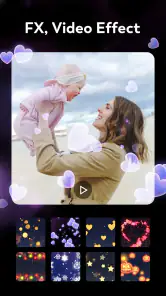
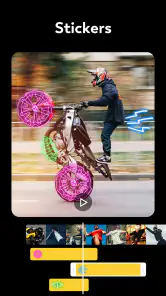
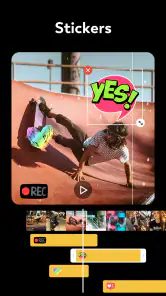
Oh, and did I mention the stickers and animations? Yeah, they’re there too, letting you add some extra flair to your videos. Whether you want a subtle heart animation or a full-on explosion, it’s just a few taps away.
Small editing decisions that improve the result
One useful habit is to make a first pass with no decorative extras at all. I’d put the images in order, add the soundtrack, and preview the sequence before trying filters, stickers, or animated elements. That reveals whether the basic story works on its own. If it doesn’t, more effects usually hide the problem rather than fix it.
I’d also keep captions short enough to read at a glance. A name, date, or location can give a photo useful context, especially when the video is being sent to someone who wasn’t there. Longer sentences compete with the image and can be hard to follow during a brief frame. When a caption is important, I’d preview the clip on a phone-sized screen rather than judging it only while editing.
There’s a similar balance with transitions. A consistent, modest style can make a sequence feel deliberate; switching constantly between flashy effects can make the viewer notice the editing more than the memory. For a playful greeting, that busier treatment may be part of the fun. For a memorial, travel recap, or family archive, restraint is likely to age better.
Sharing Made Simple
Once you’ve crafted your masterpiece, sharing it is a piece of cake. The app supports direct uploads to social media platforms like Instagram, Facebook, and YouTube. No more fussing around with downloads and reuploads. It’s all about efficiency here, and honestly, who doesn’t love saving time?
On top of that, the export quality is fantastic. You can choose the resolution that suits your needs, whether it be 720p or 1080p, ensuring that your videos look sharp and professional.
Before sending or posting a video
I’d make a final watch-through with the sound on and check the ending as carefully as the opening. It’s easy to focus on the first few images while editing, then miss a late caption that appears too quickly or a closing frame that feels abrupt. A complete preview is a small step that can prevent a video from feeling unfinished once it leaves the editor.
For a private family message, I’d prioritize legible text and a soundtrack that still works at a modest volume. For a social post, I’d consider whether the opening image makes the subject clear right away, since viewers may decide quickly whether to keep watching. Those are simple choices, but they matter more to the finished clip than adding another visual effect.
Where it sits among editing options
Compared with the usual alternatives in video editing, this is best understood as a quick slideshow and social-clip maker rather than a full production studio. Its appeal is the direct path from selected photos to a finished piece, with music, transitions, and text in one place. If your project depends on detailed timeline control, layered audio, or precise trimming, a more advanced editor is likely the better choice; those tools offer room to refine timing that a lightweight workflow may not prioritize.
That distinction also helps answer whether it is suitable for beginners. I’d recommend trying it if you want to make personal videos without first learning a complicated editing interface. Someone already comfortable with a desktop editor, or anyone producing work where exact control matters, may find the simpler approach limiting rather than convenient.
Choosing the right kind of editor
The common alternatives tend to split into two broad groups: lightweight template or slideshow tools, and editors built around a more hands-on timeline. This app belongs closer to the first group in spirit. It suits someone who wants to combine photos, music, and visual touches without treating every second as a separate editing decision. That makes it less intimidating, but the convenience is not the same as precision.
If I were assembling a short social clip from a few still images, I’d value the straightforward route. If I were cutting a spoken interview, matching several sound sources, or shaping a video around exact beats, I’d choose an editor designed for detailed timeline work instead. The distinction isn’t about one kind of app being universally better; it’s about whether the project needs speed and simplicity or fine-grained control.
It is also worth thinking about how often you expect to edit. For occasional greetings and recaps, a focused app can be easier to return to than a large editor with many controls you rarely use. For regular content creation, though, learning a more capable tool may pay off because small timing adjustments and repeatable workflows become more important over time.
What to expect before you start
Video Maker & Photo Music is a free app in the video players and editors category, developed by FotoPlay Video Maker. It is rated for Everyone, has a 4.9 average from around 685,000 ratings, and has passed 10 million installs. The current version is 7.11.2, and it requires Android 7.0 or later. Optional in-app purchases range from $0.99 to $22.99 per item, so I’d begin with the free experience and only consider paying if a specific need makes the purchase worthwhile.
Those details make it a low-friction option for casual creators, but “free” does not mean every possible extra is included at no cost. Before building a project around a particular effect or asset, check what is available in your version. And if you plan to send a video to someone else, preview the saved result on your device first; what looks good while editing should still read clearly when shared on a phone screen.
Who will get the most from it
I’d point a first-time editor toward this app if they want to make a personal montage, a quick birthday greeting, or a simple photo-led post and would rather spend their time choosing images than learning a complicated interface. It can also suit someone who edits only now and then: a short, familiar workflow is useful when you don’t want to relearn a professional tool every time an occasion comes around.
I’d steer a different kind of user elsewhere. If your work depends on accurate frame-by-frame timing, several carefully balanced audio layers, or a long sequence that needs frequent revision, a more advanced editor will be a better fit. And if your aim is a polished commercial piece, the ease of a quick slideshow workflow may not provide the level of control you expect. Knowing that before starting can save frustration.
For anyone wondering whether to pay for extras, my approach would be to make a small test project first. See whether the free tools cover the actual job, then decide whether a particular paid item solves a real problem. That is more sensible than buying something because it sounds useful in theory, especially when a simple family slideshow may not need anything beyond a few well-chosen pictures and a soundtrack.
A straightforward recommendation
In a nutshell, Video Maker | Photo Music is an app that delivers on its promises. It’s user-friendly, packed with features, and makes the process of video creation not only accessible but also enjoyable. Whether you’re making a video for a special occasion or just for fun, this app is definitely worth a shot. Give it a whirl and let your creativity run wild!
My recommendation is strongest for people who want a quick, personal result and are happy to let simplicity guide the edit. I would not choose it for a project where every cut, layer, or audio detail needs meticulous control, but that is not the job it is best suited to do. For a small collection of photos that deserves more care than a plain album but less effort than a full production, it offers a comfortable middle ground.
Video Maker & Photo Music Frequently Asked Questions
What kinds of projects can I make with Video Maker & Photo Music?
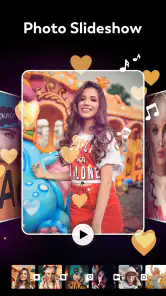
Video Maker & Photo Music is designed for creating videos from photos and video clips, including music-backed slideshows and personal edits. Its tools cover effects, transitions, and text, so you can shape the look and feel of a project rather than simply combine images. It may suit everyday memories, simple presentations, and other casual video ideas.
Who develops Video Maker & Photo Music, and what is its age rating?
The app is developed by FotoPlay Video Maker and is rated Everyone, making it intended for a general audience. It belongs to the video editing app category and is focused on making and adjusting videos with features such as music, photo slideshows, effects, transitions, and text. This gives families and casual creators a quick sense of its purpose before installing.
Is Video Maker & Photo Music suitable for beginners?
Yes. Video Maker & Photo Music is aimed at making video creation approachable, with tools for combining photos and video, adding music, applying effects, inserting text, and choosing transitions. You can start with a simple slideshow and add more edits as you get comfortable. Its focus on familiar editing tasks makes it useful for casual projects as well as more polished personal videos.
What devices and operating systems can run Video Maker & Photo Music?
Video Maker & Photo Music is an app in the Video Players & Editors category, developed by FotoPlay Video Maker. It is available for Android devices running Android 7.0 or later. The app is rated Everyone, so its content rating is intended for a general audience. Check that your device meets the operating-system requirement before downloading.
What platforms is Video Maker | Photo Music available on?
Video Maker | Photo Music is available for download on both Android and iOS platforms. Users can find the app on the Google Play Store for Android devices and on the Apple App Store for iOS devices. The app is designed to be compatible with a wide range of smartphones and tablets running these operating systems.
Pros
- User-friendly interface for easy video editing.
- Wide range of music options for customization.
- High-quality export options for professional results.
- Supports various video formats for flexibility.
- Regular updates with new features.
Cons
- Some features require in-app purchases.
- Occasional crashes during export.
- Limited free music library.
- Requires significant storage space.
- Ads can be intrusive during editing.
- Category
- Video Players & Editors
- Version
- 7.11.2











