

Video Downloader: Story Video
- 2.85K
- 4.9
- Installs
- 10.00M
- Price
- Free

Screenshots

Analysis by Reviewed
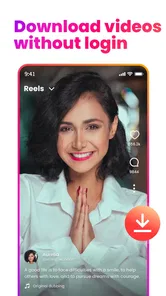
I like the idea behind Video Downloader: Story Video: save a social post for later without turning the task into a technical project. It is a focused tool in the video-player and editor space, aimed at people who want to keep reels, stories, photos, or other clips handy. My overall take is that it is most appealing when you already have a specific post in mind and want a quick route to a saved copy, rather than a full media-management suite.
Where it fits into a daily routine
A practical use is saving a short cooking clip before heading to the grocery store, so you can refer to it later without searching through a feed. The same approach can help with a travel tip, a workout demonstration, or a creative reference you want to revisit. I would treat the download as a personal convenience, not as permission to repost someone else’s work; respect the creator’s rights and the platform’s rules.
The app is free to install, though it includes in-app purchases ranging from $1.99 to $49.99 per item. That makes it sensible to try the basic workflow first and decide whether you need anything beyond it before paying. It is rated for Everyone, and the developer is Video downloader for all. Its 4.9 average from around 470,000 ratings and more than 10 million installs suggest broad adoption, but popularity cannot guarantee that every link or platform will behave the same way.
One useful way to decide whether it belongs on your phone is to look at what you actually do after finding a post. If you only want to remember it and expect to have internet access later, the platform’s own bookmark is usually tidier: it keeps the item connected to its source and avoids extra files in your gallery. If you need to consult a clip away from the feed, perhaps while following a recipe or reviewing a movement, a local copy can be more convenient. The distinction sounds small, but it prevents a downloader from becoming an unnecessary second way to save everything.
First Impressions and User Interface
Right off the bat, Video Downloader: Story Video has a sleek and user-friendly interface that even your grandma could navigate without a hitch. The main screen is straightforward with clear icons that guide you through the process of downloading videos. I appreciated how there were no unnecessary frills or complicated steps—just a simple, effective design that does what it says on the tin.
That simplicity is most valuable when the post is time-sensitive or you are switching between apps on a small screen. I would keep the source post open until the link has been copied and submitted, rather than relying on memory to find it again. It is also worth checking that the item is the right one before saving: a quick glance at the creator and caption can prevent a near-identical clip from ending up in your camera roll.
How It Works
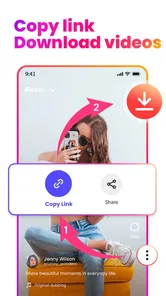
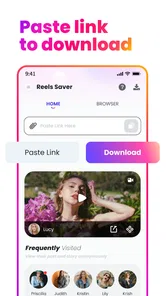
Here's where the magic happens. The app allows you to download videos in a few simple steps. You just need to copy the link of the video you want to save, paste it into the app, and hit download. Boom! The video is now in your gallery. It's almost like having a personal assistant that fetches your favorite clips for you. I tried it with a few different platforms, and it worked like a charm each time.
More From Our News Desk

 Gmail
GmailGmail in a Busy Inbox: Who Benefits Most?
From first account to crowded workday, Gmail earns its place through dependable search and flexible sorting—but its best fit depends on how much inbox maintenance you can tolerate.

 Prime Video
Switching to Prime Video: What Changes in Your Viewing Routine
Prime Video can make a compelling second home for streaming, but switching means learning a different catalog, rental layer, and route from browsing to playback.

 Universal TV Remote Control
Universal TV Remote Control Works Best as a Reliable Backup
A phone remote earns its place through quick setup and reliable habits. Here is how to get more from Universal TV Remote Control—and where its limits show.

 Weather - By Xiaomi
Weather by Xiaomi Review: Clear at a Glance, Less Clear Up Close
Xiaomi’s weather app makes everyday forecasts quick to scan, but its calm surface can leave useful details and recovery paths harder to find than they should be.

 X
XX Under Pressure: Can It Recover When Posting Goes Wrong?
A resilience-focused review of X, examining setup, mistaken posts, interruptions, weak connections, and the gaps that matter when recovery needs to be dependable.

 Clash of Clans
Clash of Clans Is Won Between the Battles
Its raids are quick; its community is a long-term project of coordination, teaching, rivalry, and shared responsibility—with all the friction that entails.
Latest News



For a smoother routine, I would copy a link only after checking that the post is the one I actually want, then return to the downloader and paste it straight away. This small habit helps avoid mixing up several saved links when browsing quickly. If a link does not work, I would first reopen the original post and copy it again; access settings or changes on the source platform can affect whether a downloader can retrieve it.
When a download fails, it helps to distinguish a bad paste from a post that is simply unavailable to the tool. I would try the link once more from the original post, then stop rather than repeatedly submitting the same address. If the source is private, restricted, removed, or otherwise inaccessible, changing the downloader workflow is unlikely to make the content available. That is a practical limit of link-based tools, not a reason to assume every social post can be fetched.
That link-based method is also the key trade-off compared with saving something inside a social app. A platform’s own save button is usually better for bookmarking posts you can still access online, while a downloader is useful when you want a local copy. Neither approach should be treated as a permanent archive: keep important personal files backed up separately, and do not assume every post can be downloaded in every circumstance.
There is another trade-off after the file arrives: a local copy can be easier to use offline, but it is no longer automatically tied to the creator’s latest version or context. Captions, comments, and the surrounding discussion may be what made a post useful in the first place, and a saved clip may not preserve that experience. For advice that could change, such as a travel recommendation or a how-to, I would keep the original post bookmarked as well when possible, so I can check its source rather than relying only on an isolated video.
Performance and Speed
I was particularly impressed with the app's speed. Videos downloaded quickly without any glitches or lags, which, let's be honest, is crucial when you're trying to save that hilarious clip before it disappears forever. The app supports multiple formats too, so you won't have to worry about compatibility issues.
In practice, I would use it selectively rather than collecting every clip I see. Short videos can accumulate quickly, so it helps to check your gallery now and then and remove files you no longer need. That is especially useful if you save several versions of a reference or share a phone with limited room for media. A downloader can make a clip easier to find later, but it does not automatically sort your collection into meaningful folders.
A simple naming and cleanup habit makes the difference between a helpful reference shelf and a pile of anonymous clips. After saving something important, I would move or organize it using the phone’s ordinary gallery or file tools, if those options are available on the device. A brief label based on the subject—rather than a long description—can make a cooking technique or exercise demonstration easier to find later. This is especially worthwhile when several clips look alike in a thumbnail.
For a realistic everyday routine, imagine spotting a short recipe while commuting, saving it for later, and opening it again in the kitchen where the connection may be unreliable. That is where a local file earns its keep. I would still check the ingredients and instructions against the original source when I can, and delete the saved copy when it has served its purpose. The workflow is best for a few useful items, not as a substitute for a curated recipe app or a comprehensive offline library.
Features That Stand Out
One of the standout features of this nifty app is its ability to download videos in high quality. Whether it's a crisp HD video or a simple story clip, the quality remains intact. Plus, the app doesn't just stop at video downloads. It also supports downloading music and images, making it a versatile tool to have in your digital arsenal.
That range is handy when the item you want to keep is a still image rather than a clip, but I would not choose this app as a replacement for a dedicated photo organizer or a full video editor. Its value is in the straightforward save-and-keep workflow. If you mainly want to trim footage, assemble projects, or manage a large library, an editor or file manager is a better fit.
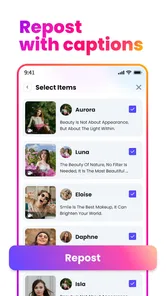
There is a useful distinction between saving a reference and creating something new from it. This app is suited to keeping an item available; it is not the tool I would reach for to add captions, cut together several scenes, or prepare a polished post. For those jobs, a video editor has controls designed for shaping content, while this downloader’s appeal is avoiding an editing workflow altogether. Choosing the right tool at the start saves time and avoids expecting the wrong kind of control.
The current version is 1.19.11, and it requires Android 9 or later. I would check that requirement before planning to use it on an older device. The app’s focus is useful for people who frequently save social media media, but someone who only needs to bookmark an occasional post may find the built-in save tools in their social apps simpler.
That platform requirement also matters if you are setting up a device for someone else. I would check the Android version before recommending it, then show the person the copy-link-and-paste routine with one post they actually want. This is a narrow task, so the app makes more sense when the intended user is comfortable moving between a social feed and a separate utility. Someone who wants one-tap saving without switching screens may prefer the platform’s own bookmark feature, even if it does not create an offline file.
Although the app is free to install, the in-app purchase range is broad enough that I would not buy anything simply because I expect every downloader to work on every post. Try the ordinary workflow first and judge whether it solves a recurring problem for you. If you only save the odd story or photo, a paid option may not improve your routine enough to justify spending. If a purchase is under consideration, check its description and terms in the app before committing rather than assuming what it unlocks.
The app also respects your privacy, which is a big win in my book. It doesn’t require unnecessary permissions or access to your personal data, so you can download with peace of mind.
Even with a straightforward utility, I would take a moment to review the permissions shown by the phone and grant only what the task requires. A downloader that saves files needs a way to make them available on the device, but I would not treat that as a reason to approve unrelated access automatically. This is a sensible habit with any media tool, particularly one that moves content from a social app into a personal library.
Before saving or sharing anything, I would still think about who made it and where it will go. Keeping a clip for private reference is different from reposting it publicly, and a download does not transfer ownership. For anyone using saved material in a project, getting the creator’s permission is the considerate and safer choice.
That point is especially important with stories, since their temporary presentation can make saving feel casual. A copy on your phone is still someone else’s work, and sharing it with a group or using it in a public post changes the situation. I would use the app for personal convenience, avoid passing files around without permission, and keep the creator’s name or original post easy to find when attribution matters. The app can simplify access; it cannot settle the rights questions for you.
Who Will Get the Most From It
I see the strongest fit for people who repeatedly encounter useful short-form posts and want a local copy for a clear reason: a tutorial to follow offline, a visual reference for a project, or a story they want to revisit while it is still accessible. It is also a reasonable choice for someone who already understands copying links and does not mind moving between apps. The focused purpose is an advantage for that audience, because it avoids the extra editing and library-management features they may never use.
I would skip it if your main goal is to organize a large collection, edit clips, or keep every saved item synchronized across devices. A file manager or media library is better suited to sorting and maintaining lots of content, while an editor is built for changing footage. If your need is simply “I might want to see this post later,” the social platform’s own save control is often the least fussy option. Choosing among these alternatives comes down to whether you need a bookmark, a local copy, or a finished edit.
For occasional use, the key question is not how many buttons the app has but whether a downloaded file genuinely improves the moment you need it. A student reviewing a visual example without reliable access to the feed may value that independence; someone who mostly watches social posts while connected may not. I would start with one or two posts that have a clear offline purpose and see whether the files are easy to locate afterward. If that small test does not make life simpler, there is little reason to add another step to your routine.
Final Thoughts
All in all, Video Downloader: Story Video is a handy app that delivers on its promises. It's efficient, easy to use, and does exactly what you need it to without any hassle. Whether you're a social media enthusiast or just someone who likes to keep their favorite clips handy, this app is definitely worth a try. So next time you find a video that tickles your fancy, you know exactly what to do!
My recommendation is specific: try it if you have a recurring need for offline access to social posts, and keep expectations focused on saving rather than editing, organizing, or guaranteeing access to every link. Its free starting point makes a cautious trial reasonable, while the purchase options are a reason to decide based on actual use instead of impulse. For someone who mainly wants bookmarks, another app is likely simpler; for someone who wants a local reference and is comfortable with the link workflow, this is a practical tool to have available.
Video Downloader: Story Video Frequently Asked Questions
Can I save downloads to watch when I’m offline?
The app is intended to help you save reels, photos, videos, and stories on your mobile device, which can make content available for later viewing without relying on an internet connection. Before downloading, consider whether saving content for offline use fits your needs, and remember that availability can depend on the source platform and the content itself.
Do I need to pay to install Video Downloader: Story Video?
The app is free to download, so you can try its download-focused features without paying an upfront price. In-app purchases are also available, with individual items ranging from $1.99 to $49.99. Consider those optional costs when deciding whether the free version suits you, and check the purchase details shown in the app before confirming any transaction.
What should I know about the app before downloading it?
Video Downloader: Story Video is a free app in the Video Players & Editors category, developed by Video downloader for all. It is rated for Everyone and has an average rating of 4.9 from around 470,000 ratings. The app has been installed over 10 million times, making it a widely used option for people looking to save video content on a mobile device.
Will Video Downloader: Story Video work on my device?
The current version is 1.19.11, and the app requires Android 9 or later. Before downloading, check your device’s operating system version to make sure it meets that requirement. The app is also available on iOS, so check the requirements shown for your device in its app store before installing. Keeping your device’s software current can also help with compatibility.
What is Video Downloader: Story Video and how can it benefit me?
Video Downloader: Story Video is a versatile app that allows users to download videos and stories from various social media platforms directly to their mobile devices. This can be particularly beneficial for users who want to save inspirational content, educational videos, or entertaining clips for offline viewing at their convenience, without worrying about internet connectivity. Its store summary highlights downloading reels, photos, and stories, which may be useful when you want to keep content handy for later.
Pros
- Easy to use interface
- Supports multiple video formats
- Fast download speeds
- Allows batch downloads
- No ads in the app
Cons
- Limited editing features
- Requires in-app purchases
- Occasional download errors
- No built-in media player
- Lacks cloud storage integration











