

Video Downloader for Tumblr
- 129.00
- 4.8
- Installs
- 10.00K
- Price
- Free

Screenshots

Analysis by Reviewed
I approached Video Downloader for Tumblr as a practical tool rather than a flashy editor. It is an Android app from Angolix in the video players and editors category, built around saving Tumblr videos, GIFs, and photos for later use. That sounds simple, but the real value depends on whether the app fits the way you browse, save, organize, and revisit media.
My first impression is that it is aimed at people who want a quicker route from finding something interesting on Tumblr to keeping a copy on their device. It is free to install, carries a Teen content rating, and has reached more than ten thousand installs. Its average rating is 4.8 from roughly 1.6 thousand ratings, which suggests that many users find the basic idea useful, although a high rating does not remove the occasional setup or compatibility frustration.
Where the saving process can become confusing
The main point of friction is not usually the download itself. It is identifying the correct Tumblr post and making sure the link or share action points to the media you actually want. A Tumblr page may contain several images, an animated GIF, a video, text, and reblog information together. If you start from the wrong screen, the app may appear unhelpful even though the problem began with the source post.
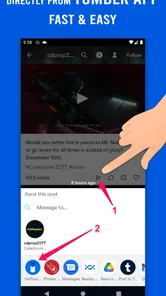
I would begin with a single item instead of immediately trying a large batch. Open the Tumblr post, use the normal sharing route available on your phone, and choose Video Downloader for Tumblr if it appears as an option. If the app is not offered, copying the post address and opening the downloader directly is the more sensible fallback. This small check separates a Tumblr sharing problem from an app problem.
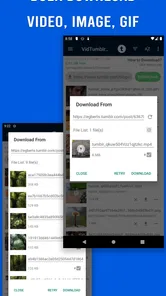
The app’s biggest appeal is its focus. It is not trying to replace a full video editor, cloud gallery, or social network. It is designed for saving media, including bulk saving of GIFs and photos. That makes it especially useful when a post contains a set of images you want to keep together, rather than when you need trimming, captions, filters, conversion, or detailed file management.
One everyday example is a Tumblr user collecting visual references for a personal project. Instead of saving every image manually, the bulk option can reduce repetitive taps when a post contains several useful photos or GIFs. I would still review the result afterward, because a fast batch workflow is only helpful if you know which files were actually saved and where your phone placed them.
Why the source post matters more than expected
Tumblr content is often reblogged, embedded, or presented through a layout that is different from the original upload. A downloader can only work with what the sharing or copied-link process exposes. If a post loads incompletely, points to a page rather than a media item, or depends on a temporary connection, repeating the same tap inside the app may not solve anything.
More From Our News Desk

 Gmail
GmailGmail in a Busy Inbox: Who Benefits Most?
From first account to crowded workday, Gmail earns its place through dependable search and flexible sorting—but its best fit depends on how much inbox maintenance you can tolerate.

 Prime Video
Switching to Prime Video: What Changes in Your Viewing Routine
Prime Video can make a compelling second home for streaming, but switching means learning a different catalog, rental layer, and route from browsing to playback.

 Universal TV Remote Control
Universal TV Remote Control Works Best as a Reliable Backup
A phone remote earns its place through quick setup and reliable habits. Here is how to get more from Universal TV Remote Control—and where its limits show.

 Weather - By Xiaomi
Weather by Xiaomi Review: Clear at a Glance, Less Clear Up Close
Xiaomi’s weather app makes everyday forecasts quick to scan, but its calm surface can leave useful details and recovery paths harder to find than they should be.

 X
XX Under Pressure: Can It Recover When Posting Goes Wrong?
A resilience-focused review of X, examining setup, mistaken posts, interruptions, weak connections, and the gaps that matter when recovery needs to be dependable.

 Clash of Clans
Clash of Clans Is Won Between the Battles
Its raids are quick; its community is a long-term project of coordination, teaching, rivalry, and shared responsibility—with all the friction that entails.
Latest News



This is one of the less obvious trade-offs: the app is convenient when the Tumblr post is straightforward, but it is not a universal extractor for every presentation of Tumblr content. When a post includes several media types, I would save one item first, confirm that it is the intended file, and only then use a broader saving action. That habit prevents a messy gallery and makes troubleshooting much easier.
What I would check before blaming the app
Before using it seriously, I would confirm that the Android device meets the minimum requirement of Android 7.0 or later. I would also make sure the Tumblr app or browser is displaying the post completely and that the phone has enough free storage for the media being saved. These are ordinary checks, but they matter more when downloading several photos or animated files in one session.
I would also test the simplest possible case: one public Tumblr post containing one clearly visible piece of media. If that succeeds, move to a GIF and then to a multi-image post. This staged approach tells you whether the issue is tied to a particular media type, a specific post layout, or the general handoff between Tumblr and the downloader.
The current version is 26.1.6, and the app has been available since December 8, 2020. Those details make it worth checking that the installed copy is current before drawing conclusions from an old installation. Updating is especially sensible if the app opens but behaves inconsistently after changes to the Tumblr app or the Android system.
Setup checks that save time later
My preferred setup is deliberately modest. I install the app, open it once, and try a single Tumblr item before planning a large collection. I then inspect the phone’s gallery or file browser to learn where the saved media appears. Knowing the destination is important because a successful download can feel like a failure if you are looking in the wrong gallery album.
I would not begin by purchasing anything. The app is free, while its in-app purchases range from $1.99 to $2.99 per item. For a casual user, the free experience should be evaluated first. If you decide the workflow is worth keeping, you can then consider whether any paid item improves your particular use, rather than paying before you know whether link sharing and media discovery work on your device.
Another useful check is storage behavior. Photos are usually easy to identify, but GIFs and videos may not appear in the same place or may take longer to become visible in a gallery. After saving, I would wait briefly, refresh the gallery, and look in the device’s recent files as well as its media albums. This is a practical distinction between “the file was not saved” and “the gallery has not indexed it yet.”
For people who save media for reference, I recommend creating a simple destination routine before downloading heavily. For example, save a small group, review it, and move only the keepers into a project album. The app’s strength is quick collection, not necessarily long-term cataloguing. Treating it as the first step in a workflow produces better results than expecting it to organize a growing archive automatically.
Bulk saving is useful, but it changes the review step
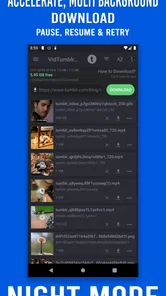
Bulk saving GIFs and photos is the feature I would use most carefully. It can be a real time-saver when a post contains several related images, such as a reference set or a visual sequence. However, batch actions also make it easier to keep duplicates, unwanted items, or files that are less useful than they looked in the post.
My practical method would be to use bulk saving only after checking the post’s contents manually. I would then open the destination folder and remove duplicates immediately, while I still remember why I saved the group. This is a small discipline, but it avoids turning a convenient collection tool into a source of gallery clutter.
There is also a quality trade-off to keep in mind. A downloader preserves what it can access from the source, but it does not turn a low-quality Tumblr upload into a sharper original. If you need a file for professional printing, editing, or archival work, I would verify the result rather than assuming that the saved copy matches an original master file.
Handling access and sharing problems
If the app does not appear in the Android share sheet, I would first close and reopen both apps, then try copying the Tumblr post address instead. I would also test whether the post itself opens normally in Tumblr or a browser. If the source page is not loading correctly, changing the downloader will not fix the underlying access problem.
If a download starts but does not finish, I would try one smaller item, check the connection, and confirm available storage. A crowded device, unstable network, or partially loaded post can all look like an app failure. The safest troubleshooting sequence is to change one variable at a time instead of repeatedly retrying a large batch.
When a saved item cannot be found, I would search recent files and the gallery’s albums before trying again. Repeated downloads can create duplicates and make the original result harder to identify. I would also avoid judging success solely by an on-screen message; opening the actual file is the more reliable test.
Recovering a workflow after something goes wrong
My recovery process starts by returning to the smallest working example. If a batch fails, I would not immediately repeat the entire batch. I would reopen the original Tumblr post, select one visible photo or video, and attempt that save again. If one item works, the problem is probably related to the post’s structure, the number of items, or the particular media type.
If a video fails while a photo succeeds, I would treat that as a media-specific issue rather than evidence that the whole app is unusable. The app’s purpose covers videos, GIFs, and photos, but those formats do not behave identically during loading or indexing. Testing them separately gives a clearer answer and avoids wasting time on broad resets.
When the share route is unreliable, copying the post address is a useful alternative workflow. I would paste or enter that address through the downloader’s normal interface, then check whether the app recognizes the post. If it still does not, I would test another public post. Two different posts provide a better comparison than repeatedly testing one unusual or heavily reblogged page.
For a collection project, I would keep a short note of what has already been saved. This is particularly helpful when bulk saving creates several files with similar names. The app can speed up acquisition, but a simple external naming or album habit makes the overall process more dependable and reduces accidental repeats.
When restarting helps and when it does not
Restarting the app can clear a temporary handoff problem, especially after switching between Tumblr and the downloader several times. Restarting the phone may also help if the gallery has stopped refreshing or the system is under storage pressure. However, restarting will not make an unavailable post accessible or create storage that the device does not have.
I would avoid clearing information or reinstalling as a first reaction. Those steps can remove useful local state and do not address a bad source link. Start with the post, the connection, the available space, and the destination folder. More disruptive fixes make sense only after those basics have been checked.
When the app is not the cause
It is easy to blame the downloader when a Tumblr post behaves differently from another one. In practice, the source may be the deciding factor. A post can be incomplete, unusually structured, or dependent on content that is not currently available to the device. If other posts save normally, that comparison is strong evidence that the problem is specific to the source rather than to the entire app.
The phone itself can also be responsible. Older Android devices may have limited storage or a gallery that updates slowly. A restrictive network, background activity limits, or a temporary system glitch can interrupt a transfer. I would test on a stable connection, keep the app visible during the first attempt, and confirm the result in the file system instead of relying only on the notification.
There is a separate question of rights and personal responsibility. Saving a file for personal reference is different from reposting it, editing it into a new project, or distributing it elsewhere. I would check the creator’s expectations and any applicable rights before sharing saved media. A convenient download does not automatically grant permission to publish someone else’s work.
Users should also understand what this app is not. It is not the best choice for someone who needs a complete media library with sophisticated tagging, synchronized collections, editing tools, or a workflow centered on another platform. A browser’s built-in saving tools may be enough for occasional one-off items, while a full file manager may be better for people who already have an established archive system.
How it compares with the usual alternatives
Compared with manually saving each Tumblr image through the browser, this app’s advantage is concentration: the saving task is placed in a dedicated tool, with bulk handling for GIFs and photos. Manual saving can still be preferable when you want maximum control over each file or only need one image occasionally.
Compared with a general download manager, Video Downloader for Tumblr is more focused on the Tumblr use case. A general manager may offer broader handling across websites, but it can require more decisions and may not be as convenient when your entire task begins with Tumblr posts. I would choose the Angolix app for repeated Tumblr collection, not for managing every download on my phone.
Compared with a screen recorder, a downloader is the cleaner option when the original media can be accessed properly. Recording the screen is slower, may reduce quality, and captures the interface around the content. I would reserve recording for situations where a normal save path is unavailable and where the resulting quality is acceptable for the intended personal use.
The important trade-off is simplicity versus control. This app is attractive because it narrows the job to saving Tumblr media. That focus makes it approachable, but it also means users wanting detailed organization or editing will probably need another tool after the download is complete.
Who will get the most from it
I think it suits Tumblr users who regularly collect visual references, GIFs, photos, or videos and want a repeatable saving routine. It is also a reasonable fit for someone who finds browser-based saving awkward and prefers a dedicated Android utility. The free entry point makes it easy to test without committing to a purchase.
It is less suitable for someone who downloads only once every few months, needs advanced video editing, or expects every Tumblr post to behave identically. It is also not the right choice if your main goal is building a carefully tagged, synchronized media library. In those cases, manual saving or a broader file-management solution may produce less friction.
The Teen content rating is worth noticing for families. The app’s function is media saving, but Tumblr itself can contain varied material. I would treat the age rating as a reminder to consider the wider content environment, especially if the device is shared with a younger user.
My practical verdict after testing the workflow
Video Downloader for Tumblr makes sense when the problem you want to solve is repeated Tumblr saving, not general media management. Its useful combination is the focused video-saving purpose and the ability to handle groups of GIFs and photos, while its weak point is the dependence on the source post, Android sharing behavior, storage, and the phone’s media indexing.
I would recommend starting with one uncomplicated post, confirming where the file lands, and only then moving to batch saving. That approach answers the questions most users have before committing: will the share route work, can the device find the saved file, and does the app fit the media types they actually collect?
Angolix has kept the product centered on a straightforward task, and the current version is 26.1.6. The strong 4.8 average from about 1.6 thousand ratings is encouraging, but my recommendation remains practical rather than universal: try it if Tumblr is your main source and speed matters; skip it if you need editing, deep organization, or a downloader that works equally across many services.
For the right user, it can remove a repetitive part of browsing and make personal reference collections easier to build. Just remember that the best results come from a clean source post, a tested saving route, enough storage, and a quick review of the files afterward. Those habits matter as much as the app itself.
Video Downloader for Tumblr Frequently Asked Questions
Does Video Downloader for Tumblr support saving GIFs and photos as well as videos?
Yes. Video Downloader for Tumblr is described as a way to save favorite Tumblr videos, with bulk saving for GIFs and photos also highlighted. That makes it useful for more than collecting clips, especially if you want to keep several kinds of public Tumblr media together. What you can save still depends on the post and whether its media is accessible to the app.
What is Video Downloader for Tumblr and how does it work?
Video Downloader for Tumblr is designed to help users save Tumblr videos to their mobile device for later viewing. After opening the app, you generally copy the link to a Tumblr post or share the post with the downloader, depending on the available workflow. The app then analyzes the link and provides an option to download the supported video file.
Can I download every video from Tumblr with this app?
Not necessarily. Download availability depends on the type of Tumblr post, the video host, privacy settings, regional restrictions, and whether the content is publicly accessible. Some embedded videos, live content, deleted posts, or media protected by technical limitations may not be recognized. It is best to use the app with public Tumblr posts and understand that results can vary from one video to another.
Where are downloaded Tumblr videos saved on my phone?
Videos are usually saved in the app’s designated download folder or in a standard media location such as the device’s Movies, Videos, or Downloads directory. The exact location can differ between Android and iOS, as well as between app versions. After downloading, check the app’s built-in library or your phone’s file manager and gallery to locate the saved video.
Is Video Downloader for Tumblr free to use?
The app is free to download, and in-app purchases range from $1.99 to $2.99 per item. The basic downloading function may be available without payment, but the overall experience can depend on the particular version of the app. Before installing, review the store details for pricing, permissions, and any limitations that could affect frequent downloading.
Pros
- Downloads Tumblr videos for offline viewing.
- Simple interface that is easy to navigate.
- Supports saving videos directly to device storage.
- Quick download process for short clips.
- Useful when mobile data or Wi-Fi is unavailable.
Cons
- May not download videos from private or restricted posts.
- Contains ads that can interrupt the user experience.
- Download quality may depend on the original Tumblr upload.
- Requires storage space for saved videos.
- Compatibility may vary after Tumblr app or site updates.











