Video Background Changer
- 903.00
- 3.3
- Installs
- 1.00M
- Price
- Free

Screenshots





Analysis by Reviewed
Ever found yourself in a situation where you wished you could change the background of a video without the hassle of using complex software? Well, let me introduce you to the magic of Video Background Changer. This nifty app is like having a green screen studio right in your pocket, and it’s surprisingly fun and easy to use!
Getting Started with Video Background Changer
First things first, downloading and installing the Video Background Changer app is a breeze. Available on both Android and iOS, you can find it in your respective app store. Once installed, it greets you with a straightforward interface that even a tech newbie could navigate.
How It Works
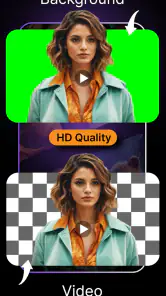
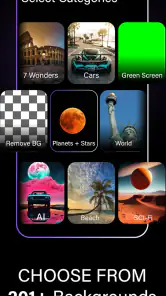
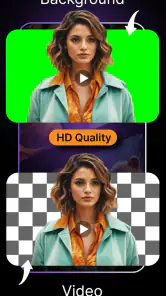
Using the app is as simple as pie. You start by selecting a video from your gallery. The app then works its magic by detecting the primary subject in the video and separating it from the background. You can choose from a variety of pre-loaded backgrounds or upload your own images to use as the new backdrop. The app’s AI does a commendable job in recognizing edges and ensuring a smooth transition between the subject and the new background.
What I absolutely love about this app is its versatility. Whether you want to place yourself on a sunny beach or in a bustling cityscape, the choice is yours. The app even allows for video backgrounds, which can add a dynamic touch to your creations.
Performance and Usability
The performance of the app is quite impressive. It processes changes swiftly, and the results are usually spot-on. Of course, like any app, it’s not entirely perfect. Occasionally, you might notice some minor imperfections in the background separation, especially if the subject is too close to the camera or the lighting isn’t ideal. However, these are rare occurrences and don’t detract significantly from the overall experience.
On the usability front, the app scores high. The controls are intuitive, and the app doesn’t bombard you with ads, which is a huge plus in my book. It’s perfect for those quick edits when you want to share something fun on social media.
Final Thoughts
In conclusion, Video Background Changer is a delightful app for anyone looking to spice up their videos without diving into professional editing software. It’s user-friendly, efficient, and offers a wide array of background options to play with. While it might not replace high-end editing tools for professionals, it’s perfect for casual users and social media enthusiasts.
Give it a try, and you might just find yourself addicted to creating quirky videos with new and exciting backdrops. Happy editing!
Pros
- Easy to use interface
- Supports various video formats
- High-quality output
- Quick processing time
- Includes background templates
Cons
- Limited free version
- Occasional crashes
- Ads in free version
- Requires internet connection
- Limited editing tools

- Category
- Beauty
- Version
- 5.0.7.8-MAJOR