

USB Audio Player PRO
- 1.36K
- 4.0
- Installs
- 100.00K
- Price
- $6.29

Screenshots
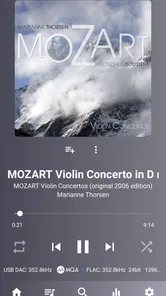
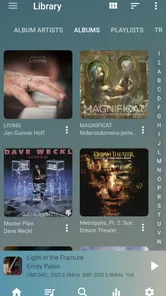
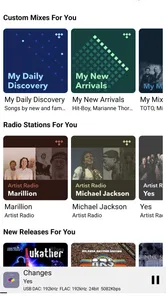
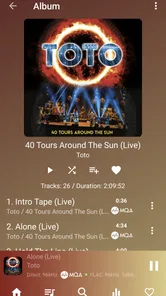
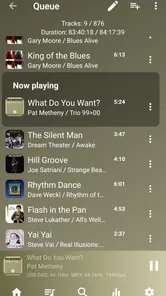
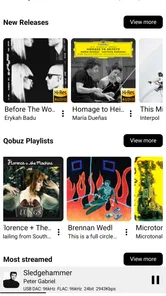
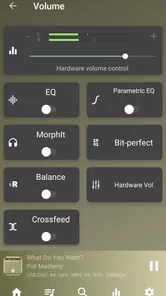
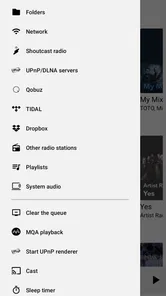
Analysis by Reviewed
I judge a music player by how easily it fits into a normal listening routine, not just by the sound claims on its store page. USB Audio Player PRO is a paid Android music app from eXtream Software Development, aimed at people who use a USB DAC or care about getting more control over local playback. Its particular appeal is that it treats the phone as part of a dedicated listening setup rather than just another place to tap shuffle.
A practical starting routine
For a first session, I’d keep things simple: choose a familiar album, listen through the phone’s usual output, then try the same material with a compatible USB DAC if you have one. That comparison helps answer the useful question—whether the extra hardware and setup actually improve your own listening—not merely whether a file has a high-resolution label. The app’s USB focus is most valuable when your DAC is already part of your routine; without one, a standard player may be more convenient.
A realistic use case is a commute or workday where I want to continue an album without rebuilding a queue each time. Folder playback and gapless playback suit albums and long mixes better than a player that inserts pauses between tracks. I’d prepare the album or folder before heading out, check that the intended output is selected, and then leave the phone alone rather than repeatedly changing settings on the move.
Unleashing Superior Sound Quality
When I first installed the USB Audio Player PRO, I was skeptical. Could an app really enhance the audio experience that much? But, after giving it a whirl, I was genuinely surprised. The app supports a wide range of audio formats, including FLAC, DSD, and MQA. This means you can play your high-resolution audio files without any downscaling or loss of quality.
One of the standout features is its ability to bypass Android's audio system, allowing for direct communication with your USB DAC. This ensures that the sound quality is top-notch, without any interference. I tested it with a few different DACs, and each time, the audio output was crisp, clear, and full of life. It's like having a portable hi-fi system in your pocket!
Settings that are worth a quick check
I’d treat the equalizer as a finishing tool, not a reason to change every track. Start with it flat, then make a small adjustment only if a recording consistently sounds too sharp, thin, or bass-heavy on your headphones. That habit makes comparisons more honest: otherwise, a louder or more heavily shaped signal can seem better simply because it is different.
For USB listening, the practical check is the whole chain: phone, cable or adapter, DAC, and headphones. A DAC that needs a particular connection arrangement can make the first setup less effortless than plugging in ordinary wired headphones. I’d test it at home before relying on it for travel, and keep a familiar non-USB listening option available for situations where carrying or connecting the DAC is a nuisance.
More From Our News Desk

 Gmail
GmailGmail in a Busy Inbox: Who Benefits Most?
From first account to crowded workday, Gmail earns its place through dependable search and flexible sorting—but its best fit depends on how much inbox maintenance you can tolerate.

 Prime Video
Switching to Prime Video: What Changes in Your Viewing Routine
Prime Video can make a compelling second home for streaming, but switching means learning a different catalog, rental layer, and route from browsing to playback.

 Universal TV Remote Control
Universal TV Remote Control Works Best as a Reliable Backup
A phone remote earns its place through quick setup and reliable habits. Here is how to get more from Universal TV Remote Control—and where its limits show.

 Weather - By Xiaomi
Weather by Xiaomi Review: Clear at a Glance, Less Clear Up Close
Xiaomi’s weather app makes everyday forecasts quick to scan, but its calm surface can leave useful details and recovery paths harder to find than they should be.

 X
XX Under Pressure: Can It Recover When Posting Goes Wrong?
A resilience-focused review of X, examining setup, mistaken posts, interruptions, weak connections, and the gaps that matter when recovery needs to be dependable.

 Clash of Clans
Clash of Clans Is Won Between the Battles
Its raids are quick; its community is a long-term project of coordination, teaching, rivalry, and shared responsibility—with all the friction that entails.
Latest News



User-Friendly Interface
Now, let's talk about the user interface. When it comes to apps, usability is a big deal for me. Thankfully, USB Audio Player PRO doesn't disappoint. The layout is intuitive and straightforward, making it easy for anyone to navigate through their music library. Even if you're not tech-savvy, you'll find that getting the hang of this app is a breeze.
Customizing your listening experience is also a piece of cake. You can easily adjust the equalizer settings to suit your preferences, whether you're a bass-head or prefer a more balanced sound. The app also provides gapless playback and a handy folder playback feature, which is perfect for those long playlists.
Faster habits for repeat listening
If I listen to the same kinds of albums often, I make the folder choice part of the routine: open the intended album folder, start playback, and avoid building a complicated queue when I only want to hear a record in order. For a mixed listening session, I’d instead use the library navigation that feels clearest. The useful distinction is not a hidden shortcut but choosing the route that matches the music: folders for deliberate album playback, broader browsing when I’m in discovery mode.
That approach also helps when comparing headphones or DACs. I’d replay the same short passage at a comfortable, similar volume and change only one part of the setup at a time. Switching the headphones, equalizer, and output together makes it hard to tell what caused a difference. This player is most rewarding for listeners willing to make those small, repeatable comparisons rather than expecting a single setting to make every recording sound perfect.
Compatibility and Performance
One of my initial concerns was whether the app would drain my phone's battery. However, I was pleasantly surprised to find that it runs efficiently, without causing any significant battery drain, even during extended listening sessions. Plus, it works seamlessly with both wired and wireless headphones, which is a huge plus in my book.
It's also worth mentioning that the app is compatible with a wide array of devices. Whether you're using the latest Android phone or an older model, chances are, this app will work perfectly fine. Just make sure your device supports USB OTG, and you're good to go.
Making a setup dependable day to day
I find it helps to decide in advance which listening setup belongs in each part of the day. At a desk, I can connect the DAC, confirm that playback is coming through it, and settle in for an album. When I leave, I can switch to a simpler arrangement rather than assuming the USB chain will be convenient everywhere. That small separation prevents a specialist player from becoming an unnecessary obstacle when I only want music quickly.
If a connection does not behave as expected, I’d troubleshoot one link at a time instead of changing several settings at once. Check the phone’s USB OTG support, reseat the cable or adapter, and then test the DAC with a familiar track. This is a more useful first response than adjusting equalization, since an output problem is not a sound-shaping problem. Once the chain works reliably, keeping the same cable and connection order makes repeat sessions less fiddly.
Where its strengths have limits
This is not the obvious choice for someone whose entire collection lives in a streaming service or who wants the simplest possible player for casual background music. Its standout reason to exist is local playback with USB audio equipment, so the benefit shrinks if you never use a DAC or do not care about managing music files. A mainstream streaming app is likely easier for recommendations and cloud access; a basic player may be quicker for occasional listening.
USB compatibility also depends on more than installing the app. Your Android device needs USB OTG support, and the DAC and connection need to work together. Before paying, I’d check that your phone can connect to the equipment you actually plan to use. Android 5.0 is the minimum OS requirement, and the app is rated for Everyone, but neither detail guarantees that every phone-and-DAC combination will suit your setup.
Who will get the most from it
I’d put this app on the shortlist for someone with a locally stored collection, wired headphones, and a USB DAC they already enjoy using. It can also make sense for a listener who wants one consistent place to browse albums and folders rather than handing playback over to a streaming service. The key is having a concrete reason to use the USB output or the player’s local-file approach; enthusiasm for audio specifications alone is not enough to make a more involved setup worthwhile.
For a casual listener, the usual phone player or a streaming app is often the sensible choice. Those options are better suited to exploring unfamiliar music, keeping playlists in the cloud, and starting playback with minimal preparation. This app is less compelling if music is mostly something I put on in the background and I rarely notice which output path is being used. Paying for a specialist tool only pays off when its focus matches a regular habit.
Choosing between formats, folders, and convenience
One question I’d ask before installing it is whether my collection is organized well enough to benefit from local playback. If album folders are clear and files are already on the phone, folder playback gives a direct route into a deliberate listening session. If music is scattered across locations or I rely on a service to remember what I like, the everyday convenience of streaming may outweigh the control offered here. I would tidy the collection gradually rather than turn setup into a large project before enjoying anything.
High-resolution files are not automatically a reason to choose this player, either. I’d start with recordings I know and compare the same track through the outputs I actually use. The practical gain may be a more suitable connection to a DAC, while the audible difference depends on the recording, headphones, and listening conditions. For commuting noise or quick background playback, carrying extra hardware may matter more than fine distinctions in sound.
Value and the mastery verdict
The price is $7.99, with in-app purchases ranging from $2.99 to $4.99 per item, so I’d consider the purchase in light of my listening habits and hardware rather than treating it as a must-have for every phone. It has a 3.9 average from around 14,000 ratings, with roughly 1,300 written reviews and over 100,000 installs. Version 7.0.8.6 is the current version. Those figures give a sense of its audience, but the deciding factor is still whether USB DAC playback and careful local listening matter to you.
For a first purchase decision, I’d also separate the app’s core appeal from optional extras. The base price is already a commitment compared with a basic player, while in-app purchases can add to the cost if you choose them. I would begin with the listening workflow I actually need, verify that my phone and DAC connect as expected, and only consider further spending after that routine feels useful. This keeps the decision grounded in real use rather than a desire to collect every audio option.
My recommendation is straightforward: if you own a compatible DAC, keep music files on your device, and enjoy making small adjustments to get a consistent listening setup, this app is worth considering. If you mostly stream, listen through wireless earbuds, or want a player that never asks you to think about connections and output, I’d choose a simpler alternative. USB Audio Player PRO makes the most sense when its specialist focus solves a real part of your everyday listening, not just because “high resolution” sounds appealing.
USB Audio Player PRO Frequently Asked Questions
Can USB Audio Player PRO play music stored on my device?
USB Audio Player PRO is designed as a music player for Android, so it is worth considering if you want to listen to music through a dedicated audio app rather than relying only on your device’s default player. Its focus on high-quality playback and USB DAC support makes the listening setup especially relevant to people who already use compatible audio equipment.
Who develops USB Audio Player PRO, and what kind of app is it?
USB Audio Player PRO is a Music & Audio app from eXtream Software Development. Its central purpose is to play audio on Android, with a particular emphasis on high-quality playback, USB audio DACs, and HiRes audio chips. That focus makes it most relevant to listeners who care about their playback setup and sound quality, rather than people looking only for a basic music library.
What devices and operating systems can I use USB Audio Player PRO on?
USB Audio Player PRO is an Android music and audio app, and it supports devices running Android 5.0 or higher. Before downloading, consider whether your phone or tablet meets that requirement. The app is aimed at people who want to play music through their Android device, with additional USB DAC support for compatible setups.
What is USB Audio Player PRO and what makes it unique?
USB Audio Player PRO is a high-quality audio player app designed for audiophiles who want to enjoy superior sound quality on their Android devices. It stands out due to its support for USB audio DACs, providing bit-perfect playback, and compatibility with a wide range of audio formats including FLAC, DSD, and MQA. This makes it ideal for users who demand the best audio experience.
Does USB Audio Player PRO support streaming services?
Yes, USB Audio Player PRO integrates with popular streaming services like Qobuz and TIDAL, allowing users to stream high-resolution audio directly through the app. This integration ensures that users can enjoy their favorite music at the highest possible quality, leveraging the app's advanced audio processing capabilities for an enhanced listening experience.
Pros
- High-resolution audio support
- Wide range of audio format compatibility
- Customizable equalizer settings
- Supports network streaming
- User-friendly interface
Cons
- Paid app with no free trial
- Limited support for some older devices
- Can be resource-intensive on battery
- Occasional UI lag on complex operations
- Learning curve for beginners











