

UnitedMasters: Release Music
- 2.02K
- 4.5
- Installs
- 1.00M
- Price
- Free

Screenshots
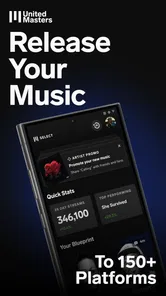

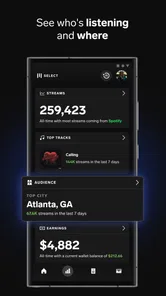
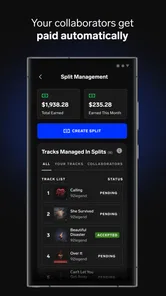
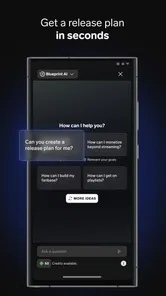

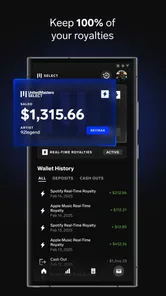
Analysis by Reviewed
When I look at UnitedMasters: Release Music, I see an app aimed at the part of music making that begins after the song is finished: getting a track ready, presenting it properly, and finding a path toward listeners. I used it with that mindset rather than treating it as a complete recording studio. That distinction matters. If you want to record instruments, arrange a full project, or replace a desktop digital audio workstation, this is not the tool I would reach for first. If you are an independent artist who already has music and wants a mobile home for release-related work, it makes much more sense.
The app comes from UnitedMasters and sits in the Music & Audio category. It is free to install, open to Everyone, and has built a sizable audience, with over one million installs and a 4.5 average from around seventeen thousand ratings. Those figures suggest that it is not a niche experiment, but they do not remove the need to understand its workflow. The useful question is not simply whether it is popular. The useful question is whether its way of handling distribution, audio preparation, and discovery matches the way you already make music.
What to decide before moving your music into the app
I’d use this section to decide whether the app fits the way I already finish and organize music, rather than moving a whole catalog at once. A single representative track can show whether its mobile release workflow feels convenient or simply adds another stop. I’d also settle on a clear role for beat discovery and audio preparation before bringing in more projects.
Start with your actual bottleneck
I would begin by identifying the problem that is slowing you down. A beginner who has only a rough vocal memo needs recording and editing tools. A producer with finished WAV files needs a reliable route from export to release. A hobbyist who mainly wants to discover beats may care more about browsing and inspiration. UnitedMasters is most appealing in the second situation, while its value in the first depends on what you already use to create the song.
This is also why I would not compare it only with other music players. Its purpose is closer to an artist-service app than to a streaming player. Traditional audio editors concentrate on cutting, mixing, effects, and arrangement. Distribution services concentrate on sending finished work outward. Beat marketplaces concentrate on finding material to build from. This app brings several artist-facing tasks into one mobile experience, so the trade-off is convenience versus the deeper control of specialized software.
Check your release habits before you start
A smooth experience depends on preparation. I would keep final mixes, cover artwork, songwriter details, and release notes organized before opening the app. That sounds basic, but mobile workflows become frustrating when the artist is trying to search through scattered files while filling in release information. The app can reduce the number of places you work, but it cannot replace a tidy music archive.
My practical advice is to treat each release as a small project folder. Keep a clearly named master audio file, an alternate version if you have one, and a simple text note containing credits. That makes the move into a distribution workflow less error-prone. It also gives you a chance to listen once on headphones and once through ordinary phone speakers before committing to the upload process.
More From Our News Desk

 Gmail
GmailGmail in a Busy Inbox: Who Benefits Most?
From first account to crowded workday, Gmail earns its place through dependable search and flexible sorting—but its best fit depends on how much inbox maintenance you can tolerate.

 Prime Video
Switching to Prime Video: What Changes in Your Viewing Routine
Prime Video can make a compelling second home for streaming, but switching means learning a different catalog, rental layer, and route from browsing to playback.

 Universal TV Remote Control
Universal TV Remote Control Works Best as a Reliable Backup
A phone remote earns its place through quick setup and reliable habits. Here is how to get more from Universal TV Remote Control—and where its limits show.

 Weather - By Xiaomi
Weather by Xiaomi Review: Clear at a Glance, Less Clear Up Close
Xiaomi’s weather app makes everyday forecasts quick to scan, but its calm surface can leave useful details and recovery paths harder to find than they should be.

 X
XX Under Pressure: Can It Recover When Posting Goes Wrong?
A resilience-focused review of X, examining setup, mistaken posts, interruptions, weak connections, and the gaps that matter when recovery needs to be dependable.

 Clash of Clans
Clash of Clans Is Won Between the Battles
Its raids are quick; its community is a long-term project of coordination, teaching, rivalry, and shared responsibility—with all the friction that entails.
Latest News



Understand the audio-preparation role
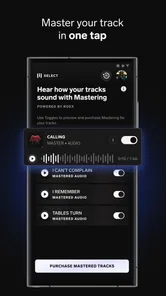
The store summary positions the app around mastering audio tracks, but I would not interpret that as permission to ignore the mix. Mastering can polish a balanced track; it cannot rescue harsh vocals, buried drums, clipping, or a weak arrangement. I found the most sensible workflow was to finish the creative mix elsewhere, then use the mobile stage for refinement and release preparation.
That separation is one of the less obvious strengths here. It keeps creative decisions and delivery decisions from becoming confused. I can revisit the mix in a full editor when something is wrong, then return to the app when the file is ready. For a solo artist working between a laptop and a phone, that division feels more efficient than forcing every task into one application.
Decide how much control you really need
There is a difference between wanting a fast release path and wanting to inspect every technical detail. If you are comfortable with a guided process, UnitedMasters feels approachable. If you want extensive routing, detailed automation, advanced mastering controls, or a large plug-in ecosystem, a desktop workstation remains the better fit. I would make this decision before paying for anything inside the app, because convenience has little value if the central workflow feels too limited for your standards.
Think about discovery as part of the artist journey
The discovery side is not just decoration. Browsing new beats can help an artist move past a creative block, compare different production directions, or find a starting point for a new session. I would use it deliberately rather than endlessly scrolling: save ideas mentally, note the tempo or mood that works for you, and then return to your own project with a clear purpose.
For a new artist, that can be more useful than opening a blank session in a full workstation. A blank timeline offers unlimited choice, which can be paralyzing. A beat-discovery environment narrows the starting point. The trade-off is that inspiration can become dependence if you stop developing your own production identity, so I see this feature as a prompt, not a substitute for songwriting or arranging skills.
Where the app wins in everyday use
The strongest advantage is continuity. I can imagine finishing a mix at home, checking the file from my phone on the way to work, and handling release tasks without waiting to return to a desktop. That does not make the phone a better studio, but it makes the administrative side of being an independent artist less tied to one location.
A realistic example would be a singer who records on a laptop, receives a final master from a collaborator, and wants to prepare a release during a lunch break. Instead of opening a workstation just to confirm the file, organize the track, and think about distribution, the artist can use this app as the mobile checkpoint. The important benefit is not flashy production power. It is reducing the gap between “the song is finished” and “the song is ready to move forward.”
I also like the way the app encourages artists to think beyond the audio file. A release is not only a waveform. It has context, presentation, and an audience. By combining release-oriented work with beat discovery, the app keeps the artist’s attention on the broader journey rather than only on technical editing.
Another useful insight is that it can serve as a bridge between creative and administrative routines. Many independent musicians lose momentum after finishing a track because the next steps feel disconnected from making music. Having those steps in the same artist-focused environment may make them easier to begin. For someone releasing occasionally, that psychological advantage can be as important as any individual tool.
Where the workflow may slow you down
The same simplicity that helps a newcomer can frustrate an experienced producer. Mobile interfaces are excellent for checking progress and handling focused tasks, but they are not ideal for long sessions of detailed audio work. Small screens make comparison, editing, and precise correction less comfortable than on a computer. I would not choose this app as my only production environment.
There is also a mental cost to moving between tools. If your music is created in a desktop editor, your files may still need to be exported, checked, named, and transferred before this app becomes useful. That is not a failure of UnitedMasters; it is simply the reality of separating production from distribution. Artists who want an all-in-one studio may feel that the app starts too late in the creative process.
Mastering should be approached with restraint as well. A louder result can initially sound more exciting, but louder is not automatically better. I would compare any processed version with the original at a similar listening level and check the vocal, low end, and overall balance. If the result makes the track tiring, I would return to the mix rather than repeatedly adjusting the final stage.
How it compares with the usual alternatives
Compared with a full digital audio workstation, UnitedMasters is easier to carry and more focused on the release journey, but it offers less room for deep production work. I would choose a workstation for composing, recording, sound design, and detailed mixing. I would choose this app when the song is already close to finished and I want a more direct artist-service workflow.
Compared with a standalone mastering application, it is broader in purpose. A dedicated mastering tool may suit someone who only wants to process audio and already has a separate distribution plan. UnitedMasters is more relevant if mastering is one step in a larger path toward releasing music. The advantage is fewer disconnected decisions; the disadvantage is that specialists may prefer more narrowly focused controls.
Compared with a beat-only platform, the app has a wider artist perspective because it connects beat discovery with release activity. A beat marketplace may be better for someone whose immediate need is licensing, browsing a large catalog, or building a production session around purchased material. I would choose UnitedMasters when discovery is useful but not the entire reason I am opening the app.
Compared with handling everything manually through separate cloud storage, audio software, and distribution accounts, this app can feel more coherent. The compromise is that a unified workflow may not satisfy artists who already have a carefully optimized system. If your current process is fast, transparent, and easy to repeat, switching only makes sense if the mobile convenience solves a real problem.
What free access means in practice
The app is free to install, which makes it easy to test without committing at the door. That is important for artists who are still deciding how serious their release schedule will be. I would use the free entry point to inspect the workflow, understand where my files fit, and decide whether the process feels natural before considering optional spending.
There are in-app purchases ranging from $0.99 to $59.99 per item. Because the range is wide, I would read each purchase screen carefully and consider whether it supports a single release or a repeatable workflow. A low-cost experiment may be reasonable for a first project, while a higher-priced option deserves a clearer plan for how often you will use it.
The cost of switching is not only financial. It includes learning a new sequence, reorganizing files, checking how your existing release habits fit, and possibly maintaining another tool for production. For an artist with many unfinished tracks, the switch can be worthwhile if it creates a consistent path from master file to release. For someone with one song and no regular publishing plan, a simpler manual approach may be enough.
I would also avoid moving an entire catalog at once. Start with one finished track that represents your normal workflow. Use it to test file preparation, audio checking, release details, and your comfort with the app’s organization. If that experience feels clear, move on to the next release. This staged approach limits disruption and shows whether the app genuinely saves time rather than merely shifting work around.
Who should use it, and who should skip it
I recommend it most readily to independent singers, rappers, producers, and small artist teams that already create music elsewhere and want a mobile-centered route for releasing it. It is especially suitable for people who work between locations, dislike juggling several artist-service tools, or want beat discovery close to their release routine.
I would be more cautious for a studio musician who needs advanced recording control, a mix engineer who expects detailed mastering adjustments, or an artist whose label already manages distribution. In those cases, the app may duplicate an established system instead of improving it. It is also not my first recommendation for someone looking primarily for a social listening app or a conventional music player.
The Everyone content rating makes it approachable for a broad audience, but accessibility does not mean every workflow will suit every skill level. Beginners may appreciate the focused direction, while advanced users may quickly notice the limits of working from a phone. The right fit depends less on experience alone and more on whether your main need is release management or deep creation.
Device expectations and version context
On Android, the app supports devices running version 8.0 or later, and the current version is 26.8.1. I would still keep the operating system updated where possible and make sure there is enough local space for audio files. A phone that is technically compatible may not feel comfortable if its screen is cramped, storage is nearly full, or switching between audio apps is slow.
That is another reason I see the phone as a companion rather than a complete studio. A newer, larger device can make browsing, reviewing, and entering release information more pleasant, but hardware does not turn a mobile release tool into a desktop workstation. Before switching, I would test the exact device I plan to use with a nonessential track.
My recommendation after weighing the trade-offs
After using it as an artist-service app rather than pretending it is a full recording suite, I find the concept convincing. Its best quality is the way it shortens the distance between a finished track and the practical work of releasing it. The beat-discovery side adds creative value, while the audio-preparation focus gives the app a clear role in a wider music workflow.
I would recommend UnitedMasters: Release Music to an independent artist who wants to organize release activity from a phone, has realistic expectations about mastering, and is willing to keep a separate tool for serious recording and mixing. I would not recommend replacing a capable workstation with it, nor would I switch from a reliable distribution setup without testing one release first.
In short, this is a useful bridge app. It is not trying to be every piece of music software at once, and that is precisely why it can work. Use it when your challenge is moving finished music forward, discovering the next direction, and keeping release tasks close at hand. Skip it when your priority is deep audio production or maximum technical control. For the right independent artist, that distinction makes the free download worth exploring before deciding how far to build it into a regular release routine.
UnitedMasters: Release Music Frequently Asked Questions
Is UnitedMasters: Release Music mainly for artists or listeners?
UnitedMasters: Release Music is designed primarily for music makers and independent artists rather than people looking for a conventional music-streaming player. Its focus is on releasing music and using artist-oriented services, with features connected to mastering audio tracks and discovering beats. If you create music or are preparing a release, its purpose may be a better fit than if you only want to listen to songs.
What should I prepare before submitting a song through UnitedMasters?
Before submitting a track, make sure you have the rights or permissions needed for the recording, composition, samples, beats, and artwork. It is also useful to have your release details and metadata ready and to review the app’s current submission requirements. Preparing these materials first can make the distribution process more straightforward and help you avoid problems with a release.
Can UnitedMasters guarantee streams, playlist placement, or a successful release?
No app can guarantee an audience response, and UnitedMasters does not promise that a release will receive streams, playlist placement, or career success. The platform can help artists distribute music and access artist-focused tools, but promotion and audience growth take effort beyond uploading a track. Treat distribution as one part of your release plan, rather than a substitute for building and promoting your music.
Is UnitedMasters: Release Music available in my language?
UnitedMasters: Release Music is a music and audio app for artists, but your experience may depend on the language and regional options available on your device and within the app. Before planning a release, review the app’s menus and guidance to make sure you can comfortably understand the submission steps and terms. This is especially important when reviewing rights, royalties, and release conditions.
Can I use UnitedMasters without a paid plan?
UnitedMasters is free to download, and some services may be available without an upfront fee. Other tools or benefits may require an in-app purchase or subscription, and plan features and revenue terms can vary. Review the options shown in the app before committing to a release so you understand any charges, royalties, payment conditions, and limitations that apply to your selected plan.
Pros
- Simple distribution tools for independent artists
- Keeps artists informed about streaming and release performance
- Useful resources for building an independent music career
- Supports multiple release formats and platforms
- Clean interface makes catalog management straightforward
Cons
- Some features may require a paid membership or upgraded plan
- Royalty and payout details can take time to fully understand
- Support response times may vary for account or release issues
- Release approvals can be delayed by platform or rights checks
- Best suited to serious artists rather than casual music uploads











