

Udemy - Online Courses
- 15.11K
- 4.4
- Installs
- 10.00M
- Price
- Free

Screenshots


Analysis by Reviewed
Trust is a practical part of choosing a learning app: courses may involve account details, purchases, progress, and sometimes interaction with instructors or other learners. I approach Udemy - Online Courses as a place to compare lessons and build a skill, not as a substitute for checking the choices an app presents on my own device. Udemy is a well-established education app, with a 4.5 average from around 497,000 ratings and more than 10 million installs, but popularity alone cannot tell me whether a particular course—or the app’s available controls—fits my needs.
What I check before signing in or buying
I would start by looking at the sign-in options and account settings shown in the app, then decide how much profile information I actually want to provide. I also review any permission prompt when it appears, rather than approving it automatically. A course that is mainly video-based may not need the same device access as a feature that uses a particular tool, so I prefer to make that choice in context and revisit the device’s permission controls if my needs change.
Purchasing deserves the same pause. The app is free to install, but in-app purchases range from $0.99 to $239.99 per item, so a free download should not be mistaken for free access to every course. Before paying, I would check the course page, its contents, and the purchase details presented at checkout. I would also make sure I am signed into the account I intend to use, especially if I switch between devices, so my decision and course access are associated with the right profile.
When a lesson includes a quiz, assignment, or discussion, I treat each as a separate choice about participation. I can learn from a lecture and try the exercise privately without posting personal details in a public or course-related conversation. If I do need to ask a question, I keep it focused on the topic and avoid sharing information that is not relevant. These habits do not depend on assuming anything about hidden data practices; they are straightforward ways to keep control over what I choose to enter.
How much structure do you want?
The main decision is whether self-paced courses match the way I learn. Udemy is useful when I already know the subject I want to explore and can supply my own routine. It is less convincing for someone who needs a teacher to check in at a set time, a cohort to keep them accountable, or a formal qualification whose recognition is important. In those situations, a live class, a school program, or a course from a provider with clearly relevant accreditation may be a better fit.
Compared with piecing together free videos and articles, a paid course can offer a more coherent path and keep related lessons in one place. That organization is valuable when I am learning a tool from the beginning, but it does not guarantee depth or teaching quality across every subject. Free resources can be the better first stop if I am only testing an interest, need a quick answer, or want to compare explanations before choosing a longer course. I see Udemy as one route among several, not a universal replacement for libraries, tutorials, or classroom learning.
Choosing a course that fits your goals
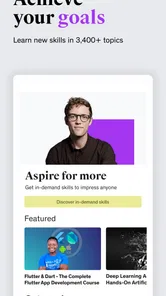
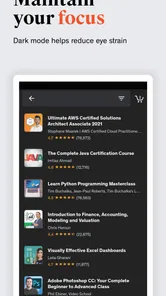
When I first opened Udemy - Online Courses, I was floored by the sheer variety of courses available. From coding and digital marketing to baking and photography, there's something for everyone. The app's interface is user-friendly, making it super easy to navigate through the categories and find courses that pique your interest. You can literally spend hours just browsing through the endless options!
More From Our News Desk

 Gmail
GmailGmail in a Busy Inbox: Who Benefits Most?
From first account to crowded workday, Gmail earns its place through dependable search and flexible sorting—but its best fit depends on how much inbox maintenance you can tolerate.

 Prime Video
Switching to Prime Video: What Changes in Your Viewing Routine
Prime Video can make a compelling second home for streaming, but switching means learning a different catalog, rental layer, and route from browsing to playback.

 Universal TV Remote Control
Universal TV Remote Control Works Best as a Reliable Backup
A phone remote earns its place through quick setup and reliable habits. Here is how to get more from Universal TV Remote Control—and where its limits show.

 Weather - By Xiaomi
Weather by Xiaomi Review: Clear at a Glance, Less Clear Up Close
Xiaomi’s weather app makes everyday forecasts quick to scan, but its calm surface can leave useful details and recovery paths harder to find than they should be.

 X
XX Under Pressure: Can It Recover When Posting Goes Wrong?
A resilience-focused review of X, examining setup, mistaken posts, interruptions, weak connections, and the gaps that matter when recovery needs to be dependable.

 Clash of Clans
Clash of Clans Is Won Between the Battles
Its raids are quick; its community is a long-term project of coordination, teaching, rivalry, and shared responsibility—with all the friction that entails.
Latest News



That abundance is useful when I have a specific goal, but it can also make browsing a trap: watching previews and comparing options can take longer than starting a lesson. I get better results by deciding what I want to make or understand first, then checking a course outline for relevant topics and a sensible order. For example, if I want to build a small coding project, I look for lessons that lead toward that outcome rather than choosing a broad course just because its title sounds impressive.
Learning in short, useful sessions
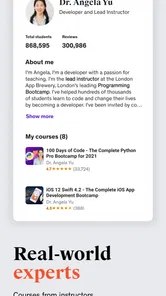
What sets Udemy apart from other online learning platforms is its interactive content. The courses are designed by industry experts who know how to keep learners engaged. With video lectures, quizzes, and assignments, it's almost like being in a real classroom, but from the comfort of your home. I personally enjoyed the ability to interact with instructors and fellow students, which made the learning experience even more enriching.
In practice, I find it helps to treat a course as a sequence of small tasks, not a video playlist to rush through. A realistic routine might be to watch one lesson during a commute or lunch break, then try the exercise later at home while the explanation is still fresh. That approach works especially well for software skills, where pausing to reproduce each step matters more than finishing quickly. It is less suited to anyone who needs a live teacher to notice confusion and adapt the lesson in the moment.
Before committing, I would check whether the course’s teaching style matches how I learn: a fast demonstration can be efficient, but a slower explanation may be better when the topic is unfamiliar. The course experience also depends on the individual instructor, so I would not assume that every subject has the same level of polish or interaction. If I need a credential tied to a formal curriculum, I would compare the course carefully with a structured school or professional program rather than treating a self-paced video course as an automatic substitute.
Making a course useful in everyday life
One practical way I would use the app is to connect a lesson to a real task already on my calendar. If I am preparing a presentation, for instance, I could look for a focused course on the software or design skill I need, watch only the relevant sections, and apply each technique to that presentation. This gives me a reason to practice immediately and a clear test of whether the instruction is useful. It also helps me avoid collecting courses simply because their topics sound interesting.
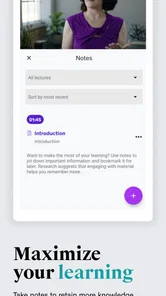
For a longer skill, I would keep a small note outside the lesson with the next action I want to try. After a video, that might be a command to test, a recipe step to repeat, or a question to revisit. This is more effective than relying on memory after several lessons, especially when I study in scattered blocks. If the course has assignments, I would use them as checkpoints; if it does not, I would invent a small project that proves I can apply what I watched.
Another useful trade-off is deciding whether to sample multiple instructors or commit to one course. A short preview can reveal whether the pace, audio, and teaching style work for me, while comparing too many options can become procrastination. I would shortlist a couple of courses, inspect their outlines, and choose the one closest to my immediate goal. If the first lesson feels mismatched, I would reassess early rather than forcing myself through a long course merely because I have started it.
Flexible study, with a little planning
One of the biggest perks of using Udemy is the flexibility it offers. Whether you're a night owl or an early bird, you can learn at your own pace. I found this particularly useful as it allowed me to fit learning around my busy schedule. Plus, once you purchase a course, you have lifetime access to it. So, there's no rush to complete it, and you can revisit the material anytime you want.
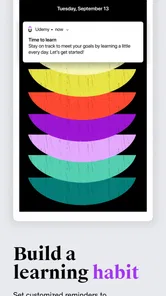
For a busy learner, that flexibility makes it easier to return to a lesson when a question comes up during a project instead of waiting for a scheduled class. I would still set a modest goal, such as completing one lesson and trying its exercise each week; without a plan, an open-ended course can sit untouched. If you are comparing the app with free tutorials, the trade-off is convenience and a more organized course path versus the ability to sample many sources without paying for a particular course.
Udemy is free to install, while individual course purchases and other in-app purchases can vary; the listed purchase range runs from $0.99 to $239.99 per item. I would check the current course price and what it includes before buying, rather than assuming the app’s free download means every lesson is free. The app has a 4.5 average from around 497,000 ratings, and more than 10 million installs, which suggests a broad audience but does not guarantee that a specific instructor’s course will suit me.
Cost, control, and trust
Let's talk about the cost because, honestly, who doesn’t love a good deal? While some courses can be pricey, Udemy often has sales where you can snag courses at a fraction of the price. I managed to get a couple of courses for less than a cup of coffee. And with a 30-day refund policy, it's a win-win situation if the course doesn't meet your expectations.
Because a course may include quizzes, assignments, or instructor and student interaction, I think about what I am comfortable sharing before participating. I can keep my learning focused on watching and practicing privately if a discussion is not useful to me, and I would avoid posting personal details in course conversations. That is a practical habit, not a claim about the app’s permissions or data handling; on any app, I check the device’s permission controls and account settings directly and choose only what I need.
The app is rated for Everyone and supports devices running Android 8.0 or later. Its current version is 9.55.1, so I would keep it updated through the relevant app store and review the permissions presented on my own device. Udemy works best for self-directed learners who want to explore a topic or build a skill in manageable sessions. I would skip it if I need guaranteed live feedback, a fixed classroom schedule, or a formal qualification without checking whether a particular course meets that need.
My cautious recommendation
Udemy is strongest when I arrive with a question, a practical goal, and enough discipline to turn lessons into practice. It is not automatically the right choice for a learner who wants a set curriculum, close supervision, or a credential that has to satisfy a specific employer or institution. Before enrolling, I would decide what success looks like, compare the course outline with that goal, and check the exact purchase details. Those few steps make the large catalog easier to use and reduce the chance of paying for a course that is broader, faster, or less hands-on than I wanted.
For privacy-conscious use, I would keep the same deliberate approach: review the permissions and account controls visible on my device, share only what is needed for a course activity, and make participation in discussions a choice rather than an obligation. If I am uncertain about a purchase or account setting, I would read the options shown in the app before continuing instead of assuming that every course works the same way. That gives me a clearer basis for deciding whether the learning experience is worth the cost and effort.
In conclusion, Udemy - Online Courses is a fantastic app for anyone looking to learn something new or enhance their existing skills. With its wide range of courses, interactive content, and flexible schedule, it caters to learners of all kinds. So, if you're ready to embark on a new learning adventure, Udemy might just be the perfect companion to guide you along the way.
Udemy - Online Courses Frequently Asked Questions
Can I browse Udemy courses before deciding to buy one?
Yes. You can explore the learning options in Udemy before choosing a course, which makes it easier to compare subjects with your goals and budget. The app focuses on online learning, with the store summary highlighting AI, coding, and more. Take time to read each course’s description and check its price before making a purchase.
Who develops Udemy, and what kind of app is it?
Udemy is an education app developed by Udemy. It brings online courses together for learners who want to explore subjects or work toward personal and professional goals. The app is free to download, but buying a course is a separate decision. You can start by looking through the available learning options and deciding whether the subjects suit what you want to learn.
Does Udemy require an account, and can I use the same courses across devices?
Udemy is designed for mobile learning, with versions for Android and iOS. If you plan to use the app on more than one device, consider signing in with the same account so you can access your learning in one place. Check the app’s sign-in options and course details as you get started, and make sure each device meets its operating system requirements.
Can I download course content for learning without an internet connection?
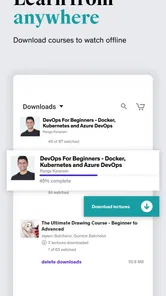
The Udemy app supports offline viewing, so you can download course content and watch it without an internet connection. This can be useful when you expect to be away from reliable internet access. Availability and the amount of content you can save may depend on the course and device, so check the relevant options in the app before relying on offline access.
Is Udemy free to download, and are courses included at no cost?
Udemy is free to download, but course purchases are separate, and prices vary by course. The app also offers in-app purchases, so check the details shown for a course before buying. Some courses may be free, while others require payment. You can browse the available learning options first and decide which content fits your goals and budget.
Pros
- Wide range of courses available
- Flexible learning schedule
- Affordable pricing options
- Expert instructors
- Lifetime access to purchased courses
Cons
- Some courses lack depth
- Inconsistent course quality
- Limited interaction with instructors
- No formal accreditation
- Mobile app requires improvements











