

TV (Samsung) Remote Control
- 11.87K
- 4.5
- Installs
- 10.00M
- Price
- Free
Screenshots
Analysis by Reviewed
When the Samsung TV remote goes missing just as I sit down to watch something, I want a quick substitute, not another complicated setup project. That’s the everyday problem TV (Samsung) Remote Control is meant to solve: it turns a compatible phone into a handheld way to manage a Samsung TV. I see its appeal most clearly as a practical backup, especially for households where the remote often gets moved between rooms or disappears into the sofa.
Before you reach for your phone
This app makes the most sense when the TV is already part of a familiar home setup and the immediate goal is simple: get control back without interrupting the evening. If the remote has slipped behind the cushions, a phone can be faster to find than a replacement remote. If you are setting up the TV for the first time, though, I would keep the physical remote close by rather than assuming the app can handle every step before it connects.
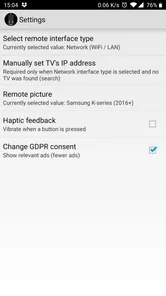
The key practical question is whether the phone and television can communicate over the same Wi-Fi network. Being connected to the internet is not always enough: a guest network or separate network bands may keep devices from seeing each other. I would check that both devices are on the household network before troubleshooting the app itself. This is a small but useful distinction, because it can prevent a simple network mismatch from looking like a broken remote.
I would also think about who normally uses the TV. A person comfortable with a phone interface may appreciate the quick access to search and navigation, while someone who wants tactile buttons without looking down may prefer the supplied physical remote. The phone version is most convincing as an alternative for particular tasks, not necessarily as a universal improvement to every viewing habit.
Getting Started with the App
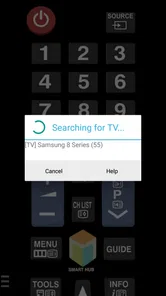
First things first, downloading and setting up the app is a breeze. It’s available on both Android and iOS, so no matter what device you’re using, you’re covered. Once you’ve got it installed, the app walks you through a simple setup process. Just make sure your phone and TV are connected to the same Wi-Fi network, and you’re good to go!
That network requirement is the first thing I would check if the connection does not come together. A phone on a guest network and a TV on the household network may not be able to see each other, even when both appear to have internet access. I’d also keep the physical remote nearby during the initial setup, since having it available is useful if the TV needs attention before the phone connection is ready.
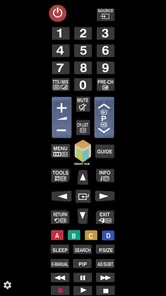
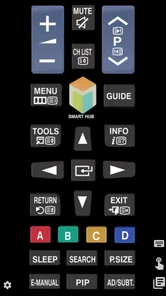
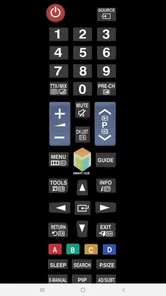
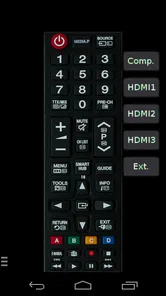
One thing I really appreciate is the clean and intuitive interface. It’s not cluttered with unnecessary features, which makes navigation super easy. All the essential controls are right there on the main screen, so you don’t have to dig through menus to find what you need.
More From Our News Desk

 Gmail
GmailGmail in a Busy Inbox: Who Benefits Most?
From first account to crowded workday, Gmail earns its place through dependable search and flexible sorting—but its best fit depends on how much inbox maintenance you can tolerate.

 Prime Video
Switching to Prime Video: What Changes in Your Viewing Routine
Prime Video can make a compelling second home for streaming, but switching means learning a different catalog, rental layer, and route from browsing to playback.

 Universal TV Remote Control
Universal TV Remote Control Works Best as a Reliable Backup
A phone remote earns its place through quick setup and reliable habits. Here is how to get more from Universal TV Remote Control—and where its limits show.

 Weather - By Xiaomi
Weather by Xiaomi Review: Clear at a Glance, Less Clear Up Close
Xiaomi’s weather app makes everyday forecasts quick to scan, but its calm surface can leave useful details and recovery paths harder to find than they should be.

 X
XX Under Pressure: Can It Recover When Posting Goes Wrong?
A resilience-focused review of X, examining setup, mistaken posts, interruptions, weak connections, and the gaps that matter when recovery needs to be dependable.

 Clash of Clans
Clash of Clans Is Won Between the Battles
Its raids are quick; its community is a long-term project of coordination, teaching, rivalry, and shared responsibility—with all the friction that entails.
Latest News



Moving from connection to control
Once the phone can reach the TV, I’d start with an ordinary test rather than trying to do everything at once: adjust the volume, move through a menu, and make sure the controls respond as expected. That gives a clear sense of whether the connection is stable enough for a longer session. If the TV does not react, I would first confirm the network match and that the television is available to be controlled, then try again before treating it as an app failure.
A useful habit is to leave the app easy to find on the phone instead of searching for it after the remote has gone missing. That matters most when the phone is already in use for music, messages, or browsing. Switching between those tasks and TV control is convenient, but it can also mean the phone locks or the app is no longer in the foreground just when someone wants to pause or change the volume.
This is where the app differs from a conventional universal remote. A physical universal remote is another device to keep charged or within reach, but it has buttons you can use without looking at a screen. This app avoids adding hardware and makes text entry more natural, yet it relies on the phone and home network being available. For a Samsung-only living room, that trade-off can be sensible; for a collection of televisions and other devices from different brands, a broader control solution may be a better fit.
Features that Stand Out
Now, let’s talk about some of the features that make this app a must-have. First off, the app mimics a traditional remote perfectly. You’ve got your power button, volume controls, channel switcher, and even a nifty touchpad for those times you want to scroll through options quickly.
The touchpad is most useful when I’m moving through on-screen menus, rather than entering a specific channel or making a precise selection. For a smoother routine, I’d use the directional controls to reach a menu and the keyboard when a search box appears. That small switch between navigation styles can save a lot of repeated button presses, particularly when looking for a particular title.
Another feature I found particularly useful is the keyboard function. Typing in search queries using a regular remote can be a pain, but with this app, you can use your phone’s keyboard, making it super convenient and fast.
This makes the app especially handy when someone wants to search for a show while another person is already browsing, or when a long title is awkward to enter one letter at a time. It is still a phone-based control method, though: the phone needs to be within reach, awake when you need it, and connected to the same network as the TV. I wouldn’t put away the regular remote if the phone is also your main device for other tasks.
One small workflow tip is to use the keyboard only once the TV is showing a field that accepts text. It is easy to assume that a phone keyboard will replace every kind of remote input, but search entry and general menu navigation are different jobs. I find it more efficient to move to the relevant search screen first, type the title, and then return to the remote controls for the rest of the session.
It can also help to keep the phone close to the person who is actually choosing what to watch. In a shared room, passing the phone around for every search can be more awkward than simply letting one person handle text entry while someone else uses the usual remote. That is a real handoff rather than a reason to make the phone the only control method: each person can use whichever input feels quicker for the current task.
Oh, and did I mention voice control? Yes, the app supports voice commands, which means you can simply tell your TV what to do. It’s like having your very own smart assistant dedicated to your TV viewing experience.
Voice input is most appealing when you are already holding the phone and would rather speak than type. I would treat it as another way to send a command, not as the only reliable way to control the TV. In a quiet room, saying a search or command may feel easier; in a shared space, or when you want to be discreet, tapping controls or using the keyboard is the more comfortable choice.
When a normal evening gets interrupted
Imagine settling in to watch a film and discovering that the remote is in another room. I would open the app, check that the phone is on the same home network as the TV, and use the controls to get to the search screen. If the title is long, the phone keyboard is the useful shortcut; after choosing something, the touchpad or directional controls can handle moving through menus, while the volume buttons take care of a quick adjustment.
The payoff is not that every part of television watching becomes better. It is that the irritating interruption—getting up, searching for the remote, or entering a title one character at a time—can be shortened. If the connection fails, the sensible fallback is to use the physical remote and return to the app later, rather than letting a network problem turn into a longer delay.
That example also shows where the app is strongest: it joins a few different jobs in one device. The phone is already suited to typing and voice input, while a physical remote can be quicker for blind, repeated button presses. Using both according to the task is a more realistic routine than expecting one to make the other obsolete.
User Experience and Final Thoughts
Using the TV (Samsung) Remote Control app has been a game-changer for me. It’s reliable, easy to use, and incredibly functional. I haven’t had any issues with connectivity, which is always a plus. Plus, it’s a great backup for those times when the physical remote decides to hide in the depths of the couch cushions.
In a realistic evening routine, I’d open the app, use the phone keyboard to find something to watch, then switch back to the on-screen controls to adjust volume or move around. That handoff is the main practical advantage over reaching for the TV’s physical remote: searches can be easier on a phone, while familiar buttons still handle everyday changes. Compared with a universal remote, this approach avoids keeping another piece of hardware nearby, but it depends on a working phone and Wi-Fi connection.
The app is a good fit if you own a Samsung TV, want a simple backup, and often type searches or navigate menus. It may be less suitable if you prefer a dedicated remote with physical buttons, need control when the home network is unavailable, or are looking for one app to manage several kinds of home devices. The developer, npe, focuses this app on Samsung TV control; its narrow purpose is convenient when that is exactly what you need, but it is not a replacement for every remote in a mixed-device living room.
For someone deciding whether to keep it installed, I would ask two practical questions: do you often use your phone while watching, and do you have a dependable shared network at home? If the answer to both is yes, having the app ready can be worthwhile even if it is used only when the regular remote disappears or a search becomes tedious. If you value tactile controls above all, or regularly use the TV away from the home network, a physical remote remains the more dependable everyday choice.
It is a free app in the video player and editor category, with an Everyone age rating. It has a 4.5 average from around 182,000 ratings and has passed 10 million installs. Those figures suggest it is widely used, though I’d still judge it by whether it pairs smoothly with your own TV and network. The app was released on April 24, 2014, and version 2.9.9 supports Android 5.0 and later.
Its simple focus is both the appeal and the limitation. I would choose it over a more general remote app when I want a straightforward phone-based way to control a Samsung TV, rather than extra controls for devices I do not need. I would choose a physical or more broadly compatible option when my setup calls for button-first operation or control across different equipment. That distinction makes it easier to decide what role this app should play before relying on it during a night in.
To wrap it up, if you own a Samsung TV and are looking for a convenient way to control it, I’d highly recommend giving this app a shot. It’s streamlined, user-friendly, and just makes life a little bit easier. So go ahead, download it, and enjoy the convenience of controlling your TV right from your smartphone.
TV (Samsung) Remote Control Frequently Asked Questions
Is TV (Samsung) Remote Control available for iPhone and iPad?
TV (Samsung) Remote Control is listed as an Android app, with Android 5.0 as its minimum operating system requirement. If you use an iPhone or iPad, check the app store for your device before downloading, since this listing describes the Android version. Choosing an app made for your platform helps ensure it can be installed and used as intended.
Can this app replace my physical Samsung TV remote?
It is designed to give you a way to control a Samsung television from a mobile device, with an interface intended to resemble a conventional remote. That can be handy when your physical remote is misplaced or you prefer using your phone for everyday controls. Keep in mind that the app’s usefulness depends on whether your TV and home setup work with it.
What devices and operating systems can I use with TV (Samsung) Remote Control?
TV (Samsung) Remote Control is an app for Android, listed with a minimum operating system requirement of Android 5.0. Before downloading, check that your device runs a compatible version and that you are getting the app from the store for your platform. The app is free, and its age rating is Everyone, so it is presented for a broad audience.
Who developed TV (Samsung) Remote Control, and how popular is it?
The app is developed by npe and is listed in the Video Players & Editors category. It has over 10 million installs, around 182,000 ratings, and around 11,000 written reviews, with an average rating of 4.5. Those figures suggest that many people have tried it, though your experience can still depend on your phone, TV, and home network.
What is the Samsung TV Remote Control app?
The Samsung TV Remote Control app is a mobile application that allows users to control their Samsung televisions using a smartphone or tablet. It provides an interface similar to a physical remote, offering functionalities such as changing channels, adjusting volume, and accessing smart features directly from your mobile device.
Pros
- Easy setup and user-friendly interface
- Compatible with most Samsung TV models
- Quick response time for commands
- Supports voice control for convenience
- No additional hardware required
Cons
- Only works with Samsung TVs
- Ads can be intrusive during use
- Some features require premium upgrade
- Limited customization options
- Occasional connectivity issues











