TuneLush-Offline Music Player
- 10.00
- 4.5
- Installs
- 100.00K
- Price
- Free

Screenshots
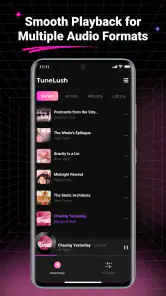

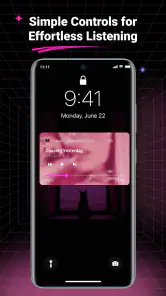
Analysis by Reviewed
I tested TuneLush-Offline Music Player as a practical tool for listening to music already stored on a device. The appeal is straightforward: instead of building a listening session around a connection, an account, or a streaming catalog, I could work with local audio, arrange it into playlists, and keep lyrics close at hand. That makes it a useful option for people whose music collection is already on their phone and who want a clean way to reach it.
The app comes from Motasemviedo dev and sits in the tools category, although its purpose is clearly focused on local music playback. It is free, rated for Everyone, and its current version is 1.0.6. I found the experience most convincing when I treated it as a personal library companion rather than a replacement for a large streaming service. That distinction matters, because TuneLush is strongest after you already have audio files ready to use.
From a folder of music to a usable listening session
Starting with the music already on the phone
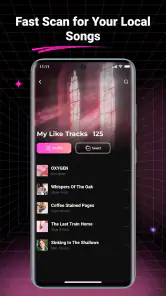
The first useful step is the local scan. Rather than manually adding every track one by one, I would begin by letting the player look through the device for supported music. This is the sensible starting condition for an offline player: the value depends on how quickly an existing collection becomes visible and manageable. If your phone already contains albums, downloaded tracks, or carefully organized folders, the scan gives you a route into that library without requiring a separate streaming account.
That workflow is particularly handy after moving music to a new phone. I can place the files where I want them, open the player, and use the scan as the handoff between storage and playback. It is less appealing for someone who expects the app to discover new music, recommend artists, or supply a catalog. TuneLush works with what is local; it is not designed around finding content inside the app.
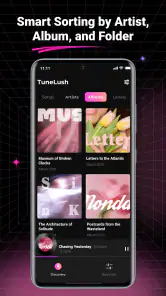
A useful habit is to tidy the collection before scanning. Clear folder names and consistent track information make the resulting library easier to understand, while a messy storage layout can make any local player feel disorganized. This is one of the less obvious trade-offs: the app can simplify playback, but it cannot fully repair a music collection that has poor organization at its source.
Turning the scan into playlists
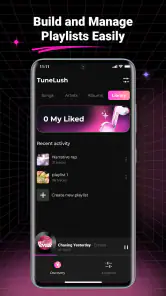
Once the tracks are available, playlists become the bridge between a general library and a specific moment. I would make separate lists for situations such as commuting, focused work, exercise, or a quiet evening. That is more useful than repeatedly searching through every local track, especially when the phone contains music from several periods or genres.
The offline approach also changes how I think about preparation. A streaming app encourages me to decide what to play while I am already online. With TuneLush, the better workflow is to prepare the playlist before leaving home, then rely on that finished selection later. For a flight, a long train ride, or a place with unreliable reception, this removes one source of uncertainty. The handoff is simple: organize while convenient, listen when connectivity is irrelevant.
I would not create dozens of tiny playlists without a reason. Local collections are easier to maintain when each list has a clear purpose. A short, focused playlist is often more practical than one enormous list, particularly when I want to start listening quickly. The app’s value here is not just that it can play songs; it gives a stored collection a more deliberate shape.
Using lyrics without interrupting playback
Lyrics add a second layer to the listening session. When I want to follow a song rather than leave it playing in the background, having lyrics available in the same general experience is more convenient than switching between a music player and a separate search. This is useful for singing along, checking a line I misheard, or simply paying closer attention to a familiar track.
The practical benefit is continuity. I can begin with a playlist, move into a song, and use its lyrics as part of that same listening routine. That makes the app more interesting than a bare file browser with a play button. At the same time, lyrics are most valuable when they match the correct recording. If a collection contains alternate versions, live performances, edits, or poorly labeled files, I would check the song identity before assuming the displayed words fit perfectly.
This is also where expectations should stay reasonable. Lyrics support the listening experience, but they do not turn the app into a full music-discovery or learning platform. Someone looking for synchronized educational tools, detailed artist information, or a broad online lyrics database may prefer a specialized service. For a local listener who wants words nearby while a stored track plays, the feature is much more appropriately sized.
Keeping playback offline in everyday use
After scanning and preparing playlists, the outcome is uncomplicated: choose a list, start a track, and continue listening without depending on a live connection. I see the clearest benefit in a realistic commute. Before leaving, I would scan the collection and select a playlist for the journey. On the way, I could listen in places where reception changes or disappears, without planning around buffering or using mobile data for every song.
The same workflow suits a person who keeps an older music collection, a listener with limited connectivity, or anyone who prefers owning and arranging files personally. It can also help when I want predictable playback instead of recommendations taking over the session. The music I hear is the music I selected, and the playlist remains tied to my own library rather than to a service’s changing catalog.
There is a quiet advantage in that predictability. A locally prepared playlist is not affected by a removed online track, a changed subscription tier, or a recommendation that does not fit the mood. That does not make the app universally better, but it does make it dependable for a very specific job: playing personal audio with a little more organization than the default file tools usually provide.
Where the handoffs need attention
The complete flow has several handoffs: files must be present, the scan must find them, playlists must be built, and lyrics must correspond to the intended tracks. Each stage is manageable, but the experience depends on the quality of the previous stage. If the files are scattered, mislabeled, or incomplete, the player inherits that friction.
This is why I would treat the initial scan as a setup task rather than something to repeat casually. If I add music regularly, I would use a consistent storage routine and scan after meaningful additions. That reduces the chance of wondering whether a missing track is unavailable or simply has not been brought into the visible library yet. A little preparation makes the offline workflow feel much smoother.
The app is also a better fit for listeners who enjoy control than for people who want everything automated. A streaming alternative may be faster when the goal is to search for an artist, start a radio-style mix, or discover something unfamiliar immediately. TuneLush asks me to bring the content and make more of the organizational decisions myself. In return, I get a listening setup that is less dependent on an external catalog.
What the current version means for a new user
With version 1.0.6, I would approach TuneLush as a focused tool rather than a mature all-purpose music ecosystem. Its feature set is easy to understand: scan local music, arrange playlists, play offline, and use lyrics when useful. That clarity is a strength because there is little need to learn a complicated system before listening.
It also means I would keep my expectations centered on the confirmed workflow. I would not install it expecting cloud synchronization, a social layer, or a replacement for every function found in a major streaming app. The more narrowly I define the job, the more satisfying the result becomes. For local playback, simplicity can be an advantage; for a connected music lifestyle, it may feel limited.
The app has reached over one hundred thousand installs and holds a 4.5 average from more than a hundred ratings. Those figures suggest that its basic idea has found an audience, but they should not replace personal testing against your own library. A local player can feel excellent with one collection and awkward with another, depending on how the files are stored and labeled.
Who should use it, and who should choose something else
I would recommend TuneLush to someone who already keeps music on an Android device and wants a dedicated place for it. It is especially suitable for listeners who value offline access, prefer making their own playlists, and occasionally want lyrics while tracks play. Because it is free and rated for Everyone, it is easy to try without turning the decision into a major purchase.
It is also a good match for a listener preparing music for a specific environment. Think of a road trip where the route may pass through weak coverage, a study session where interruptions are unwelcome, or a workout playlist assembled from files collected over time. In each case, the important outcome is not discovery; it is having a chosen set of tracks ready at the moment it is needed.
I would skip it if my main habit is searching for music I do not already own. A streaming service is better for broad catalogs, recommendations, release alerts, and effortless access across devices. I would also look elsewhere if I need advanced library management, extensive metadata editing, or a deeply integrated online account system. TuneLush’s focused design is helpful only when that focus matches the way I listen.
Device compatibility and the practical decision
The minimum operating system is Android 7.0, so the app is aimed at a wide range of Android phones rather than only recent hardware. That makes it worth considering for people using an older device as a dedicated music player. Before relying on it for travel, I would still complete the scan and test the exact playlists I plan to use, because preparation is more valuable than discovering a library problem after going offline.
My own decision would come down to the source of my music. If my collection is stored locally and I want a straightforward player with playlists and lyrics, TuneLush offers a sensible path from files to listening. If my collection mainly lives in the cloud or I want the app to supply the music itself, the usual streaming alternatives will be more convenient.
The final listening result
What I like most is the complete, understandable workflow. Music begins as files on the device, becomes visible through the local scan, gains structure through playlists, and ends as an offline listening session with lyrics available when I want them. The handoffs are not invisible, but they are logical. Once the setup is done, the result feels personal and predictable.
What I like least is the dependence on that initial organization. TuneLush cannot make an empty library feel full, and it is not the right answer when discovery matters more than ownership. The app’s limitations are therefore closely tied to its purpose rather than hidden behind a complicated interface.
For me, TuneLush-Offline Music Player is worth trying when the goal is controlled local playback, not an all-in-one music subscription. Its free price, accessible age rating, offline focus, playlist workflow, and lyric support make it a practical choice for the right listener. I would prepare the library carefully, test one complete playlist before depending on it, and choose it confidently for personal offline listening—while keeping a streaming app available for discovery and online convenience.
Pros
- Plays downloaded music without requiring mobile data or Wi‑Fi.
- Simple queue controls make everyday listening quick and convenient.
- Supports background playback while using other apps.
- Useful for keeping music available during travel or poor-signal areas.
- Local playback can help reduce battery and data consumption.
Cons
- Requires you to import or download music before listening offline.
- Music discovery and streaming features may be limited or unavailable.
- Library organization can feel basic with large music collections.
- Compatibility may vary with uncommon audio formats or file metadata.
- Offline playback does not include access to licensed streaming catalogs.

- Category
- Tools
- Version
- 1.0.6











