

TuneCarry: Offline Music
- 0.00
- 3.6
- Installs
- 100.00K
- Price
- Free

Screenshots
Analysis by Reviewed
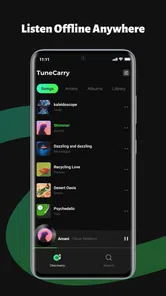
I like music apps that respect the simple reason I opened them: I want to press play and hear my own files without depending on a signal, a subscription, or a recommendation feed. TuneCarry: Offline Music takes that focused approach. It is a free Music & Audio app from Photos & Videos Download Tools, built around local songs, playlists, folders, and lock screen controls rather than online discovery.
After spending time with it, I see the appeal clearly. This is less of a streaming replacement and more of a practical player for people who already keep audio on their device. The experience is straightforward, but the details matter: how you organize folders, how you prepare playlists before leaving home, and how you use lock screen controls can make the difference between a tidy offline library and a frustrating pile of files.
The app is available for Everyone and costs nothing to use. Its current version is 1.0.1, and it runs on Android 8.0 or later. It has reached over 100 thousand installs and holds a 3.8 average from 43 ratings, which suggests a modest but real audience rather than a heavily established music platform. I would approach it as a focused utility, not as a full ecosystem for discovering or managing music.
How I use TuneCarry for a dependable offline library
I use this section to explain how I’d build a local library that stays easy to navigate, even when I’m adding music for different situations. A small amount of planning—especially keeping the original files organized before making playlists—can save time later and make the next setup check more useful.
Starting with the local collection
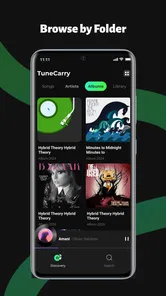
The first useful habit is to think of the app as a window onto music already stored locally. Instead of beginning with a search box for artists across the internet, I begin by checking whether my audio files are arranged in a way that makes sense on the phone. Folder names become important here. A clean structure such as artist, album, or purpose makes the app easier to use because the folder view reflects the decisions I made before opening the player.
This is one place where TuneCarry feels different from a streaming service. Streaming apps usually hide file organization behind albums, editorial sections, recommendations, and account libraries. Here, the physical location of a song matters. That can be a strength when I have carefully prepared folders, but it also means the app cannot magically fix a messy collection. If several files have vague names and are scattered across storage, playback may feel less polished until I organize them.
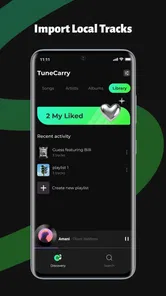
My preferred first pass is simple. I create broad folders for music I listen to regularly, long-form audio, and temporary material. I then use playlists for listening order rather than trying to make folders perform every job. That separation is useful: folders describe where files live, while playlists describe what I want to hear together. It also makes it easier to replace a group of files without rebuilding every listening habit.
More From Our News Desk

 Gmail
GmailGmail in a Busy Inbox: Who Benefits Most?
From first account to crowded workday, Gmail earns its place through dependable search and flexible sorting—but its best fit depends on how much inbox maintenance you can tolerate.

 Prime Video
Switching to Prime Video: What Changes in Your Viewing Routine
Prime Video can make a compelling second home for streaming, but switching means learning a different catalog, rental layer, and route from browsing to playback.

 Universal TV Remote Control
Universal TV Remote Control Works Best as a Reliable Backup
A phone remote earns its place through quick setup and reliable habits. Here is how to get more from Universal TV Remote Control—and where its limits show.

 Weather - By Xiaomi
Weather by Xiaomi Review: Clear at a Glance, Less Clear Up Close
Xiaomi’s weather app makes everyday forecasts quick to scan, but its calm surface can leave useful details and recovery paths harder to find than they should be.

 X
XX Under Pressure: Can It Recover When Posting Goes Wrong?
A resilience-focused review of X, examining setup, mistaken posts, interruptions, weak connections, and the gaps that matter when recovery needs to be dependable.

 Clash of Clans
Clash of Clans Is Won Between the Battles
Its raids are quick; its community is a long-term project of coordination, teaching, rivalry, and shared responsibility—with all the friction that entails.
Latest News



A realistic commute workflow
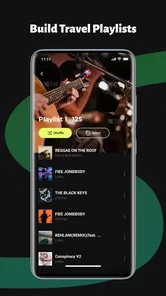
For an everyday example, imagine preparing for a train journey where coverage may be unreliable. Before leaving, I open the local library, check the songs I want, and place them into a travel playlist. I do not rely on a last-minute search or assume that an online service will keep everything available. Once the playlist is ready, I can start playback before boarding and use the lock screen controls when the phone is in my pocket.
That routine sounds basic, but it solves a common problem: discovering that a favorite album is unavailable only after the connection disappears. TuneCarry is most useful when I treat preparation as part of listening. I make the playlist while I have time, verify that the intended files are actually on the device, and then leave the app alone during the journey.
The same approach works for a workout, a flight, a camping trip, or a place where mobile data is expensive. It is also helpful for listeners who keep personal recordings or legally obtained audio that does not exist in a streaming catalog. In those situations, a local player can be more dependable than an account-based service whose library changes over time.
Why folders and playlists complement each other
Folders are particularly useful when I want to browse a known collection quickly. If I have separated albums or projects into recognizable locations, I can navigate by context instead of scrolling through one enormous list. Playlists are better when the listening order matters, such as a calm sequence for reading or a selection that gradually increases energy.
I would not use a single playlist as a replacement for all organization. That creates a long queue that becomes difficult to maintain. A better pattern is to keep a few stable playlists for repeated situations and use folders for the underlying archive. When a song belongs in more than one mood or activity, adding it to several playlists is more practical than moving the original file.
The most reliable setup is to use folders for storage and playlists for decisions. That small distinction reduces maintenance and makes the offline workflow easier to repeat.
Lock screen controls in daily use
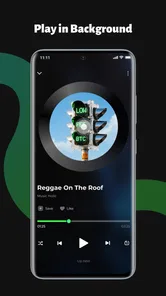
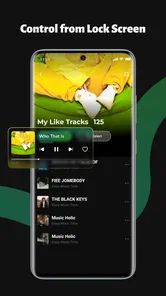
Lock screen controls are the feature I notice most during ordinary listening. They let me handle basic playback without unlocking the phone, which is useful while walking, cooking, commuting, or keeping the device in a bag. The value is not dramatic, but it removes a repeated interruption from the listening routine.
I still keep expectations realistic. Lock screen controls are convenient for play, pause, and moving through tracks, but they do not replace a complete browsing interface. If I want to change from a carefully prepared playlist to a different folder, I expect to interact with the app itself. The shortcut is best understood as a control surface for playback, not as a miniature music library.
Settings and habits that make the player easier to live with
Here I focus on small habits that help me catch avoidable snags before I depend on playback away from home. I also consider how I’d keep a library manageable as listening needs change, so the faster routines that follow feel practical rather than fussy.
Check the basic playback environment first
When I install a local music player, I do not immediately import everything into a giant queue. I first check how the app presents its library and whether the folders I care about are easy to reach. With TuneCarry, that early inspection helps reveal whether my existing storage layout is suitable or needs tidying.
I also test the lock screen behavior with a short playlist before depending on it outside the home. This is a practical step, not a criticism of the app. Phone manufacturers handle background audio and lock screen behavior differently, so I prefer to confirm that the controls behave as expected on my own device. A quick test prevents an awkward moment when I am away from a charger or network.
Prepare playlists for the way you actually listen
Many people make playlists by genre, but I find situation-based lists more useful for an offline player. A “short walk” playlist, a “long journey” playlist, and a “quiet evening” playlist answer real decisions faster than broad labels. Since TuneCarry is centered on local playback, these lists can also act as a check that the right files are physically available.
I keep the names short and recognizable because I may select them from a small screen. I also avoid making one list so long that I cannot remember what is inside it. The goal is not to recreate every feature of a streaming platform. The goal is to remove hesitation when I want music immediately.
Use folder names as a maintenance tool
A useful but easy-to-miss advantage of folder-based playback is that it encourages better file housekeeping. If I notice duplicate tracks, unclear album names, or unfinished downloads, the problem becomes visible in the collection. I can correct it at the storage level instead of repeatedly ignoring it inside a crowded library.
This is also where TuneCarry may feel less forgiving than a modern streaming service. Streaming catalogs usually standardize artwork, artist names, and album information for me. A local player depends more on the quality of the files and folders I bring to it. Listeners who enjoy controlling their own archive will appreciate that honesty; listeners who want everything automatically polished may find it laborious.
Keep the offline plan deliberate
The app’s offline focus makes it a good companion for a prepared collection, but it does not remove the need to manage storage. I avoid copying every song I own to the phone. Instead, I keep a rotating selection that matches current needs. For example, I might maintain one permanent comfort playlist and refresh travel or seasonal folders when my listening changes.
This approach has two benefits. It keeps browsing manageable, and it makes it easier to know what is available before I leave a reliable connection. It also avoids confusing the player with files I copied temporarily and no longer want to hear.
Build repeatable shortcuts rather than chasing complexity
Experienced use here is mostly about routine. I open the same playlist for a familiar activity, keep folders predictable, and rely on lock screen controls once playback starts. Those habits are more valuable than constantly rearranging the library.
I would also keep a small “check before leaving” routine: confirm the intended playlist, start one track, and make sure the phone is not waiting for an online source. That takes little time and is especially worthwhile before a flight or a long trip. The app is designed around local songs, so confidence comes from preparation rather than from a large collection of automatic services.
Faster patterns for regular listeners
This section looks at ways I’d reduce repeated browsing when I listen to the same kinds of music regularly. The useful trick is to make each playlist answer a real listening decision, while leaving folders to keep the underlying collection understandable.
Separate discovery from playback
TuneCarry is not where I would go to discover unfamiliar artists. I would use another service, a browser, radio, or recommendations from friends for that part of the process, then place music I want to keep into my local collection. This division gives each tool a clear job: discovery elsewhere, dependable playback here.
That may sound like an extra step, but it can be valuable for listeners who dislike losing access when a license changes or a connection fails. Once a song is part of my local library, TuneCarry gives me a direct route to it without surrounding the experience with unrelated suggestions.
Make playlist length match the situation
A playlist for a short errand should not be organized like one for an entire day. I prefer compact lists when I want quick control and longer lists when I want uninterrupted background music. This makes the lock screen controls more useful because I am less likely to need to search for a different section while moving around.
For longer sessions, I group tracks by energy or mood rather than by strict alphabetical order. That creates a better listening flow without requiring any elaborate feature. It is a small example of how the app rewards preparation: the quality of the session depends partly on the choices made before playback begins.
Use folders for temporary projects
One of my favorite practical uses is creating a temporary folder for a specific period, such as a trip or a personal project. I can keep those files together, build a playlist from them, and later remove or archive the folder without disturbing my main collection. This is cleaner than mixing temporary audio into permanent playlists.
The trade-off is that this method requires discipline. If temporary folders remain forever, the library becomes cluttered again. I treat them as working areas and review them occasionally. TuneCarry makes that organization visible, but it does not make the decision for me.
Know when the alternative is better
If I want synchronized libraries across several devices, cloud backups, lyrics, social sharing, podcasts, or constant recommendations, a mainstream streaming service is likely a better fit. Those services are built around accounts and online catalogs, while TuneCarry is built around files already on the device.
If I want a highly specialized player with extensive audio controls, equalizer tools, format management, or deep metadata editing, I would compare dedicated alternatives before settling here. TuneCarry’s appeal is its focused workflow, not an attempt to cover every audio enthusiast feature.
Where the simple approach reaches its limits
I use this section to set a clear boundary around what a local player can sensibly do. That perspective helps me distinguish an app limitation from a mismatch in expectations, and leads into a verdict based on who will benefit most from this focused approach.
Local files require local responsibility
The biggest limitation is also the central design choice: TuneCarry works best when I already have music stored and organized. It is not a substitute for obtaining audio, and it does not turn an empty phone into a ready-made catalog. Anyone expecting to type an artist name and instantly stream a huge selection may be disappointed.
File management can also become friction when a collection grows. Without careful naming and folders, finding a particular recording takes longer than it would in a service with polished catalog metadata. I consider this a fair trade for offline control, but it is still a trade-off that prospective users should understand.
Do not confuse offline playback with automatic backup
Keeping songs on a phone is convenient, but it should not be treated as a backup strategy. If the device is lost, damaged, or reset, the local collection may need to be restored from wherever the original files are kept. I would maintain a separate copy of anything difficult to replace, especially personal recordings or carefully assembled collections.
This point matters because the app makes local listening feel dependable, yet the dependability comes from the files being present. The player can organize access to them, but my broader storage habits still determine how safe the library is.
Expect the phone’s environment to matter
Playback apps do not operate in isolation. Battery settings, storage permissions, audio interruptions, and manufacturer-specific background rules can affect how comfortable long sessions feel. I check the app on my own phone before relying on it for an important trip, and I avoid assuming that every device will behave identically.
The minimum operating system is Android 8.0, so older phones may not be suitable. For supported devices, the modest requirements make it a plausible choice for people who want a simple player rather than a demanding media platform. Still, the practical experience depends on the phone’s storage and system behavior as much as on the app itself.
What the rating tells me as a buyer
The 3.8 average from 43 ratings gives me a measured impression. It is enough to show that people are trying the app, but not enough to treat it as a universally proven replacement for established players. I would install it when its local-file focus matches my needs, then judge it against my own folder structure and daily routine.
The developer name, Photos & Videos Download Tools, also makes me look carefully at the app’s purpose rather than assuming it comes from a long-standing music brand. That is not automatically a problem, but it reinforces my preference for testing the basic workflow first: locate a folder, start a playlist, lock the screen, and return to playback later.
My verdict after building a repeatable routine
TuneCarry: Offline Music works best for a specific kind of listener: someone who owns or keeps local audio files and wants a clean way to play them without relying on an internet connection. Its combination of folders, playlists, and lock screen controls supports a sensible offline routine, especially when I prepare a few situation-based playlists and keep the storage structure tidy.
I would recommend it to a commuter with a personal music archive, a traveler who wants predictable access to selected albums, or anyone who prefers local control over an algorithmic feed. It is also a reasonable option for an older supported Android phone where a lightweight, focused player is more useful than a large streaming application.
I would skip it if my main goal is music discovery, synchronized access across devices, cloud-based library management, or advanced audio customization. In those cases, a streaming platform or a specialist player may provide a more complete experience. TuneCarry is not trying to be all of those things, and judging it by that standard would miss its strongest quality.
My final recommendation is to install it with a small, organized collection rather than dumping an entire archive into the phone at once. Create a few folders, make playlists around real activities, test the lock screen controls, and keep a separate backup of important files. For prepared offline listening, its simplicity is the feature; for an all-in-one music ecosystem, it is the boundary.
TuneCarry: Offline Music Frequently Asked Questions
Will TuneCarry work on my phone or tablet?
TuneCarry: Offline Music is an app in the Music & Audio category, and its current version is 1.0.1. It supports Android devices running version 8.0 or later, so check your operating system before installing. The app is rated for Everyone, and its local-music features are intended for carrying songs on your device and playing them offline.
Can TuneCarry organize my songs into playlists and folders?
Yes. TuneCarry’s store summary highlights playlists and folders for organizing local songs, which can make a personal music collection easier to browse. You can use these tools to group tracks in a way that suits your listening habits, then play them without depending on an internet connection. The app also advertises lock screen controls, so basic playback actions can be available while your phone is locked.
What is TuneCarry: Offline Music, and how does it work?
TuneCarry: Offline Music is designed for listening to downloaded audio without relying on a continuous internet connection. After obtaining music through the app’s supported sources or import options, you can organize tracks into a personal library and play them offline. The exact features may depend on your device, app version, and regional availability, so checking the in-app instructions before downloading content is recommended.
Can I listen to music offline after downloading it?
Yes, offline playback is the main purpose of TuneCarry: Offline Music. Once a track has been successfully downloaded and stored on your device, it should remain available without mobile data or Wi-Fi. However, downloads may be affected by available storage, file format support, licensing restrictions, or an occasional requirement to reconnect and verify the app. Test a few tracks in airplane mode before relying on it during travel.
Does TuneCarry: Offline Music include a built-in music catalog or streaming service?
The available music sources can vary depending on how TuneCarry is distributed and the region where it is used. Some versions may focus on managing imported or downloaded files rather than providing a full commercial streaming catalog. Before installing, review the app description and permissions carefully to understand whether music comes from an integrated service, local files, or another supported source, and always use content you are legally allowed to access.
Pros
- Works without an internet connection after songs are saved locally.
- Simple interface makes browsing downloaded tracks quick and convenient.
- Useful for reducing mobile data usage during commutes or travel.
- Supports creating a personal library for more focused listening.
- Offline playback can improve listening reliability in areas with weak signal.
Cons
- Music availability may depend on the sources or files you import.
- Downloaded tracks can use considerable device storage over time.
- No connection means newly added music may not appear immediately.
- Playback features may feel basic compared with major streaming services.
- Users may need to manage files manually to keep the library organized.











