

TrustDial: Caller, SMS & Block
- 27.00
- 4.3
- Installs
- 5.00M
- Price
- Free

Screenshots
Analysis by Reviewed
For me, the appeal of TrustDial is straightforward: it brings caller identification and text filtering into one communication app, so I can make quicker decisions about interruptions without treating every unknown number as a threat. That combination is useful, but it is not a substitute for judgement. A caller label can guide a choice, not guarantee who is on the other end, and a filter can hide messages as well as reduce clutter. Its value depends on how often both calls and texts are a problem in your everyday life.
A practical choice when calls and texts are both noisy
I find the combined focus more convincing than a promise to solve every kind of unwanted contact. If your phone is regularly interrupted by unfamiliar callers and questionable texts, keeping those two jobs together can make them easier to manage. If you only need to block one persistent number, the controls already on your phone may be enough; adding another app would bring little benefit.
A useful way to judge a screening tool is to ask what you want it to do before you install it. Do you want to decide whether to answer, reduce the number of unwanted messages you see, or both? TrustDial is most relevant when the answer includes calls and SMS. It is not a general solution for junk email, social-media messages, or every form of online fraud, so I would not choose it expecting one switch to tidy up all digital communication.
Where a little restraint helps
My main caution is about the balance between fewer interruptions and the risk of missing a useful contact. A first call from a tradesperson, a new workplace, or a medical office may arrive from a number you have never saved. If you block too broadly, the peace and quiet can come at the cost of being harder to reach. I would begin with a moderate approach, watch how the app handles incoming activity, and only tighten things if the reduction in nuisance calls is worth the trade-off.
The same careful mindset applies to text filtering. A message being separated or flagged does not, by itself, prove that it is harmful; a legitimate message can look unfamiliar, and a deceptive one can look ordinary. I would review anything that could affect an appointment, payment, or account before deleting it or following its instructions. Treating filtering as a first pass, rather than an unquestionable verdict, is the safer workflow.
Who gets the most from this setup
I would put TrustDial on the shortlist for someone who gets enough unfamiliar calls and unwanted SMS to make manual blocking tiresome. It can also be a sensible option for a family member who wants call and text management presented together, provided they are comfortable with the access the app needs. For a person who rarely receives spam, or who values the smallest possible phone setup, the built-in call controls and message tools may be a better fit.
There is a useful distinction between wanting convenience and wanting certainty. Caller identification can help you decide whether to answer, but it cannot establish that a caller is trustworthy. If your priority is verifying a person or organization, use a contact method you already trust rather than relying on a label alone. I see TrustDial as an interruption-management tool, not an identity check or a security guarantee.
More From Our News Desk

 Gmail
GmailGmail in a Busy Inbox: Who Benefits Most?
From first account to crowded workday, Gmail earns its place through dependable search and flexible sorting—but its best fit depends on how much inbox maintenance you can tolerate.

 Prime Video
Switching to Prime Video: What Changes in Your Viewing Routine
Prime Video can make a compelling second home for streaming, but switching means learning a different catalog, rental layer, and route from browsing to playback.

 Universal TV Remote Control
Universal TV Remote Control Works Best as a Reliable Backup
A phone remote earns its place through quick setup and reliable habits. Here is how to get more from Universal TV Remote Control—and where its limits show.

 Weather - By Xiaomi
Weather by Xiaomi Review: Clear at a Glance, Less Clear Up Close
Xiaomi’s weather app makes everyday forecasts quick to scan, but its calm surface can leave useful details and recovery paths harder to find than they should be.

 X
XX Under Pressure: Can It Recover When Posting Goes Wrong?
A resilience-focused review of X, examining setup, mistaken posts, interruptions, weak connections, and the gaps that matter when recovery needs to be dependable.

 Clash of Clans
Clash of Clans Is Won Between the Battles
Its raids are quick; its community is a long-term project of coordination, teaching, rivalry, and shared responsibility—with all the friction that entails.
Latest News



Have you ever been bombarded with calls from unknown numbers, or received spam messages that seem to flood your inbox just when you're about to take a nap? Trust me, I know the feeling. That's why I was thrilled to try out TrustDial: Caller, SMS & Block, an app that promises to be your knight in shining armor against unwanted calls and messages. Let's dive into my experience with it!
Getting Started with TrustDial
First things first, downloading TrustDial was a breeze. Available on both Android and iOS, I found it easily on the app store, and within minutes, it was up and running on my phone. The installation process was smooth, and I appreciated the concise yet informative onboarding tutorial that walked me through its main features. It's always nice when an app doesn't assume you're a tech genius!
Features That Stand Out
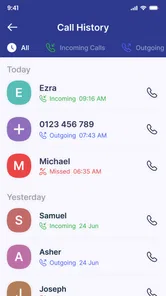
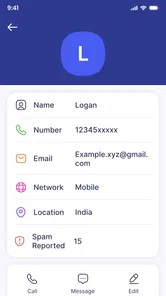
Once I got the hang of it, I was pleasantly surprised by how intuitive the interface is. The app allows you to identify unknown callers before answering, which is a lifesaver if you're like me and dread picking up calls from unknown numbers. The caller ID feature is pretty spot on, and it even provides a nifty little detail about the caller's background if available. Talk about being in the know!
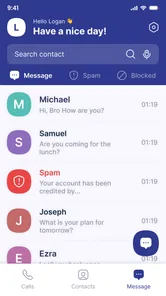
Another feature that caught my attention was the robust SMS blocking. It intelligently filters out spam messages, ensuring that my inbox remains clutter-free. I could even customize the blocking settings to suit my needs, which is perfect because one size never fits all, right?
Making its filters work for your routine
A low-effort workflow can make a difference: decide in advance which calls you are willing to miss, rather than changing your blocking approach every time an unknown number appears. If you are expecting a callback, keep filtering conservative until that conversation is over. For an ordinary day with no expected calls, you may be more comfortable letting the app help screen interruptions. This kind of situational adjustment is more useful than treating one strict setting as right for every week.
For texts, I would avoid making a quick swipe or deletion the final step when a message may relate to something you are waiting for. Check the filtered area when you have a quiet moment, especially after signing up for a service or arranging a delivery. That habit gives filtering a chance to reduce distraction without turning it into a blind spot. It also helps you learn what kinds of legitimate messages might be caught by your preferred settings.
Where It Fits Into a Daily Routine
What makes a caller-screening app useful is not simply the occasional suspicious number; it is how well it fits into ordinary routines. Imagine waiting for a delivery or a call back from a clinic while unknown numbers keep appearing. Caller identification can help you make a more informed choice before picking up, while message filtering can make it easier to spot personal conversations among unwanted texts. I would still check a message carefully before acting on it: filtering can reduce clutter, but it should not replace common sense about links, requests for money, or unexpected requests for personal details.
There is also a practical trade-off in tightening block settings. More aggressive filtering may cut down interruptions, but it can make a legitimate first-time caller harder to reach. I would start with settings that feel comfortable rather than blocking every unfamiliar number, then adjust after seeing what actually gets through. That approach is especially useful if you are job hunting, arranging appointments, or expecting calls from people whose numbers you have not saved.
Choosing Between a Dedicated App and Built-In Tools
TrustDial is aimed at people who want caller identification and SMS filtering together, rather than switching between separate tools or relying only on a phone’s basic call controls. Built-in blocking is a sensible choice if you only need to silence a few known numbers and prefer to keep your setup simple. A dedicated communication app may suit you better when unknown callers and incoming spam texts are both regular annoyances. The useful question is whether you will actually use both sides of it; if your main problem is email or social-media spam, this is not the tool for that job.
For someone helping a less confident phone user, the clearest benefit is having call and text management in one place. I would set it up together and explain what a caller ID can and cannot tell you, rather than treating a displayed identity as proof that a call is safe. That small habit helps keep convenience from turning into misplaced trust.
How It Keeps You Safe
One of the things I loved about TrustDial is its commitment to privacy. In today's digital age, this is more important than ever. The app does not store your contacts or share your data with third parties, which is a relief given the numerous privacy scandals we've witnessed lately. It feels good knowing that your personal information stays personal.
That privacy reassurance matters most when an app sits close to calls and messages, but I still recommend reading the permission prompts and choosing only the access needed for the features you want to use. If you are uncomfortable granting a communication app access to relevant phone functions, the built-in tools on your device may feel like a better fit. Privacy is not just a claim to appreciate; it is also a personal comfort level you should weigh before relying on any caller-screening service.
What to consider before installing
On Android, the minimum operating system requirement is version 8.0, so I would check the phone’s software before planning to use it there. The app is free and rated for Everyone. Those points make it easy to consider, but I would still decide based on fit: installing a free app is not automatically worthwhile if your phone already handles the few numbers you want to block.
TrustDial is made by Oregon Coast App LLC. It was released on January 3, 2025, and the current version is 3.0. It has an average rating of 4.4 from around 8,200 ratings, with more than 5 million installs. Those figures show that many people have tried it, but they cannot predict how well its caller identification and message filtering will suit your particular mix of contacts. I would treat popularity as context, not as a reason to grant more trust than the app’s actual behavior earns.
If you are comparing it with using separate tools, consider the small daily cost of switching between them. A single place for call screening and SMS filtering may feel more straightforward, especially for someone who checks messages often but does not enjoy adjusting phone settings. On the other hand, built-in controls can be preferable if you want fewer apps involved in communications or only need occasional blocking. The better choice is the one that reduces friction without making you less careful about unfamiliar contacts.
Who Should Give It a Try
TrustDial is most compelling for people who regularly receive unfamiliar calls and promotional or suspicious texts, and who want one focused place to manage those interruptions. Oregon Coast App LLC develops the app, which is free and rated for Everyone. It has an average rating of 4.4 from around 8,200 ratings, and has passed 5 million installs. Those figures suggest a sizeable audience, though they cannot tell you whether its filtering will match your own mix of callers and messages.
The app was released on January 3, 2025, and its current version is 3.0, with Android 8.0 as the minimum operating system. If you are deciding whether to install it, check that your device meets that requirement and think about your actual pain point: people who mainly need a simple way to block a known nuisance number may not need a separate app, while those juggling call identification and SMS cleanup could get more value from the combined approach.
Wrapping It Up
So, what's the verdict? TrustDial: Caller, SMS & Block is a fantastic app that does exactly what it promises—keeping those pesky calls and messages at bay. It's user-friendly, efficient, and respects your privacy, making it a must-have for anyone looking to regain control over their phone communications. If you're tired of dodging unwanted calls or sifting through spam texts, give TrustDial a shot. You won't be disappointed!
In a world where staying connected is crucial, TrustDial ensures that you're only connected to what matters. And honestly, isn't that what we all want at the end of the day?
My final recommendation
I would recommend trying TrustDial if caller screening and SMS cleanup are both recurring needs, and if you are willing to review how its filters behave instead of assuming every decision is perfect. Its strongest case is convenience: one communication app can help you handle two familiar sources of interruption. Keep your expectations grounded, make room for legitimate first-time callers, and check important filtered messages before acting. If you mostly need a basic block list, or would rather avoid another app with access to communication functions, your phone’s built-in options are likely the simpler choice.
TrustDial: Caller, SMS & Block Frequently Asked Questions
Who develops TrustDial, and what kind of app is it?
TrustDial is a communication app developed by Oregon Coast App LLC. Its focus is making calls and messages easier to manage, with tools for identifying callers, blocking spam, and organizing SMS. If you want a dedicated app for those everyday tasks rather than a general messaging service, TrustDial is designed around that purpose.
What is TrustDial and what features does it offer?
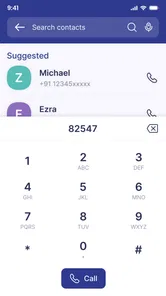
TrustDial is a comprehensive app designed to enhance your communication experience by providing features such as call identification, SMS filtering, and call blocking. It helps you identify unknown numbers, block spam calls and messages, and organize your SMS inbox efficiently. The app is equipped with a user-friendly interface and offers real-time protection to ensure a seamless communication experience.
How does TrustDial protect against spam calls and messages?
TrustDial uses an advanced database and machine learning algorithms to detect and block unwanted calls and SMS. It continuously updates its database with the latest spam numbers, ensuring you are protected from telemarketers, scammers, and other unwanted callers. Additionally, users can manually block numbers and report them to the community, enhancing the app's effectiveness.
Is TrustDial free to use, or does it require a subscription?
TrustDial is free to download and use. Its caller-identification, SMS-filtering, and call-blocking functions make it possible to try the app without a subscription. Check the app's current in-app options before making a decision, and consider whether its communication tools fit the way you handle calls and messages.
Does TrustDial access my contacts or personal data?
TrustDial is committed to user privacy and ensures that your personal data, including contacts, is not accessed without permission. The app requires certain permissions to function effectively, but it does not store or misuse your data. Users can review and manage permissions at any time through their device's settings, maintaining control over their personal information.
Pros
- Easy-to-use interface for quick navigation.
- Comprehensive caller ID feature.
- Efficient SMS organization and management.
- Advanced call blocking options.
- Customizable settings for user preferences.
Cons
- Occasional ads can be intrusive.
- Requires internet for caller ID updates.
- Limited features in free version.
- Initial setup can be time-consuming.
- Consumes moderate battery life.












