TREBEL: Music, MP3 & Podcasts
- 84.57K
- 4.7
- Installs
- 50.00M
- Price
- Free

Screenshots

Analysis by Reviewed
When I choose an audio app, I’m usually deciding between two habits: streaming whatever comes to mind right now, or preparing a small selection for later. TREBEL: Music, MP3 & Podcasts is geared toward the second habit, pairing music and podcast discovery with offline listening. I see it as a practical listening companion rather than a tool for producing, editing, or organizing creative work. If your goal is to make audio, you’ll need a different kind of app; if your goal is to decide what to hear and have it ready when a connection is patchy, TREBEL has a more relevant role.
A useful starting point when you don’t have a song in mind
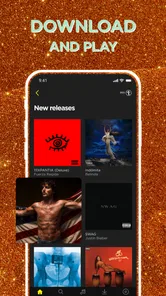
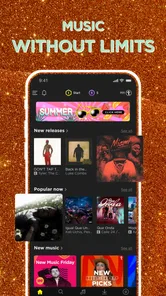
I often open a music app with a mood, not an artist or track. TREBEL’s discovery and playlist approach suits that starting point: I can browse for something to play instead of building a queue from scratch. Trending playlists give me another way to explore when I want a current-feeling selection rather than a search for one specific song.
That open-ended browsing is most helpful when I’m choosing background music for a walk, a chore, or a low-key evening. It is less compelling if I already know exactly what I want and expect a highly customized search-and-library workflow. I’d use discovery to find candidates, then save only the tracks or episodes I expect to replay. That simple choice keeps browsing from becoming an endless scroll and makes offline listening easier to plan.
Finding, saving, and returning to audio
From the moment I open the app, I find its focus on finding music and preparing it for offline listening easy to understand. TREBEL is a free music and audio app from M&M Media, Inc. Its store summary highlights music downloads, playlists, and MP3 playback, but I wouldn’t mistake that broad listening focus for a full-featured audio production setup. I can use it to choose what to hear; it isn’t where I’d record, edit, mix, or publish a finished track.
That distinction matters for creators. If I’m making a podcast or a music project, TREBEL may serve as a listening companion for references or a break between work sessions, but I wouldn’t choose it to manage the actual project. Someone building a creative workflow needs tools designed for recording and editing, while someone looking for a ready-to-play selection may find this app more fitting.
Music discovery without turning it into a project
The app’s music and playlist focus makes it approachable when I don’t want to spend time managing a collection. I can start from a genre, a mood, or what is trending and see whether anything catches my attention. For me, that works best as a short discovery session: browse, choose a few promising items, and move on with the day instead of expecting every recommendation to land perfectly.
For a more useful routine, I’d separate discovery from preparation. When I have a stable connection, I can browse and save likely replays; later, when I’m heading out, I can rely on those selections instead of trying to decide what to play at the last minute. If I already have a precise track in mind, direct search is the more focused route. If I’m open to surprises, playlists offer a less effortful way to begin.
More From Our News Desk

 Gmail
Gmail in a Busy Inbox: Who Benefits Most?
From first account to crowded workday, Gmail earns its place through dependable search and flexible sorting—but its best fit depends on how much inbox maintenance you can tolerate.

 Prime Video
Switching to Prime Video: What Changes in Your Viewing Routine
Prime Video can make a compelling second home for streaming, but switching means learning a different catalog, rental layer, and route from browsing to playback.

 Universal TV Remote Control
 Works Best as a Reliable Backup
A phone remote earns its place through quick setup and reliable habits. Here is how to get more from Universal TV Remote Control—and where its limits show.

 Weather - By Xiaomi
Weather by Xiaomi Review: Clear at a Glance, Less Clear Up Close
Xiaomi’s weather app makes everyday forecasts quick to scan, but its calm surface can leave useful details and recovery paths harder to find than they should be.

 X
X Under Pressure: Can It Recover When Posting Goes Wrong?
A resilience-focused review of X, examining setup, mistaken posts, interruptions, weak connections, and the gaps that matter when recovery needs to be dependable.

 Clash of Clans
 Is Won Between the Battles
Its raids are quick; its community is a long-term project of coordination, teaching, rivalry, and shared responsibility—with all the friction that entails.
Latest News



Planning downloads around real life
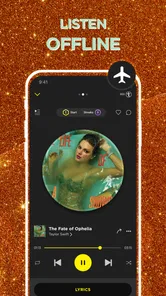
Offline listening is most valuable when I think ahead. Before a commute, trip, or stretch of time in a place with unreliable service, I’d choose the audio I want while connected and check that it is saved before leaving. That check is a small but useful habit: it avoids finding out at the inconvenient moment that I planned to listen to something I had only browsed.
I’d also keep downloads purposeful. A compact set of familiar music is easier to return to than a long collection of tracks I saved on impulse and forgot about. For a day with different kinds of downtime, I might prepare music for short stretches and choose a podcast for a longer journey. The trade-off is that this approach asks for a little preparation; a streaming-first service can feel easier if I usually make spontaneous choices and have reliable access to the internet.
Podcasts for longer stretches of listening
Music is only part of the app’s appeal: TREBEL also includes podcasts, giving me a spoken-word option when I want more than a playlist. I’d browse for an episode when I have a longer walk, a drive, or a stretch of routine work ahead. The mix of music and podcasts can be convenient when I’d rather keep those listening choices in one place than switch between separate audio apps.
For a trip, I’d choose the podcast episode first because it has a more defined listening span, then add music for the remaining time. That is a practical way to avoid having plenty of songs ready but nothing suitable when I want spoken audio. Downloading ahead is especially useful for travel, though I’d still verify the saved selection before setting off rather than treating an online browse as offline preparation.
Choosing between TREBEL and other listening habits
Compared with a conventional streaming app, TREBEL puts more emphasis on finding audio and preparing downloads for later. Compared with a basic MP3 player, it adds discovery and podcast browsing to the listening experience. I see that combination as its main point: it can bridge the gap between browsing for something new and keeping a selection ready, without asking me to treat audio as a carefully maintained personal archive.
There are clear cases where I’d choose something else. A listener who wants detailed library controls, careful file organization, or a collection built around their own audio may be better served by a dedicated music player. Someone who rarely needs offline access and prefers to decide what to hear in the moment may find a streaming-oriented alternative more natural. And anyone expecting tools to record, edit, or publish a creative project should look beyond TREBEL; its value here is listening, not making.
What to expect from the free app
TREBEL is free to install, with optional in-app purchases. I’d pay attention to purchase prompts if my aim is to keep using it without spending, and I’d make the same practical check I would with any free app: understand what is included before choosing an optional purchase. Its Teen content rating is another useful point for households deciding whether the app is appropriate for a younger listener.
The app has a 4.8 average from around 1.6 million ratings and has passed 50 million installs. Those figures indicate that many people have tried it, but they don’t tell me whether its download-centered approach fits my own habits. It was released on December 2, 2016, and its current version is 7.0.2, with Android 7.0 or later required. I’d treat those details as practical compatibility context, not as a substitute for deciding how I actually listen.
Finding, saving, and returning to audio
From the moment I open TREBEL: Music, MP3 & Podcasts, I find the app’s central promise easy to grasp: discover audio, choose what I want, and prepare it for listening later. It is built around music and audio rather than creative production, so I wouldn’t expect a workspace for recording or editing. Its appeal is the transition from “what should I hear?” to “I have something ready to play.”
A World of Music at Your Fingertips
Whether you’re into pop, rock, hip-hop, or classical, TREBEL has got you covered. The app boasts a massive library of songs and podcasts, allowing you to explore different genres and discover new favorites. What I love is the personalized playlist feature. It's like the app can read my mind and knows exactly what I want to listen to, even before I do!
For a more useful discovery routine, I’d start with a mood or genre, then save only the tracks I’m likely to replay. That keeps offline listening intentional rather than turning downloads into a pile I never revisit. I’d also treat recommendations as a jumping-off point, not a promise that every playlist will match my taste; when I already know precisely what I want, direct search is the quicker route.
Downloading music for offline listening is seamless. The app allows you to download and store your favorite tracks, so you can listen to them no matter where you are, even without an internet connection. Commuting, traveling, or just chilling at home, your music is always with you.
Making offline listening work in real life
A realistic use is preparing before a commute: while connected, I can pick music for the trip, download it, and then rely on those selections when a connection is unreliable. The same habit works before a flight or a long drive. I’d check that the items I want are actually saved before leaving, rather than assuming a playlist I browsed online will be ready offline. That small step matters most when there’s no easy way to troubleshoot.
Offline access is also a trade-off. Downloads are convenient, but they work best when I plan ahead and keep my choices focused; they are not the same thing as having every possible track instantly available. If you mostly listen to whatever is trending at the moment and rarely replay songs, a streaming-first service may feel more effortless. If you repeatedly listen to a familiar set and want it on hand, TREBEL’s download-centered approach makes more sense.
Podcasts Galore
While music is the star of the show, TREBEL doesn't skimp on podcasts. If you're a podcast junkie like me, you'll appreciate the wide selection available. From true crime to comedy, there's something for everyone. The app makes it easy to browse and subscribe to your favorite podcasts, so you're always up-to-date with the latest episodes.
The organization of podcasts is pretty neat too. You can create playlists and even download episodes for offline listening, which is perfect for long flights or road trips. It's like having a personal podcast library in your pocket.
One practical way to use both sides of the app is to keep music for short transitions and episodes for longer stretches, such as a walk followed by a train ride. Before a trip, I’d choose the podcast episodes first, since they take a deliberate commitment of time, then fill any remaining listening time with music. That avoids arriving with a playlist full of tracks but no episode ready when I want something spoken-word.
How it compares, and where it may not fit
Against a conventional streaming app, TREBEL’s appeal is its emphasis on finding and downloading audio for later, rather than simply relying on an always-connected listening session. Compared with a basic MP3 player, it offers discovery and podcast browsing alongside music playback. Those differences are useful, but they don’t make it the best choice for everyone: listeners who want highly customized library tools or a single, deeply managed collection may prefer a traditional player, while people who rarely need offline access may find a streaming-oriented alternative easier for spontaneous listening.
The app has a 4.8 average from around 1.6 million ratings, and it has passed 50 million installs. Those figures suggest broad appeal, but they can’t decide whether its particular mix suits you. It is rated Teen, and the current version is 7.0.2 for devices running Android 7.0 or later. The app is free to install, with optional in-app purchases ranging from $0.49 to $49.99 per item, so I’d check purchase prompts carefully if I’m trying to keep the experience free.
The Verdict
So, is TREBEL: Music, MP3 & Podcasts worth downloading? In my opinion, absolutely! It's a fantastic app that caters to both music lovers and podcast enthusiasts. With its extensive library, user-friendly interface, and offline capabilities, it's hard not to fall in love with it. Whether you're looking to discover new music, catch up on your favorite podcasts, or just enjoy a seamless listening experience, TREBEL has it all.
In a world where music apps are a dime a dozen, TREBEL stands out for all the right reasons. It's more than just an app; it's a ticket to a world of endless entertainment. So why wait? Dive into the world of TREBEL and let the music take over!
My practical recommendation is to try it if you want a straightforward way to browse music and podcasts, then save listening for offline moments. It is especially appealing if you have a predictable commute or travel regularly and can prepare your audio beforehand. I’d skip it if your priority is advanced collection management or if you want an app that revolves around a different listening workflow. For everyday listening with a little planning, though, it offers a clear, useful role on my phone.
TREBEL: Music, MP3 & Podcasts Frequently Asked Questions
Is TREBEL available in my country, and will its music selection match my tastes?
TREBEL is a music, MP3, and podcast app with discovery features such as trending playlists. The selection and recommendations can differ by location and over time, so the most useful way to judge its fit is to explore the catalog available to you after installing it. If you have particular artists or genres in mind, search for them early to see whether the app suits your listening habits.
How much storage space should I set aside for TREBEL downloads?
Downloaded audio takes up space on your device, so the amount you need depends on how much music and how many podcasts you choose to save. If your phone has limited storage, it may help to start with a small collection and remove downloads you no longer listen to. Keeping an eye on available device storage can make offline listening easier to manage.
Can I use TREBEL without creating an account?
Before downloading, it is worth considering how you prefer to access your music library. TREBEL is designed around discovering music and saving tracks for listening, while its free, ad-supported approach lets users enjoy music without a subscription. Your experience may involve setting up access within the app, so check the sign-in options shown during installation and choose the one that suits you.
What kind of content can I find on TREBEL?
TREBEL is centered on music, MP3 audio, and podcasts, with discovery features such as trending playlists. It can suit listeners who want more than a basic audio player: you can explore music and podcasts, then download content for offline listening. The available catalog and recommendations may vary, so browsing within the app is the best way to see whether its selection fits your tastes.
Is TREBEL suitable for teenagers?
TREBEL is rated for Teen audiences, so it may be suitable for older children and teenagers depending on a family’s preferences. Parents and guardians should still consider the kinds of music and podcasts a young person may discover, as audio content can cover a wide range of themes. The app is free to download, but its ad-supported experience and optional in-app purchases are also worth discussing.
Pros
- Offline listening available
- Wide range of music genres
- Free to use with ads
- User-friendly interface
- High-quality audio streaming
Cons
- Limited song skips with free version
- Ads can be intrusive
- Offline downloads expire after time
- Limited podcast selection
- Requires internet for initial download