Transact eAccounts
- 349.00
- 4.5
- Installs
- 500.00K
- Price
- Free

Screenshots
Analysis by Reviewed
Campus life moves quickly, and the small tasks around it can become surprisingly annoying: opening a residence hall door, checking an account, or paying for something without digging through a wallet. Transact eAccounts is an education app from Transact Campus Inc. that brings those campus-related actions into one mobile experience. I found its main appeal less in flashy design and more in reducing the number of physical cards and separate steps I need to think about during a busy day.
The app is free and aimed at everyone from a content-rating perspective, while its practical audience is clearly students and other members of participating campuses. It has been available since January 14, 2019, and its current Android release is version 2026.5.0 (2026071302), requiring Android 10 or later. With more than 500 thousand installs and an average score of 4.5 from roughly 3.3 thousand ratings, it has the kind of established presence I expect from a campus utility rather than a short-lived experiment.
Where the connection matters most
The first thing I noticed is that this is an app whose usefulness depends heavily on the moment when I need it. A campus account or access tool is not something I open for entertainment; I open it at a doorway, a checkout counter, or while trying to understand what is available in an account. That makes connectivity part of the experience even when the app itself feels simple. If the phone cannot communicate properly at the right time, convenience quickly turns into hesitation.
For a student arriving at a residence hall, the difference can be very practical. Instead of searching for a physical card, I can try to use the mobile access option associated with my campus account. The important habit is to prepare before reaching the door rather than treating the app as something to configure at the last second. I would sign in, check that the correct campus information is visible, and make sure the phone has enough battery before leaving for class. That small routine matters more here than it would with an ordinary timetable app.
The same applies to campus payments. Transact eAccounts is designed around the idea that a phone can stand in for a card in supported campus situations, but the experience still lives inside a real-world transaction. A weak connection, a slow login, or an account that has not been set up correctly can be much more stressful when other people are waiting behind me. I like the card-free concept, but I would not treat it as a reason to abandon every backup payment method immediately.
One useful distinction is between checking information and completing an action. Looking at an account can feel low-pressure, while presenting a mobile credential or paying at a point of service is time-sensitive. I recommend opening the app before entering a busy building or approaching a checkout area. It gives the phone time to connect and lets me discover a problem while I still have room to solve it.
That is also why the app is more compelling for students who regularly use campus services than for someone who visits a campus occasionally. Frequent users benefit from removing repeated friction. Occasional visitors may find that carrying the usual card is simpler, especially if they do not want to learn a campus-specific account system for a short stay.
More From Our News Desk

Weather by Xiaomi Review: Clear at a Glance, Less Clear Up Close

X Under Pressure: Can It Recover When Posting Goes Wrong?

Clash of Clans Is Won Between the Battles

Android Auto Makes the Case for Quieter Car Software

MobiOffice: Transforming Mobile Productivity with Seamless Integration

EA SPORTS FC™ Mobile Soccer: Redefining Mobile Sports Gaming
Using it in ordinary mobile situations
Most people will use this app while moving, not while sitting at a desk. I can imagine checking an account between lectures, preparing to enter a dorm after carrying groceries, or trying to pay on campus while my phone is already busy with messages and navigation. Those situations expose a different kind of quality than a screenshot can show: how quickly I can reach the relevant action, whether I understand what the app expects, and whether I can recover without holding up everyone else.
The strongest everyday scenario is a student who leaves their physical card in their room but still has their phone. If the campus supports the relevant mobile function and the account is ready, the app can turn that mistake from a trip back upstairs into a manageable interruption. I would still set it up well before that emergency. Mobile credentials are most useful when they are part of a routine, not when they are being activated for the first time outside a locked building.
Another good use is keeping track of campus spending without switching between unrelated services. Having account access and payment-related tasks in the same campus-focused app can make it easier to check the right place before buying something. I found that more useful than a generic budgeting app for immediate campus questions, because a general finance tool usually cannot replace the institution-specific account or access workflow.
There are trade-offs, though. A phone is easier to forget, lose, or run out of power than a simple plastic card. It is also more affected by notifications, screen locks, system updates, and the general state of the device. If I rely on the app for entry or payment, I treat battery level and account access as part of my preparation. That is not a criticism unique to this product; it is the cost of moving a physical campus credential onto a connected phone.
I would also avoid assuming that every campus uses every function in exactly the same way. The app is a platform for campus accounts, so the usefulness I get depends on what my institution has enabled and how its account system is organized. Before depending on it for a specific door or payment situation, I would confirm the feature through my campus instructions rather than assuming the app’s presence guarantees identical support everywhere.
What happens when something goes wrong
The most important test for an app like this is not the ideal path. It is the moment when I am standing somewhere inconvenient and the app does not behave as expected. A connection may be slow, the account may need attention, or the phone may not be ready to present the required credential. My preferred recovery approach is simple: stop retrying blindly, check the connection, reopen the relevant account area, and use the campus’s normal support or physical alternative if the problem continues.
I would prepare for that before a high-pressure moment. After installing the app, I would complete the sign-in process at home or in a reliable network environment, inspect the account details, and test the actions my campus actually supports. If an account needs a separate activation step, discovering that in advance is far better than finding out at a locked entrance. This is one of the less obvious strengths of reviewing a campus utility early: a few minutes of setup can prevent a much longer interruption later.
Another practical tip is to keep the app updated, but not at the exact moment I am rushing to class. The current release is 2026.5.0 (2026071302), and staying current is sensible for compatibility and fixes, yet I would not begin an update while standing at a reader or checkout point. I prefer to update when I have time to reopen the app and confirm that the account still behaves as expected.
If the phone is lost or replaced, the problem becomes more serious than simply reinstalling a social app. Because this tool may be connected to campus access and accounts, I would contact the appropriate campus office promptly and secure the device through the phone’s own controls. I would not assume that deleting the app alone handles every access concern. The right recovery path depends on the institution, which is another reason to know the campus support contact before an emergency.
There is also a human-factors issue. When an app is used for a door or payment, I need clear feedback that the action worked. If I am unsure whether a credential was presented or a transaction completed, repeatedly tapping can make confusion worse. I would pause, look for confirmation in the app or at the reader, and ask staff for help rather than creating duplicate attempts. That cautious behavior is especially important when account balances or access permissions are involved.
Keeping mobile data use sensible
Transact eAccounts is not the type of app I would leave open continuously. Its value appears when I need a campus account or mobile credential, so I use it deliberately instead of refreshing it every few minutes. That approach is better for battery, attention, and data use, and it reduces the temptation to treat a campus utility like a live dashboard.
My routine would be to connect to a trusted network for initial setup and any account-management work, then use the app when necessary while out. I would not claim that every function works without a connection, because the experience depends on campus systems and the action being performed. The safe assumption is that important steps may need communication with the service, so I prepare while connected and keep a backup plan for moments when the network is unreliable.
Privacy-conscious users should also think about context. A phone used at a residence hall or payment point can reveal more than an ordinary classroom app simply because it is tied to campus life. I avoid leaving account screens visible longer than necessary, use the phone’s normal lock protection, and close the app after finishing a sensitive task. These are small habits, but they fit this app better than casually handing an unlocked phone to someone else.
On a limited mobile plan, I would not expect this app to be a major source of data compared with video or social media services, but I still would not make unsupported assumptions about its exact network behavior. The sensible approach is to use system-level data controls if I need strict limits and to reserve account setup or troubleshooting for Wi-Fi. The more important concern is reliable access at the moment of payment or entry, not squeezing every possible background refresh out of the app.
Compared with a physical card, the phone-based approach trades one kind of simplicity for another. A card does not need a charged battery or an app session, while the phone is harder to leave behind if it is already in my hand. Compared with a generic wallet app, Transact eAccounts has the advantage of being focused on campus accounts and services rather than trying to organize every payment card I own. Compared with a campus website, it is better suited to quick mobile moments, although a browser may be more comfortable for lengthy account administration.
Who should use it and who should skip it
I would recommend Transact eAccounts to students living on or near a participating campus, especially those who regularly need residence access or campus payment functions. It is also a sensible choice for anyone who prefers carrying a phone instead of another physical card and is willing to complete setup carefully. The free price removes the most obvious barrier, and the Everyone age rating makes it broadly approachable, although the actual usefulness is tied to campus membership and supported services.
I would be more cautious recommending it as the only option. Students who frequently have low battery, unreliable mobile service, or a habit of leaving their phone behind may be better served by keeping the physical campus card available. Someone who only needs a one-time campus payment may also find the traditional method faster than installing and configuring a specialized account app. The app is not a universal replacement for every campus credential; it is most valuable when the institution and the user’s daily routine both support it.
For families helping a student get settled, I would focus less on the download itself and more on the first-use checklist: install it on the correct phone, finish account setup on a dependable connection, understand which campus functions are available, and identify the fallback if the phone fails. That preparation answers the questions users usually discover too late: whether their campus is ready for the mobile workflow, whether the phone meets the Android requirement, and how they will enter or pay if the service cannot connect.
The Android requirement is straightforward: the app needs Android 10 or later. That is worth checking before planning around it, particularly on an older phone kept as a backup device. Because a backup phone may not meet the minimum system requirement or may not have the same account setup, I would test it rather than assuming it can take over immediately.
My connectivity verdict
After looking at the app through the situations that matter most, I see Transact eAccounts as a practical campus companion rather than a complete replacement for preparation. Its best quality is convenience at repeated, ordinary moments: opening a supported dorm entrance, checking a campus account, or paying without reaching for a separate card. The experience makes sense when I already belong to a participating campus and want those tasks closer at hand.
Its main weakness is the same thing that gives it value: the phone becomes part of the access and payment chain. Connectivity, battery, account setup, and campus support all matter. I would not install it five minutes before an important move-in or rely on it without understanding the fallback. Used thoughtfully, however, it can remove real friction from student life.
Transact Campus Inc. has built an app with a clear purpose, and its established audience is reflected in its 4.5 average rating and more than 500 thousand installs. I would choose it over a generic payment tool when my campus supports its functions, while keeping a physical card or another approved option for recovery. For me, that balanced approach is the best verdict: use the app for convenience, prepare for network-dependent moments, and never let a mobile shortcut become the only way through an important campus task.
Transact eAccounts Frequently Asked Questions
Is Transact eAccounts free to download, and which devices can run it?
Transact eAccounts is free to download and is listed for devices running iOS 10 or later. It is an education app from Transact Campus Inc., intended for people whose school or organization supports its services. Before installing, make sure your institution participates and that your phone meets the operating-system requirement; having the app alone does not grant access to campus accounts or credentials.
Does Transact eAccounts work at every college or university?
No. Transact eAccounts is useful only when your college, university, or organization supports the platform and has configured the relevant services. Even at a participating campus, the features available can depend on your account and the institution’s setup. Check with your campus card office or student services team to confirm support before relying on the app for payments, account management, or entry.
What is Transact eAccounts, and what can I use it for?
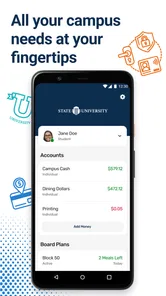
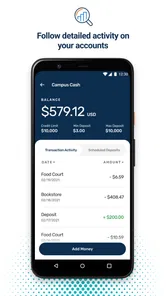
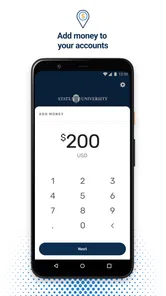
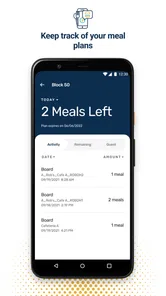
Transact eAccounts is a mobile app that allows eligible students and employees to manage campus-related accounts and services from a smartphone. Depending on the institution, you may be able to view account balances, access a digital campus ID, review recent transactions, add funds, manage meal plans, and use supported campus payments. Available features vary by school and account setup.
How do I sign in to Transact eAccounts?
To use Transact eAccounts, you generally need an account connected to a participating college, university, or organization. Sign-in is usually completed with your institution’s credentials, and some schools may require additional verification or activation before the app works. If your institution is not listed or your login fails, contact the campus card or student services department rather than creating unrelated credentials.
Can I use Transact eAccounts as a digital student ID?
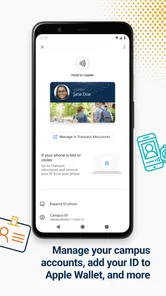
At participating institutions, Transact eAccounts may provide a digital campus credential that can be used for approved services such as building access, dining, library entry, recreation facilities, or identification. However, digital ID support depends entirely on the institution’s configuration and compatible devices. Before relying on it, check whether your campus accepts mobile credentials everywhere you need them.
Pros
- View balances
- transactions
- and statements in one convenient place.
- Secure sign-in helps protect sensitive account information.
- Paperless statements reduce clutter and support a more eco-friendly banking routine.
- Transaction history makes it easier to monitor spending and account activity.
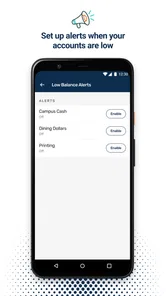
- Useful account alerts can help users stay informed about important changes.
Cons
- Features may vary depending on the financial institution using the platform.
- Requires internet access to load current account details and statements.
- Some users may need to reauthenticate frequently for security reasons.
- The interface can feel basic compared with full-featured mobile banking apps.
- Not all account services or support options may be available in the app.












