Transact Mobile Ordering
- 1.29K
- 4.6
- Installs
- 100.00K
- Price
- Free

Screenshots
Analysis by Reviewed
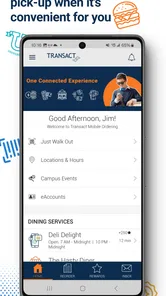
When I use a campus food-ordering app, I am not looking for a huge restaurant marketplace. I want to know whether it can make a short break less stressful: choose something available, pay without standing in a line, and collect it without confusion. That is the standard I used with Transact Mobile Ordering, a free Food & Drink app from Transact Campus Inc. Its purpose is focused, and that focus is important when deciding whether it belongs on your phone.
The app is built around mobile ordering rather than general meal discovery. In practical terms, it makes the most sense in a school, college, or campus environment where participating food locations use the Transact ordering system. I found that this changes the way I judge it. The question is not whether it replaces every delivery or restaurant app; it is whether it makes a familiar pickup routine quicker and easier.
It is available for everyone by age rating, and the app itself is free. The current version is 2026.3 and requires Android 10 or later. Those details matter if you are using an older phone, sharing a device, or deciding whether to install it before a busy term. The app has been available since September 25, 2018, so it is not a new experiment trying to prove the idea of mobile ordering for the first time.
What I would check before choosing it
My first decision criterion is access. A mobile ordering app is only useful when the places I actually want to use are connected to it. Before relying on it for lunch, I would open the app on campus, look through the available ordering locations, and check whether the menu reflects the places I normally visit. This is more important than the app’s general rating because a polished ordering experience cannot compensate for an incomplete selection at your location.
The second criterion is timing. Ordering ahead sounds simple, but the benefit depends on how well the pickup process fits my schedule. If I have a short gap between classes, I need to place the order early enough for preparation while avoiding a pickup window that is too soon. I would treat the app as a planning tool, not as a guarantee that food will be ready the instant I arrive.
The third criterion is payment comfort. Paying inside the app can remove one step at the counter, but it also means I need to be comfortable managing the transaction digitally. I would make sure my account and payment details are ready before the first rushed order. Doing that preparation at home is a small effort that prevents a frustrating delay when I am already hungry and trying to get across campus.
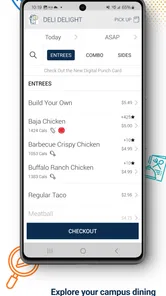
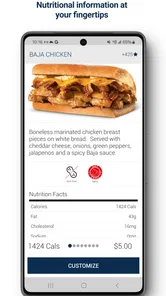
I also pay attention to clarity. A good ordering flow should let me understand what I am selecting, where I am collecting it, and when I should arrive. If a menu has several similar items or customization choices, I slow down before submitting rather than assuming I can correct everything at pickup. That habit is especially useful with a system designed for speed, because convenience can make people tap through decisions too quickly.
More From Our News Desk

Weather by Xiaomi Review: Clear at a Glance, Less Clear Up Close

X Under Pressure: Can It Recover When Posting Goes Wrong?

Clash of Clans Is Won Between the Battles

Android Auto Makes the Case for Quieter Car Software

MobiOffice: Transforming Mobile Productivity with Seamless Integration

EA SPORTS FC™ Mobile Soccer: Redefining Mobile Sports Gaming
The app’s average rating is 4.5 from roughly 6,700 ratings, with about 1,300 written reviews. I see that as encouraging evidence that many users find the basic idea worthwhile, but I would not treat it as a promise about every campus. The real experience depends on the participating locations, the local pickup routine, and how consistently those locations keep their menus and preparation process aligned with what appears on screen.
A realistic weekday test
Imagine I have a lecture ending shortly before another class and do not want to spend the entire break waiting to order. I would open the app before leaving the first class, select the location I plan to pass, review the available choices, and submit the order while I still have a few minutes. I would then walk to the pickup point rather than joining the ordering line. The value is not dramatic, but it is practical: fewer decisions at the counter and a more predictable use of a short break.
There is a useful trade-off in that scenario. Ordering early may save time, but it also reduces flexibility. If the lecture runs late, the pickup plan may no longer match my schedule. I would therefore use the app most confidently when I know my route and timing, rather than placing an order far ahead simply because I can. The best workflow is based on the day’s movements, not on ordering as early as possible.
Where the focused design works well
The strongest part of the experience is its narrow purpose. I do not have to browse unrelated restaurants, delivery areas, or promotional content when my goal is a campus pickup. That makes the app feel more appropriate for a quick meal between obligations. For someone who already knows where they want to eat, the ordering path can be more useful than opening a broad delivery marketplace and sorting through options that are not relevant to the moment.
I also like the distinction between ordering and collecting. A person who is already near a participating location does not necessarily need delivery. They need a way to handle the ordering step before reaching the counter. That can be a better fit for campus life, where walking to a dining location may be easier than arranging a delivery handoff.
The app is most valuable when it removes a queue, not when it tries to replace the whole dining experience. That is the central strength I would explain to a friend. If your daily routine repeatedly involves the same participating food locations, the time saved through a familiar ordering process can add up in a way that a one-off restaurant app may not match.
Another practical strength is repeatability. Once I understand the local ordering pattern, I can use the same general routine on different days: check the location, choose the meal, confirm the order, and head toward pickup. That consistency matters more to me than a long list of extra functions. A campus app earns its place when it becomes an uncomplicated part of an existing routine.
Small habits that make the app more dependable
I would not wait until I am standing outside the pickup location to learn the interface. My first order would be a low-pressure test, ideally at a time when I have enough room to read the menu and confirm the collection point. That first trial can reveal whether the location I expected is actually the one shown in the app and whether the ordering steps feel natural on my phone.
I would also check the order summary carefully before paying. This is a simple but important safeguard when menus contain similar names, optional additions, or different serving choices. A few seconds spent checking the final selection is preferable to discovering an error after leaving the counter. The app may speed up ordering, but it does not remove the need for careful review.
For a busy day, I would keep a backup plan in mind. If the pickup point is unexpectedly crowded or my schedule changes, I would not assume that a mobile order automatically solves the problem. I might choose a different participating location, eat at another time, or use the ordinary counter process. This is not a criticism unique to the app; it is a reminder that digital convenience still operates inside a real dining environment.
One less obvious consideration is habit formation. Ordering through an app can make it easy to choose the same familiar meal repeatedly because it is fast to find. I would occasionally browse the available choices instead of immediately repeating my previous selection. That keeps the app useful as an ordering tool without allowing speed to turn into an unnecessarily narrow routine.
When another type of app may fit better
I would choose a broad delivery service instead if my main need were food brought to a home, office, or location away from campus. Transact Mobile Ordering is centered on ordering and pickup, so it is not the natural choice for someone comparing delivery coverage, browsing many independent restaurants, or arranging a meal for a group in another part of town.
I would also consider a restaurant’s own app when I mostly eat from one chain and care about that chain’s loyalty system or account history. A dedicated restaurant app may be more convenient for that single brand, while Transact’s advantage is its connection to participating campus food locations. The better option depends on where I eat most often, not on which app has the longer feature list.
For users who prefer ordering face to face, the app may add an unnecessary step. Someone who wants to ask detailed questions, make a complicated request, or decide at the last second may feel more comfortable speaking with staff. Digital ordering is strongest when the order is reasonably clear and the user values speed; it is less persuasive when conversation is part of the decision.
I would be cautious if my campus has only limited participation or if the available menus are not kept current. In that situation, the app could still be worth checking, but I would not make it my only way to get food. The number of installs, which is over 100,000, shows that the product has a substantial user base, yet that does not tell me whether my particular dining locations will provide the coverage I need.
There is also a difference between convenience and control. A normal counter visit lets me see the line, ask what is available, and adjust immediately if an item is missing. With mobile ordering, I make more of those decisions before arrival. That is efficient when the information is clear, but less comfortable when I need live guidance. I would skip the app for an unfamiliar order if speaking to staff would prevent mistakes.
The cost of changing your routine
Because the app is free, the main cost of switching is not the download itself. It is the time needed to set up a reliable routine: install it, understand the local locations, prepare for payment, and learn how pickup works. I think that cost is low for students or staff who buy food on campus several times a week. For an occasional visitor, the setup may not repay itself before the visit is over.
The bigger adjustment is mental. Instead of arriving first and deciding at the counter, I need to decide earlier and trust the order flow enough to walk toward pickup. That can feel awkward during the first few uses. I would begin with a familiar meal and a schedule that allows a little extra time. Once the process feels predictable, I would use it for tighter breaks.
There is no reason to abandon the traditional counter immediately. I would keep both options available while learning the app. Use mobile ordering when the queue is the problem, and use the counter when I need help, want to inspect the choices, or have not planned ahead. This blended approach avoids turning a convenience tool into a rigid requirement.
Device compatibility is another switching consideration. The minimum operating system is Android 10, so anyone using an older Android phone should check compatibility before building their routine around the app. For supported devices, the practical question is less about technical novelty and more about whether the phone, account, and payment process are ready when the lunch rush begins.
Who should install it
I would recommend it to students, faculty, and campus visitors who regularly use participating food locations and often have limited time between activities. It is particularly suitable for people who already know what they want and would rather collect an order than wait to place it. The free price also makes trying it a relatively low-risk decision, provided the local locations match the user’s routine.
I would be more selective for someone who rarely eats on campus, prefers delivery, or needs extensive personal assistance with every order. That person may find a general delivery platform, a single restaurant’s ordering system, or the traditional counter more comfortable. The app is not a universal food solution, and I think it is better to say that clearly than to present mobile pickup as useful for everyone.
Parents or guardians helping a young person navigate campus food may appreciate the straightforward purpose, while still wanting the user to check the final order and pickup details personally. The Everyone age rating makes the app broadly accessible, but age suitability does not replace ordinary care with payments, account access, or collecting the correct order.
My recommendation after using it
My recommendation is positive, with one condition: install Transact Mobile Ordering when your everyday food stops are supported and pickup is genuinely part of your routine. In that setting, it does what I want a focused campus ordering app to do. It moves the ordering step away from the counter, helps me plan a short break, and avoids the distraction of a much broader food marketplace.
I would not install it expecting a universal restaurant directory or a delivery replacement. Its value comes from the local connection between the app and the participating dining locations. Check that connection first, make one uncomplicated test order, and pay attention to how much time the process really saves you. If it consistently makes campus meals easier, it deserves a permanent place on your phone.
Transact Campus Inc. has kept the product centered on a practical problem rather than trying to make it serve every possible food scenario. That simplicity is its best argument. For my use, the app is worth choosing when I need predictable pickup during a busy day; when I need discovery, delivery, or detailed face-to-face help, I would choose a different route.
Overall, I see Transact Mobile Ordering as a useful routine app rather than an app I would open for entertainment or exploration. It earns its recommendation through repeated small conveniences: ordering before reaching the counter, using a familiar pickup path, and making a crowded campus break easier to manage. If those are the problems you face, I think trying it is sensible. If they are not, the ordinary alternatives may remain simpler.
Transact Mobile Ordering Frequently Asked Questions
Is Transact Mobile Ordering free to download, and which devices can run it?
Transact Mobile Ordering is a free Food & Drink app from Transact Campus Inc. Its listed minimum operating-system requirement is version 10, so check your device’s software before downloading. The app is intended for ordering and paying at participating locations, and access to the available services depends on the school, organization, or venue you use.
Can I use Transact Mobile Ordering at any restaurant or campus dining location?
The app works with participating campus dining locations and other supported venues, rather than serving as a universal ordering app for every restaurant. Whether it is useful to you depends on whether your school, organization, or local dining service uses Transact. Once you sign in, the locations and menus available to you reflect the service connected to your account.
What is Transact Mobile Ordering used for?
Transact Mobile Ordering is designed to let users browse menus, place food and beverage orders, and manage purchases from participating campus dining locations or other supported venues. After signing in, you can review available items, customize eligible products, choose a pickup location, and submit an order without waiting in a traditional line. Available features may vary depending on the institution or business using the platform.
Do I need an account to place an order?
In most cases, you need to sign in with an account connected to the participating school, organization, or dining service before placing an order. Some locations may support guest access, but this depends on how the service has been configured. Creating or using an account can also be necessary for viewing balances, applying meal plans, saving preferences, tracking order history, and receiving updates about order status.
Can I pay with a meal plan, campus account, or credit card?
Payment methods depend on the institution or venue connected to Transact Mobile Ordering. Supported options may include meal-plan credits, campus funds, stored-value accounts, debit or credit cards, and other locally enabled methods. Before confirming an order, the app normally displays the available payment choices. Users should check their account balance and review the final total carefully, since taxes, service charges, or location-specific fees may apply.
Pros
- Order meals quickly without waiting in line.
- Convenient access to menus
- prices
- and order details.
- Helps reduce ordering mistakes through clear item selection.
- Useful for repeat orders at participating locations.
- Supports a more contactless ordering experience.
Cons
- Availability depends on participating restaurants and venues.
- Features and payment options may vary by location.
- Busy kitchens can still cause delays after ordering.
- Requires a stable internet connection to place orders.
- Some menu items or customizations may be unavailable in-app.











