Traductor IA VOZ TEXTO IMAGEN
- 147.00
- 4.7
- Installs
- 100.00K
- Price
- Free

Screenshots
Analysis by Reviewed
I tend to judge translation tools by one simple question: do they reduce the awkward pause between seeing a foreign message and understanding what it means? Traductor IA VOZ TEXTO IMAGEN is built around that moment. It is a free tools app from CLOPZ that brings together translation from written text, spoken input, and photos, with the main promise of handling languages broadly rather than making you choose a separate tool for every situation. After using it, I see its strongest value in quick, everyday interpretation rather than careful professional translation.
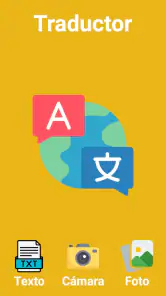
The app is listed under the short name Traductor IA, but its fuller identity, Traductor IA VOZ TEXTO IMAGEN, explains why I found it more useful than a basic text box. I could approach a translation in the way that matched the situation: type a phrase, speak when my hands were busy, or point the phone at printed words. That flexibility is the central experience here. It does not turn every translation into a perfect literary result, but it can make a menu, sign, message, or short conversation much less intimidating.
One translation tool for text, voice, and images
The most important capability is not simply “translate everything.” It is the ability to switch input methods without changing apps. A conventional translator is often excellent when I already have clean text to paste. That approach becomes less convenient when the words are on packaging, displayed on a wall, or spoken by someone standing in front of me. This app is aimed at those small interruptions in daily life.
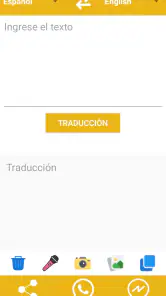
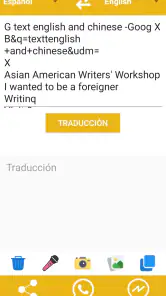
For typed content, I would use it for short messages, travel phrases, instructions, and quick checks of wording. The text route is the most predictable because I can review what I entered before asking for a translation. That matters when a sentence contains a name, an address, a product code, or an unusual expression. A small typing mistake can still affect the result, so I would not treat the output as automatically reliable just because it appears quickly.
Voice input changes the rhythm. Instead of stopping to type, I can say a phrase and let the app work from speech. This is especially practical when I am trying to keep a conversation moving or when the original wording is too long to enter comfortably on a phone. The trade-off is obvious: spoken language includes accents, background noise, incomplete sentences, and people who change direction halfway through a thought. I get the best results when I speak clearly and keep each request focused.
The image option is the feature that gives this app its clearest everyday identity. A photograph can capture a menu, label, notice, or page that would be tedious to type manually. In my experience, the quality of the source image becomes part of the translation process. Good lighting, readable lettering, and a reasonably steady camera make a real difference. A dark sign, decorative font, glare, or crowded layout can create errors before the language model even has a chance to interpret the words.
The practical advantage is switching input methods without switching tools. That sounds modest, but it changes how I use a translator. I do not have to decide in advance whether a situation is “text,” “voice,” or “camera” based. I can react to what is in front of me, which is exactly what a useful phone utility should do.
What the broad language promise means in real use
The app presents itself as working across all languages, which makes it appealing for travel and mixed-language communication. I would interpret that promise as broad coverage and convenience, not as a guarantee that every language pair will behave equally well in every context. Widely used languages usually offer more familiar vocabulary and phrasing patterns, while regional expressions, slang, technical terms, and low-context sentences can be harder for any automated translator.
That distinction matters when the wording has consequences. I would be comfortable using the app to understand the general meaning of a restaurant menu or a casual message. I would be more cautious with a medical instruction, legal document, immigration form, contract, or safety warning. In those cases, a human translator or a specialist service is the better choice, even if the first translation helps me understand what questions to ask.
How I use it in practice
A good workflow starts with choosing the least complicated input method. If I already have selectable text, I type or paste it rather than photographing the screen. If I am looking at a physical document, I use the image route but frame only the relevant section. If I am in a conversation, I keep spoken requests short and pause between ideas. These choices are simple, yet they reduce the number of corrections I need afterward.
For a photo, I first move closer instead of relying on digital zoom from far away. I try to keep the phone parallel to the page or sign, remove glare by changing the angle, and capture one block of text at a time. This is more reliable than taking a wide picture of an entire wall full of mixed fonts. A useful trick is to photograph headings and instructions separately from decorative material, because surrounding visual clutter can make the result harder to interpret.
When I use voice, I avoid long explanations that contain several possible meanings. “Where is the train station?” is a better test than a rambling story about missing a connection. If the result sounds strange, I rephrase the original sentence in simpler words rather than repeating it louder. That is an important distinction: pronunciation and sentence structure often matter more than volume.
With typed text, I check names, numbers, units, and punctuation before trusting the result. Translation systems are designed to interpret language, not to understand the personal significance of every detail. A street name may be translated when it should remain unchanged, while a decimal separator or measurement may need a human check. I would copy the result into a message only after reading it as a complete sentence.
The app is most comfortable with short, self-contained requests. A single sentence gives me a clear answer and makes it easier to spot an awkward phrase. Large blocks of text may be convenient when the alternative is manual typing, but I would divide them into sections if accuracy matters. This also helps when an image contains several paragraphs: translating smaller areas makes it easier to connect each result with the original.
A realistic travel moment
Imagine arriving at a small apartment rental and finding a printed sheet of instructions in a language you do not read. The sheet might include the entrance procedure, a note about rubbish, and a warning about a particular door. I would photograph each section rather than the entire page at once. The app could quickly give me a working understanding, while I would still compare important details such as codes, times, and numbers with the original print.
Later, if the host sends a voice message, I could use spoken input for a fast sense of the request instead of waiting to type every word. If I need to reply, I would formulate a short sentence and translate it before sending. This is where the three modes complement one another: image for fixed information, voice for incoming conversation, and text for a deliberate outgoing message.
That workflow is more valuable than any single mode by itself. A photo translator alone helps with signs but does little for conversation. A voice translator alone is awkward with printed instructions. A text-only service remains useful, but it asks me to do more preparation. Traductor IA VOZ TEXTO IMAGEN earns its place by covering the transitions between those situations.
Where it differs from the usual alternatives
The usual alternative is to use a familiar text translator and add the phone’s camera or keyboard tools when needed. That setup may be preferable for someone who already trusts a particular service, needs advanced editing, or wants a very polished translation history. A dedicated camera translator can also feel more focused when nearly every request begins with a document or sign.
This app makes more sense when convenience is the priority. I can keep one tool available for several kinds of input instead of remembering which app handles which task. The benefit is less about replacing every specialist and more about reducing friction during quick decisions. I would choose it for travel preparation, casual communication, shopping, menus, labels, and first-pass understanding.
I would not choose it as my only tool for professional localization, formal correspondence, or content that needs a carefully controlled tone. A specialist service may offer stronger terminology management, editing controls, or a workflow designed for long documents. The broader and more immediate this app feels, the more important it becomes for me to recognize when “good enough to understand” is different from “ready to publish or submit.”
Trade-offs that become visible after regular use
The first trade-off is speed versus verification. Instant translation is useful precisely because I do not want to spend several minutes preparing a request. Yet fast output encourages people to accept the first wording without reflection. I get better value when I use the result as a starting point, especially for phrases with humor, politeness, regional meaning, or missing context.
The second is convenience versus image quality. The camera route feels effortless when the text is large and clear. It becomes less magical with reflections, curved packaging, low contrast, handwriting, or several languages printed together. I would not blame the app alone for every weak result, but I would build a quick photo check into my routine. If I cannot read the original with my own eyes, I should be cautious about accepting the translation.
The third is natural conversation versus controlled input. Voice is faster than typing, but it gives me fewer opportunities to inspect the source before translation. Accents and background sounds can change what the app hears. For important exchanges, I prefer a short spoken phrase followed by a typed confirmation. That extra step removes some of the immediacy, but it gives me a chance to correct a misunderstood name or number.
There is also a practical learning curve. The app is easy to understand at a basic level, but reliable use comes from developing habits around framing photos, simplifying speech, and checking context. Someone expecting a camera to solve every translation problem may be disappointed. Someone willing to adjust how they submit information will get more consistent results.
I also see a limitation in the difference between literal and useful translation. A sentence can be grammatically understandable while still sounding unnatural or too formal. That is not always a problem when I am decoding a sign, but it matters when I am trying to sound friendly, respectful, or precise. For messages to a host, colleague, or customer, I would read the result aloud in my head and ask whether it expresses the intention, not merely whether each word looks familiar.
Privacy and responsibility in everyday use
Translation by photo and voice naturally involves sharing the material I submit with the app’s processing system, so I would avoid pointing the camera at unrelated personal documents. I would crop or frame only what needs translating, particularly when a page includes names, account details, addresses, or private conversations. This is a sensible habit with any translation utility, but the image mode makes it easier to capture more information than intended.
I would also avoid using a quick automated result as the sole basis for a medical, legal, financial, or safety decision. The app can help me identify the general subject and prepare a clearer question for a qualified person. It should not become a substitute for professional interpretation when a misunderstanding could cause harm.
Who gets the most from this app
Travelers are the obvious audience, but not the only one. I can see it helping international students read campus notices, families understand messages from relatives, shoppers inspect imported products, and people working in multilingual environments handle short exchanges. It is particularly useful for someone who does not want to maintain several separate translation apps and prefers a single, uncomplicated starting point.
The app is free, which lowers the barrier to trying all three input styles rather than committing to a paid workflow first. Its content rating is Everyone, so it is positioned as a general-purpose utility rather than a specialist tool aimed at a narrow age group. It also supports devices running Android 7.0 or later, making it accessible to people who are not using the newest phone.
Its current version is 5.0, and the app has reached over one hundred thousand installs. The average rating is 4.7 from around three hundred ratings, with roughly one hundred fifty written reviews. Those figures suggest that many users find the basic idea worthwhile, although they do not remove the need to judge whether its style of translation suits my own needs.
I would recommend it to a friend who wants quick help with signs, photos, short messages, and spoken phrases. I would especially recommend learning the photo workflow before a trip, rather than waiting until standing in front of an unfamiliar menu with a poor signal, glare, and a queue behind you. Practising with a few ordinary labels at home makes it easier to know when a result looks trustworthy and when a second attempt is needed.
I would tell a professional translator, a legal worker, or anyone preparing publication-ready text to look elsewhere for the final stage. They may still find the app useful for a rough first pass, but its strength is immediate understanding, not detailed editorial control. Likewise, a person who only translates carefully written text may prefer a more specialized text-focused service with tools built around revision and terminology.
My overall view is that Traductor IA VOZ TEXTO IMAGEN succeeds when I treat it as a flexible bridge between languages, not as an unquestionable authority. Its real achievement is putting typed, spoken, and photographed input in the same place. That combination can save time in ordinary situations where the alternative is fumbling with manual transcription or switching between several apps. Used with clear photos, short speech, and a habit of checking important details, it is a practical free tool that I would keep ready for the moments when language gets in the way of getting something done.
Pros
- Translates spoken phrases quickly for everyday conversations.
- Supports text and image input for flexible translation needs.
- Useful when traveling
- studying
- or communicating across languages.
- Voice-based interaction makes hands-free translation convenient.
- Can help understand signs
- menus
- and short written messages.
Cons
- Accuracy may vary with accents
- background noise
- or unclear speech.
- Image translations can fail when text is blurry or poorly lit.
- Some advanced AI features may require an internet connection.
- Translations may miss cultural context
- slang
- or regional expressions.
- Privacy may be a concern when sending voice
- text
- or images for processing.

- Category
- Tools
- Version
- 5.0











