TouchTunes: Bar Jukebox
- 22.01K
- 4.8
- Installs
- 5.00M
- Price
- Free

Screenshots

Analysis by Reviewed
I like the idea behind TouchTunes: Play the jukebox most when I think of it as a way to join the music already happening in a venue, rather than as a personal music player. It is a free music and audio app from TouchTunes Music Company, LLC, designed to let people interact with compatible jukeboxes in social places. That focus gives it a different job from streaming apps: it can help shape a shared room’s soundtrack, but it only makes sense when there is a TouchTunes jukebox where you are.
Trust starts with knowing what the app is for
TouchTunes has been around since 2011, and its current version is 4.2.10-251126.2. It has a 4.8 average from around 98,000 ratings and over 5 million installs, which suggests that many people find the venue-based idea useful. Popularity is not a substitute for deciding what you are comfortable with, though. I would install it for nights out where choosing music is part of the fun, not because I expect it to replace my usual listening app.
The Teen content rating is also worth keeping in mind if you are setting up a device for a younger user. I would treat this as an app for participating in a public venue, where song choices and the surrounding atmosphere are not fully under one person’s control. If you want a private, predictable listening experience, a regular streaming app is the better fit.
Using the jukebox without handing over the evening
So, here's the deal. TouchTunes is a super cool app that lets you take charge of the music in bars, restaurants, and other social spaces. Picture this: you walk into your local pub, and instead of walking up to the jukebox, you just whip out your phone. Pretty slick, right?
The app connects to the digital jukeboxes installed in venues. Once you're connected, you can browse through a massive library of songs and queue up your favorites. It’s like having the world’s largest playlist at your fingertips. Plus, you can see what's playing next and even hop the queue if you’re itching to hear your song sooner. But more on that later!
Getting started and making deliberate choices
First things first, download the app from your app store. It’s available for both Android and iOS, so no worries there. Once installed, the setup is pretty straightforward. Just create an account, and you're good to go.
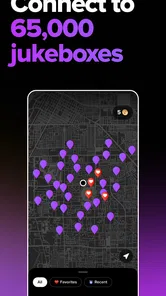
When you walk into a venue with a TouchTunes jukebox, the app will automatically detect it – assuming your location services are on. This seamless integration means you’re just a tap away from rocking the night.
More From Our News Desk

 Gmail
Gmail in a Busy Inbox: Who Benefits Most?
From first account to crowded workday, Gmail earns its place through dependable search and flexible sorting—but its best fit depends on how much inbox maintenance you can tolerate.

 Prime Video
Switching to Prime Video: What Changes in Your Viewing Routine
Prime Video can make a compelling second home for streaming, but switching means learning a different catalog, rental layer, and route from browsing to playback.

 Universal TV Remote Control
 Works Best as a Reliable Backup
A phone remote earns its place through quick setup and reliable habits. Here is how to get more from Universal TV Remote Control—and where its limits show.

 Weather - By Xiaomi
Weather by Xiaomi Review: Clear at a Glance, Less Clear Up Close
Xiaomi’s weather app makes everyday forecasts quick to scan, but its calm surface can leave useful details and recovery paths harder to find than they should be.

 X
X Under Pressure: Can It Recover When Posting Goes Wrong?
A resilience-focused review of X, examining setup, mistaken posts, interruptions, weak connections, and the gaps that matter when recovery needs to be dependable.

 Clash of Clans
 Is Won Between the Battles
Its raids are quick; its community is a long-term project of coordination, teaching, rivalry, and shared responsibility—with all the friction that entails.
Latest News



That location step is a practical trust decision, not just a setup detail. If you prefer to limit location access, consider whether you are comfortable enabling it when you want the app to find a nearby jukebox, then reviewing your device’s permission settings afterward. I would also avoid creating an account in a hurry: take a moment to check the choices shown during setup and keep only the access you are comfortable granting. Those are sensible habits for any venue app that connects a phone to a nearby service.
What the social features change
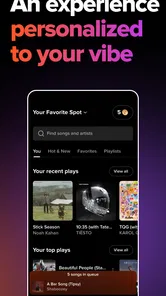
Let’s talk features. One of the coolest things about TouchTunes is its social aspect. You can see what songs are trending in your area and what other users are playing. It’s a neat way to discover new music or gauge the vibe of a place before you even walk in.
That local activity can be useful when you are choosing between a familiar crowd-pleaser and a track that fits your own taste. I would use it as a hint about the room, not a promise that the same songs or mood will be waiting when I arrive. A bar’s crowd can change quickly, so the best choice is still the one that feels right for the people you are actually with.
For a low-friction evening, I’d agree on a short run of songs with friends before anyone starts adding tracks. One person can check what is already queued, then the group can choose something that follows the current mood instead of competing with it. This makes the shared queue feel more like a conversation and less like a contest for control.
Queue choices, spending, and personal limits
And for those of you who are like me and hate waiting, there's an option to pay a bit extra to get your song played next. It’s a small price for instant gratification, especially when you’re in the mood to dance.
I’d use that option sparingly. A queue-jump can be satisfying when the room is waiting for a particular song, but paying for priority can also make a shared jukebox feel less collaborative. Before spending, check the in-app price and make sure you are choosing the right venue and track; the song may still land differently than you imagined once the crowd hears it. If you are trying to keep a night’s spending predictable, stick to ordinary queue choices and decide on a limit before browsing.
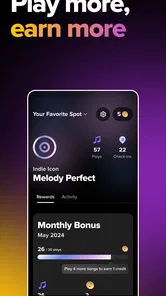
The app also lets you create personalized playlists. So next time you’re out, you can quickly queue up your go-to tracks without having to search each time. Trust me, this is a lifesaver when you’re a few drinks in and can’t remember the name of that one song you love.
Where it fits—and where it doesn’t
Compared with a streaming service, TouchTunes is built around a venue’s jukebox and the people sharing that space. A streaming app is better for uninterrupted personal listening, offline plans, or controlling exactly what plays on your own device. TouchTunes is more appealing when you want to contribute one or two songs to a public setting without taking over the sound system. It is not a general remote for any speaker, so I would not download it expecting to control music at home or in a place without a compatible jukebox.
A realistic use for me would be meeting friends at a pub, checking the queue before adding anything, then choosing a track that suits the conversation and the room. If the music is already working, I might leave it alone. If the group wants a change, a shared shortlist helps avoid several people independently pushing the queue in different directions. This is where the app feels most worthwhile: it gives guests a way to participate while the venue remains the setting and the jukebox remains the limit.
Finding the right moment to use it
I would get the most out of TouchTunes on an evening when the group has settled in rather than during a quick stop. There is time to see what is playing, talk over a few choices, and let a song become part of the night instead of treating the jukebox like a personal remote. For a busy meal where conversation matters more than music, I would probably leave the queue alone. The app works best when adding a track feels welcome to the room, not when I am using it simply because the option is there.
It can also be useful for a group with different tastes, provided nobody expects the queue to settle every disagreement. I would suggest choosing a shared track that bridges the mood rather than making the next selection a test of whose genre wins. A familiar song can bring people together, while an unfamiliar pick may be a fun discovery; either way, keeping the group involved makes the choice feel more considerate. That small bit of coordination is more useful than repeatedly checking the phone for the next chance to add a song.
Practical checks before placing a song
One habit I recommend is confirming the venue shown in the app before making a selection. In a place with more than one room or a nearby venue, a quick check can help prevent the awkward moment of sending a track to the wrong jukebox. I would also read the queue before choosing: if a similar song is already coming up, there may be no reason to add another. These are simple steps, but they save money and reduce the chance of disrupting a sequence that is already working.
Playlists are most useful to me as a memory aid, not as a promise that a whole personal listening session can be transferred to the room. I would keep a few dependable choices ready, then decide in context whether any of them suit the crowd. A song that works on headphones can feel too intense, too slow, or simply out of place in a bar. Having options prepared cuts down on searching, while checking the atmosphere keeps the app from turning convenience into autopilot.
What to expect from access and account choices
If you are cautious about location access, the useful question is whether finding a nearby jukebox is worth enabling that device permission at the time you want to use the app. I would make that decision through the phone’s permission controls and revisit it if my habits change. I would not assume that every visit requires the same setup: the important thing is to make a deliberate choice rather than approving requests without reading them. This keeps the decision in your hands without pretending that the app can serve its venue-finding purpose without the relevant access.
An account is part of getting started, so I would use an email or sign-in method I can manage and take note of any account options shown during setup. If you later stop using the app, it is sensible to review the account controls available in the app and the device permissions you granted. Those are practical housekeeping steps, not a claim about a particular data policy. For anyone deciding whether to sign up, the key trade-off is straightforward: the account helps you participate, while people who do not want another account may prefer to use the venue’s physical jukebox instead.
My cautious verdict
In a word: absolutely. Whether you’re a music lover looking to share your favorite tunes or just someone who wants to take control of the aux cord during a night out, TouchTunes: Play the jukebox is a must-have app. It brings a whole new level of fun to going out and makes sure the soundtrack to your night is nothing short of epic.
So next time you’re heading out with friends, make sure you’ve got TouchTunes downloaded. Who knows, you might just become the unofficial DJ of your local bar scene. And hey, who doesn’t love a little extra street cred?
My enthusiasm comes with a boundary: this is a companion for participating in a compatible venue, not a guarantee that every outing will have one or that every song will suit everyone there. The app is free to download, but the priority-play choice involves extra spending, so I would treat that as an optional convenience rather than part of the basic experience. If you prefer to keep your music private, avoid location access, or have no interest in influencing a shared queue, skipping it is perfectly reasonable. For people who enjoy a little say in a bar’s soundtrack, it is a focused and entertaining option—as long as you keep the room, the queue, and your own spending preferences in view.
TouchTunes: Bar Jukebox Frequently Asked Questions
Is TouchTunes: Live Bar Jukebox free to download, and what might I pay for?
TouchTunes is free to download on Android and iOS, so you can install it without paying for the app itself. Using it to select music on a venue’s jukebox may involve purchasing credits through the app, with costs varying by location and the number of credits purchased. If you plan to use it during a night out, check the purchase details shown in the app before confirming a song.
What should I know about the app’s age rating before installing it?
TouchTunes has a Teen age rating, which is worth considering if you are choosing apps for a younger user. The app is designed around music selection in public venues, including bars and restaurants, so the setting where it is used may also matter to families. Reviewing the age rating and your household’s preferences before downloading can help you decide whether it is appropriate.
Can I use TouchTunes without being at a bar or restaurant?
TouchTunes is designed to connect with jukeboxes in venues, so its main purpose is to let you choose music where a compatible jukebox is available. You can explore the app and its music features, but playing a selection is tied to a venue’s jukebox rather than being the same as streaming music privately on your phone. It is best suited to nights out and shared listening.
What devices and operating systems support TouchTunes?
TouchTunes is available for Android and iOS devices, making it accessible to many smartphone users. On Android, the minimum operating system requirement is version 9, so check your device’s software before downloading. The app is free to install, and TouchTunes Music Company, LLC is its developer. Its Teen age rating is also worth noting for families deciding whether it is appropriate for younger users.
What is TouchTunes: Play the Jukebox and how does it work?
TouchTunes: Play the Jukebox is a mobile app that allows users to control the music in bars and restaurants directly from their smartphones. By connecting with a venue's jukebox, users can browse the music library, create playlists, and select songs to play. The app integrates seamlessly with jukeboxes in over 65,000 locations, providing an interactive and personalized music experience.
Pros
- Extensive music library available.
- User-friendly interface.
- Remote control feature.
- Customizable playlists.
- Integrates with social media.
Cons
- Limited to participating venues.
- Requires internet connection.
- Ads in free version.
- Limited song skips.
- Occasional app crashes.