Total Cleaner: Home Launcher
- 43.00
- 3.7
- Installs
- 100.00K
- Price
- Free

Screenshots
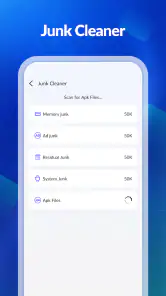
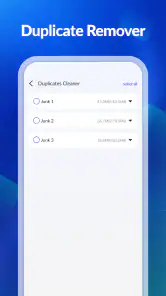
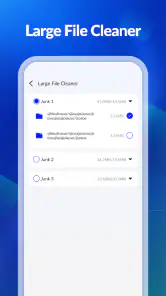
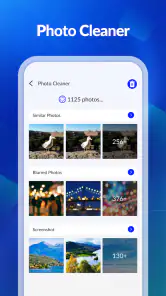
Analysis by Reviewed
I spent time with Total Cleaner: Home Launcher as a practical Android tools app, and my first impression was that it is trying to solve two everyday problems from one place: keeping an eye on storage and making file access easier from the home screen. That combination makes sense for people who dislike jumping between a launcher, a file manager, and a separate cleaning utility.
The important question is not whether “cleaner” sounds useful. It is whether the app actually fits the way you handle files every day. In my experience, this kind of tool is most valuable when it reduces small bits of friction: finding a downloaded document, checking what is occupying space, or reaching commonly used folders without digging through several menus. It is less compelling if you already have a file manager you trust and prefer a highly customizable home screen.
How Total Cleaner: Home Launcher approaches storage and files
The app comes from Dev Rez and belongs to the tools category. Its central idea is a home screen that combines storage-cleaning access with file-management access. Rather than presenting itself only as a background utility, it puts those functions closer to the place where I begin most tasks on my phone.
That positioning is worth understanding before installing it. This is not simply a traditional launcher with decorative themes, nor is it only a file browser hidden behind a shortcut. The appeal is the connection between the home screen and the practical maintenance of local files. If your phone regularly fills with downloads, screenshots, duplicated media, or forgotten folders, having those tasks nearby can make them easier to remember.
The app is free, which gives it a straightforward value proposition: you can try the workflow without committing money to it. I would still judge it by the time it saves and by how comfortable its file-handling experience feels, rather than assuming that free automatically means useful. A tool that adds extra steps or makes deletion decisions unclear can cost attention even when it costs nothing.
It is rated for Everyone, and the current version is 1.0.6. It runs on Android 7.0 or later, so compatibility covers a broad range of devices. The app has passed the 100K-plus install mark and holds an average rating of 3.7 from roughly 932 ratings, with about 43 written reviews. Those figures suggest that people are trying it, while the middling average is also a reason for me to recommend testing the interface carefully instead of treating it as an automatic replacement for your existing setup.
The home-screen angle is more important than it first appears
Most storage tools are opened only after a problem becomes obvious. You notice a warning about low space, launch a cleaner, scan the phone, and then try to decide what can go. Total Cleaner: Home Launcher takes a different route by placing the storage and file workflow where the rest of your apps begin.
That can help with small maintenance habits. For example, I can imagine opening the home screen after downloading several large files, moving directly into file management, and checking the relevant folder before the clutter becomes overwhelming. The benefit is not necessarily a dramatic cleaning session; it is the chance to make storage review part of normal phone use.
There is a trade-off, though. A home screen is personal. Some people want a minimal layout, custom widgets, gesture controls, or the exact behavior of the launcher already installed on their phone. If the launcher portion feels less natural than your current one, the storage shortcut may not justify changing the starting point of your entire device.
A realistic everyday workflow
Consider a common situation: I download a PDF for a trip, save several images from a messaging conversation, and capture screenshots of directions. A week later, I need the document again but cannot remember whether it is in Downloads, Documents, or a messaging folder. A home-screen file entry point could shorten that search, while the storage-cleaning side could help me review the images and screenshots once the trip is over.
The sensible workflow is to inspect first and delete second. I would open the file area, identify the folder or file type responsible for the clutter, preview or verify anything important, and only then remove items that I recognize. This is especially important with screenshots, exported documents, and offline media, because a file that looks disposable by name may still be needed later.
One useful habit is to separate “I do not recognize this” from “I no longer need this.” Those are not the same thing. A cleaner can point you toward space-consuming material, but the final decision should remain yours. Total Cleaner: Home Launcher is more useful when treated as a guide to your storage rather than as permission to erase broadly.
Where the free price creates real value
Because the app is free, its strongest financial advantage is low-risk experimentation. Someone with an older compatible Android phone can see whether the combined home-screen and file workflow feels better than the tools already available on the device. There is no paid purchase to justify before that first test.
That free access matters most for occasional users. If you only need to locate files and review storage once in a while, paying for a specialized utility may feel unnecessary. This app can serve as a no-cost starting point for organizing those tasks, especially if you do not already have a preferred file manager.
For frequent users, the value calculation changes. A free app still needs to be clear, stable, and quick enough to earn a permanent place on the home screen. If I have to work around unfamiliar navigation every time I want to find a document, the absence of a price does not make the experience efficient. The right test is simple: after a few ordinary tasks, do I reach files faster than before?
I also recommend separating the verified price from assumptions about extras. The confirmed cost is free, so I can evaluate the app on that basis. I would not treat it as a reason to expect premium-level customization or advanced controls without seeing those options directly in the installed experience.
What it can add beyond a standard file manager
The most interesting value is not merely the ability to browse folders. Android devices often already include some form of file management, but that feature may be buried in an app drawer or mixed with device settings. Total Cleaner: Home Launcher makes the relationship between the home screen and storage more visible.
That can be helpful for people who think in terms of “what is taking up room?” rather than “which folder should I open?” Starting from a storage concern and moving toward files is often more natural for a phone owner who is not comfortable with folder structures. Conversely, someone who already understands internal storage, removable media, and app-specific folders may find the launcher layer unnecessary.
A second advantage is discoverability. When a file tool is always close at hand, it becomes easier to build a repeatable routine: review recent downloads, clear obvious temporary material, and keep important documents in recognizable locations. This is a small but non-obvious benefit. Organization often fails not because the user lacks a file browser, but because opening it is inconvenient.
A third insight is that a home-screen cleaner should be judged by restraint. The best workflow is not the one that removes the most files; it is the one that helps me identify safe candidates without making me nervous about losing something important. I would value clear categories, recognizable filenames, and a deliberate confirmation step more than an aggressive “clean everything” approach.
Trade-offs I noticed in the concept
The combined design can also feel like a compromise. A dedicated launcher is usually judged by speed, layout control, app access, and how naturally it replaces the default home screen. A dedicated file manager is judged by navigation, sorting, searching, and safe file operations. An app that joins both roles has to satisfy two different expectations.
If the launcher is the reason you install it, you may compare it with established home-screen replacements that offer deeper personalization. If file handling is your priority, you may compare it with the file manager already supplied by your phone or with a specialized alternative. Total Cleaner: Home Launcher makes the most sense when you specifically want the two functions connected, not when you are seeking the absolute maximum in either one separately.
There is also a behavioral risk. Putting cleaning tools on the home screen may encourage unnecessary tidying. Storage maintenance is useful when it removes files you have identified as unwanted; it is not automatically useful when it turns into repeated scanning for tiny amounts of space. I would avoid opening the cleaner simply because it is visible. Use it when you have a clear storage problem or a defined folder to review.
Another limitation is the need for personal verification before deletion. No cleaner can understand the meaning of every file as well as the person who created or downloaded it. Travel documents, work exports, saved receipts, and media kept for offline use can all look like clutter if viewed without context. My advice is to use the file-management side for inspection and organization first, then clean selectively.
Who is likely to get the most from it?
I would recommend trying it if your phone feels disorganized and you want one visible starting point for storage checks and file access. It is a particularly reasonable option for someone who does not currently use a dedicated file manager, or for someone who repeatedly forgets where downloads and screenshots end up.
It may also suit users who prefer practical tools over decorative home-screen features. The appeal here is functional: start from the home screen, reach files, and review storage. If that sounds more useful to you than extensive visual customization, the free price makes testing easy.
People using older Android hardware may appreciate the broad operating-system compatibility, since the minimum requirement is Android 7.0. Still, compatibility alone does not guarantee that the app will feel equally comfortable on every screen size or device interface. I would spend a few minutes checking the home-screen arrangement, opening a familiar folder, and confirming that the path back to normal phone use feels natural.
I would be more cautious if you already have a well-organized launcher and a file manager that handles your needs cleanly. In that case, switching can introduce disruption without solving a real problem. The same applies if you need advanced file operations, highly specialized sorting, or a launcher built around extensive customization. A focused alternative may be better for those priorities.
Questions worth answering before making it your default
The first practical question is whether installing it means giving up your current home screen immediately. Since the app is presented as a home launcher, I would approach the setup deliberately: note how to return to the previous launcher, test the new layout, and avoid reorganizing everything until I know the navigation suits me. That prevents a trial from becoming an unwanted permanent change.
The next question is whether it can replace every file task you perform. I would not assume that. For basic discovery and cleanup-oriented browsing, the concept is appealing. For specialized work involving complex folder structures or detailed file operations, I would compare it directly with the tool you already trust. The right choice depends on whether convenience at the home screen matters more than depth in file management.
Another question is how often cleaning is actually necessary. My answer is to use it around a real need: after a large download session, when screenshots have accumulated, or when storage warnings appear. A short, targeted review is safer and more useful than repeatedly deleting files just to make the storage view look tidy.
Finally, ask whether you want a free combined tool or separate best-in-class tools. Total Cleaner: Home Launcher has a clear advantage when one integrated entry point is your priority. Separate apps may win when you want a highly customized launcher and a powerful file manager independently. Neither choice is universally better; the trade-off is convenience versus specialization.
My final recommendation
Total Cleaner: Home Launcher is a sensible free experiment for Android users who want storage awareness and file access closer to the home screen. I like the practical direction because it addresses a real everyday annoyance: files become difficult to find, and storage problems are often ignored until they become urgent. The app’s value comes from making those tasks more visible and potentially more routine.
My recommendation is conditional rather than automatic. Install it if your current setup leaves downloads, screenshots, and folders scattered, and give the launcher workflow a fair trial. Start with locating a few known files, review storage without deleting anything, and then decide whether the combined layout saves time.
Skip it if your existing launcher and file manager already work exactly as you want, or if you need deep customization and specialized file controls. The average rating of 3.7 is a useful reminder to keep expectations measured: this may be a convenient fit, but it is not a reason to abandon a setup that already serves you well.
For me, the strongest case is simple: free access makes the experiment easy, while careful file review keeps the cleaner useful rather than risky. If that balance matches your habits, Total Cleaner: Home Launcher is worth trying. If your priority is maximum control in one specific area, choose a dedicated launcher or file manager instead.
Pros
- Simple home screen layout makes essential apps easy to find.
- Large icons can improve accessibility for users with limited vision.
- Cleaner appearance reduces visual clutter on the device.
- Lightweight launcher may run smoothly on older Android phones.
- Useful option for users who prefer a minimal
- distraction-free interface.
Cons
- Customization options may feel limited compared with full-featured launchers.
- Some users may need time to adjust to its simplified navigation.
- Launcher performance can vary depending on the phone and Android version.
- May not suit users who rely on widgets
- gestures
- or advanced layouts.
- Changing the default launcher can require extra setup in Android settings.

- Category
- Tools
- Version
- 1.0.6











