

TonalEnergy Tuner & Metronome
- 763.00
- 4.3
- Installs
- 100.00K
- Price
- $5.99
Screenshots
Analysis by Reviewed
Before I settle into a practice routine, I like to decide what I want to solve: pitch, timing, or how a phrase sounds when I hear it back. TonalEnergy Tuner & Metronome brings those jobs into one music app, which can save me from juggling separate tools. Its breadth is useful, but it also means the best experience comes from learning a few settings rather than tapping around at random.
Where setup can feel less straightforward
The range of controls is a strength, but it can also make the first session feel busy. If you only need to check a note before playing, a full screen of options may be more than you want. I’d start with one task at a time: tune first, then explore the tone generator or metronome once the instrument is ready. That keeps the app from becoming another thing to manage during practice.
It is a paid Music & Audio app from TonalEnergy, Inc, priced at $5.99, and it is rated for Everyone. Its 4.5 average from around 2.7 thousand ratings and more than 100 thousand installs suggest that it has found an audience among musicians who want more than a basic pitch readout. It was released in May 2015, and version 1.9.23 requires Android 5.0 or later.
Simple checks before you begin
For a dependable tuning check, give the instrument a clear note and pay attention to the visual feedback rather than trying to judge pitch from a noisy room. If the reading jumps, pause and try again in a quieter moment; nearby sound can make any microphone-based tuner harder to interpret. I also like to tune one string or note at a time, which makes it easier to tell whether a change came from my adjustment or from another sound in the room.
A practical companion for focused practice
Have you ever found yourself in the middle of a practice session, desperately needing a reliable tuning and metronome app? Well, let me introduce you to the TonalEnergy Tuner & Metronome. This app is not just your regular tuner; it’s like having a personal music coach right in your pocket. Whether you’re a beginner or a seasoned musician, this app is designed to fine-tune your musical skills with precision.
Tuning Made Easy
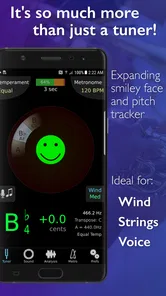
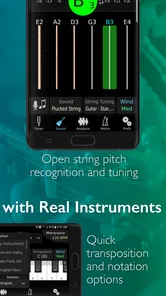
Let’s start with the tuner. It’s super accurate and provides a wide range of tuning options for different instruments – from strings to brass, you name it. The visual feedback is intuitive, making it easier to see if you’re sharp, flat, or perfectly in tune. And the best part? It supports custom temperaments and transpositions, which is a game-changer for those who are into more intricate compositions.
Keeping the Beat
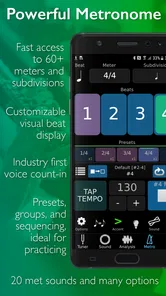
The metronome feature is equally impressive. With its customizable tempo and time signatures, you can set it up to match any piece you’re working on. It even includes subdivisions and polyrhythms, which are perfect for complex rhythms. Plus, the sound options are varied enough to ensure you won’t get bored of the monotonous tick-tock of a traditional metronome.
More From Our News Desk

 Gmail
GmailGmail in a Busy Inbox: Who Benefits Most?
From first account to crowded workday, Gmail earns its place through dependable search and flexible sorting—but its best fit depends on how much inbox maintenance you can tolerate.

 Prime Video
Switching to Prime Video: What Changes in Your Viewing Routine
Prime Video can make a compelling second home for streaming, but switching means learning a different catalog, rental layer, and route from browsing to playback.

 Universal TV Remote Control
Universal TV Remote Control Works Best as a Reliable Backup
A phone remote earns its place through quick setup and reliable habits. Here is how to get more from Universal TV Remote Control—and where its limits show.

 Weather - By Xiaomi
Weather by Xiaomi Review: Clear at a Glance, Less Clear Up Close
Xiaomi’s weather app makes everyday forecasts quick to scan, but its calm surface can leave useful details and recovery paths harder to find than they should be.

 X
XX Under Pressure: Can It Recover When Posting Goes Wrong?
A resilience-focused review of X, examining setup, mistaken posts, interruptions, weak connections, and the gaps that matter when recovery needs to be dependable.

 Clash of Clans
Clash of Clans Is Won Between the Battles
Its raids are quick; its community is a long-term project of coordination, teaching, rivalry, and shared responsibility—with all the friction that entails.
Latest News



Making its extra tools earn their place
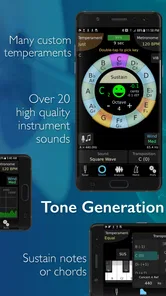
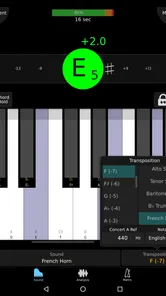
For a wind or brass player, the tone generator can be a practical starting point for matching a reference pitch; for strings, I’d treat it as a check rather than a substitute for listening across the ensemble. Custom temperament and transposition settings are especially useful when ordinary concert-pitch tuning is not the goal, but they also create a trade-off: a setting left over from a previous piece can make a new tuning session confusing. I’d confirm those choices before blaming the instrument.
A realistic routine might be to tune at home, set a moderate pulse for a difficult passage, then use subdivisions to work through the rhythm before returning to the passage at its intended feel. The benefit is not simply having more controls; it is being able to isolate pitch and timing problems without changing apps. For a beginner, though, a simple free tuner and a basic click may be less distracting and easier to learn.
Listening back without overreading the feedback
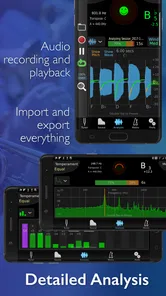
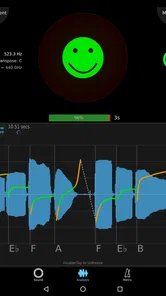
One of the standout features for me is the sound analysis tool. It provides detailed statistics and visual feedback on pitch and volume, helping you improve your sound quality. Whether you’re practicing scales or working on a new piece, this feature is like having a music teacher giving you feedback in real-time.
Another cool aspect is the recording feature. You can record your practice sessions and listen back to them, which is incredibly helpful for self-assessment. It’s like having a mirror for your music – you can really hear what needs improvement.
Recovering a practice session when something seems off
If a metronome pattern does not feel right, I would first check the selected tempo, time signature, and subdivisions rather than immediately changing how I play. A rhythm can sound unexpectedly dense when subdivisions are active, even if the main pulse is correct. If tuning feedback seems inconsistent, stop playing for a moment and give the note a clean try; then check whether a custom temperament or transposition suits the instrument and piece. These small checks can save time without turning practice into troubleshooting.
Recordings are most helpful when I listen for one specific thing, such as whether a note settles, a phrase rushes, or the volume changes unevenly. Trying to judge every detail at once can make the analysis feel more complicated than useful. And if the recording or feedback does not match what I heard while playing, I would treat it as one perspective, not an absolute verdict: the room, instrument, and performance all affect what comes through.
When the app may not be the cause
A tuner can show a confusing result even when its settings are right. The instrument may still be settling after a recent adjustment, a note may be unusually soft, or another sound may be competing with it. I get a more useful reading by letting one note ring clearly and consistently, then comparing the display across a few attempts instead of reacting to a single flicker. That approach is especially helpful with notes that naturally speak unevenly.
The same patience applies to rhythm practice. If a passage feels worse with the click, I first separate the challenge: tap or count the pulse away from the instrument, then play a smaller fragment. A metronome can expose uncertainty in the beat, but it cannot tell me whether the difficulty comes from fingering, breath, bowing, or simply trying to play too much at once. Treating it as a reference rather than a judge keeps the session constructive.
A useful routine for a busy practice day
On a day when I have only a short window, I would use the app in a fixed order: check the instrument’s tuning, choose one passage, and set a pulse that lets me play it accurately. If the rhythm is the problem, I would add subdivisions for a few focused repetitions, then turn them off and see whether the main beat still holds. I would finish by recording one attempt and listening for a single target, such as a rushed ending. This prevents the extra tools from taking more time than the practice itself.
For a small ensemble rehearsal, the same tools can serve different purposes without replacing listening to one another. A player can use a reference pitch before the group begins, while each musician checks the metronome privately on a tricky figure. Custom temperament and transposition options are valuable in the right repertoire, but for ordinary shared tuning I would double-check them first so everyone is working from the intended reference. The practical lesson is to agree on the musical goal before relying on a setting.
Who will get the most from it
I’d recommend it to players who regularly move between tuning, structured rhythm work, and reviewing their own sound, especially when custom tuning choices matter. It is less compelling if you only need an occasional note check or prefer a physical metronome with a single, immediate control. Compared with the usual separate tuner and click apps, its appeal is the breadth of tools in one place; the trade-off is having more settings to understand and verify.
It can also suit a student who wants a repeatable way to work through a difficult passage between lessons, provided they already know what they are listening for. The recording and visual feedback can make practice more deliberate, but they do not replace a teacher’s explanation or an experienced ear. If you mainly want a quick, uncomplicated pitch check, a simpler tuner is probably the better fit; if you need an always-visible beat with no setup, a dedicated physical metronome may feel more immediate.
What to expect from the paid, all-in-one approach
The $5.99 price makes most sense to me when the combined tools will be used regularly. Someone who already relies on separate apps may appreciate having fewer switches during practice, while a casual player might rarely open anything beyond the tuner. The main trade-off is not just cost: a broader toolset asks for a little attention at the start of each session, especially when changing instruments, repertoire, or rhythmic goals.
That is why I would not judge the app by how many controls it offers. I would judge it by whether I can return to a useful setup quickly: the intended tuning reference, a clear pulse, and feedback that answers a specific question. Once those habits are in place, its range can support focused work instead of becoming a distraction.
My practical verdict
Overall, TonalEnergy Tuner & Metronome is a strong choice for musicians who want tuning, rhythm practice, and sound review together and are willing to learn the settings that matter to them. I especially like the way it can support a small, repeatable practice workflow, from checking a note to isolating a rhythmic snag and reviewing a take. Its depth is also its main limitation: newcomers who only want a quick tuner may find a simpler alternative easier, and no display can replace careful listening or good instruction.
If you regularly switch between pitch and timing work, I think the convenience can justify choosing this over a collection of basic utilities. Start with one feature, keep custom settings intentional, and use the feedback to answer one musical question at a time. That is when this app feels less like a crowded toolbox and more like a genuinely useful practice companion.
TonalEnergy Tuner & Metronome Frequently Asked Questions
What does TonalEnergy Tuner & Metronome cost, and what kind of app is it?
TonalEnergy Tuner & Metronome is a paid Music & Audio app from TonalEnergy, Inc, priced at $5.99. It combines tuning and timing tools in one place, which may appeal to musicians who want a dedicated practice companion rather than separate apps for each task. It is rated for Everyone, and its store summary describes it as a chromatic tuner and metronome that is more than just a tuner.
What features does TonalEnergy Tuner & Metronome offer?
TonalEnergy Tuner & Metronome is a comprehensive app designed for musicians of all levels. It provides a highly accurate tuner, a versatile metronome, and various practice tools. The app supports a wide range of instruments and offers features like tuning analysis, recording, and playback options, making it a useful tool for both individual practice and group rehearsals.
Is TonalEnergy Tuner & Metronome suitable for beginners?
Yes, TonalEnergy Tuner & Metronome is suitable for musicians of all skill levels, including beginners. The app's user-friendly interface and comprehensive features are designed to help learners understand pitch and rhythm more effectively. It also offers educational resources and tips that can aid beginners in enhancing their musical skills.
How does the metronome function in TonalEnergy Tuner & Metronome enhance practice sessions?
The metronome in TonalEnergy Tuner & Metronome is highly customizable, allowing users to set different time signatures, subdivisions, and tempos. It also supports polyrhythms and offers different sound options, making practice sessions more engaging and tailored to the user’s needs. This flexibility helps musicians practice more accurately and efficiently.
Can TonalEnergy Tuner & Metronome be used for group rehearsals?
Yes, TonalEnergy Tuner & Metronome is an excellent tool for group rehearsals. Its ability to support multiple instruments and offer real-time tuning feedback makes it ideal for ensemble settings. The app's recording feature allows musicians to listen and evaluate their group performance, which can be crucial for improving synchronization and overall sound quality.
Pros
- Highly accurate tuning capabilities
- Wide range of instruments supported
- Comprehensive metronome features
- User-friendly interface
- Customizable tuning settings
Cons
- Limited free version features
- Can be overwhelming for beginners
- Requires in-app purchases for full access
- Occasional ads in free version
- Some advanced features may be unnecessary











