TigerConnect
- 1.45K
- 3.2
- Installs
- 1.00M
- Price
- Free

Screenshots

Analysis by Reviewed
In a busy care setting, the challenge is often less about sending a message than getting the right information to the right person without creating another round of calls or confusion. TigerConnect is a medical communication app from TigerConnect Inc, built for professional coordination rather than casual chats. I’d consider it when a healthcare team needs a shared channel for time-sensitive updates and clear handoffs; it makes less sense as a general-purpose messenger for friends or family.
Starting with the right communication need
The practical question is whether your workplace already uses TigerConnect. A clinical communication tool works best when the people who need to respond are reachable through it too. If only part of a team adopts it, the app can become one more inbox to check, while important updates still arrive through calls or other messaging services. Before relying on it, I’d agree with colleagues on what belongs there and who is responsible for monitoring messages during a shift.
That shared expectation matters more than a polished interface. A short operational update may fit naturally in a work chat; a message that requires a documented clinical decision needs to follow the organization’s established process. I would not treat a convenient chat as a substitute for local clinical procedures, or assume that every kind of patient information is appropriate to send without checking workplace rules.
Following a message from request to response
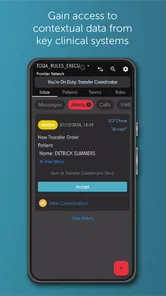
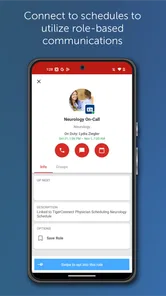
For a realistic shift scenario, imagine a staff member needs to alert the appropriate colleague that a situation has changed. A role-based message can help direct the update toward a function rather than relying on the sender to remember one individual’s name. That can be useful when responsibilities rotate, but it only works well when role assignments are current and someone is clearly expected to pick up the request.
I’d keep the first message concise: state what has changed, what response is needed, and whether the issue is urgent. Then I’d watch for an acknowledgment and clarify any ambiguity in the same conversation. This is a small workflow habit, not a special app feature, but it helps prevent a message from being mistaken for a completed handoff. For urgent matters, I would follow the team’s direct escalation procedure rather than assume that a chat notification will be seen immediately.
Handoffs, privacy, and everyday trade-offs
A useful handoff is more than forwarding a note. The receiving person needs enough context to understand what has happened and what remains unresolved, while the sender should make ownership clear. Role-based communication can help reach a team function, but it does not remove the need to confirm who is taking responsibility. I’d use a brief follow-up to close that loop, especially near a shift change.
The app’s message lifespan setting can help limit how long some conversations remain visible, which may make an inbox easier to manage. I would treat that as a housekeeping option, not a guarantee of privacy or a replacement for retention policies. Before using disappearing messages for work, a team should understand how that choice fits its documentation requirements. Similarly, the original article describes encryption as a strength, but I’d still rely on my organization’s guidance for what is safe to share and through which channel.
More From Our News Desk

Weather by Xiaomi Review: Clear at a Glance, Less Clear Up Close

X Under Pressure: Can It Recover When Posting Goes Wrong?

Clash of Clans Is Won Between the Battles

Android Auto Makes the Case for Quieter Car Software

MobiOffice: Transforming Mobile Productivity with Seamless Integration

EA SPORTS FC™ Mobile Soccer: Redefining Mobile Sports Gaming
What Makes TigerConnect Stand Out?
Let's dive into what makes TigerConnect a game-changer. First off, the security features are top-notch. In today’s digital age, ensuring the privacy of our conversations is crucial, and TigerConnect nails this with its robust encryption protocols. It's like having a personal security guard for your messages, making sure they only reach the intended recipient. And trust me, this is a feature you’ll appreciate, especially if you’re in industries like healthcare or finance where confidentiality is key.
Features that Pack a Punch
Beyond security, TigerConnect offers a suite of features designed to streamline communication. One feature I love is the message lifespan setting. You can set messages to disappear after a certain period, which is perfect for keeping your inbox clean and ensuring sensitive information doesn’t linger longer than it should. It’s like having a self-destruct button for your chats!
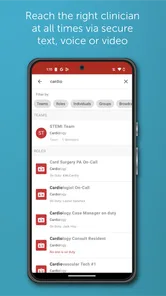
Another standout feature is the role-based messaging. This is brilliant for organizations because it allows you to send messages to specific roles within your company, rather than individual people. It simplifies communication and ensures that everyone who needs to be in the loop, stays in the loop.
User Experience and Interface
When it comes to user interface, TigerConnect is sleek and intuitive. The app is designed with the user in mind, making navigation a breeze. Everything is where you’d expect it to be, and the learning curve is minimal. This is a big plus because, let’s face it, no one wants to spend hours figuring out how to use a new app.
The app also supports integrations with other tools and platforms, which is a fantastic feature for enhancing productivity. Whether you're syncing it with your calendar or integrating it with your project management tools, TigerConnect helps keep everything connected seamlessly.
Making a pilot useful rather than disruptive
If I were introducing TigerConnect to a team, I would begin with one recurring communication task instead of moving every conversation into it at once. For example, colleagues could use it to route routine shift updates to a role that is consistently responsible for receiving them. The point of this small trial would be to learn whether the message reaches the right person and whether the handoff is clearer, not to prove that a new app is automatically better.
I’d also agree on a simple message format before the pilot starts: what changed, what action is needed, and who owns the next step. That structure makes messages easier to scan when several people are busy, while keeping the chat from turning into a running record of unrelated details. If a discussion becomes a clinical decision or needs formal documentation, I would move it into the organization’s approved process rather than let convenience blur the boundary.
One practical trade-off is that role-based routing can reduce dependence on a named colleague but may make ownership less obvious after the message arrives. A role is a destination, not proof that a particular person has accepted the task. I’d therefore use a clear acknowledgment and, where needed, a direct handoff to a named teammate. That small discipline matters most when coverage changes during the day.
Choosing it for the team, not just the phone
Its best audience is a healthcare team that needs work-focused communication and can establish shared habits around response and handoff. If you are a patient looking for a way to contact a clinic, or an individual wanting a private messenger, I would choose the organization’s official contact route or a general messaging app instead. TigerConnect’s value depends on team participation, not simply installing it on one device.
Compared with ordinary SMS or consumer chat apps, its role-based approach is more suited to routing work updates across a team. SMS may be simpler for a one-off personal exchange, while email can be better for longer, less urgent material that needs a fuller record. Neither alternative automatically gives a team the same work-oriented routing pattern, but the right choice depends on local policy and how colleagues actually handle messages. I would ask an administrator how accounts, access, and approved use are managed before making it part of a clinical workflow.
For a small practice or team that rarely changes coverage, a phone call or existing approved channel may be easier than maintaining another inbox. In contrast, rotating teams can benefit when a message should reach whichever colleague is currently covering a function. That advantage is conditional: it depends on accurate role assignments and a shared understanding of who checks them. I would not choose the app just because a team has many members; I’d choose it if the routing problem is real and the team is willing to maintain the workflow.
Questions to settle before relying on it
A natural concern is whether installing the app is enough to start using it. In practice, I’d first confirm that the organization has adopted it and that the right colleagues have access to the relevant communication paths. A personal installation cannot create a useful team channel by itself, and the workplace should clarify account setup, approved use, and who can help when a role or access issue needs attention.
Another question is whether messages can replace the formal record. I would not assume they can. The safest working distinction is to use a communication channel for coordination and follow the organization’s documentation rules for decisions and records. Before relying on a message lifespan setting, I’d also ask how it interacts with local retention requirements; convenience should not decide what information must remain available.
For urgent communication, the useful question is not simply whether a notification can be sent, but what happens if nobody responds. I’d agree in advance on a backup route and a point at which to use it. Similarly, a user who works across several teams should confirm which channel is being monitored for each responsibility rather than trust that one message will reach every relevant person. Those checks prevent a specialized tool from creating false confidence.
Practical setup and version context
The app is free to download, carries an Everyone age rating, and has been available since July 14, 2010. Its current version is 9.12.65, and it requires Android 8.0 or later. That makes device compatibility worth checking before a team standardizes on it; an older phone that cannot meet the minimum requirement may be a stumbling block even if the app itself seems straightforward. TigerConnect has more than 1 million installs, with an average rating of 3.2 from around 5,400 ratings and about 1,500 written reviews. I read that mixed reception as a reason to test the actual workflow in your workplace rather than judge it by popularity alone.
The rating is a useful cue to keep expectations practical, not a verdict on whether the app will fit a particular team. A clinical communication product is shaped by how an organization configures and uses it, so a smooth experience for one group may not translate directly to another. I’d pay attention during a trial to everyday points of friction: whether people notice incoming messages, whether roles stay current, and whether conversations remain distinct from formal documentation.
When the workflow breaks
The main friction is organizational: a role may be out of date, a recipient may be unavailable, or a message may not be acknowledged in time. Notifications can also compete with the stream of other shift activity, so I would not assume that sending equals delivery in the practical sense of someone acting on it. Teams should settle on a backup route for urgent issues, define who checks role-based messages, and avoid duplicating sensitive details across multiple channels just to make sure they are noticed.
There is also a human-factor problem: if every minor update is sent through the same channel, important requests can become harder to pick out. I’d keep messages purposeful and avoid treating the app as a substitute for deciding what truly needs an immediate response. A team can reduce noise by agreeing which kinds of updates belong there and which should go elsewhere under its local rules. That is not glamorous setup work, but it can determine whether people keep using the channel consistently.
For a small team that already coordinates reliably by phone, introducing another app may add more checking than it saves. For a larger or rotating group, role-based routing can be worth that adjustment if responsibilities and escalation expectations are kept clear. I’d start with a limited, everyday use case, such as routine coordination between colleagues, then see whether handoffs become easier without weakening existing procedures.
Final Thoughts
In conclusion, if you’re on the hunt for a secure, efficient, and user-friendly communication tool, look no further than TigerConnect. It’s not just an app; it’s a solution designed to meet the demands of modern professional communication. Whether you’re in healthcare, finance, or just looking for a way to keep your communications safe and streamlined, TigerConnect has got you covered.
So, why not give it a try? You might just find it to be the communication upgrade you’ve been searching for.
TigerConnect Frequently Asked Questions
Is TigerConnect free to download, and who is it intended for?
TigerConnect is a free medical app developed by TigerConnect Inc, with a content rating of Everyone. Its store summary describes it as a clinical communications solution for healthcare, so its purpose is centered on communication in healthcare settings. Before downloading, consider whether you need this kind of work-focused communication tool; it is not presented as a general-purpose social messaging app.
What should I know about TigerConnect’s version and device compatibility before downloading?
TigerConnect’s current version is 9.12.65, and it requires Android 8.0 or later. Checking your device’s operating system before downloading can help you avoid compatibility problems. The app is also available for iOS, so healthcare professionals using different mobile platforms can access it. The version and system requirement are practical details to review before installing, especially on an older device.
What is TigerConnect and what are its primary features?
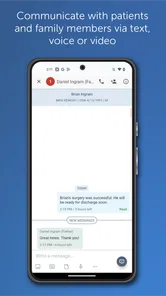
TigerConnect is a secure communication platform designed for healthcare professionals. It offers features like secure messaging, voice, and video calls, and integrates with healthcare systems to ensure compliance and improve workflow efficiency. The app prioritizes patient confidentiality and supports communication among teams, helping streamline healthcare operations.
Is TigerConnect compliant with healthcare regulations?
Yes, TigerConnect is fully compliant with healthcare regulations, including HIPAA. This ensures that all communications are secure and meet the necessary standards for protecting patient information. The app's compliance features make it a reliable choice for healthcare providers seeking to maintain confidentiality and data security.
Can TigerConnect be integrated with existing healthcare systems?
TigerConnect can be integrated with various healthcare systems such as electronic health records (EHRs) and other clinical applications. This integration facilitates seamless communication and data exchange, enhancing the efficiency and effectiveness of healthcare delivery. Users can expect improved coordination and productivity through such integrations.
Pros
- Intuitive user interface.
- Supports secure messaging.
- Integrates with EHR systems.
- Offers video conferencing.
- Provides real-time notifications.
Cons
- Limited free version features.
- Requires stable internet connection.
- Occasional notification delays.
- No offline access.
- Limited customization options.











