ThriftBooks: New & Used Books
- 2.05K
- 4.1
- Installs
- 1.00M
- Price
- Free
Screenshots
Analysis by Reviewed
If you're anything like me and have a voracious appetite for reading but don't want to break the bank, then let me introduce you to the ThriftBooks: New & Used Books app. This gem is a book lover’s paradise, offering a wide range of books at prices that won’t make your wallet cry.
A book hunt the household can share
I can see this app working well in a home where people read different things but share a budget-conscious approach to buying books. One person might be looking for a paperback for the commute, while another wants a reference title to keep nearby. With more than 13 million new and used books to browse, it is a practical place to search before paying full list price elsewhere. I would still keep each reader’s choices and intended purchases clear: sharing a device does not automatically mean sharing preferences or agreeing on what to order.
Keep purchases and preferences clear
For a shared phone or tablet, I’d treat browsing as a group activity but make the final buying decision with the person who will actually read the book. Before ordering, check the selected title, format, and condition together; similar editions can be easy to confuse when you are shopping quickly. If several people are collecting ideas, a simple household note with titles and authors can prevent duplicate buys without relying on any special family feature. The app is free to download, but the books themselves are purchases, so it helps to separate “save for later” browsing from an agreed order.
One device, different reading needs
A shared tablet can make book discovery feel like a small household activity: one person searches for a novel, someone else checks a reference title, and a third reader can weigh in on whether a used copy looks suitable. I’d keep the device available for browsing but avoid treating its search history or open listings as a reliable record of everyone’s plans. When several people use the same screen, a written list of the intended reader, exact title, and preferred format is a more dependable handoff than trying to remember which result belonged to whom.
This matters most when a household is shopping for books with different purposes. A paperback for personal reading can be flexible about edition, while a course assignment or a gift may need a specific format or a cleaner copy. I would sort those needs before browsing rather than comparing every result as if the books were interchangeable. It keeps a shared session focused and makes it easier to stop when the right option is not available.
Discovering a Treasure Trove of Books
First off, the selection on ThriftBooks: New & Used Books is simply mind-blowing. Whether you’re into the classics, want to dive deep into the latest sci-fi saga, or are hunting for a hidden gem in the world of non-fiction, this app has got you covered. I was pleasantly surprised to find some rare editions and out-of-print titles I had been searching for ages. It’s like stepping into a virtual wonderland of books!
Making the search work harder
For a specific book, I’d search by the exact title and author, then compare the available editions rather than choosing the first result. That matters when a school reading list, a gift, or a book-club pick calls for a particular version. The barcode scan can also be useful in a secondhand shop: scan a copy you have found and check whether it is listed in the app before deciding whether to buy it there or in person. It is a comparison aid, not a promise that every physical copy will match the online listing.
More From Our News Desk

Weather by Xiaomi Review: Clear at a Glance, Less Clear Up Close

X Under Pressure: Can It Recover When Posting Goes Wrong?

Clash of Clans Is Won Between the Battles

Android Auto Makes the Case for Quieter Car Software

MobiOffice: Transforming Mobile Productivity with Seamless Integration

EA SPORTS FC™ Mobile Soccer: Redefining Mobile Sports Gaming
One useful habit is to search twice when the first result seems close but not quite right: once for the title and author, then again with a distinctive subtitle or series detail if you know it. That extra check helps separate editions that share a familiar title, particularly when the cover art has changed over time. I would also keep a note of the author’s name alongside the title before handing the device to someone else, since a short search phrase can bring up several plausible matches.
Easy Navigation and User Experience
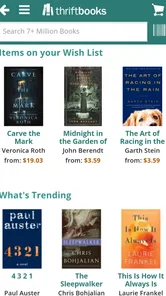
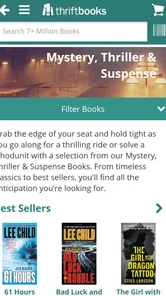
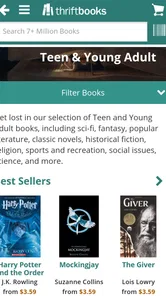
Let's talk about the user interface for a second. Navigating through the app is a breeze. The search function is robust, allowing you to filter by author, genre, condition, and even price range. And let’s not forget their cool feature that lets you scan a book’s barcode to check if it’s available on their platform. That’s convenience at your fingertips!
Condition, timing, and expectations
When I buy used books, I care less about a pristine-looking cover than whether the condition is suitable for the book’s purpose. A copy meant for a child to annotate or for a class can tolerate more wear than a gift or a display copy. I’d read the condition details before adding an item to a shared order and be flexible if the exact edition is not available at the price I want. The low-cost appeal is strongest when I am happy to accept secondhand variation; readers who require an untouched copy may be better served by choosing a new edition from a conventional bookseller.
For a household order, I’d make condition part of the decision instead of treating it as a detail to glance at after choosing a title. Ask who will use the book, whether notes or highlighting would matter, and whether it is meant to look presentable as a gift. That small conversation can prevent a low-cost copy from becoming a disappointing purchase. It also helps explain why two readers can reasonably make different choices about the same listing: one values an affordable working copy, while another wants something closer to shelf-ready.
Quality and Pricing
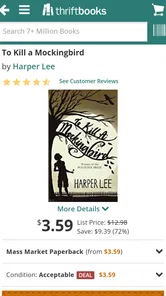
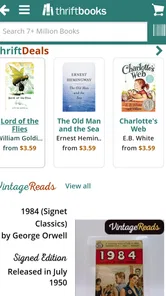
Now, I know what you’re thinking – what about the quality of these used books? Rest assured, the app provides detailed information about the book's condition before you hit that purchase button. And the prices? Oh boy, they are unbeatable! With frequent discounts and deals, you’ll often find yourself in book heaven without the accompanying financial guilt.
Everyday reading, and when another option wins
A realistic use for me would be checking a reading list on the way home, looking up each title, and then placing one considered order rather than making several impulse purchases. That is particularly useful for building a home shelf on a budget or finding older titles that may be harder to spot at a nearby shop. Compared with a library, the advantage is owning a copy and being able to return to it; the library is the better choice when I only need a book briefly or want to avoid buying altogether. Compared with a local used bookstore, this app makes broader searching easier, while a shop lets me inspect the actual copy before paying. Neither route is best for every purchase.
If I were using it for a busy week, I’d collect likely titles as I encounter them, then review the list at home when I can give each edition proper attention. For example, a parent checking a school list could search for the required title during a commute, but wait until home to confirm the reader, edition, condition, and whether the book is actually needed. That pause is useful because a broad catalogue can tempt me to add appealing extras that were not part of the original plan.
The choice between this app and a library depends less on convenience than on how long I expect to keep a book. For a title I want to reread, annotate, or pass around the household, buying may make sense. For a one-time read, a library can be the more practical route. And when the exact physical copy matters, browsing a local shop has an advantage the app cannot replace: I can inspect that copy before deciding. I see the app as a useful additional way to search, not a reason to abandon those alternatives.
Rewards for the Bookworm
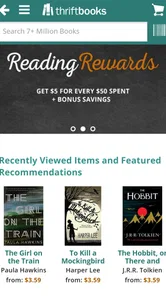
One of the coolest features of the app is the reward program. As you purchase books, you earn points that can later be redeemed for free books. It’s like getting rewarded for doing what you already love – reading! This feature had me hooked, and I found myself eagerly checking my points balance after every purchase.
Age, trust, and household fit
The app is rated Teen, so I would keep age context in mind if a younger reader uses a shared device. That rating is a useful general signal, not a substitute for checking whether a particular book is appropriate for the person who will read it. ThriftBooks is a Books & Reference app from Thrift Books Global, LLC.; it is free to install, has a 4.2 average from around 4.4 thousand ratings, and has been downloaded over a million times. Those figures suggest an established shopping destination, but they do not remove the need to review a title and its condition carefully before buying.
For younger readers, I’d make the book choice an adult-and-reader decision rather than assuming that a shopping app’s age label describes every title available through it. The label applies to the app experience; the books themselves cover many subjects and audiences. In a shared household, it is sensible to agree on who is allowed to place an order and who should check the final selection. That is a practical boundary, not a special control I would expect the app to manage for the family.
Account boundaries deserve the same straightforward treatment. If several people browse on one device, I would not assume that their personal interests or planned purchases stay separated automatically. A household can reduce confusion by having the purchaser review the basket before checkout and by keeping a separate note of requests. If readers want distinct personal shopping records, using their own accounts and devices where appropriate is clearer than relying on a shared screen to remember who chose what.
Who will get the most from it
I think this is a particularly good fit for readers who are patient enough to compare editions and who like the possibility of finding older or secondhand books. It can also suit a family trying to build a varied home shelf without buying every title new, provided everyone agrees that condition and edition matter. The strongest use is not necessarily a single urgent purchase; it is a considered search across several titles where having a broad selection in one place is helpful.
I would be less enthusiastic about using it when I need a book immediately, cannot compromise on a specific physical copy, or simply want to read once without owning anything. In those cases, a local shop, a new-book seller, or a library may fit better. I would also advise against shopping in a hurry for a title where the edition is important. Taking a moment to compare the listing details is part of getting the value from secondhand shopping, not an optional extra.
Final Thoughts
In a nutshell, the ThriftBooks app is a must-have for any book enthusiast. With its vast selection, user-friendly interface, and unbeatable prices, it has redefined the way I buy books. Whether you’re a casual reader or a dedicated bibliophile, this app deserves a spot on your device. So why not give it a try and dive into your next literary adventure?
My household verdict
I’d recommend it to readers who enjoy browsing secondhand options, are comfortable comparing editions, and want an easy way to search beyond the shelves nearby. I’d skip it for a particular purchase if I need to inspect a used copy in person, need a book immediately, or want to borrow rather than own. The app’s current version is 2.1.2 and it supports Android 5.0 or later, useful details when deciding whether an older device can run it. For a shared household, the best approach is simple: browse together, agree on the title and condition, and let the person paying make the final check before ordering.
My bottom line is that the app works best as a shared discovery tool with a clear purchaser, not as a substitute for deciding together what the household actually needs. I’d start with a short list, compare the exact editions, and check that each used copy suits its intended reader. That routine keeps the appeal of browsing intact while reducing duplicate orders and mismatched expectations. For homes that enjoy owning books and can be flexible about secondhand condition, it is a worthwhile place to look; for urgent, borrow-only, or copy-specific needs, I’d choose another route.
ThriftBooks: New & Used Books Frequently Asked Questions
Is ThriftBooks free to download, and what devices can run it?
ThriftBooks is free to download and is designed for Android and iOS devices. On Android, it requires version 5.0 or later, so it is worth checking your device’s software before installing. The app is listed in the Books & Reference category and has a Teen content rating, which can help families decide whether it is suitable for their household.
Who develops ThriftBooks, and is it a well-established app?
ThriftBooks is developed by Thrift Books Global, LLC. It has been available since February 27, 2017, and its current version is 2.1.2. The app has more than one million installs, with an average rating of 4.2 from around 4,400 ratings and approximately 1,900 reviews. Those details offer a quick sense of its history and the amount of user feedback available.
What is ThriftBooks and how does it work?
ThriftBooks is an online platform that offers a wide selection of new and used books at affordable prices. Users can easily browse through various genres and categories, make purchases directly through the app, and have books delivered to their doorstep. The app also allows users to track their orders, manage their wishlists, and receive personalized recommendations based on their reading preferences.
Is ThriftBooks available for both Android and iOS devices?
Yes, ThriftBooks is available for both Android and iOS devices. Users can download the app from the Google Play Store for Android devices and the Apple App Store for iOS devices. This ensures that book lovers can access their favorite reads conveniently, regardless of their device type. The app provides a seamless user experience across all platforms.
What types of books can I find on ThriftBooks?
ThriftBooks offers a diverse range of books, including fiction, non-fiction, textbooks, and children's books. The platform provides access to rare and out-of-print titles, making it an excellent resource for book collectors and enthusiasts. Whether you're looking for the latest bestseller or a classic novel, ThriftBooks has something for everyone, catering to a wide array of reading interests.
Pros
- Wide selection of new and used books.
- User-friendly interface for easy navigation.
- Frequent promotions and discounts.
- Loyalty rewards program available.
- Fast shipping options.
Cons
- Limited availability of rare books.
- Occasional issues with order tracking.
- Some books may have wear and tear.
- International shipping can be costly.
- App requires stable internet connection.











