Thrift & Profit Finder - Gemli
- 1.12K
- 4.7
- Installs
- 100.00K
- Price
- Free

Screenshots

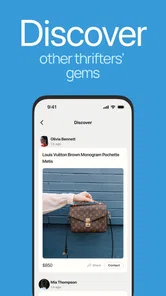
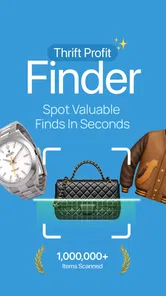
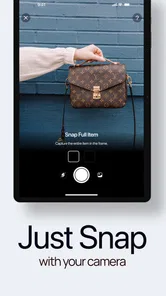
Analysis by Reviewed
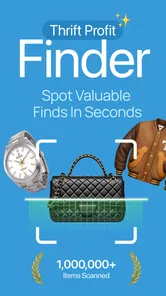
I like thrift shopping most when it feels like a small investigation rather than a blind gamble. A crowded rack can hide a bargain, but it can also hide an item that looks exciting only because the shop has priced it confidently. Thrift & Profit Finder - Gemli is built for that moment: you photograph a second-hand item and use the app’s AI-assisted approach to get a sense of its real value before deciding what to do next.
That makes Gemli a lifestyle app with a very specific purpose. It is not a general shopping browser, a resale marketplace, or a replacement for your own judgment. I see it as a decision-making tool for people who regularly visit thrift stores, charity shops, flea markets, and similar places where the information on the tag may be limited. The developer is 326 LAB - FZCO, and the app is free to start, with optional in-app purchases listed from $3.99 to $34.99 per item.
From a crowded thrift rack to a clearer buying decision
I start with the moment Gemli is meant to help: spotting something intriguing in a busy thrift shop without yet knowing what it is or whether it merits closer attention. In this section, I’ll look at how a photo can make that first decision easier, while keeping the next step—careful inspection—firmly in view.
The starting condition: uncertainty in the aisle
Imagine finding a jacket with a familiar-looking label, a ceramic piece with no obvious maker’s mark, or a pair of shoes that seem barely worn. You have only a few minutes, the lighting is not ideal, and other shoppers are moving around you. Searching manually can be awkward because you first need to know what the item is, which details matter, and which resale sites are worth checking.
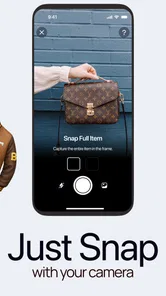
Gemli’s central idea is simple: begin with a photo instead of a carefully written search. That is a sensible starting point for thrift shopping because the visual details often come before the vocabulary. I may recognize a shape, logo, fabric, or design without knowing the exact model name. An image-based tool can help turn that vague recognition into a more useful starting point.
I would still treat the first result as an estimate, not a verdict. A photograph can show the item, but it may not reveal hidden damage, missing parts, an altered size, fading, odors, repairs, or whether a supposedly branded object is genuine. The most useful mindset is to ask, “Is this worth investigating further?” rather than, “Has the app guaranteed that this is valuable?”
Step one: prepare a photo that gives the AI something useful
The quality of the input matters more than many first-time users expect. Before taking a picture, I would move the item away from a messy rack if possible and make sure the main surface is visible. A label, logo, maker’s mark, sole, clasp, stamp, or model detail may be more informative than a full view from several feet away.
More From Our News Desk

Weather by Xiaomi Review: Clear at a Glance, Less Clear Up Close

X Under Pressure: Can It Recover When Posting Goes Wrong?

Clash of Clans Is Won Between the Battles

Android Auto Makes the Case for Quieter Car Software

MobiOffice: Transforming Mobile Productivity with Seamless Integration

EA SPORTS FC™ Mobile Soccer: Redefining Mobile Sports Gaming
For clothing, I would capture the front and then pay attention to the neck label, care label, stitching, fabric texture, and any distinctive hardware. For accessories, the underside, interior stamp, fastening, and wear points can be more useful than the decorative front. For books, homeware, or collectibles, the back, base, spine, and printed marks may change the identification completely. The app’s photo-first workflow is most helpful when I use it as an inspection routine rather than a quick snapshot.
This is one of the practical trade-offs: Gemli can reduce the effort of starting a search, but it cannot remove the need to look closely. A rushed image may lead to a broad or misleading interpretation. I would avoid photographing through reflective glass, under harsh shadows, or with fingers covering the very mark that distinguishes one version from another.
Step two: let the result guide the next question
Once the item has been photographed, the app’s purpose is to help assess its real-world value. That wording matters. “Real value” is not always the same as the highest price someone has posted online. A resale figure can depend on condition, size, color, completeness, timing, location, and whether a buyer actually wants that particular version.
I find the strongest use of an AI estimate is narrowing the field. It can help me decide whether an apparently ordinary object deserves a closer look, whether a branded piece is worth researching, or whether I should leave a bulky item behind instead of carrying it home on hope. That is a much more realistic benefit than expecting one scan to produce a perfect resale plan.
A good habit is to compare the app’s interpretation with the physical item immediately. Does the suggested identity match the material? Is the logo in the right place? Does the colorway exist for that product? Are the visible details consistent with the apparent age? If the answer is no, I would retake the image or treat the result as too uncertain to support a purchase.
The handoff from app result to human inspection
This handoff is where Gemli becomes more useful than a novelty camera tool. The app can help with recognition and an initial value perspective, but I remain responsible for the buying decision. I would check zippers, seams, soles, hinges, glazing, stains, cracks, missing buttons, and signs of repair. For electronic or mechanical items, I would also consider whether I can test them before paying.
That division of labor is important for anyone hoping to make money from thrift finds. The app may help identify a promising object, but profit depends on the complete transaction: purchase cost, cleaning, storage, photography, listing effort, shipping materials, platform fees, returns, and the time spent waiting for a buyer. A high apparent value can become a poor deal once those practical costs are included.
For a casual shopper, the handoff is simpler. I might use the result to decide between two similar items, justify a little extra inspection, or avoid buying something merely because it looks unusual. For a regular reseller, the app fits best at the discovery stage, before a more disciplined process of checking condition and demand.
A realistic everyday scenario
Suppose I am in a charity shop and find a leather-looking bag with an unfamiliar emblem. The price is low enough to be tempting, but the bag has surface wear and I cannot immediately tell whether the emblem belongs to a known brand. I take a clear photo of the exterior, then another of the interior label and hardware. Gemli gives me a starting point for understanding what I may be looking at.
I would not stop there. I would inspect the lining for tears, check the strap attachments, look for a serial or maker’s mark, and decide whether the material is actually leather or only resembles it. Then I would ask myself whether I want the bag even if the resale opportunity is weaker than expected. If the app’s result and the physical evidence point in different directions, I would leave it behind rather than allowing an optimistic estimate to make the decision for me.
In that scenario, the outcome is not necessarily a profitable purchase. The outcome may be confidence: I either found a candidate worth researching or avoided paying for an item whose appeal depended on guesswork. That is a modest benefit, but it is exactly the kind of benefit an app like this can deliver consistently when used with restraint.
What happens after the scan
Gemli is most valuable when its result changes what I do next. I might photograph a second angle, examine a label, ask a shop employee whether testing is possible, or compare the item with completed sales elsewhere. The app acts as a bridge between seeing something interesting and forming a more informed plan.
For a reseller, I would use a simple sequence: scan, verify identity, grade condition, estimate the total cost, and only then decide whether to buy. Keeping those stages separate prevents a promising identification from being confused with confirmed demand. It also makes it easier to learn from mistakes because I can tell whether the problem was recognition, condition assessment, pricing, or the final sale.
For someone furnishing a home or refreshing a wardrobe, the workflow can be less commercial. The app may help answer whether an unusual lamp, chair, coat, or accessory deserves attention compared with a more familiar alternative. In that case, “value” includes usefulness and personal appeal, not just resale potential.
Where the workflow breaks
The biggest weakness is the unavoidable gap between an image and an object in your hands. A camera can miss damage, and an AI system can overemphasize a recognizable visual pattern. Items with obscure variations, custom alterations, incomplete sets, counterfeit branding, or poor lighting are especially likely to require extra caution.
The physical setting can create friction too. Thrift stores are not always arranged for careful photography. You may have limited space, low light, reflective surfaces, or a queue behind you. If the item is fragile, oversized, or behind a counter, the photo-first process may be inconvenient. In those situations, a quick manual search or asking staff may be faster than trying to force the app into the moment.
There is also a financial boundary to keep in mind. The app itself is free, but optional purchases range from $3.99 to $34.99 per item. Anyone scanning casually should decide in advance how much an individual evaluation is worth to them. If you are only curious about an inexpensive object, paying for an assessment may not make sense unless the possible saving or opportunity is meaningful.
That pricing consideration makes Gemli a better fit for focused use than constant experimentation. I would reserve paid evaluations for items where the answer could genuinely affect a purchase or resale decision. If I am scanning every object for entertainment, the cost can become part of the hobby without producing enough practical value in return.
How it compares with ordinary alternatives
The usual alternative is manual research: take several photos, describe the item in a search engine, browse marketplace listings, inspect sold examples, and try to separate similar models. That method can be more thorough, especially for experienced collectors, but it is slower and depends on knowing the right terms. Gemli’s advantage is the first step. It can help when I do not yet know what words to type.
Visual search tools can also offer image-based matches, but they are not always designed around the particular question thrift shoppers have: “Is this item worth further attention?” Gemli’s positioning makes it more directly relevant to that decision. Even so, manual research remains better when authenticity, condition, exact model differences, or recent selling prices matter.
A knowledgeable shop employee or collector may beat any app when the item has subtle construction details that are difficult to photograph. On the other hand, human help is not always available, and advice can vary. I would use Gemli as an accessible first opinion, then bring in a specialist or deeper research when the stakes are higher.
Who will get the most from it
I think Gemli is especially suitable for beginners who feel overwhelmed by thrift-store discovery. It gives them a practical reason to slow down and examine an item instead of relying only on a familiar brand name or an attractive appearance. It can also help occasional shoppers build the habit of checking details before spending money.
Regular resellers may appreciate it as a rapid triage tool. It can help separate “look closer” items from obvious passes, particularly when a store contains many unfamiliar objects. The benefit is greatest when the user already has a personal checklist for condition, demand, and costs. The app does not replace that checklist; it makes the opening stage less intimidating.
I would be more cautious recommending it to advanced collectors who already recognize their niche quickly. They may prefer specialized references, community knowledge, or direct market research. Likewise, someone who wants guaranteed authentication or a precise profit calculation should not treat an AI-assisted photo result as sufficient evidence.
Compatibility, audience, and day-to-day fit
The current version is 1.5.0 and requires at least iOS or Android 11, so I would check the operating system on an older phone before planning a shopping trip around it. The app is marked for a Teen audience. That makes sense for a shopping and lifestyle tool, but younger users should still understand that estimates are not promises and that purchases involve real money.
Its public reception is strong, with a 4.7 average from around 13 thousand ratings and over 100 thousand installs. Those figures suggest that the concept has found an audience, but they do not remove the need to judge whether the workflow matches your own shopping habits. A well-liked app can still be unnecessary for someone who rarely buys second-hand goods or already has a reliable research method.
My practical routine for using it well
I would keep the process deliberately short. First, photograph the whole item so the app has context. Next, capture the detail most likely to identify it: the label, mark, hardware, sole, base, or back. Then compare the result with what is physically visible. Finally, decide whether the item survives a condition and cost check.
The best rule is to use the result as a filter, never as permission to ignore evidence. That rule protects against the most tempting mistake: buying something because an estimated value sounds exciting. I would also take notes on why I rejected or accepted an item. Over time, that makes the app part of a learning process rather than a magic answer machine.
Another useful habit is to separate personal value from resale value. A jacket may be worth buying because I will wear it often even if the resale opportunity is ordinary. A rare-looking ornament may have an attractive estimate but still be a bad purchase if it is fragile, difficult to ship, or unlikely to find the right buyer. Gemli can start the conversation, but I still need to define what “worth it” means in that particular situation.
My final view
Thrift & Profit Finder - Gemli is a focused lifestyle app with a useful idea: turn a quick photo into a more informed starting point for second-hand shopping. I like it most as a bridge between visual discovery and careful inspection. It can reduce the intimidation of unfamiliar items, speed up the first stage of research, and help shoppers decide where to spend their limited attention.
Its limits are just as important. Image-based recognition cannot fully assess condition, authenticity, completeness, buyer demand, or the real cost of resale. The optional per-item purchases also mean I would use the service selectively rather than scanning without a plan. If you want a guaranteed valuation or specialist authentication, a dedicated expert or deeper manual research is the better choice.
For beginners, curious thrift shoppers, and resellers who need quick triage, I think Gemli is worth trying while keeping expectations realistic. The app is free to begin, and its narrow purpose makes sense in a real store aisle. I would recommend it to a friend with one qualification: let it point toward the promising finds, then let your eyes, hands, budget, and common sense make the final call.
Thrift & Profit Finder - Gemli Frequently Asked Questions
Can I use Gemli to research items beyond traditional thrift-store finds?
Gemli is described as a thrift-shopping app with AI that lets you snap thrift-store items to see their real value. If you are considering it for items found at flea markets, garage sales, or other second-hand settings, the same careful approach applies: use the result as a prompt for further research, not a promise of resale value. Check the item's condition and likely demand before making a purchase.
Is Gemli suitable for occasional thrift shoppers, or is it mainly for people who resell regularly?
Gemli can be useful whether you browse thrift stores occasionally or source items more regularly. Casual shoppers may appreciate having a way to investigate an unfamiliar find, while resellers may use it as one step in a broader research routine. Its value depends on how often you shop and whether its results help you make more informed choices. In either case, consider the item carefully rather than treating an estimate as a guarantee.
Does Gemli make buying decisions for me, or should I still research each item myself?
Gemli can help you investigate a thrift-store find, but it should not make the buying decision on your behalf. A suggested value is only one part of the picture: condition, authenticity, demand, selling costs, and the time needed to resell can all affect whether an item is worthwhile. Use the app to guide your research, then check relevant marketplace information and inspect the item before spending money.
Is Thrift & Profit Finder - Gemli free to download, and are there optional purchases?
Thrift & Profit Finder - Gemli is free to download, so you can try the app without an upfront purchase. It also offers in-app purchases, with prices ranging from $3.99 to $34.99 per item. Check the purchase details shown in the app before confirming anything, and consider whether any paid option suits the way you plan to use Gemli. The app is rated for Teen users.
What should I know about Gemli’s availability and device compatibility?
Gemli is a Lifestyle app developed by 326 LAB - FZCO. It was released on November 2, 2025, and its current version is 1.5.0. The minimum operating system requirement is version 11, so check your device’s software before downloading. The app has over 100,000 installs and a 4.7 average from around 13,000 ratings, offering a useful snapshot of its reach and user feedback.
Pros
- Simple interface makes deal hunting easy for beginners.
- Useful for comparing potential resale value before buying.
- Can help uncover overlooked bargains in thrift stores.
- Supports more informed purchasing decisions with quick research.
- Helpful for resellers building a repeatable sourcing routine.
Cons
- Results may vary depending on item category and available data.
- Estimated profits may not include shipping
- fees
- or repair costs.
- Some features may require an account or paid access.
- Internet access is needed for current product and market information.
- New users may need time to understand resale terminology and metrics.












