

The Cheesecake Factory
- 197.00
- 4.5
- Installs
- 100.00K
- Price
- Free

Screenshots



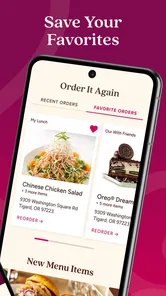
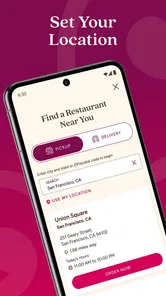
Analysis by Reviewed
I approached The Cheesecake Factory as a practical dining companion rather than something I would open for entertainment. Its purpose is straightforward: help me interact with the restaurant before and around a visit, with rewards and reservations at the center. That makes it most useful when I already have a meal in mind and want fewer steps between deciding where to eat and sitting down.
The app comes from Cheesecake Factory INC and is listed in the Food & Drink category. It is free to download, suitable for Everyone, and has reached over 100 thousand installs. Those details suggest a product aimed at ordinary diners rather than a specialist audience. I also found its current version to be 2.0.6, with support beginning at Android 7.0, so people using older devices should check their operating system before spending time troubleshooting.
My overall impression is positive, but with an important qualification: this is a restaurant-specific tool, not a replacement for a broad restaurant directory or a general rewards wallet. Its value depends on how often I visit The Cheesecake Factory and whether I am comfortable managing reservations and rewards inside a dedicated app. If that matches your habits, it can make repeat visits more organized. If you only need a phone number, a map, or a quick look at options, the usual alternatives may be faster.
Where the experience can become confusing
The first point of friction is deciding what the app is meant to do for me. The store summary emphasizes rewards, reservations, and more, but that compact description leaves the practical order of operations to the user. I would begin by treating it as a visit-planning app: establish the restaurant-related task I need, then look for the matching area instead of tapping around without a clear goal.
That distinction matters because reservation planning and rewards management are different jobs. A reservation is time-sensitive and location-dependent, while rewards are connected to repeat use. Mixing the two can make the interface feel less obvious than a single-purpose booking service. I recommend handling the immediate dining task first, then reviewing the rewards side once the visit itself is settled.
Another common sticking point is expecting the app to behave like a general-purpose restaurant platform. A map app may be better for comparing nearby businesses, checking directions, or browsing many restaurants at once. A broad booking service may also feel more familiar if I regularly reserve tables at several unrelated chains. The Cheesecake Factory app makes more sense when the restaurant itself is the focus.
There is also a difference between an app being unable to complete an action and an action simply requiring information I have not prepared. Before trying repeatedly, I would have the preferred restaurant, approximate visit time, and the details needed for any account or reservation step ready. That small amount of preparation reduces the chance of blaming the app for an incomplete process.
More From Our News Desk

 Instagram
Instagram’s Power Comes From Its Place in Your Phone
A close look at how Instagram turns Meta’s reach, recommendation systems and everyday camera habits into durable platform power—and what that costs users.

 Gmail
GmailGmail in a Busy Inbox: Who Benefits Most?
From first account to crowded workday, Gmail earns its place through dependable search and flexible sorting—but its best fit depends on how much inbox maintenance you can tolerate.

 Prime Video
Switching to Prime Video: What Changes in Your Viewing Routine
Prime Video can make a compelling second home for streaming, but switching means learning a different catalog, rental layer, and route from browsing to playback.

 Universal TV Remote Control
Universal TV Remote Control Works Best as a Reliable Backup
A phone remote earns its place through quick setup and reliable habits. Here is how to get more from Universal TV Remote Control—and where its limits show.

 Weather - By Xiaomi
Weather by Xiaomi Review: Clear at a Glance, Less Clear Up Close
Xiaomi’s weather app makes everyday forecasts quick to scan, but its calm surface can leave useful details and recovery paths harder to find than they should be.

 X
XX Under Pressure: Can It Recover When Posting Goes Wrong?
A resilience-focused review of X, examining setup, mistaken posts, interruptions, weak connections, and the gaps that matter when recovery needs to be dependable.
Latest News



The public response is encouraging without being overwhelming: it carries a 4.5 average from around 369 ratings, alongside roughly 195 written reviews. I read that as evidence that many users find the basic idea worthwhile, while still leaving room for individual experiences to vary by device, connection, and visit circumstances. A good rating does not remove the need for a sensible setup routine.
What I check before trying to use it
I start with compatibility. Android 7.0 is the stated minimum, so an older phone may be the real reason an installation or update does not behave properly. On a compatible device, I would confirm that the app finished installing completely, then open it again rather than assuming a failed first launch means the service itself is unavailable.
Next, I check whether the phone has a stable internet connection. Restaurant-related actions are naturally dependent on current information, especially when I am trying to arrange a visit. If the screen loads partially, buttons do not respond, or content appears stale, I switch between a reliable Wi-Fi connection and mobile data if available. The goal is to separate a connection problem from an application problem.
I also make sure the app is updated to the current version shown in its listing. Running an older build can create avoidable inconsistencies, particularly after the service changes something on its side. At the same time, I would not update moments before an important reservation unless necessary; doing routine maintenance earlier gives me time to test the app calmly.
Because the app is free, the decision to install it is relatively low-risk, but free does not mean frictionless. I still prefer to install it before I am standing outside a busy restaurant. That is one of the most useful habits I took from testing it: set up the app before the meal, not during the most time-sensitive part of the visit.
My setup sequence is deliberately simple:
Install the app on a supported Android device and open it once at home.
Identify whether I am preparing a reservation, checking rewards, or doing another restaurant-related task.
Test the relevant screen while the connection is dependable.
Close and reopen the app so I know I can return to the same workflow later.
This is not about performing complicated maintenance. It is about discovering sign-in, loading, or navigation friction before I have a table to catch. If the app works in a relaxed setting, I have a much clearer baseline for diagnosing a problem later.
Recovering when a task does not finish
When an action stalls, I avoid tapping the same control repeatedly. Repeated attempts can make it unclear whether the first request succeeded in the background. Instead, I wait briefly, check whether the screen changed, and then reopen the relevant area. For a reservation-related task, I would verify the result before starting over, because duplicate attempts are more confusing than a single failed attempt.
If the application appears frozen, I close it fully and launch it again. This is a safer first response than immediately reinstalling, because reinstalling can interrupt whatever account or session state I was using. If restarting does not help, I check the connection and device storage, then try once more under better conditions.
A useful recovery habit is to record the exact point of failure in plain language. “The app is broken” is not very actionable; “the reservation screen opened but did not finish loading after I selected a location” gives me a much better basis for the next step. It also helps me decide whether to switch to another route for the immediate meal.
I would use the same cautious approach with rewards. If a reward-related screen does not update, I would not assume that repeatedly refreshing has changed my account. I would exit, reopen the app, and look for a clear confirmation before relying on the result. For an important visit, keeping a personal note of what I expected to see can prevent confusion later.
There is a trade-off here. A dedicated app can keep restaurant tasks together, but when one step fails, I may have fewer built-in alternatives than I would in a web search or general booking platform. That is why I treat the app as a convenience layer, not my only plan. If I am already late, I would use another normal contact or discovery method rather than spending the entire journey debugging a screen.
When the phone is not the real problem
Not every failed reservation or unavailable option points to a software defect. Restaurant capacity, timing, location selection, and changing availability can all affect what I see. If a desired time cannot be selected, the more likely explanation may be that the restaurant cannot offer it at that moment, rather than that the app has malfunctioned.
The same reasoning applies when I am traveling or using a weak signal. A screen that loads correctly at home but struggles in a crowded area may be revealing a network limitation. I would test the app in a stable location before concluding that the installation is faulty. This simple comparison often saves more time than deleting and reinstalling.
Device age can matter too. The minimum operating system is Android 7.0, but meeting a minimum requirement does not guarantee the same experience on every phone. Older hardware may open modern apps less comfortably, especially when several other applications are running. Closing unnecessary apps and restarting the phone are sensible general checks before more drastic action.
I also distinguish between account access trouble and reservation trouble. If I cannot get into the account area, that is a different problem from a restaurant option failing to load. Treating them as separate cases makes troubleshooting more precise. I would first confirm that the phone is online, then retry the specific step once, and only afterward consider broader device or installation fixes.
For urgent plans, the app should not be the sole source of certainty. I would not leave for a special meal assuming that a partially completed screen equals a confirmed reservation. A visible confirmation is the practical point at which I would consider the task complete. If that confirmation never appears, I would use an alternative way to verify the plan.
How I would use it in an ordinary week
Imagine I am arranging dinner for a small group after work. Earlier in the day, I open the app on a dependable connection, choose the restaurant-related workflow I need, and handle the reservation while I have time to correct an error. I then return later to review the visit details or rewards area instead of trying to reconstruct everything from memory.
That workflow is more useful than opening the app for the first time in the car park. It gives me room to compare the proposed time with my schedule, notice whether I am working with the correct restaurant, and recover if the screen fails. The app’s main advantage is not that it eliminates every step; it puts the relevant restaurant tasks in one place.
For a frequent diner, the rewards element may justify keeping the app installed even when reservations are occasional. I would still make a habit of checking the status of anything important before assuming it is ready to use. Rewards are most helpful when they fit naturally into my normal visits, not when they encourage me to open the app constantly without a specific purpose.
For someone visiting once while traveling, the calculation is different. A map application may be more useful for directions and nearby comparisons, while the restaurant’s own app can be reserved for the specific interaction it handles best. Installing it can still make sense, but I would avoid expecting it to replace every planning tool on my phone.
Who benefits most from this dedicated approach
I think the app is a good match for regular guests who want a direct way to organize restaurant visits and keep rewards-related activity close to that planning process. It is also suitable for people who prefer a focused interface over searching through a general restaurant marketplace.
It is less compelling for diners who rarely visit The Cheesecake Factory, dislike maintaining separate restaurant apps, or mainly need broad local discovery. In those cases, a map service, a general reservation platform, or simply contacting the restaurant through a familiar channel may be more efficient. The dedicated approach only pays off when the restaurant’s own tools are relevant often enough.
The Everyone age rating makes it broadly approachable, but ease of use still depends on the person holding the phone. Someone who is uncomfortable with account-based apps may prefer to plan through a more familiar method. I would recommend the app to a friend who visits the chain regularly, but I would not insist that every occasional diner install it.
One subtle advantage is control over timing. Using the app before a visit lets me separate planning from the noisy, rushed environment of a restaurant entrance. One subtle weakness is the opposite: if I have not prepared beforehand, the dedicated workflow can feel like an extra obligation compared with a quick search. That trade-off is central to whether the app feels convenient.
The developer is Cheesecake Factory INC, which gives the app a clear connection to the restaurant it represents. That direct connection is useful when I want restaurant-specific tasks rather than a broad directory. It also means I judge the app by a narrower standard: I care less about discovering unrelated places and more about whether this particular visit is easier to arrange.
My practical verdict after using it
I see The Cheesecake Factory as a focused companion for reservations, rewards, and related restaurant planning. It is free, available for a wide range of users, and has enough adoption to feel like a serious option rather than an experiment. Its 2.0.6 release is the version I would look for when checking that my installation is current.
The app’s strongest quality is concentration. Instead of spreading a restaurant visit across a search engine, a separate rewards page, and improvised notes, I can begin with one restaurant-specific tool. That does not guarantee a perfect experience, but it gives repeat diners a logical home for the tasks they perform most often.
Its main limitation is equally clear: it cannot replace general-purpose tools or real-world availability. A network problem, an older phone, an unconfirmed action, or a full time slot can still interrupt the plan. I appreciate the app more when I use it with realistic expectations and a backup option for time-sensitive arrangements.
If I were recommending it to a friend, I would say: install it ahead of your next visit, test the exact feature you expect to use, and verify important results rather than assuming a tap completed the job. Use a map or broader restaurant service when you need comparison and discovery. Use this app when the goal is a smoother relationship with The Cheesecake Factory itself.
That makes it a worthwhile download for regular customers, especially those who value having reservations and rewards in one restaurant-focused workflow. Occasional visitors may find the setup unnecessary, but they can still benefit if they prepare early. My final view is favorable, with the practical reminder that convenience here comes from preparation: the app works best when I open it before the pressure of the meal begins.
The Cheesecake Factory Frequently Asked Questions
What devices can run The Cheesecake Factory app?
The Cheesecake Factory app is available for Android and iOS devices, making it a convenient option for customers who prefer to browse restaurant information or manage a visit from a phone. The current version is 2.0.6, and it requires Android 7.0 or later. Check your device’s operating system before downloading so you can confirm that it meets the app’s compatibility requirement.
Is The Cheesecake Factory app suitable for all ages?
The Cheesecake Factory app is rated Everyone, so its content is generally considered appropriate for a broad audience. It is a Food & Drink app from Cheesecake Factory INC, centered on restaurant-related features such as rewards and reservations. Parents and other users can still review the app’s permissions and features on their device before installing, particularly if the phone is shared or used by children.
What is The Cheesecake Factory app used for?
The Cheesecake Factory app is designed to make ordering and restaurant visits more convenient. Depending on your location and the features currently available, you can browse the menu, view dish descriptions, find nearby restaurants, place pickup or delivery orders, and check restaurant information. It is especially useful for reviewing the extensive menu before visiting and managing an order without waiting in line.
Can I place an order for pickup or delivery through the app?
In supported locations, the app allows you to order food for pickup and may also provide delivery options. Availability can depend on the restaurant, local service coverage, operating hours, and third-party delivery partners. Before confirming an order, check the estimated preparation or delivery time, applicable fees, taxes, and the selected location to make sure the order is being sent to the correct restaurant.
Does the app show the complete Cheesecake Factory menu and allergen information?
The app generally provides access to a broad selection of The Cheesecake Factory menu, including appetizers, main courses, desserts, beverages, and cheesecake flavors. It may also display nutritional details and allergen information for many items. However, recipes and preparation conditions can change, and cross-contact may occur in the kitchen. Customers with serious allergies should confirm details directly with restaurant staff before ordering.
Pros
- Extensive menu with options for many tastes and dietary preferences.
- Generous portions can make meals suitable for sharing.
- Dessert selection offers many distinctive cheesecake flavors.
- Locations often provide a comfortable setting for group dining.
- Online ordering makes pickup convenient at participating restaurants.
Cons
- Menu size can make choosing a meal feel overwhelming.
- Prices may be high compared with casual dining alternatives.
- Large portions can be difficult to manage for solo diners.
- Popular locations may involve long waits during peak hours.
- Nutrition details are not equally clear for every menu item.











