

Texaco
- 470.00
- 4.7
- Installs
- 100.00K
- Price
- Free

Screenshots

Analysis by Reviewed
Paying for fuel without leaving the driver’s seat sounds like a small convenience, but it matters most when getting out of the car is difficult, unpleasant, or simply unsafe. I spent time looking at Texaco as a mobile payment tool for refueling, with particular attention to how clearly it guides a person through the process and how well it fits different physical and everyday situations. It is a free Maps & Navigation app from Chevron U.S.A. Inc., aimed at making the visit to a Texaco station less dependent on handling a pump or walking into the store.
My overall impression is that its value is very focused. This is not an all-purpose navigation replacement or a general wallet for every fuel brand. Its strongest idea is the ability to manage fuel payment from inside the car. That narrow purpose can be genuinely useful, especially for drivers who need fewer steps outside the vehicle. At the same time, the experience depends heavily on being at a participating Texaco location and being comfortable completing a payment flow on a phone.
How clearly the app supports different drivers
I’ll look at how the app’s focused payment approach can suit different drivers, while keeping in mind that comfort and independence depend on both the phone and the station. A helpful way to judge it is to separate the steps it can simplify from the physical parts of fueling that remain. That distinction leads naturally to the practical question of who is most likely to benefit.
Readability and navigation during a fuel stop
The most important design question here is not whether the app contains a long list of tools. It is whether I can understand what to do when I am parked beside a pump and want to start fueling. A payment app for this situation should make the station choice, pump identification, authorization, and completion feel like one connected task rather than a series of unrelated screens.
Texaco benefits from having a very specific job. Because the purpose is tied to fueling, a first-time user is less likely to wonder why the app exists or where to begin. The store positioning makes the central promise clear: handle fuel payment from the comfort of the car. For someone who prefers a direct interface over a crowded loyalty platform, that focus is a strength.
I would still approach the first visit slowly. Before pulling up in a hurry, it is sensible to open the app, check that the station is recognized, and make sure the phone is ready for the payment step. That small preparation reduces the chance of trying to read instructions while cars are waiting behind me. It also gives a new user a chance to learn the wording and layout before dealing with a busy forecourt.
Readability is especially important for people who use larger text, screen magnification, or a high-contrast display setting. A payment action should remain easy to identify even when the phone is being held at an awkward angle in a parked car. Texaco can be a good fit for users who find a short, task-based flow easier than walking into a store and explaining what they need, but the practical result will depend on how comfortably each person can read and operate the phone.
More From Our News Desk

 Weather - By Xiaomi
Weather by Xiaomi Review: Clear at a Glance, Less Clear Up Close
Xiaomi’s weather app makes everyday forecasts quick to scan, but its calm surface can leave useful details and recovery paths harder to find than they should be.

 X
XX Under Pressure: Can It Recover When Posting Goes Wrong?
A resilience-focused review of X, examining setup, mistaken posts, interruptions, weak connections, and the gaps that matter when recovery needs to be dependable.

 Clash of Clans
Clash of Clans Is Won Between the Battles
Its raids are quick; its community is a long-term project of coordination, teaching, rivalry, and shared responsibility—with all the friction that entails.

 Android Auto
Android Auto Makes the Case for Quieter Car Software
The car interface is no longer judged by how much it can do, but by how quietly it helps. Android Auto shows what drivers now expect—and what still gets in the way.

 MobiOffice: Word, Sheets, PDF
MobiOffice: Transforming Mobile Productivity with Seamless Integration
MobiOffice: Word, Sheets, PDF is redefining mobile productivity with a surprising blend of functionality and innovation.

 EA SPORTS FC Soccer Mobile 26
EA SPORTS FC™ Mobile Soccer: Redefining Mobile Sports Gaming
Dive into EA SPORTS FC™ Mobile Soccer, where immersive gameplay and strategic depth transform mobile sports gaming.
Latest News



I would not treat it as a substitute for a dedicated navigation app. Its Maps & Navigation classification reflects the fuel-stop context, but the app’s main usefulness is payment at Texaco rather than planning a complicated journey. If I am comparing routes, looking for traffic-aware directions, or searching broadly across fuel brands, a conventional navigation service is likely to be the better first tool. I would use that service to reach the station and Texaco for the station-specific payment task.
Motor and sensory considerations
The clearest inclusive advantage is that payment can be handled without walking from the car to a payment terminal or entering the shop. That can make a meaningful difference for someone with limited stamina, chronic pain, a temporary injury, balance concerns, or a mobility aid that makes repeated movement inconvenient. It can also help a driver who is caring for a sleeping child or who cannot comfortably leave the vehicle unattended.
There is a useful distinction here: the app may reduce physical movement, but it does not remove every motor demand. I still need to hold or position a phone, select the correct station or pump information, and complete the payment interaction. Someone with limited finger movement, tremors, or difficulty with small touch targets may find the phone portion harder than the walking portion. In that situation, the app is potentially helpful, but only if its controls work comfortably with the person’s device settings and input method.
VoiceOver, TalkBack, magnification, switch access, and other operating-system tools may influence the experience, yet I would not assume that every screen behaves perfectly with every assistive setup. Payment is a sensitive moment for any user, so a person relying on spoken feedback should test the basic flow at a quiet station before depending on it during a long trip. That is not a criticism unique to this app; it is a practical safeguard whenever a fuel payment depends on a phone.
Sensory needs also vary. Some drivers may appreciate avoiding the noise, bright lighting, queues, and strong smells around a busy station shop. Remaining in the car can create a calmer environment and reduce exposure to weather. On the other hand, a user who has difficulty distinguishing pump numbers, reading labels, or confirming a visual prompt may need more time or another person’s assistance. The app can move the transaction indoors to the phone, but it cannot make every physical detail at the pump disappear.
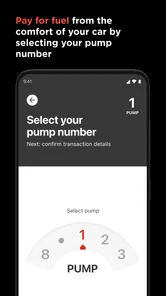
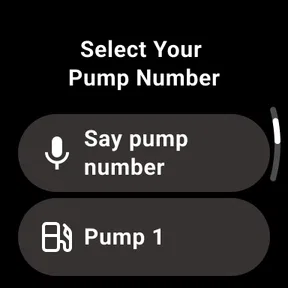
One non-obvious benefit is the reduction of divided attention. A driver who has difficulty processing several spoken instructions at once may find it easier to complete a familiar phone sequence from the parked car than to communicate at a counter while managing keys, wallet, and surroundings. I would establish the routine when there is no pressure: park, confirm the location, identify the pump, authorize payment, and only then begin fueling.
Situational access beyond disability
Accessibility is not limited to permanent conditions. A person with a stroller, an arm in a cast, a migraine, or a child who cannot be left alone may value the same feature. In cold rain or extreme heat, avoiding an unnecessary walk to the store is more than a luxury. It can make the fuel stop shorter and less stressful.
Consider a realistic evening stop after a long drive. I pull into a Texaco station with a tired passenger resting in the back seat. Instead of waking them or leaving the car, I can try to complete the payment from the front seat, then focus on fueling. That workflow is particularly attractive when the station is unfamiliar and I want to keep my attention on the vehicle and surroundings rather than on a counter queue.
There is also a privacy and comfort angle. Some people feel uneasy handling a wallet in a crowded shop or discussing payment at a counter. A phone-based process can make the transaction more discreet. However, the driver should complete the interaction only while parked. Using the app while moving would create an obvious safety problem, and no convenience justifies dividing attention on the road.
For older drivers, the most useful preparation may be setting up the phone before arriving. Increase text size if needed, charge the device, keep the app easy to find, and avoid learning the process while another vehicle is waiting. A family member can help with the initial setup without taking over every future visit. That preserves independence while reducing the anxiety of an unfamiliar payment routine.
Texaco is also potentially useful for people who want fewer objects to manage. Reaching for cash, a physical card, keys, and a receipt can be awkward when one hand is occupied or movement is limited. A phone does not automatically solve that problem, but it can consolidate part of the task. The trade-off is that the phone itself becomes essential, so battery level and reliable device access matter more than they would with a traditional card.
What the workflow asks from the user
My practical advice is to separate navigation from payment. Use a familiar route-planning tool to decide where to stop, then open Texaco once I am safely parked at the intended station. This avoids expecting one app to do two different jobs and makes the payment screen easier to concentrate on.
At the station, I would verify the location and pump details before confirming anything. A rushed selection is the kind of mistake that can undermine an otherwise simple experience. If the app presents a confirmation step, I would read it rather than tapping through automatically. People using magnification or spoken output should allow extra time for this part, because accuracy is more important than speed.
A second useful habit is to keep a backup method available. That does not mean the app is unreliable; it means fuel is an essential purchase and phones can be unavailable for ordinary reasons. A low battery, poor connection, a locked account, or a station-specific issue can interrupt a digital payment. Carrying a physical payment option gives me a way to finish the stop without turning a convenience feature into a travel dependency.
Another trade-off concerns assistance. A companion may be able to help read the screen or operate the phone, but the driver should still confirm the station and pump personally when possible. That reduces the risk of selecting the wrong fueling position. For someone with low vision or limited dexterity, a consistent verbal routine can help: announce the station, identify the pump, confirm the fuel action, and check that the transaction is complete before putting the phone away.
Remaining barriers and where another option wins
The biggest limitation is brand and location dependence. If I usually buy fuel from several different companies, Texaco cannot serve as a universal payment solution. Its focused design is helpful for a regular Texaco customer, but less useful for someone who chooses stations based on price, route, fleet arrangements, or whichever brand appears first.
It also may not be the best choice for a driver who prefers cash, avoids smartphone payments, or has limited confidence with mobile authentication. A conventional card transaction at the pump can be more familiar and may involve fewer app-specific decisions. For some people, the physical terminal is actually the more accessible option, particularly when the phone screen is difficult to read or touch.
Station conditions remain part of the experience. A phone can help with payment, but it does not change the height of the pump, the reach required for the nozzle, the condition of the forecourt, or the availability of accessible parking and equipment. Someone who needs assistance with the physical fueling step may still require a companion or station staff member. The app addresses one part of the visit, not the whole environment.
There is a similar limitation for sensory and cognitive access. A clear payment purpose is useful, but users who need very predictable confirmation, large controls, or fully dependable spoken guidance should test the app on their own device. I would not recommend making it the sole plan for a first attempt during a stressful journey. A quiet trial run is a better way to discover whether the interface, phone settings, and personal payment habits work together.
The app’s public store presence suggests a well-established level of interest, with an average rating of 4.7 from around 3.9 thousand ratings and more than 100 thousand installs. Those figures are encouraging, but they do not replace personal testing for accessibility. A highly rated app can still be uncomfortable for a particular user, especially when motor, visual, hearing, or cognitive needs differ widely.
Texaco has been available since May 15, 2019, and its age rating is Everyone. I see that broad rating as consistent with a straightforward fueling utility rather than entertainment aimed at a narrow age group. It does not, by itself, answer the more important question of whether an individual can complete payment independently. That depends on the person, the phone, and the station environment.
My inclusive verdict
I recommend Texaco to drivers who regularly use Texaco stations and want to minimize walking, shop queues, or handling several payment items outside the car. Its best contribution is practical rather than flashy: it brings the fuel-payment step closer to the driver. For people with mobility limitations, temporary injuries, young passengers, or weather-related concerns, that can turn a difficult stop into a manageable one.
I would recommend preparing before the first real use, checking the station and pump carefully, and keeping a backup payment method. Those habits matter even more for users who depend on magnification, spoken feedback, alternative input, or assistance from a companion. The app can support independence, but it should not be presented as a complete answer to every accessibility challenge at a fuel station.
Compared with ordinary pump payment, it offers the comfort of staying in the car. Compared with a general navigation app, it is more specialized and less suitable for broad route planning. Compared with a universal fuel-payment service, its limitation is that my choices remain tied to Texaco locations. That balance makes the decision fairly simple: regular Texaco customers should give it a careful trial, while brand-agnostic drivers or people who prefer physical terminals may be better served by their usual method.
For me, the app’s strongest quality is its focused purpose. It does not need to replace every tool on my phone to be useful. If its payment flow is readable and manageable on my device, it can remove a real physical and situational barrier from a routine errand. Its accessibility value comes from reducing the need to leave the car, not from promising that every part of fueling becomes effortless. As a free app from Chevron U.S.A. Inc., it is worth considering for the right driver, provided convenience is balanced with careful station checks, safe phone use, and a dependable alternative.
Texaco Frequently Asked Questions
Is the Texaco app free, and who makes it?
The Texaco app is free to download and is published by Chevron U.S.A. Inc. It is a Maps & Navigation app, with a general audience rating. Before installing, check that the app shown in your device’s store is the official Texaco app from this developer. Downloading it is free, though fuel purchases and any optional services used through the app are separate.
What is the Texaco app used for?
The Texaco app is designed to make visits to participating Texaco service stations more convenient. Depending on your location, it may help you find nearby stations, check fuel prices, view available services, plan routes, manage loyalty benefits, and access promotions. Features can vary by country, so it is worth checking the app description and supported region before downloading.
Can I use the Texaco app to pay for fuel?
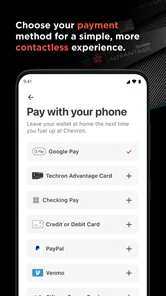
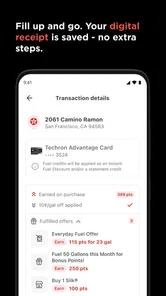
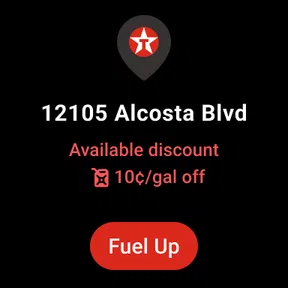
The app’s central convenience is paying for fuel from the comfort of your car. Whether mobile payment is available depends on the country and participating station, so check the app’s payment options for your location before relying on it. Review the transaction details before authorizing a payment, and follow any instructions shown in the app at the station.
Does Texaco offer rewards, discounts, or loyalty benefits through the app?
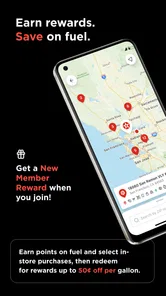
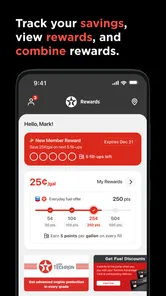
Texaco may provide loyalty programs, promotional offers, digital coupons, or rewards through its app, although the exact benefits differ by region. Some offers require registration, a linked payment method, or scanning a membership code during checkout. Read the terms carefully, especially expiration dates, participating stations, minimum purchases, and restrictions on combining promotions.
What information is required to create a Texaco account?
Account requirements depend on the version of the Texaco app available in your country. Typically, registration may request an email address, phone number, password, and basic profile information. If you use payment, loyalty, or personalized features, additional details may be needed. Before signing up, review the privacy policy to understand how your information is collected and used.
Pros
- Easy access to nearby Texaco stations and fuel prices
- Mobile payments can make fueling faster and more convenient
- Digital receipts help keep purchase records organized
- Rewards features may provide savings on eligible purchases
- Useful station details can support route planning
Cons
- Fuel prices and station information may not update instantly
- Rewards availability can vary by location and purchase type
- Some features require account creation and personal information
- App usefulness is limited in areas without participating Texaco stations
- Occasional login or payment issues may interrupt the fueling process













