

Chevron
- 12.13K
- 4.8
- Installs
- 1.00M
- Price
- Free
Screenshots
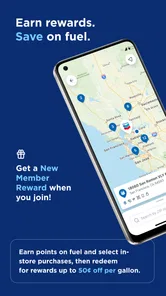
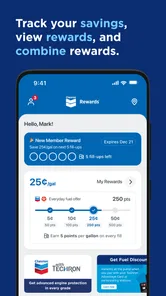
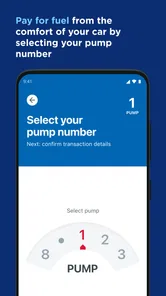

Analysis by Reviewed
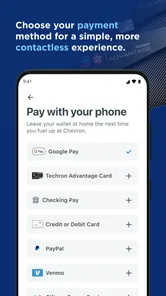
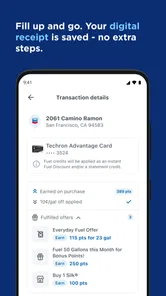
I treat the Chevron app as a tool for one specific moment in a drive: paying for fuel without having to step away from the car. That focus matters. It is not a general-purpose vehicle log or a broad fuel-budgeting planner; its clearest use is making a stop at a Chevron station more convenient. If you regularly choose those stations and prefer handling a purchase from your seat, that can make it worth keeping on your phone. If you usually fill up wherever is cheapest or closest, its usefulness will depend on how often a Chevron stop fits your route.
What it is built to do
Developed by Chevron U.S.A. Inc., this free Auto & Vehicles app is aimed at drivers who want a more convenient way to pay for fuel. The practical question is not whether it replaces every part of a fuel stop, but whether paying through your phone suits your routine. I would think of it as a station-specific payment option, rather than an all-in-one solution for vehicle expenses.
The app has been available since April 17, 2019, and its current public reception is strong: it holds a 4.8 average from around 108,000 ratings, with over one million installs. Those figures suggest that many drivers find a reason to use it, but they do not tell me whether it will fit your local driving habits. The age rating is Everyone, so it is presented for a broad audience; as with any payment-related app, the usefulness still depends on whether you are comfortable managing a fuel purchase on your phone.
A smoother stop, with a few practical checks
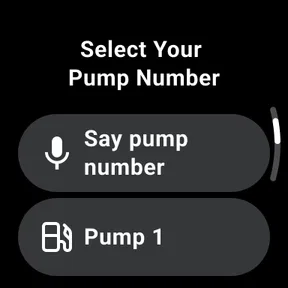
The best case is easy to picture: you pull into a Chevron station on the way to work, open the app while parked, and use it to handle payment rather than going inside. That can be especially appealing when the weather is unpleasant, you have a passenger who should not be left alone, or you are trying to keep a short stop simple. My main advice is to get comfortable with the app before you are in a hurry. Set it up and learn where its payment flow begins while you are safely parked, not while you are handling the pump.
It is also worth keeping your usual backup payment method available. A phone may need a working connection or enough battery at the wrong moment, and a payment app is only helpful when the station, device, and transaction all cooperate. That is not a reason to avoid it; it is just sensible preparation. I would not make it the only way I can pay on a long drive, particularly if I am far from home or arriving with a nearly empty phone.
Where it fits—and where it doesn’t
Compared with paying at the counter or using a card at the pump, the app’s appeal is convenience: it moves the payment step onto your phone. Compared with broad fuel-finding or expense-tracking tools, its value is narrower and tied to Chevron. That trade-off is straightforward. Drivers who often choose Chevron may appreciate having a dedicated option ready; people who prioritize comparing every nearby station, or who rarely visit Chevron, may be better served by their normal card and a separate route or budgeting tool.
I would also separate payment convenience from fuel tracking. The clearest confirmed purpose here is paying for fuel from the comfort of your car, so I would not choose it on the assumption that it will automatically build a detailed mileage history or manage a household vehicle budget. If recording every fill-up is important to you, a dedicated tracking method may be a better companion. The app makes most sense when the task you want to simplify is the payment itself.
More From Our News Desk

 Weather - By Xiaomi
Weather by Xiaomi Review: Clear at a Glance, Less Clear Up Close
Xiaomi’s weather app makes everyday forecasts quick to scan, but its calm surface can leave useful details and recovery paths harder to find than they should be.

 X
XX Under Pressure: Can It Recover When Posting Goes Wrong?
A resilience-focused review of X, examining setup, mistaken posts, interruptions, weak connections, and the gaps that matter when recovery needs to be dependable.

 Clash of Clans
Clash of Clans Is Won Between the Battles
Its raids are quick; its community is a long-term project of coordination, teaching, rivalry, and shared responsibility—with all the friction that entails.

 Android Auto
Android Auto Makes the Case for Quieter Car Software
The car interface is no longer judged by how much it can do, but by how quietly it helps. Android Auto shows what drivers now expect—and what still gets in the way.

 MobiOffice: Word, Sheets, PDF
MobiOffice: Transforming Mobile Productivity with Seamless Integration
MobiOffice: Word, Sheets, PDF is redefining mobile productivity with a surprising blend of functionality and innovation.

 EA SPORTS FC Soccer Mobile 26
EA SPORTS FC™ Mobile Soccer: Redefining Mobile Sports Gaming
Dive into EA SPORTS FC™ Mobile Soccer, where immersive gameplay and strategic depth transform mobile sports gaming.
Latest News



Getting Started with Chevron
First things first, downloading and setting up Chevron is a breeze. Available on both Android and iOS, it’s just a quick search away on your respective app store. Once you’ve got it installed, the user interface welcomes you with its clean and intuitive design. It’s like the app just knows how to make you feel at home, which I absolutely love.
Fuel Management Made Easy
One of the standout features of this app is how it simplifies fuel management. Whether you’re tracking your daily commutes or planning a long road trip, Chevron provides detailed insights into your fuel usage. The app calculates your fuel expenses based on the current fuel prices, which it updates regularly, ensuring you’re always in the loop. It’s like having a personal assistant that handles all the number crunching for you!
User-Friendly Features
Chevron doesn’t skimp on features either. The app allows you to log each fuel purchase, monitor your vehicle’s fuel efficiency, and even set reminders for your next fill-up. All this data is presented in easy-to-read graphs and charts, which, let’s be honest, makes the whole process a lot more engaging. Plus, you can export all your data if you’re the kind of person who loves to keep backups of everything.
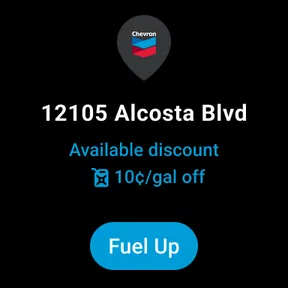
Another neat feature is the GPS functionality that helps locate nearby Chevron stations. It’s super handy when you’re in unfamiliar territory and need to find a reliable place to fuel up. I mean, who doesn’t appreciate a little extra convenience on the road?
My Personal Take
In my opinion, Chevron is a must-have app for anyone who spends a lot of time driving. It’s practical, user-friendly, and packed with features that genuinely make life easier. The ability to track and manage fuel expenses with such precision is a game-changer, and it’s something I wish I had discovered sooner.
While no app is without its quirks, the overall experience with Chevron is overwhelmingly positive. It’s clear that the developers put a lot of thought into making this app as helpful as possible, and for that, I tip my hat to them. So, if you’re on the fence about giving it a try, I’d say go for it. You might just find it’s exactly what you’ve been looking for.
Who should keep it in their routine
For an existing user, the best reason to keep the app installed is simple: it can make a familiar Chevron stop feel more streamlined. I would check that my phone is ready before pulling in, then treat the app as one payment option rather than assuming every visit will go identically. On a road trip, I’d decide on a backup card before leaving and use the app when a Chevron station naturally fits the route, rather than detouring solely to use a particular payment flow.
It is a stronger fit for drivers who already choose Chevron regularly, want to complete a fuel purchase from the car, and are comfortable using a phone for that task. It is less compelling for someone who fills up at many different brands, prefers cash, or wants one app to compare prices across stations and maintain a complete record of vehicle costs. Those are different jobs, and a payment-focused app should not be judged as though it were a full expense-management system.
How I’d judge the experience over time
The app’s release history begins in 2019, but I would not read that date as proof of any particular feature change or current workflow. For an existing user, the useful test is whether the present version continues to make payment clear and dependable at the stations they actually visit. Before relying on it for a time-sensitive stop, I’d open it while parked, make sure I can reach the relevant screen, and keep another way to pay within reach. That small habit can prevent a minor phone issue from becoming a frustrating delay.
One practical trade-off is that using a dedicated station app can reduce friction at a stop while adding a little preparation beforehand: the phone needs to be charged, accessible, and ready when you arrive. I would avoid trying to navigate or troubleshoot it while driving, and I would not let an app distract me around the pump. If the payment process does not feel straightforward on a particular visit, switching to a familiar payment method is the sensible choice.
A measured recommendation
My recommendation is selective rather than universal. If you already stop at Chevron and like paying by phone, this free app is a reasonable option to try; it has a substantial audience and a strong average rating, though neither guarantees that every stop will suit every driver. If your priority is finding the lowest-priced fuel regardless of brand, keeping detailed mileage records, or paying without a smartphone, your usual alternatives may serve you better.
For me, the decision comes down to one question: would paying from the car make a regular Chevron stop noticeably easier? If yes, the app has a clear place in your routine. If not, there is little reason to add another step to your phone just because it exists. I’d install it for that specific convenience, learn the payment flow while parked, and keep a backup available—an uncomplicated way to see whether it genuinely earns its place.
Chevron Frequently Asked Questions
Can I download the Chevron app for free?
Yes. Chevron is free to download, so you can install it without paying an upfront purchase price. Its main stated purpose is to let you pay for fuel from the comfort of your car. As with any app, review the permissions and terms shown by your device’s app store before installing, and make sure you select the official app published by Chevron U.S.A. Inc.
Who develops the Chevron app, and what kind of app is it?
Chevron is an Auto & Vehicles app developed by Chevron U.S.A. Inc. Its store description is simply “Chevron,” while its central purpose is clear: paying for fuel from the comfort of your car. If you are searching for it among apps with similar names, check the developer name so you choose the official Chevron app rather than an unrelated result.
What does the Chevron app let me do at the pump?
Chevron is an app from Chevron U.S.A. Inc. in the Auto & Vehicles category. Its central feature is paying for fuel from the comfort of your car, so you can use your phone to handle payment without going inside. The app is free to download and is rated for everyone.
What is Chevron and what does it offer to users?
Chevron is a comprehensive app designed for car enthusiasts and owners, providing a wide range of features such as fuel tracking, service reminders, and real-time diagnostics. It helps users maintain their vehicles by offering insights into fuel efficiency, scheduling maintenance, and providing alerts for potential issues, making car management convenient and efficient.
Is Chevron available for both Android and iOS platforms?
Yes, Chevron is available for download on both Android and iOS platforms. Users can easily find the app on the Google Play Store for Android devices and the Apple App Store for iOS devices, ensuring compatibility with a wide range of smartphones and tablets.
Pros
- User-friendly interface for easy navigation
- Comprehensive fuel tracking features
- Access to exclusive Chevron discounts
- Real-time fuel price updates
- Secure payment options
Cons
- Limited to Chevron stations only
- Requires constant internet connection
- Occasional app crashes reported
- Not compatible with some older devices
- Limited customer support availability













