Tennessean: News & eNewspaper
- 169.00
- 3.0
- Installs
- 50.00K
- Price
- Free

Screenshots





Analysis by Reviewed
If you want Tennessee news in one place rather than jumping between a newspaper website, sports pages, and a general news app, Tennessean: News & eNewspaper is built around that routine. I found its purpose easy to understand from the first launch: it combines news coverage, an eNewspaper experience, local sports, and broader updates under the Tennessean name. It is a free News & Magazines app from USA TODAY Co., aimed at readers who want a distinctly local starting point on Android or iOS.
My overall impression is mixed but useful. The app can become a convenient morning stop, especially if local reporting matters more to you than having every possible national source in one feed. At the same time, it is not the cleanest replacement for every news service, and the average rating of 3.0 from around 473 ratings suggests that the experience has not worked equally well for everyone. I would approach it as a focused newspaper companion, not as a universal news reader.
What to expect before you begin
The most important thing to understand is that this is not simply a headline widget. Its identity is tied to the Tennessean newspaper, so the useful parts are the combination of current articles, regional interests, sports coverage, and the digital newspaper edition. That makes it more relevant to someone following Tennessee communities, teams, public affairs, and local developments than to someone who only wants a broad national news digest.
The store summary mentions breaking news, the eNewspaper, local sports, and more, and those pieces serve different reading habits. Breaking updates are for quick checks during the day. Local sports are useful when a national sports app gives your area only a passing mention. The eNewspaper is better suited to a slower reading session when you want to browse a publication rather than open individual stories one by one.
I would not expect the same experience as a general-purpose aggregator. An aggregator usually gives you many publishers and lets you compare coverage from different viewpoints. This app gives you a more defined editorial home. That focus is its strength when you already trust or follow the Tennessean, but it is also the main limitation if you want a wide range of independent sources in one place.
The app has been available since June 1, 2012, and its current version is 8.10.3. Those details matter less than the practical question of whether your phone can run it: the stated minimum is Android 8.0. It is rated Everyone 10+, so it is positioned for a broad audience, although news topics can naturally include serious or unsettling events.
There is no purchase required to install it, but the app includes in-app purchase items ranging from $14.99 to $69.99 each. I would therefore treat the free installation as an opportunity to inspect the reading experience, not as proof that every part of the newspaper service will be free. If you are considering a subscription or premium newspaper access, read the offer shown inside the app carefully before confirming anything.
More From Our News Desk

Weather by Xiaomi Review: Clear at a Glance, Less Clear Up Close

X Under Pressure: Can It Recover When Posting Goes Wrong?

Clash of Clans Is Won Between the Battles

Android Auto Makes the Case for Quieter Car Software

MobiOffice: Transforming Mobile Productivity with Seamless Integration

EA SPORTS FC™ Mobile Soccer: Redefining Mobile Sports Gaming
Who will get the most from it
I think it suits three kinds of readers particularly well. The first is a resident who wants local stories to appear before national headlines. The second is a former Tennessee resident who still follows local news and sports from elsewhere. The third is a newspaper reader who likes having both article-style updates and a digital edition available from the same publisher.
It is less suitable for someone who wants a completely neutral, multi-source news dashboard, an extensive international news service, or a sports-first app with deep statistics and live-game tools. In those cases, a general news aggregator or a dedicated sports application may be a better companion. Installing this one does not need to be an all-or-nothing decision; it can fill the local-news gap while another app handles national or international coverage.
Setting it up without overcomplicating the first visit
After installing, I would begin with one simple goal: find a story that is genuinely useful to you. Do not spend the first session trying to inspect every section. Open the main news area, look for a local topic you recognize, and then check the sports and eNewspaper areas afterward. This order gives you a fast sense of whether the app's coverage matches your interests.
The first screen can feel more valuable when you approach it with a specific question. You might be checking for developments in your community, looking for a local team update, or trying to read the day's newspaper edition. A clear purpose helps you distinguish between a temporary unfamiliarity with the layout and a real mismatch with your reading habits.
Because the app combines different formats, I recommend treating the article feed and the eNewspaper as separate tools. The feed is the place I would go when I have two or three minutes. The digital edition is the place I would go when I want to browse more deliberately. Trying to use the eNewspaper like a stream of short headlines can make it feel slower than it needs to be.
One practical tip is to decide early whether you are a headline reader or an edition reader. If you mainly want alerts and quick updates, stay with the news areas and avoid judging the whole app by the newspaper interface. If you enjoy the layout and rhythm of a traditional paper, give the eNewspaper enough time to become familiar before deciding that it is inconvenient.
I also suggest checking the purchase prompts with patience. Since the app is free to download but lists paid items, the first meaningful setup is not complete until you understand which reading paths are available without payment and which may lead toward a purchase. This is not a reason to avoid the app, but it is a reason to avoid tapping through an offer automatically.
Your first useful action should take less than a morning
For a first successful session, I would use this sequence: open the app, read one local article, move to local sports, and then open the eNewspaper to compare the two reading styles. This small tour answers the questions that matter most: Does the local coverage interest me? Is the sports section relevant? Do I prefer the newspaper presentation or the individual-story format?
A realistic everyday example would be a weekday morning before work. I would scan the local news for a story that affects the area, check sports for an overnight result or team update, and save the eNewspaper for a quieter moment later. That workflow is more practical than trying to read everything immediately, and it lets the app serve both quick checking and longer reading without forcing one style on you.
Another useful workflow is to use the app during a developing local event. A general national service may mention the event only when it becomes widely important, while a local newspaper app is more likely to be the place you check first for regional context. I would still compare major claims with another reputable source, but the local focus can make this app the more relevant first stop.
The non-obvious advantage here is the change in perspective between the feed and the eNewspaper. The feed helps you react to what is new. The edition encourages you to notice stories you might never search for directly. If you only open the most obvious headlines, you may miss that second benefit. A good habit is to browse beyond your usual topic once or twice a week, especially when you want a broader sense of what the local newsroom considers important.
Sports readers can use a similar two-stage approach. Check the sports area for immediate local relevance, then use the broader news sections for the surrounding context: community reaction, business effects, or public discussion. I would not expect a specialist sports product to be replaced by this app, but I do see value in having local sports connected to a newspaper's wider coverage.
Where new users may become confused
The biggest possible confusion is assuming that “free” means every newspaper feature is automatically included. The installation costs nothing, yet in-app purchase items are listed, so the app may present different access paths. Read each screen rather than treating a subscription prompt as an error. If you only want freely available news, back out carefully and continue exploring the standard reading areas.
A second point of friction is the difference between a current article and an eNewspaper page. Articles are usually approached as individual pieces with a clear headline and reading flow. A digital edition behaves more like a publication: you may need to browse, choose a page, or change how you navigate. If the first format feels obvious and the second feels less direct, that is a difference in design purpose rather than a sign that you are using it incorrectly.
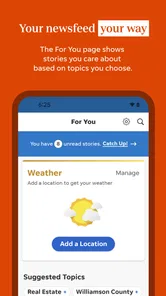
Some readers may also expect the app to personalize itself immediately around their exact interests. I would not rely on that assumption. Start by exploring the sections that matter to you and build your own routine. For a local-news app, the value often comes from repeatedly checking the right areas, not from expecting the opening screen to predict every preference perfectly.
Another trade-off is editorial concentration. A focused publisher can provide stronger local identity than a broad aggregator, but you are still reading through one newsroom's selection and presentation. When a story is important, I recommend opening a second source for confirmation or an alternative perspective. That is especially sensible for public safety, elections, health, and other subjects where a single article may not answer every question.
The rating history is also worth keeping in mind. With an average of 3.0 and around 169 written reviews, the app has received enough feedback to show that user satisfaction is uneven. I would not treat that rating as a final verdict, because news apps can behave differently depending on reading habits and expectations. Still, it is a fair warning to test the navigation and purchase flow yourself before committing to a paid option.
How it compares with familiar alternatives
Compared with a general news aggregator, this app offers a clearer local identity and a more direct connection to the Tennessean's newspaper format. The aggregator wins when you want many publishers, fast topic switching, or side-by-side coverage. Tennessean: News & eNewspaper wins when your first question is, “What is happening in this Tennessee community?” rather than, “What are all publishers saying about this subject?”
Compared with reading the newspaper website in a mobile browser, the app is more natural for a repeat routine because it keeps the news and eNewspaper experience in a dedicated mobile environment. The browser may still be preferable if you dislike installing separate apps, want to move easily between publishers, or find a website's navigation more familiar. I would choose the app when local reading is a daily habit, not merely an occasional visit.
Compared with a dedicated sports app, this one is broader but less specialized. It can keep local sports connected to news and community coverage, while a sports service will generally be the better choice for readers who want scores, schedules, league-wide tracking, or detailed game information. The right choice depends on whether sports is your main purpose or one part of your local-news routine.
Compared with a national newspaper app, the Tennessean product gives local relevance priority. A national publication may be stronger for national politics, business, and international reporting, while this app makes more sense when regional stories are the reason you opened your phone. I would happily use both if local coverage and national context are equally important to me.
Small habits that make the app more worthwhile
Use the app at two different speeds. Give the news feed a short check when you need immediate awareness, then reserve the eNewspaper for a longer, less distracted session. This prevents the newspaper format from being judged by the standards of a breaking-news feed and helps you get value from both sides of the product.
Do not make your first decision based only on the opening screen. News priorities change, and a local story may not be visible in the exact order you expect. Visit the sections that reflect your real interests, especially local sports and the eNewspaper, before deciding whether the app belongs in your daily rotation.
Keep a second source for verification rather than expecting this app to replace every other news tool. That is not a criticism unique to the Tennessean; it is a sensible habit for any single-publisher news application. The app is most useful as a strong local lens, not as the only lens you ever use.
If you are evaluating a paid feature, think in terms of reading frequency. Someone who reads local coverage every day and values a digital newspaper may find the purchase path more meaningful than someone who opens the app only during major events. Since individual items are listed between $14.99 and $69.99, compare the offer with how often you will realistically use it rather than deciding from curiosity alone.
My recommendation after using it as a local-news reader
I would recommend Tennessean: News & eNewspaper to readers who want a Tennessee-centered news routine and appreciate having local sports and an eNewspaper alongside regular articles. Its strongest quality is focus: it gives local coverage a more prominent role than a broad aggregator normally would. That makes it particularly practical for residents, families following local developments, and people who have moved away but still care about the area.
I would skip it if your priority is a huge range of publishers, deep specialist sports tools, or a purely free experience with no purchase considerations. In those situations, a general aggregator, browser-based reading, or a dedicated sports service may fit better. The app does not need to be perfect for everyone to be useful; it simply needs to match the way you consume local news.
For a first-time user, the safest path is straightforward: install it on a device running Android 8.0 or later, explore one local story, check the sports area, and sample the eNewspaper before making any commitment. That short test will tell you more than the headline list alone. My final view is that this is a focused newspaper app with real value for local readers, provided you understand the difference between quick news, edition-style reading, and the paid options that may appear along the way.
Tennessean: News & eNewspaper Frequently Asked Questions
What devices and operating systems support Tennessean: News & eNewspaper?
Tennessean: News & eNewspaper is a mobile news app from USA TODAY Co. It requires Android 8.0 or later, so check your device’s operating system before downloading. Once installed, you can use it to browse news and access the eNewspaper. Keeping your device and app updated can help you get the latest available version and a smoother reading experience.
Is Tennessean: News & eNewspaper suitable for younger readers?
The app has an Everyone 10+ content rating, making it intended for a general audience aged 10 and older. Its coverage includes news and topics such as sports, politics, business, and community events, so the material can vary by article. Parents may wish to review the app and its content with younger users to decide whether it is appropriate for them.
What is Tennessean: News & eNewspaper?
Tennessean: News & eNewspaper is the official mobile app for The Tennessean, providing access to local and regional news across Tennessee. After installing it, readers can browse breaking stories, politics, sports, entertainment, business, opinion, and community coverage, while the eNewspaper offers a digital version of the printed publication in a newspaper-style layout.
Is Tennessean: News & eNewspaper free to download and use?
The app is free to download, and some articles or features may be available without a subscription. However, full access to unlimited news, the complete eNewspaper, premium stories, archives, and certain subscriber benefits may require a paid Tennessean subscription. In-app purchases are offered, with prices ranging from $14.99 to $69.99 per item. Check the current details shown in the app before signing up.
What can I read or do inside the Tennessean app?
The app lets you follow the latest Tennessee news, read articles by topic, view breaking-news updates, and explore coverage of local communities, sports teams, government, and events. Depending on the current version, you may also be able to customize notifications, save articles, share stories, listen to selected content, and switch to the eNewspaper for a replica of the print edition.
Pros
- Fast access to breaking news and local Tennessee coverage
- Digital replica preserves the layout of the printed newspaper
- Useful alerts help you stay informed about important local events
- Covers community issues
- sports
- politics
- and regional developments
- Articles can be saved for reading when you have more time
Cons
- Many premium stories require a paid subscription
- Some content may load slowly on weaker mobile connections
- Frequent notifications can feel excessive for casual readers
- The app may use considerable storage for downloaded editions
- Coverage is strongly focused on Tennessee and nearby communities













