AZ Central: Arizona Republic
- 487.00
- 2.5
- Installs
- 100.00K
- Price
- Free

Screenshots





Analysis by Reviewed
I approached AZ Central: Arizona Republic as a local-news reader rather than as someone looking for a general national news app. That distinction matters. Its purpose is to bring Arizona-focused reporting into a mobile format, while also giving space to broader news, photography, and video. In my experience, the app makes the most sense for residents, former residents, families with connections to the state, and anyone who wants local coverage without relying entirely on a national news feed.
The app is free to download and belongs to the News & Magazines category. It is developed by USA TODAY Co., carries an Everyone 10+ content rating, and has been available since March 11, 2014. Its current version is 8.10.3, with support beginning at Android 8.0. Those details make it a fairly established option rather than a brand-new experiment, although its average rating of 2.5 from around 1.1 thousand ratings suggests that the experience has not worked equally well for everyone.
How clearly the app presents Arizona news
The strongest part of the experience is the app’s editorial focus. Instead of opening to an entirely broad stream where local stories are easy to lose, AZ Central is built around Arizona Republic coverage. That gives the app a clear identity: it is most useful when you want to understand what is happening in Arizona, not merely collect headlines from everywhere.
I found that focus helpful during an ordinary weekday. Imagine checking the news before work, wanting a quick sense of local developments, public affairs, community stories, and the larger national events that may affect the state. A local publication can provide context that a general aggregator often misses. An aggregator may show the same major headline as every other service, but it usually does not give the story the same regional framing.
The interface is easier to judge when used in short sessions. A reader can scan headlines, decide which subjects deserve attention, and move into a story without treating the app like a full newspaper spread. That is a good fit for commuting, waiting in a school pickup line, or taking a few minutes during lunch. It also means that people who prefer a calm, highly customizable reading environment may find the experience less satisfying than a dedicated RSS reader or a text-first news service.
My main readability tip is to treat the home screen as a starting point, not as your entire news routine. I would scan it for local priorities first, then open only the stories that genuinely matter to me. This reduces the temptation to jump between headlines and helps separate useful reporting from the visual noise that can come with a media-rich news app.
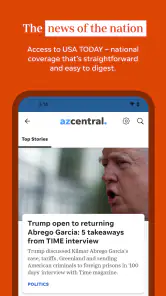
The app’s store summary emphasizes local and national news alongside photography and video, and that combination affects how it feels to use. It is not simply a list of plain headlines. Visual journalism can make a story easier to understand, especially when the subject depends on place, people, or changing conditions. At the same time, images and video can make a page feel busier than a traditional text-only article.
More From Our News Desk

Weather by Xiaomi Review: Clear at a Glance, Less Clear Up Close

X Under Pressure: Can It Recover When Posting Goes Wrong?

Clash of Clans Is Won Between the Battles

Android Auto Makes the Case for Quieter Car Software

MobiOffice: Transforming Mobile Productivity with Seamless Integration

EA SPORTS FC™ Mobile Soccer: Redefining Mobile Sports Gaming
Navigation that works best for deliberate readers
For me, the clearest workflow is to enter with a question. I might want to know what is changing locally, whether a developing event has received an update, or which Arizona stories deserve a longer read. This approach is more effective than opening the app repeatedly without a purpose, because the value comes from its regional editorial selection rather than from endless entertainment-style scrolling.
Readers who have difficulty locating controls in visually dense layouts may need extra patience. News apps often place headlines, images, video elements, promotional areas, and account or subscription prompts close together. Even when each item is understandable on its own, the combined page can demand more visual attention than a simple article reader. I would recommend moving slowly through a story and checking that a tap has opened the intended item before continuing.
The app’s scale also matters. With over one hundred thousand installs, it has a meaningful audience, but it is still a focused regional product rather than a universal news platform. That is a strength for Arizona readers and a limitation for people who want one application to cover many states with equal depth.
Compared with Google News or another broad aggregator, AZ Central feels more intentional but less neutral in scope. An aggregator is better when I want to compare many publishers or follow an international subject from several angles. This app is better when the local Arizona viewpoint is the reason I opened the phone in the first place. Compared with a newspaper website in a browser, the app can feel more convenient for repeated checks, while the browser may be preferable for readers who dislike installing dedicated apps or who need more control over text presentation.
Reading comfort across different abilities and situations
I judge reading comfort by more than whether an article is legible on a calm afternoon: lighting, fatigue, screen size, and the need to pause all change how a news app feels. I’d try a short, familiar story first, adjusting the phone’s display settings and checking whether I can resume without losing my place. That practical test leads naturally to the next question: how the app’s visual mix affects attention and sensory comfort.
Visual readability and sensory load
Local reporting is only useful if I can comfortably read it. For readers with low vision, visual fatigue, or sensitivity to busy screens, the combination of news headlines, photography, and rich video deserves careful consideration. A media-heavy presentation can help a person who understands information better through images, but it can also compete with the written article.
I would use the phone’s own display settings to improve comfort where needed, such as adjusting system text size, contrast, brightness, or color-related settings. Those changes are not the same as an app-specific accessibility guarantee, but they can make a meaningful difference. The practical test is whether the headline hierarchy remains understandable after enlarging text and whether controls still feel easy to identify.
Video is another area where personal needs vary. Some readers appreciate visual reporting, while others need captions, prefer not to hear unexpected sound, or rely mainly on text. I would not assume that every piece of media offers the same accessible experience. If a story is important, I would look for the written article rather than depending entirely on the video presentation.
This is also where the app’s visual strengths become a trade-off. Strong photography can provide context that words alone cannot, including the appearance of a location or the human effect of an event. But a reader who wants a quiet, low-stimulation interface may prefer a lightweight text feed. In that case, a mobile browser with simplified reading tools, a screen reader-friendly news source, or a plain RSS workflow could be the better choice.
Motor effort and touch accuracy
News reading usually involves repeated taps, scrolling, and returning to a previous screen. That can be manageable for many people, but it may become tiring for readers with tremors, limited dexterity, joint pain, or difficulty making precise selections. A page containing several interactive elements can increase the chance of opening the wrong headline or activating a media item unintentionally.
My practical advice is to use the app in shorter sessions and avoid rapid tapping. Let each page finish appearing before selecting another item, and use the device’s standard navigation controls when they are more reliable than small on-screen targets. A larger phone or tablet may also make the reading area more comfortable, although the app’s suitability will still depend on the individual device and system settings.
People who rely on external keyboards, switch access, voice control, or screen readers should test the most important workflow before committing to regular use: opening a local story, reading through it, returning to the news stream, and moving to another section. I cannot treat compatibility with every assistive setup as automatic. The app may be perfectly usable for one reader and frustrating for another, especially when media and navigation elements are mixed together.
Access when attention, time, or connectivity is limited
Situational access is just as important as permanent disability. I may be reading with one hand while carrying groceries, looking at the screen in bright sunlight, or trying to catch up during a noisy break. In those moments, a clear local-news destination is useful because I do not have to search the entire internet for Arizona coverage.
On the other hand, rich photography and video can be less convenient when I am conserving attention, dealing with a slow connection, or trying not to disturb people nearby. I would avoid making this my only way to follow urgent information if I expected to be offline or unable to interact with a visually active page. A saved browser bookmark, a text-based alternative, or another source with simpler delivery can provide useful backup.
The free entry point is welcome, but readers should pay attention to the commercial side of the experience. In-app purchases range from $19.99 to $69.99 per item. That does not make the app unusable, but it does mean that a person who wants an entirely uninterrupted free reading experience should review any purchase-related prompts carefully instead of assuming that every part of the publication is included without conditions.
Where the experience still creates friction
The average rating of 2.5 is the clearest warning sign I would not ignore. A rating cannot explain every individual complaint, but it does tell me to approach the app with realistic expectations. The presence of around 487 written reviews also indicates that users have had enough experience to comment on the product, yet the overall score remains modest. I would install it and test the basic reading flow before making it central to my daily news routine.
Another limitation is the narrow geographic purpose. If I live outside Arizona and only occasionally want a story from the state, the app may feel excessive compared with a general news service. If I need international reporting, several editorial viewpoints, or a highly personalized topic dashboard, a broader alternative will likely serve me better. AZ Central earns its place when Arizona relevance is the priority.
There is also a difference between having news available and making it accessible. A publication can offer valuable reporting while still presenting challenges for readers who need large controls, minimal motion, predictable navigation, captions, or a low-distraction layout. I would judge the app by my own complete routine rather than by a single successful article: can I find the story, read it comfortably, understand any media, return without confusion, and avoid accidental purchases?
Who should install it
I would recommend AZ Central to Arizona residents who want a direct local-news habit, to people following family or community developments in the state, and to readers who value photography and video as part of reporting. It is also a reasonable option for someone who wants local coverage alongside national stories without starting from a completely general feed.
I would be more cautious if I depended on highly specialized accessibility tools, needed an exceptionally quiet reading interface, or wanted guaranteed offline access. In those cases, I would test the app with my own assistive technology and compare it with a browser reading mode, a text-focused publication, or an aggregator before deciding. The same advice applies to anyone sensitive to subscription prompts or who wants every article to be freely available without additional decisions.
For a practical setup, I would keep the app for Arizona reporting and use a second source for national and international comparison. That two-source approach is more useful than expecting one regional publication to meet every information need. It also helps me distinguish local context from the broader picture, which is especially important when a major story is developing quickly.
My inclusive verdict
AZ Central: Arizona Republic has a clear reason to exist: it puts Arizona-centered journalism in a convenient mobile destination and combines written reporting with photography and video. I like that focus more than I would like an undifferentiated stream of headlines. For the right reader, it can turn local news from something occasionally searched into a regular, manageable part of the day.
Still, I would not call it a universal recommendation. The modest average rating, the potentially busy media presentation, the range of in-app purchase amounts, and the uncertainty that can come with different assistive setups all deserve attention. Readers who need a very simple interface should compare alternatives, while readers who want Arizona context should give this app a fair hands-on trial.
My final recommendation is conditional but positive: choose it when local Arizona coverage is your main goal, and pair it with a simpler or broader source if accessibility, comparison, or low-distraction reading is essential. That balance reflects what the app does best without overlooking the people and situations for whom its presentation may be harder to use.
AZ Central: Arizona Republic Frequently Asked Questions
Who publishes AZ Central: Arizona Republic, and what devices can run it?
AZ Central: Arizona Republic is a News & Magazines app published by USA TODAY Co. It is intended for mobile devices, and its minimum operating-system requirement is version 8.0. The app’s current version is 8.10.3. Before downloading, check that your device meets the requirement and has enough available storage for the app and its news content.
What is AZ Central: Arizona Republic?
AZ Central: Arizona Republic is the official mobile news app for azcentral.com and The Arizona Republic. It brings local reporting, breaking news, politics, sports, business, entertainment, weather, and community stories from across Arizona into one place. The app is designed for readers who want quick access to statewide headlines as well as coverage focused on cities such as Phoenix, Tucson, Mesa, and Scottsdale.
Is AZ Central: Arizona Republic free to download and use?
The app is free to download, and users can usually read a selection of articles without paying. However, access to the complete news archive, premium stories, and unlimited reading may require a subscription to The Arizona Republic or a related digital membership. In-app purchases range from $19.99 to $69.99 per item, so review the purchase details and subscription conditions shown in the app before committing.
What type of news and features does the app provide?
AZ Central: Arizona Republic focuses heavily on Arizona news, including local government, public safety, education, housing, transportation, and major community developments. It also includes sports coverage, opinion pieces, investigative journalism, entertainment, business updates, weather information, and breaking-news alerts. Its content includes photography and video, alongside coverage of local and national news.
Does the app send breaking-news notifications?
Yes, AZ Central: Arizona Republic can send notifications about breaking news, important local developments, sports results, weather events, and other selected topics. Notifications can be useful when you want immediate updates, especially during severe weather or major Arizona events. If the alerts become too frequent, you can usually manage them through the app’s settings or your device’s notification controls.
Pros
- Covers Arizona politics
- sports
- business
- and local events in one app.
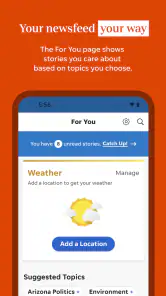
- Personalized news feeds make it easier to follow preferred topics.
- Breaking-news alerts help users stay updated on major local developments.
- Includes access to in-depth reporting from The Arizona Republic newsroom.
- Clean layout makes articles easy to browse on phones and tablets.
Cons
- Many premium articles require a paid subscription to read in full.
- Frequent notifications may feel excessive unless carefully customized.
- Some content can load slowly on weaker mobile connections.
- Coverage is strongly Arizona-focused and may feel limited elsewhere.
- Advertising and subscription prompts can interrupt the reading experience.
- Category
- News & Magazines
- Version
- 8.10.3













