IndyStar: Indianapolis Star
- 295.00
- 2.7
- Installs
- 100.00K
- Price
- Free

Screenshots



Analysis by Reviewed
I approached IndyStar as a practical news companion rather than an app I would open only when a major story breaks. Published by USA TODAY Co., it brings Indianapolis-focused reporting, local sports, entertainment, breaking updates, and an eNewspaper experience into one mobile place. That combination is useful, but it also means the app works best when I give it a clear role in my daily routine instead of expecting it to replace every news source I use.
The app is free to install and sits in the News & Magazines category. It is rated for Everyone 10+, runs on Android versions from 8.0 onward, and the current release is 8.10.3. I also found that optional purchases range from $19.99 to $69.99 per item, so the free download should be viewed as an entry point rather than an assumption that every part of the experience is permanently unrestricted.
How IndyStar fits into a normal news routine
My most useful baseline workflow was simple: open the app once to scan what was happening locally, read one or two complete stories that mattered to me, and return later only when a developing story justified another look. That approach kept the app from becoming an endless stream of headlines. Indianapolis news can cover very different needs in one session, from a city issue to a Colts update or a local entertainment item, and the broad mix is one of the strongest reasons to keep it installed.
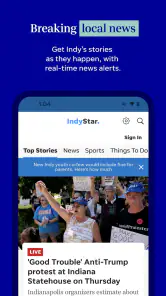
The breaking-news side is most valuable when I want local context rather than a national headline with Indianapolis mentioned in passing. A general news app may tell me that something happened, but a local publication is more likely to frame why it matters to residents, which neighborhoods or teams are involved, and what details deserve attention. I would still compare important claims with another reputable source, especially during a rapidly changing event, but IndyStar gives local readers a much more relevant starting point than a purely national feed.
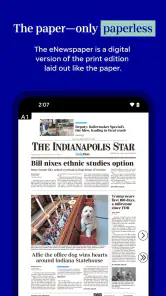
The eNewspaper is a different kind of experience from scrolling through individual articles. I see it as better suited to readers who enjoy a newspaper-style layout, want to browse beyond the first few prominent headlines, or prefer a familiar edition-based reading habit. It is less convenient when I only have a minute and want one answer immediately. In that situation, the standard article flow is quicker; when I have time to browse, the eNewspaper can feel more complete.
A realistic everyday use case would be a weekday morning before work. I might check local developments, glance at sports, and save the longer reading for a commute or lunch break. In the evening, I could return for entertainment coverage or use the eNewspaper to browse stories I would not have searched for directly. That rhythm makes the app feel like a local briefing with optional depth, rather than an obligation to read everything it presents.
The key habit is separating quick awareness from deliberate reading. If I treat every headline as something I must open, the experience becomes noisy. If I use the initial scan to choose only the stories connected to my interests, the app becomes much easier to manage. This is especially important because a local publication naturally covers more topics than one person can follow closely.
More From Our News Desk

Weather by Xiaomi Review: Clear at a Glance, Less Clear Up Close

X Under Pressure: Can It Recover When Posting Goes Wrong?

Clash of Clans Is Won Between the Battles

Android Auto Makes the Case for Quieter Car Software

MobiOffice: Transforming Mobile Productivity with Seamless Integration

EA SPORTS FC™ Mobile Soccer: Redefining Mobile Sports Gaming
What the content mix does well
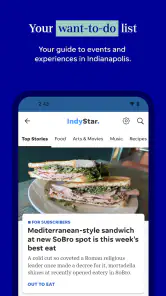
IndyStar’s strongest identity is its local focus. Sports followers may appreciate having local team coverage alongside general reporting, while residents who want Indianapolis-specific developments do not have to filter a national feed first. Entertainment coverage adds another reason to check in, particularly for readers who want local cultural information in the same place as hard news.
I also like the contrast between immediate updates and the slower newspaper format. A breaking story is useful for awareness, while the eNewspaper encourages browsing and discovery. Those modes serve different moods, and the app is more convincing when I use each for its intended purpose instead of judging the whole product by the speed of one screen.
There is a trade-off, though. A broad local publication app does not offer the narrow specialization of a dedicated sports app, a city-alert service, or a national news reader. If my only goal is scores, alerts, or worldwide headlines, IndyStar is not the most focused tool. Its value comes from combining several Indianapolis interests in one publication.
Settings and choices worth checking early
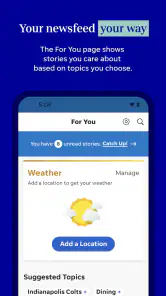
When I set up a news app, I first look for control over notifications and reading behavior. With IndyStar, that means deciding whether breaking updates deserve a place in my day or whether I would rather check manually. A person who wants immediate local awareness may welcome alerts, while someone who already receives many notifications should be selective. The best choice depends less on the app than on whether interruption helps or distracts you.
I would also review how the app presents articles and the eNewspaper before settling into a routine. These are not interchangeable reading modes. Article pages are generally the practical choice for a single story, while the eNewspaper is better for browsing an edition as a whole. Knowing that distinction prevents a common frustration: opening the newspaper view when all I wanted was a fast update, or expecting the article feed to provide the same sense of completeness as a full edition.
Account and purchase decisions deserve attention as well. Because the app is free but includes in-app purchases, I would read the wording shown at the point where access, subscription, or an expanded newspaper experience is offered. I would not assume that installing the app automatically grants the same access as a paid newspaper customer. That is an important practical distinction for anyone downloading it mainly for the eNewspaper.
The app has an average rating of 2.7 from 667 ratings, with 295 written reviews. I would treat that as a reason to test the current experience personally rather than dismissing the app immediately or assuming it will suit everyone. Store ratings can reflect different expectations: some readers may want a pure free news feed, while others may be evaluating newspaper access, notifications, or account-related friction. The rating is worth noticing, but my own use would focus on whether the app fits my reading habits.
For an older Android phone, the minimum operating-system requirement is relatively approachable because Android 8.0 is supported. That does not guarantee identical performance on every device, but it makes the app accessible to people who are not using the newest hardware. I would still keep the application updated, particularly for a news product where article loading and live content matter more than they do in a static reference app.
Faster patterns for experienced readers
After using the app for a while, I found that speed came more from repeatable habits than from trying to consume more content. My preferred pattern is a three-pass check. First, I scan only the headlines. Second, I open the stories that affect my city, interests, or plans. Third, I return to one longer piece when I have enough time to read it properly. This prevents sports, entertainment, and breaking news from competing equally for my attention.
Another useful pattern is to assign the eNewspaper a specific time. Instead of opening it randomly throughout the day, I would use it during a quieter reading period, such as the evening. That makes the edition feel intentional and reduces the temptation to jump between the newspaper layout and the faster article feed without finishing anything.
For sports readers, I would avoid using the entire app as though it were a live-score utility. The local sports coverage is valuable for reporting and context, but a dedicated scores service may be faster for someone who only wants a current result. IndyStar becomes the better choice when I want the local angle, analysis, or surrounding story rather than a number alone.
For breaking news, I recommend opening the first report as a starting point and then checking how the story develops before drawing a firm conclusion. Early coverage can change as officials release more information. The app is useful for keeping me close to local updates, but responsible reading still means distinguishing an initial report from a settled account.
A less obvious advantage of this workflow is that it protects attention. Local news is meaningful precisely because it connects to daily life, yet that connection can make every update feel urgent. By choosing a scan window and a deeper-reading window, I can stay informed without letting the app dictate my entire schedule.
Where the experience reaches its limits
IndyStar is not the right answer for someone who wants a completely neutral, all-purpose news dashboard assembled from many publications. Its identity is tied to one local newspaper, and that focus is a strength only if Indianapolis coverage is relevant to you. Readers outside the area, or people who mainly follow international affairs, may get more value from a broader news aggregator.
It is also not ideal for readers who want everything to remain free with no purchase decisions. The free installation is attractive, but the presence of in-app purchases means I would approach the eNewspaper and any expanded access with realistic expectations. Anyone who dislikes subscription prompts or wants a single unrestricted feed should compare the app with a free public-radio application, a local television-news app, or a general headline reader before committing to it as a primary source.
The average rating suggests that some users have encountered enough friction to leave a disappointing impression. I would not invent a single explanation for that score, because different readers judge a news app by different standards. Still, it tells me to pay attention to the practical details: how smoothly stories open on my device, whether the reading format suits me, how notifications behave, and whether the access model matches what I expected from a free download.
There is also a natural tension between immediacy and depth. A breaking-news feed needs to be quick, while a newspaper edition is designed for broader browsing. No single screen can be perfect at both. I found the app more satisfying when I accepted that distinction, rather than expecting the eNewspaper to behave like a social feed or the article stream to feel like a complete printed edition.
Privacy-conscious readers should make their own comfort decision after reviewing the permissions and account prompts shown on their device. I would avoid granting attention or access automatically simply because the app is familiar. The same applies to alerts: local notifications can be useful during a major event, but they can also become background noise if I do not tailor them to my routine.
Who should install it and who should look elsewhere
I would recommend IndyStar to an Indianapolis resident who wants local reporting, sports, entertainment, and a newspaper-style option without installing several separate apps. It is also a reasonable choice for former residents who still follow the area, provided they are comfortable with the app’s access model and do not need a purely national perspective.
I would be more cautious about recommending it to someone who only wants rapid scores, only reads national news, or refuses any paid-access pathway. Those users may find a specialized sports service, a free local broadcast-news app, or a broad aggregator more efficient. The app’s range is helpful, but range can feel like clutter when a reader has one narrow purpose.
It is free to download, which makes testing the workflow low-risk, but I would still spend a few days using both the article experience and the eNewspaper before deciding whether it deserves a permanent place on my home screen. That trial should include a normal morning, a busy news day, and a quieter browsing session. Those situations reveal more than a quick launch does.
My verdict after building a repeatable routine
IndyStar works best as a local publication app with two personalities: a quick Indianapolis news check and a more traditional eNewspaper reading experience. I appreciate that it brings local reporting, sports, entertainment, and breaking developments together, and I found the combination more useful than a generic national feed when I wanted to understand what was happening close to home.
My recommendation comes with clear conditions. Use the article feed for targeted updates, reserve the eNewspaper for intentional browsing, keep notifications under control, and examine purchase prompts before assuming the free download includes every reading option. Those small habits make the difference between a focused local-news tool and an app that feels busy or inconvenient.
For Indianapolis readers, the local focus is the reason to try it; for everyone else, it is the reason to be selective. The 100K+ install base shows that it has reached a meaningful audience, but popularity alone does not solve the fit question. I would install it if local context matters to my day and I want one publication covering several interests. I would skip it in favor of a specialized alternative if my needs are limited to scores, national headlines, or entirely free access.
Overall, I see IndyStar as a useful but expectation-sensitive news app. It rewards readers who create a simple routine and understand the difference between fast updates and edition-style reading. It is not the most universal news solution, and the modest average rating makes a personal trial sensible, but for the right Indianapolis reader it can become a dependable part of the daily information mix.
IndyStar: Indianapolis Star Frequently Asked Questions
Is IndyStar: Indianapolis Star available for both Android and iOS?
IndyStar: Indianapolis Star is a news app for mobile devices, and readers can look for it in the app store available on their device. The app is developed by USA TODAY Co. Its minimum operating-system requirement is version 8.0, so it is worth checking your device’s software compatibility before downloading. The app is free to download, while some content may involve in-app purchases.
What age group is the IndyStar app intended for?
The app has an Everyone 10+ content rating, which indicates it is intended for a broad audience, with guidance for users aged 10 and older. Its reporting covers current events and may include topics such as crime, politics, and other serious news. Parents and caregivers can consider whether that material is suitable for younger readers and use their device’s family settings when appropriate.
What is IndyStar: Indianapolis Star?
IndyStar: Indianapolis Star is the official mobile news app for readers who want coverage of Indianapolis and communities across Indiana. It brings together local and breaking news, politics, sports, business, entertainment, lifestyle stories, weather updates, and opinion content. The app is designed for quick reading on a phone or tablet, with articles organized into sections for easier browsing.
Is the IndyStar app free to download and use?
The IndyStar app can generally be downloaded at no cost from the Android or iOS app store, and some articles or features may be available without a subscription. However, access to the full article archive and unlimited premium content may require a paid IndyStar or USA TODAY Network subscription. Before downloading, check the current pricing, trial terms, and account requirements shown in your store or within the app.
What type of news and content does IndyStar provide?
IndyStar focuses primarily on Indianapolis and Indiana news, including local government, crime, education, health, transportation, and community developments. It also offers coverage of Indiana sports, including major local teams and events, along with business, entertainment, food, lifestyle, investigative reporting, and editorial content. The available sections may change as news priorities and special coverage develop.
Pros
- Covers Indianapolis news with strong local context and reporting.
- Includes sports coverage for Colts
- Pacers
- and other regional teams.
- Breaking-news alerts help readers stay informed about major developments.
- Subscription supports local journalism and investigative reporting.
- Clean layout makes articles easy to browse on mobile devices.
Cons
- Many full articles require a paid subscription to access.
- Some content may focus heavily on Indianapolis-area readers.
- Frequent notifications can feel excessive unless carefully customized.
- Video and interactive features may use significant mobile data.
- Coverage can be less useful for readers outside central Indiana.
- Category
- News & Magazines
- Version
- 8.10.3













