Telemundo 51 Miami: Noticias
- 1.62K
- 4.5
- Installs
- 500.00K
- Price
- Free

Screenshots


Analysis by Reviewed
I judge a local-news app by how well it fits into a real day, not by how many headlines it can put on screen. Telemundo 51 Miami: Noticias is aimed at people who want to keep up with Miami-area reporting, weather and traffic from a familiar local outlet. I find that focus useful when I need a quick sense of what is happening nearby rather than a broad national-news feed.
Finding a story without extra effort
For everyday use, the main question is whether I can get from opening the app to the information I need without having to learn a complicated layout. The experience is organized around news content, with weather and other local updates close at hand. That makes it a practical starting point during a busy morning: I can check what is developing, then decide whether a story deserves a closer read.
Telemundo 51 Miami is a News & Magazines app from NBCUniversal Media, LLC. It is free, and the current version is 8.5.1. Its Teen age rating is worth noting for families choosing news apps for younger users, since reporting can cover serious or unsettling events. I would use the age label as a prompt to consider a child’s maturity, not as a substitute for checking what they are reading.
Readable in more than one situation
Local news is often checked in short bursts: before leaving home, while waiting for an appointment, or after hearing about an incident nearby. I like that this kind of focused app can make those quick checks feel more manageable than searching several websites. A useful habit is to open a story when you have time to read it, rather than relying on a notification headline to provide the full context.
For sensory comfort, I would treat video as an option rather than the default way to follow a story. In a quiet room, a clip can add useful context; on a crowded bus or in a waiting room, reading may be less disruptive. I also recommend checking your phone’s own text-size, sound and notification settings to make the experience suit you. Those adjustments can help, though they do not guarantee that every part of an app will respond equally well.
The Pulse of Miami at Your Fingertips
From the moment you fire up the app, you're greeted with a slick, user-friendly interface that screams simplicity. No one wants to dig through layers of menus to find the latest news, right? With Telemundo 51 Miami: Noticias, everything is just a tap away, whether you're interested in breaking news, weather updates, or sports highlights.
News That Matters
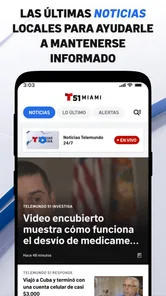
One thing I love about this app is how it tailors the news to what's relevant in our community. Whether it's local politics, community events, or the latest in entertainment, the app curates content that feels personal. It's as if the app knows exactly what you'd want to read, and I find myself scrolling for longer than I'd like to admit.
More From Our News Desk

Weather by Xiaomi Review: Clear at a Glance, Less Clear Up Close

X Under Pressure: Can It Recover When Posting Goes Wrong?

Clash of Clans Is Won Between the Battles

Android Auto Makes the Case for Quieter Car Software

MobiOffice: Transforming Mobile Productivity with Seamless Integration

EA SPORTS FC™ Mobile Soccer: Redefining Mobile Sports Gaming
That local emphasis is also the main trade-off. If I need a broad comparison of national coverage, a specialist publication, or several viewpoints on a complex issue, I would use those sources alongside this app rather than expect one Miami newsroom to do everything. In contrast with a general news aggregator, its appeal is the local lens; the aggregator may be more convenient for collecting outlets in one place, but it can make neighborhood-specific reporting harder to spot.
Weather? Sorted!
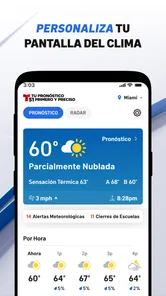
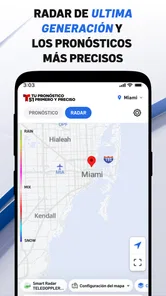
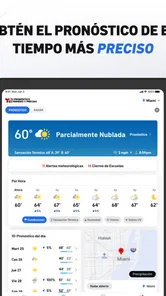
Okay, let's talk weather. Living in Miami means dealing with unpredictable weather patterns, and having a reliable source for updates is crucial. The app offers real-time weather updates, complete with radar images and forecasts. I can't count the number of times I've dodged a rainstorm thanks to a timely notification from this app.
For a practical routine, I would check conditions before setting out and then use traffic updates to reassess the route if the weather changes. That is more useful than glancing at a forecast once and assuming the whole day will follow it. If I am making a high-stakes travel decision, though, I would cross-check current road or weather information rather than depend on any single news app.
Sports and More
For sports enthusiasts, this app is a treasure trove. Whether you're a fan of the Miami Heat or follow the Marlins, the app keeps you updated with scores, stats, and even some behind-the-scenes tidbits. It’s like having a sports commentator in your pocket!
But wait, there’s more. The app also dives into cultural stories and offers a peek into the vibrant Latin community that defines Miami. It’s a beautiful blend of news and culture that keeps me coming back for more.
Making room for different needs
On the motor-access side, the simpler the task, the easier it is to fit a quick check into a small window of time: opening one article or scanning a weather update takes less commitment than navigating a long collection of feeds. If repeated scrolling or precise tapping is tiring, I would keep visits focused on a specific question instead of trying to browse everything. People who need reliably large controls, extensive keyboard navigation or carefully labeled screen-reader elements should test the app on their own device before making it their main source; I can’t assume those details work the same for everyone.
Context matters, too. On a commute, traffic and weather are directly useful, but reading while walking or driving is unsafe; I would check before setting off and rely on a passenger or safe stopping point for later updates. In a noisy place, text can be more convenient than video, while at home a clip may be a better way to catch up. Anyone who needs news in a language other than Spanish or English, or who wants a customizable national feed, may be better served by another outlet or an aggregator.
Seamless Experience
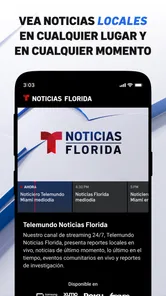
While using the app, I've noticed how seamlessly it transitions between articles and videos. The multimedia integration is top-notch, making it easy to switch from reading an article to watching a news clip without any hiccups. Plus, the video quality is impressive, ensuring you don’t miss a single detail.
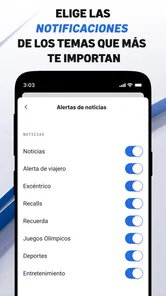
One small workflow that helps me avoid information overload is to treat alerts as prompts to check a developing story, not as a complete account. If a notification arrives while I’m occupied, I can leave it for a safer, quieter moment and then read the article for context. This is especially useful during breaking local coverage, where an early update may change as reporting develops. On a normal day, I would also decide in advance whether I want urgent notifications, routine browsing, or both, and adjust the phone’s notification controls accordingly.
A useful routine for busy days
For example, if I am planning a trip across Miami, I would check the local forecast and traffic before leaving, then save the deeper news reading for when I have stopped. That separates immediate practical information from stories that need attention. It also avoids the trap of opening a feed while rushing and leaving with only a headline, which can give a misleadingly thin picture of a developing event.
For someone who has family in the area, a different routine may work better: check local coverage at a set time, then open a relevant story if a headline raises a specific concern. I would not treat every alert as a reason to interrupt work or assume that silence means nothing is happening. Alerts are most useful when they fit the person’s needs, so I would keep the phone’s notification choices focused rather than allowing every update to demand attention.
Who will get the most from it
I’d recommend the app most to Miami-area residents who want local reporting within easy reach, especially people who regularly check weather, traffic, community stories or regional sports. It can also be useful for someone who has moved away but still wants a window into Miami. The app has a 4.4 average from around 4.9 thousand ratings, and it has been installed over 500 thousand times; those figures suggest a sizable audience, though they can’t tell you whether its coverage matches your own interests.
If you mainly want international headlines, deep specialist analysis, or a single feed that combines many publishers, I would choose a broader news service instead. This app is at its best when Miami itself is the reason you opened it. Its local focus saves time for that purpose, but it also means it should be one part of a wider news routine when a story needs more perspectives.
Choosing it alongside other sources
Compared with a television newscast, a phone app is easier to consult at a time that suits me and can put a particular local story within reach without waiting for a scheduled broadcast. A radio report may be more practical when I cannot look at a screen, while a general aggregator is stronger when I want to scan multiple publishers. I see this app as a useful local layer, not a replacement for every way of following the news.
That distinction matters most when a story affects a decision. I would use its local coverage to understand what is being reported, then look for official guidance when I need instructions about an emergency, travel disruption, or other consequential situation. For less urgent browsing, one local source may be enough; for a complex issue, comparing reporting helps me see what is established and what is still developing.
The app first appeared on January 11, 2013, and it requires Android 9 or later. That makes the minimum system requirement easy to check before installing, particularly if you are setting it up on an older phone. As with any news source, I’d also keep expectations practical: it can help me stay informed, but it cannot replace direct emergency guidance or careful verification when a decision has serious consequences.
Where the experience may not fit
The most important limitation is also its reason for being: the coverage is centered on Miami. If I lived elsewhere and wanted a dependable stream of news about my own neighborhood, this would not be the right local substitute. Likewise, readers who prefer one carefully filtered feed of many publishers may find a single-outlet app narrower than they want, even if its regional emphasis is exactly what a Miami reader values.
Accessibility needs can also change whether it feels comfortable. A reader who depends on larger text, voice control, screen reading, or reduced motion should try the specific tasks they use most on their own phone before relying on it every day. I would test opening a story, following a video, and getting back to the main news area. A quick trial can reveal whether the combination of controls, text and media works for that person, rather than assuming a general accessibility setting will solve every issue.
A local companion, not the whole picture
Overall, the Telemundo 51 Miami: Noticias app is like a trusty friend who’s always in the know. Whether you’re a news junkie, a weather watcher, or just someone who loves to be informed about your community, this app has something for everyone. So, if you haven’t yet, give it a whirl – you might just find it becoming your go-to source for all things Miami.
My recommendation is strongest for someone who wants a convenient way to check Miami-area reporting and practical updates, then has the time and attention to read beyond a headline when needed. It is less suitable as a one-stop news service for people who want broad geographic coverage or multiple editorial viewpoints in a single place. Used with that boundary in mind, it can be a helpful part of a daily routine; for readers with specific access needs, a brief hands-on check is the sensible final test.
Telemundo 51 Miami: Noticias Frequently Asked Questions
Is Telemundo 51 Miami: Noticias available for my phone’s operating system?
Telemundo 51 Miami: Noticias is available for Android and iOS devices. On Android, the current version is 8.5.1 and the minimum operating system requirement is Android 9, so it is worth checking your device’s software before downloading. The app is published by NBCUniversal Media, LLC and is listed as a News & Magazines app.
Is Telemundo 51 Miami: Noticias suitable for younger users?
The app has a Teen content rating, which is useful to keep in mind when deciding whether it is appropriate for a younger user. Its focus is local news, live alerts, traffic, and weather for Miami, Florida. As with any news app, the stories and broadcasts may cover current events, so parents may wish to review the content and notification settings together with younger users.
What is Telemundo 51 Miami: Noticias app?
Telemundo 51 Miami: Noticias is a dedicated news application that delivers the latest local news, weather updates, live sports, and entertainment from Miami and surrounding areas. The app offers a Spanish-speaking audience timely and relevant information, ensuring users are always informed about the happenings in their community. It is available for both Android and iOS devices.
Is Telemundo 51 Miami: Noticias app free to use?
Yes, Telemundo 51 Miami: Noticias app is free to download and use. Users can access a wide range of local news, videos, and live broadcasts without any subscription fees. However, there might be in-app advertisements, which is a common way for free apps to generate revenue and support the content provided.
What features does Telemundo 51 Miami: Noticias app offer?
The app offers a variety of features including breaking news alerts, video clips of news events, weather forecasts, and live streaming of Telemundo 51 Miami broadcasts. Users can also customize notifications to receive updates on specific topics of interest such as sports, politics, or weather, making the app a comprehensive news source for the Miami area.
Pros
- Comprehensive local news coverage
- User-friendly interface
- Live streaming available
- Breaking news alerts
- High-quality video content
Cons
- Ads can be intrusive
- Limited international news
- Requires stable internet
- Occasional app crashes
- Notifications can be overwhelming













