

Taptap Send: Money Transfer
- 13.94K
- 4.7
- Installs
- 10.00M
- Price
- Free

Screenshots
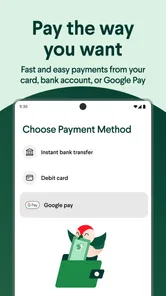

Analysis by Reviewed
Sending money across borders is less about flashy features than knowing what will arrive, where it will go, and what the transfer will cost. I see Taptap Send as a practical option for people who regularly support someone abroad, especially when a phone-based service feels easier than visiting a bank or agent. Its value depends on the route and the recipient’s needs, so I would check the transfer details before treating it as a universal replacement for other ways to send money.
What free access means in practice
The app is free to download, and Taptap Send, Inc. is the developer. That is useful, but it is not the same as saying every transfer has no cost: I would review the rate and the amount the recipient is set to receive before confirming. The exchange rate affects the practical value just as much as a visible fee does. For anyone comparing services, the useful question is not simply “Is it free?” but “How much will the person on the other end receive for this exact transfer?”
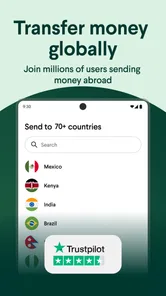
As a finance app, it focuses on sending money to recipients in parts of Asia, Africa, and Latin America. That regional focus can make it more relevant than a general banking app for someone whose family or regular payments are in those destinations. If your recipient is somewhere the app does not serve, or you need a different kind of financial service, another provider will be a better fit.
Before you rely on a quoted amount
For a first-time user, the most useful comparison is to enter the same sending amount in the options you are considering and compare what each says the recipient will receive. I would do this close to the time I plan to send, rather than relying on an old screenshot or a remembered exchange rate. A fee-free transfer can still be a poor deal if the conversion leaves the recipient with less, while a visible charge does not automatically make another option worse.
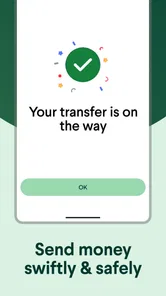
I would also treat the confirmation screen as part of the decision, not just the last button before sending. Check the recipient, destination, amount being sent, and expected amount received in one pass. If something looks different from what you expected, stop and compare rather than assuming the app will correct it later. This is especially valuable when I am sending under time pressure, because urgency makes it easy to skim details that matter.
A transfer routine that can save effort
For recurring support, I would treat the first transfer as a setup task rather than something to rush through. Check the recipient’s details carefully, compare the displayed exchange rate with what you usually use, and note how the transfer is expected to reach them. Once the recipient is saved, later sends can take less repeated entry, but that convenience is only helpful if the saved information remains current.
For example, imagine sending money home after payday to help with household expenses. I would open the app, select the saved recipient, enter the amount, and pause at the confirmation screen to verify the destination and expected amount received. That final check is a small habit with real value: it helps catch an old recipient detail or an unexpectedly different rate before money leaves your account. For an urgent payment, I would also avoid assuming every route moves at the same speed; timing can depend on the destination and transfer method.
More From Our News Desk

 Gmail
GmailGmail in a Busy Inbox: Who Benefits Most?
From first account to crowded workday, Gmail earns its place through dependable search and flexible sorting—but its best fit depends on how much inbox maintenance you can tolerate.

 Prime Video
Switching to Prime Video: What Changes in Your Viewing Routine
Prime Video can make a compelling second home for streaming, but switching means learning a different catalog, rental layer, and route from browsing to playback.

 Universal TV Remote Control
Universal TV Remote Control Works Best as a Reliable Backup
A phone remote earns its place through quick setup and reliable habits. Here is how to get more from Universal TV Remote Control—and where its limits show.

 Weather - By Xiaomi
Weather by Xiaomi Review: Clear at a Glance, Less Clear Up Close
Xiaomi’s weather app makes everyday forecasts quick to scan, but its calm surface can leave useful details and recovery paths harder to find than they should be.

 X
XX Under Pressure: Can It Recover When Posting Goes Wrong?
A resilience-focused review of X, examining setup, mistaken posts, interruptions, weak connections, and the gaps that matter when recovery needs to be dependable.

 Clash of Clans
Clash of Clans Is Won Between the Battles
Its raids are quick; its community is a long-term project of coordination, teaching, rivalry, and shared responsibility—with all the friction that entails.
Latest News



A practical improvement to that routine is to ask the recipient what they actually need before choosing a delivery option. Someone paying a bill may need funds in an account, while another person may prefer a different available way to receive money. Sending first and sorting out the handoff later can create avoidable stress. I would also keep a simple personal note of the date, amount, and recipient for household budgeting; that makes repeat support easier to reconcile without treating the app as a complete record of family expenses.
Where it differs from familiar alternatives
Compared with a traditional bank transfer, a dedicated remittance app can feel more direct because the task is centered on sending money abroad rather than managing a full bank account. Compared with cash-based transfer services, the phone-first approach may be more convenient when both the sender and recipient can use the available delivery options. Those advantages are route-dependent, though. If you need face-to-face help, a cash pickup option, or a transfer to a destination outside Taptap Send’s coverage, a bank or another specialist service may suit you better.
I would compare the recipient’s final amount and the expected delivery details rather than choosing on a “no fee” claim alone. If you send often, repeating that comparison occasionally is worthwhile: rates can change, and the most convenient choice is not automatically the best value for every transfer. For a one-off payment, it is also sensible to check the recipient’s preferred way to receive funds before sending.
The main trade-off against a bank is not simply convenience versus formality. A bank may be a better fit if you already manage the payment from an account, need a familiar in-person process, or are sending to a destination better covered by that bank. A remittance-focused service is more appealing when the task is a regular personal transfer and the app’s route and recipient options line up with what the other person can use. Neither approach is automatically cheaper or more dependable for every corridor, so I would let the actual transfer quote and recipient preference decide.
Getting Started with Taptap Send
First things first, downloading and setting up Taptap Send was a breeze. Available on both Android and iOS, the app guides you through a straightforward registration process. All you need is your phone number, and you’re ready to go. The interface is clean and intuitive, which I appreciated because who has time to figure out complex apps these days?
In practical terms, I would set it up before the day I need to send an urgent payment. That gives me time to complete any account checks the app requests and review the recipient details without pressure. A user should expect to follow the steps shown in the app rather than assuming every account will be ready immediately. If a deadline matters, having a backup method is sensible until I know the route and my own account are working smoothly.
Features that Make a Difference
What truly sets this app apart are its user-friendly features designed to make your money transfer experience seamless. You can send money to several countries across Africa and Asia, with more regions being added regularly. The exchange rates are competitive, often beating those offered by traditional banks.
Plus, Taptap Send doesn’t charge any fees for sending money. Yes, you heard that right—zero fees. This was a huge selling point for me because every penny counts when you’re sending money to loved ones.
For a careful user, the useful point is to separate the app’s cost to install from the full cost of a transfer. The app is free, but I would still look at the live quote and recipient amount each time. A displayed rate is more informative when I compare it against another service for the same currency pair and sending amount, at roughly the same moment. That comparison helps avoid deciding on a slogan or on a previous transaction that may no longer reflect today’s rate.
Security and Speed
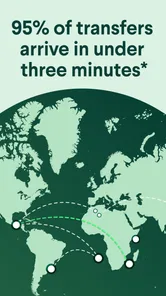
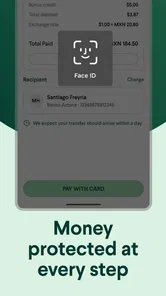
Sending money internationally can be nerve-wracking, especially when it comes to security. Thankfully, Taptap Send uses top-notch security measures to ensure your money gets to where it needs to go safely. I tried sending money to Ghana, and it arrived almost instantly. The speed of transfer was impressive, making it ideal for emergency situations.
I would not turn one quick delivery into a promise about every future transfer. A transfer’s progress can depend on its destination and method, and an emergency is exactly when it is worth checking the expected timing before relying on a particular service. For a payment that has a hard deadline, I would send with enough lead time when possible and keep the recipient informed about what the app shows, rather than assuming “sent” means “available” at once.
The Little Things Matter
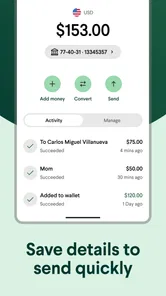
Another cool feature is the ability to track your transfers in real-time. It’s reassuring to see exactly where your money is and when it’s been received on the other end. The app also allows you to save recipient details, so you don’t have to input them every single time.
Saved details are a convenience, not a reason to stop checking. If a recipient changes accounts, phone numbers, or preferred delivery method, I would update the details before the next transfer and verify them with the person receiving the money. For regular household support, that small check can prevent a familiar name from creating a false sense of certainty about where funds are going.
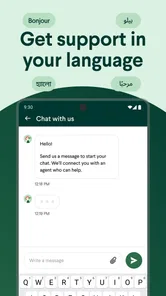
Customer support is another area where Taptap Send shines. They offer support in multiple languages, and the response time is swift. I had a minor issue with verifying my account, but their team sorted it out in no time.
If verification or a transfer takes longer than expected, I would use the in-app support route and keep the relevant transaction information handy. I would avoid sending the same payment again simply because I am uncertain about the first one; checking its status first helps prevent duplicate transfers. That is a particularly useful precaution when money is intended for a time-sensitive bill or family need.
Who is most likely to get value
I would shortlist it if I send money to supported destinations more than once, want to manage transfers from my phone, and prefer a repeatable routine over starting from scratch each time. The recipient-saving and transfer tracking described above are especially useful when the same person receives regular help: they reduce routine effort and make it easier to check progress without relying only on memory or messages.
It is less compelling for someone who sends money only once and already has a dependable, cheaper route, or for a person who wants to speak with a teller before every transaction. Likewise, if the person receiving the money cannot use the available delivery method, the app’s convenience disappears. I would settle that practical question with the recipient before making it my regular service.
It can also suit people who coordinate support with relatives. For instance, if I share responsibility for a parent’s monthly household costs with a sibling, I can agree on a transfer amount and confirm the recipient details before sending, then use the progress information to know whether the payment has moved along. The app does not replace that conversation or decide who owes what; it makes the transfer itself more manageable once the family has agreed on the plan.
On the other hand, I would skip it as my only option if I regularly need counter service, if the recipient specifically needs a method the app does not offer for that route, or if I cannot afford any uncertainty around delivery timing. A local bank or another transfer provider may be preferable in those cases. The right choice is the one that fits the person receiving the money, not the one with the most convenient-looking interface for the sender.
Check the fit before relying on it
The app has a 4.7 average from around 239,000 ratings, and it has passed 10 million installs. That scale can offer reassurance that many people use it, but popularity cannot guarantee a particular transfer’s timing or suitability. It is free, rated for Everyone, and version 2.55.0 requires Android 8.0 or later; the iOS app is also available. I would still confirm that my own device and destination are supported before depending on it for a time-sensitive payment.
That broad user base is useful context, but it should not replace checking the details that affect my own transaction. A well-liked service can still be the wrong fit for a particular destination, recipient, or urgency. I would also think about how I prefer to manage money: if I want all transfers handled through my existing bank relationship, adding a separate app may not be worth the extra routine. If I send regularly to a supported destination, the focused workflow may justify it.
Final Thoughts
In a world where sending money across borders is often riddled with fees and delays, Taptap Send is a breath of fresh air. It’s fast, secure, and incredibly easy to use. Whether you’re supporting family or paying for services abroad, this app ensures your money gets there without unnecessary complications.
If you’re looking for a reliable money transfer app, give Taptap Send a shot. With its no-fee policy and user-friendly interface, it’s hard not to recommend it. So go ahead, download it, and see for yourself why it’s becoming a favorite among users worldwide.
My recommendation is strongest for someone who has a supported recipient, expects to send more than once, and is willing to check the quote before confirming. I would start with a non-urgent transfer, learn how the recipient receives it, and compare the final amount with the alternatives I already use. That first experience gives me a practical basis for deciding whether the convenience is worth keeping in my regular routine.
For an occasional sender, a familiar bank or a cash-based service may be the better answer if it matches the recipient’s preference or offers more useful assistance for that particular transfer. For recurring family support, though, the app’s focused purpose, saved recipient details, and transfer progress can reduce the friction of a task that otherwise needs repeating. I would use it when those strengths match the route, and keep another option available when they do not.
My practical verdict is to try it when the destination and recipient options match your needs, then judge it by the amount received, clarity of confirmation, and how well the tracking works for your routine. Keep another method in mind for a payment that cannot wait, and do not assume that a past fast transfer guarantees the next one will arrive on the same timetable. For regular family support, though, the combination of a focused transfer app and saved recipient details can make an otherwise repetitive task feel much more manageable.
Taptap Send: Money Transfer Frequently Asked Questions
Is Taptap Send available in my country, and can I send money to my recipient’s destination?
Taptap Send is designed for international transfers to destinations across Asia, Africa, and Latin America. Availability can depend on where you are sending from and where the recipient lives, so check the available routes in the app before relying on it for a particular transfer. This is especially useful if you regularly send money to a specific country and want to confirm that the route suits your needs.
What information should I have ready to sign up for Taptap Send?
Before getting started, be ready to create an account and provide the information requested during registration. Money-transfer services may need to verify details so they can support transactions, so use accurate information and follow the in-app instructions. Having the recipient’s correct details and preferred way to receive funds handy can also make it easier to set up a transfer once your account is ready.
Is Taptap Send free to download, and what devices can run it?
Taptap Send is a free finance app for sending money internationally. It is available for Android and iOS, so you can check the relevant app store for compatibility with your device before installing. The app is intended for everyone, though users should be prepared to create an account and provide the information required to use a money-transfer service.
What is Taptap Send and how does it work?
Taptap Send is a mobile application that allows users to send money internationally with ease. The app is designed to facilitate quick and affordable money transfers to various countries, primarily focusing on markets in Africa and Asia, as well as Latin America. Users can download the app, register, and start sending money by linking their bank accounts or using mobile money services available in the recipient's country. The platform is known for its competitive exchange rates and low transfer fees, making it a popular choice for remittances.
Is Taptap Send safe to use for money transfers?
Yes, Taptap Send is considered safe for international money transfers. The app employs high-level encryption and security protocols to protect users' financial data and transactions. Additionally, it complies with international financial regulations and partners with reputable financial institutions to ensure safe and secure transfers. Users are encouraged to keep their account information confidential and enable two-factor authentication for added security.
Pros
- Fast international money transfers
- User-friendly interface
- Competitive exchange rates
- Low transaction fees
- Supports multiple currencies
Cons
- Limited recipient countries
- Requires internet connection
- Occasional delays in processing
- No in-app customer support chat
- Limited payment method options











