TapRead - Read Good Story
- 1.46K
- 3.9
- Installs
- 1.00M
- Price
- Free

Screenshots

Analysis by Reviewed
I tend to enjoy reading apps most when they fit the small gaps in an ordinary day: a few chapters during a commute, a quiet stretch before bed, or a break while dinner is in the oven. TapRead - Romance Stories is built around that kind of serialized reading, where a story can pull you into a longer world one chapter at a time. My main advice is to treat it as a personal reading space, especially if your phone or tablet is shared at home.
When a shared device becomes a shared reading space
On a shared device, it is easy for someone else to open the app and see what is on screen or continue from the reading session left behind. I would avoid treating a family tablet as a private library unless everyone using it is comfortable with that overlap. A practical routine is to finish a chapter, leave the app in a neutral place, and agree that each reader should check whose story is open before tapping further. That small habit matters more here than it might in a general reference app, because romance and mature fiction can be personal choices.
The format suits readers who like ongoing plots and cliffhangers more than people who want a complete book in one sitting. If I had only ten minutes, I would pick up a chapter and stop at a natural pause rather than begin several stories at once. Keeping a short mental note of character names or the last major twist also helps when reading in scattered bursts; serialized fiction can be harder to resume than a self-contained short story.
A simple routine for picking up a story
For a household that passes one phone or tablet around, I would make the handoff deliberate rather than rely on everyone remembering where the previous reader stopped. Before opening a story, check the screen and confirm that the active reader is comfortable continuing from that point. When it is your turn, choosing one series for the evening is often more satisfying than browsing widely and leaving several unfinished starts behind.
This is especially useful in an everyday situation like waiting at an appointment or taking a short break between chores. A chapter can make that pause feel like reading time without requiring a long block of attention, but it helps to stop at a sensible point and keep the next step in mind. If interruptions are common, I would avoid beginning a complicated plot right before setting the device down; a quick note to yourself about the characters or conflict can make the next visit less of a reread.
A Treasure Trove of Stories
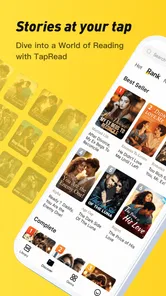
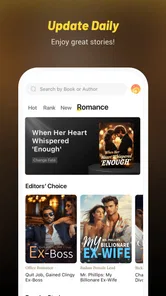
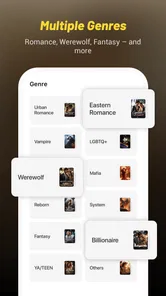
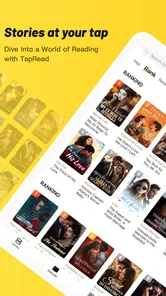
First off, let me talk about the sheer variety. TapRead isn’t just about your typical love stories. Oh no, it’s a vast library filled with genres ranging from fantasy to sci-fi, and of course, drama-packed romances. I was particularly hooked by a series that intertwined magic with classic romance, making it impossible to put my phone down.
Choosing what fits your mood
Compared with an e-book reader focused on books you already own, TapRead is better suited to browsing for a continuing story and following it over time. A traditional library app is usually the stronger choice if you want familiar borrowing rules, a clearly bounded book, or a dependable way to read a title you have already selected. Here, I would browse with a specific mood in mind—say, fantasy romance rather than romance in general—and sample a story before committing attention to a long arc. That makes it easier to avoid the common trap of starting several serials and then forgetting which one you actually want to continue.
More From Our News Desk

Weather by Xiaomi Review: Clear at a Glance, Less Clear Up Close

X Under Pressure: Can It Recover When Posting Goes Wrong?

Clash of Clans Is Won Between the Battles

Android Auto Makes the Case for Quieter Car Software

MobiOffice: Transforming Mobile Productivity with Seamless Integration

EA SPORTS FC™ Mobile Soccer: Redefining Mobile Sports Gaming
How to judge a serial before settling in
When I try a serialized story, I pay attention to whether the opening establishes a conflict I care about, not just whether the first chapter ends on a dramatic note. A cliffhanger can be effective, but it is not the same as a story whose characters and stakes hold my interest. Sampling with that distinction in mind is a useful way to decide whether a series deserves a place in your regular reading routine.
It also helps to think about how much continuity you want to carry between sessions. A lighter, episodic read may be easier to enjoy in short waits, while a plot with many twists can be more rewarding when you have time to read several chapters close together. If you regularly forget names or plot details, choose one main serial at a time and revisit it when you can give it enough attention; the broader selection is most useful when it helps you find a good fit, not when it encourages endless switching.
Engaging Narratives
What really sets this app apart is the quality of writing. The narratives are so engaging, you feel like you’re right there beside the characters. The authors on this platform know how to craft a story that keeps you guessing at every turn. I found myself eagerly waiting for the next chapter release, and trust me, the wait is always worth it.
That chapter-by-chapter rhythm is also a trade-off. If you prefer a finished novel with a known ending, waiting for a story to continue may feel frustrating rather than suspenseful. I would make the choice based on your reading style: follow an ongoing tale when you enjoy anticipation, or choose a complete e-book elsewhere when you want control over the whole arc. Before settling into a long series, it is sensible to check how its pacing feels to you and whether you are happy reading in installments.
Making the reading experience comfortable
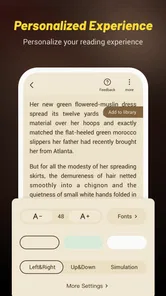
Now, let’s talk about the user interface. It's as smooth as silk. Navigating through different genres and picking a story is as easy as pie. The app design is intuitive, and you can even customize your reading experience with different fonts and background colors. This feature made long reading sessions a breeze for me.
For a shared household routine, font and background choices are worth treating as part of the individual reader’s setup, not as a setting everyone should expect to stay the same. If another person uses the device, a quick glance at the display before starting can prevent a confusing handoff. I would also keep the app’s purchase option in mind when deciding whether a shared device is appropriate: TapRead is free to download, but in-app purchases range from $0.99 to $199.99 per item. That is a reason to agree on who is responsible for any purchase before browsing, rather than assuming every part of a reading session is free.
Keeping spending and reading choices separate
My practical advice is to decide in advance whether the shared device is only for browsing and reading or whether its user may also make purchases. That boundary avoids awkward surprises, especially when several people can access the same screen. If you prefer not to mix household spending decisions with a casual reading session, use a personal device for purchases or agree that any paid choice needs the device owner’s approval first.
The free download makes it easy to try the reading experience, but it does not mean every possible in-app option is free. I would explore at a comfortable pace and treat any purchase prompt as a separate decision, not as something required to judge whether the writing suits you. Readers who want a completely cost-free experience should be attentive to what is optional and stop before paying if they are not comfortable with the terms presented in the app.
TapRead is developed by TapRead, and its current version is 3.27.5. It has a 4.5 average from around 8.6K ratings, with over 1M installs, so it has attracted a sizeable readership. Those figures can help set expectations about adoption, but they do not tell me whether a particular story will suit your taste; sampling the writing is still the useful test.
Comments without losing your place
One of the coolest features of TapRead is the interactive community. You can comment on chapters, share your thoughts, and even engage with authors. It’s like being part of a book club with thousands of members. I loved reading the comments section to see what others thought about the plot twists — it’s quite the lively place!
That social layer can make a chapter more fun, but I would use it selectively. If I want to avoid spoilers, I would finish the chapter before opening its comments, since reactions can hint at a reveal even when nobody spells it out. Comments are best treated as a conversation around the reading, not as a substitute for the story itself; the discussion may add energy, but it can also steer your interpretation before you have formed your own.
What to expect from the community
For a reader who likes to compare reactions, comments can turn a solitary chapter into a small shared event. I would still keep my expectations modest: discussion is most useful when it adds a perspective or helps me notice a detail, rather than when I expect every thread to be thoughtful or spoiler-free. If you prefer to read privately, you can simply focus on the story and treat the social side as optional rather than a required part of using the app.
On a shared device, comments also deserve the same consideration as the reading history. A person opening the app may see more than the text of a novel, so the household should be comfortable with that possibility. If privacy matters more than public discussion, a conventional e-reader with books chosen individually may feel like a better match.
Age, privacy, and household expectations
The app is rated Mature 17+, so I would not hand it to a younger reader as casual entertainment. A household should make that age context part of the decision before installing it on a shared device, particularly when adults and teenagers use the same screen. The rating is a prompt for adults to judge suitability, not a replacement for knowing what a young person is reading. If age-appropriate fiction is the priority, a curated children’s or teen reading service is a better fit.
I would also keep account boundaries simple: use the app as the reading space for the person who chose the stories, and avoid assuming that separate readers will have separate histories or preferences on a device they share. For a household, the useful question is less “Can everyone open it?” and more “Are we comfortable with everyone seeing the same reading environment?” If not, a personal device or a different service designed around separate household readers is the cleaner option.
Who should choose another kind of reader?
I would steer away from this app if you mainly want children’s books, a carefully separated family library, or a quiet tool for reading titles you already own. A dedicated e-book reader or library service is likely to suit those needs better, especially if you value completed books and predictable access over discovering ongoing romance fiction. Likewise, if cliffhangers and waiting between installments irritate you, a finished novel is a more comfortable choice.
It is a more natural fit for an adult who enjoys romantic plots, likes exploring stories across genre lines, and does not mind reading in installments. It can also suit someone who enjoys reacting to chapters with other readers, provided that the social element is something they want rather than a distraction. The best test is to try a story that matches your current mood and see whether its opening keeps your attention before you invest time in a longer reading habit.
TapRead is a free Books & Reference app, released on March 20, 2019, and its minimum OS requirement is 7.0. I see it as a strong choice for adults who enjoy romantic serial fiction, genre-mixing plots, and lively chapter discussions, especially when they like discovering stories as they go. I would skip it if I wanted a quiet, fully completed book, a children’s reading space, or clearly separated household libraries. If you do share a device, decide on age suitability and purchase responsibility first, then let each reader browse with their own expectations. In conclusion, if you're a fan of romance novels or just love getting lost in a well-written story, TapRead - Romance Stories is a must-try. It offers a seamless reading experience and a community that makes reading even more enjoyable. So, grab your phone, download the app, and get ready to embark on a literary adventure like never before!
TapRead - Read Good Story Frequently Asked Questions
Is TapRead suitable for younger readers?
TapRead is intended for mature audiences, with a 17+ content rating. That makes it important to consider the app’s age guidance before downloading it for a younger reader. The stories focus on romance and may include themes better suited to adults, so parents and guardians should make the choice based on the reader’s age and comfort with mature material.
Which devices can run TapRead?
TapRead is available for Android devices running version 7.0 or later. Before downloading, check your device’s operating system version to make sure it meets that requirement. The app is a reading platform, so having enough available storage for the app and any reading material you choose to keep on your device can also help make the experience more convenient.
What is TapRead and what type of content does it offer?
TapRead is a digital platform offering a wide selection of romance stories, catering to various tastes and preferences. Users can explore a vast library of novels and stories, ranging from contemporary romance to fantasy and historical genres. The app is designed for readers who enjoy immersive storytelling and are looking for both popular and niche romance themes.
Is TapRead free to use, or does it require a subscription?
TapRead is free to download, and users can access a selection of stories without paying. It also offers in-app purchases, with individual items ranging from $0.99 to $199.99, so costs can arise when choosing paid content. Review purchase options in the app before buying, particularly if you are managing a budget or setting limits for someone else.
Can I read stories offline on TapRead?
Yes, TapRead allows users to download stories for offline reading. This feature is particularly useful for readers who want to enjoy their favorite novels without internet connectivity. Users can save multiple stories to their device, ensuring they have access to content during travel or in areas with limited internet access.
Pros
- Wide variety of romance genres available.
- User-friendly interface with easy navigation.
- Offline reading mode for convenience.
- Regular updates with new content.
- High-quality images enhance reading experience.
Cons
- Frequent ads can disrupt reading flow.
- Limited free content without subscription.
- Some stories have translation issues.
- No option for audiobook format.
- Occasional app crashes reported by users.











